The hard part about UX failures is that you can't see them from where you sit.
Disney built the queue as part of the ride. You stand in line for ninety minutes and it doesn't feel like ninety minutes, because somebody decided what you'd be looking at, how far ahead you could see, when the line would move. Mira, nobody ever walks out saying the queue was well designed. They only notice the bad ones. Even then they can't tell you what was wrong with it.
Your site has the same problem in reverse. You know where everything is, because you built it or approved it. Nobody has ever landed on your own homepage carrying a problem you needed solved this week, with no idea who you are.
The Short Answer
User experience for a service business is whether someone can move from interested to in touch without getting stuck. You can know exactly who you serve and price it correctly and write it well. The site can still make it impossible for them to act on any of that, which is what a UX failure is: everything present, nothing reachable.
If You're Reading This Because It's Your Site
Reading more isn't the hard part. La Jugada is $47 and it tells you which layer this is actually sitting in.
Get it, $47Which User Experience Failures Show Up Most?
These are patterns. Each one I've watched play out more than once.
1. The service list with no way in. Four services described accurately, nothing indicating which is the right one for which situation. They have to work out which one is theirs before they can pick, so they pick nothing.
2. An ask that's too big for how long they've been reading. A page they've spent twenty seconds on asking for a thirty-minute call, the classic reason people don't click a call to action. They're interested, but they aren't thirty-minutes interested, so there's nowhere for them to land.
3. Contact as the only exit. Every path ends at a form. For someone who is still reading around, that's a dead end with a politeness problem, because the only thing they can click is the thing they aren't ready to do. Nothing else on the page can turn that visitor into a lead.
4. The answer sits below where they stopped scrolling. Pricing, process, timeline, who it's for. The page answers their objection two screens after they thought of it, which is two screens too late.
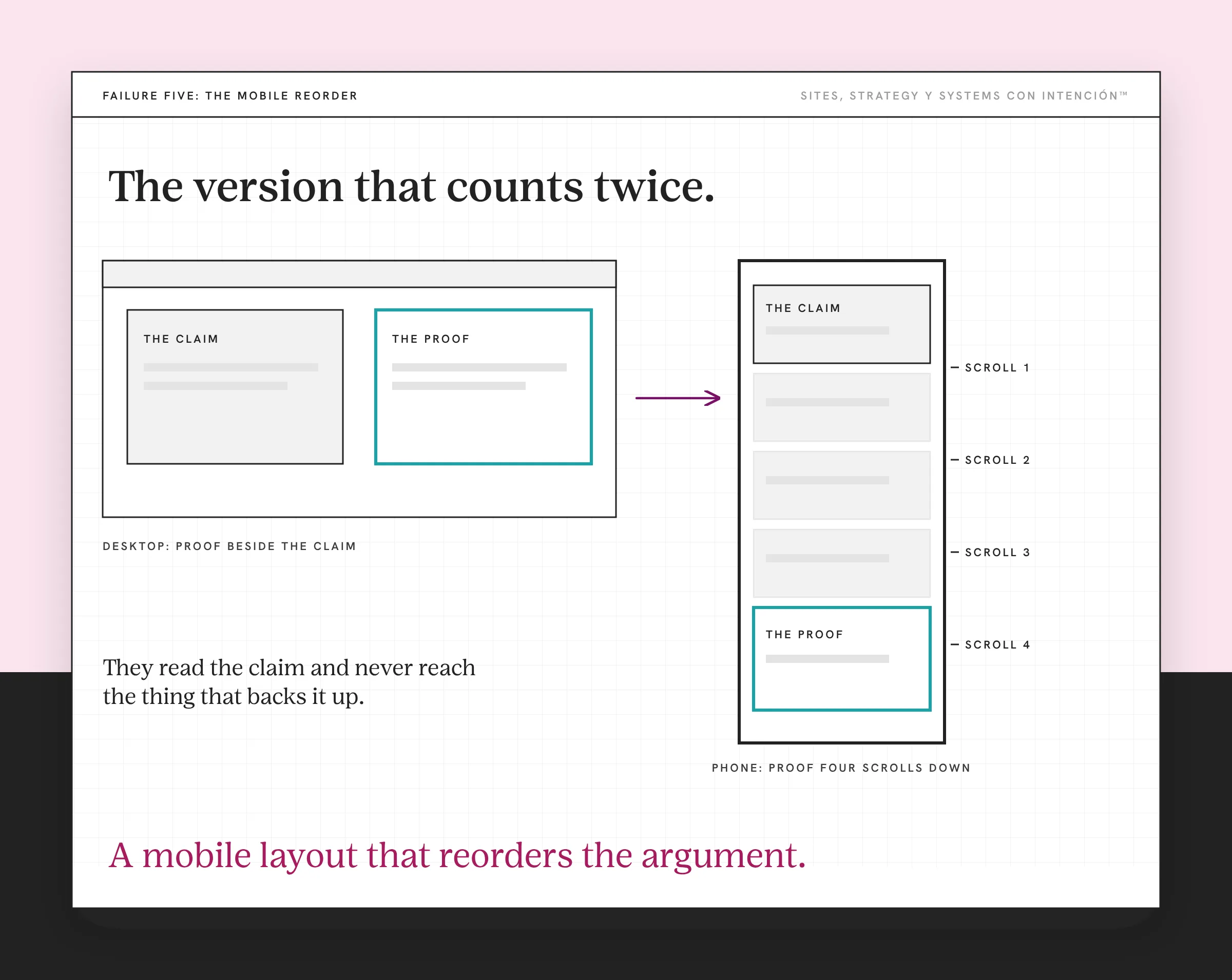
5. A mobile layout that reorders the argument. Google indexes the mobile version of your pages, so this is the version that counts twice. Desktop puts proof beside the claim. The phone version stacks it four scrolls down, so they read the claim and never reach the thing that backs it up.
6. Two competing calls to action of equal weight. Book a call and download the guide, same size, same color, same row. They now have a decision about your website rather than a decision about your work, which is Hick's Law in action.
Why Can't You See Any of This?
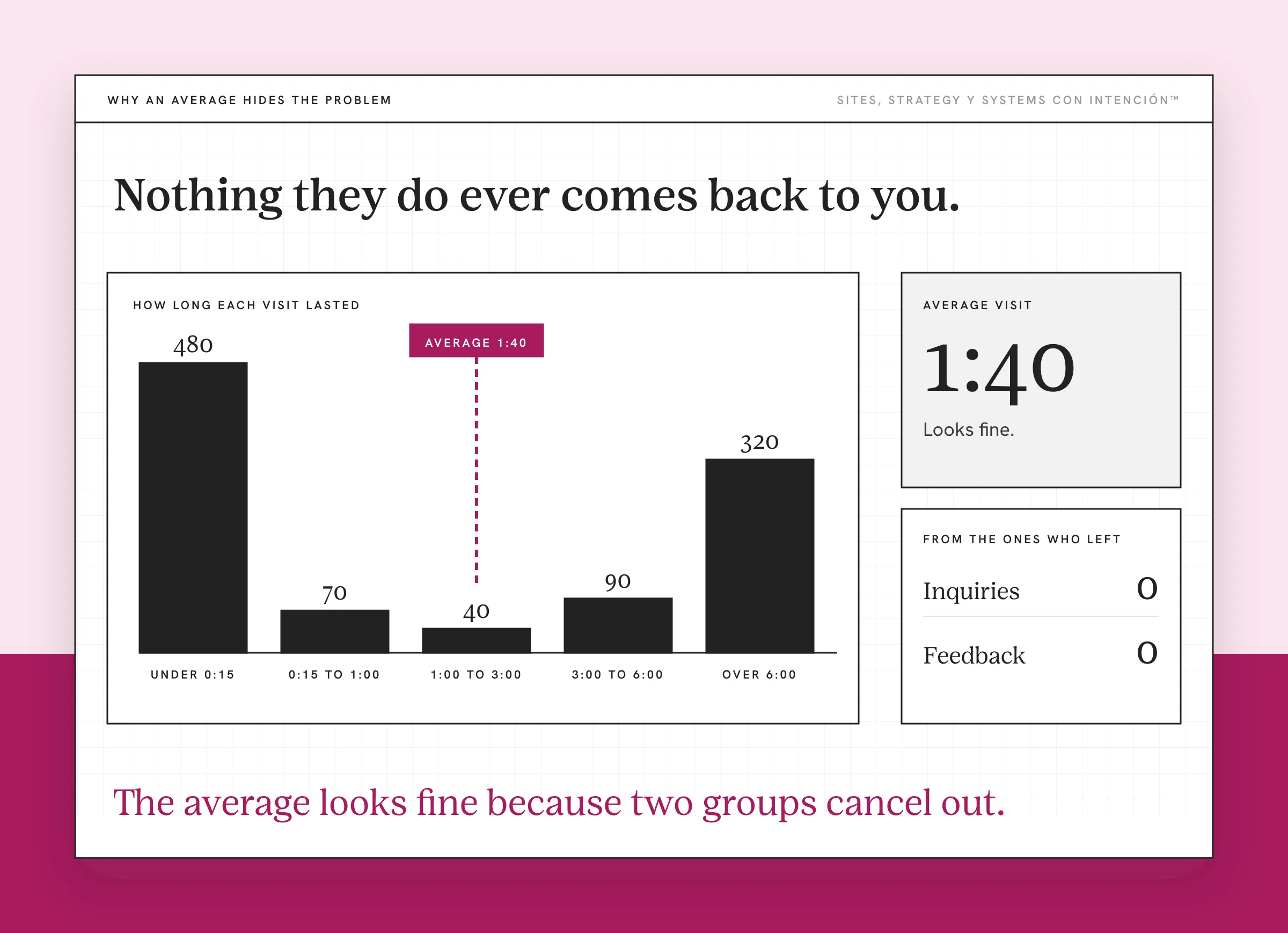
Nothing they do ever comes back to you, y aquí es where this gets hard.
Four things happen on the visitor's side, all at once.
They assume it's them. They couldn't find the thing, so they conclude they missed something obvious. That reads as their failure, which means they leave slightly embarrassed instead of annoyed.
Getting stuck reads as sloppiness. Not as a website problem. As a preview of what working with you is like, which is how website design builds or breaks trust. A site that's hard to move through suggests a project that will be hard to move through.
So they go quiet instead of asking. This is the one nobody writes about y it's the reason the whole category stays invisible. Reaching out to ask a question they think they should have been able to answer means admitting they didn't understand. That feels worse than leaving, y por eso nadie te dice nada. You get no inquiry and no feedback, which is indistinguishable from nobody visiting.
And they compare you to someone easier. Not on purpose. Not because they decided your work was worse either. They find the one whose site let them decide faster and they book that one.
All four of those end the same way. They say nothing and ahí está the whole problem. A site nobody visits also says nothing and from your side the two look identical.
Why Are UX and the Backend One Pass?
When I audit a site I usually start in this order and anything that's clearly broken jumps the line. Sites first, meaning the experience and the backend together in a single pass. Then strategy, meaning search. Then systems, meaning the automations.
The part worth explaining is why UX and backend are one step.
A visitor can't tell them apart. Nielsen Norman Group's definition of user experience is deliberately broad for the same reason: it covers everything that happens to them, not only what they see on the screen. A form that submits into nothing, a booking link pointing at a calendar with no availability, a post-click confirmation email that never arrives, a page that takes six seconds on a phone, slow enough to lose people. To them these are the same event as a confusing menu: they tried, it didn't work, they left. Whether the thing behind the button is actually running counts too, so checking the front without the back leaves the broken parts broken.
That's how I built my own booking flow. A visitor can book a call without trading emails with me, then the intake form, the CRM entry and the follow-ups all happen without anyone pressing a button. Clients I've built the same kind of flow for get time back from it too.
This is also why a design review misses most of what I find on good-looking sites that don't generate leads. A design review evaluates the page. The six above are mostly happening between pages, after a click or on a phone nobody looked at. That between-pages layer is where a lot of website strategy lives.
For the full sequence and what each layer turns up, that's what a website audit is.
What Fixing the Experience Will Not Fix
Four things it doesn't touch, because they all sit underneath it.
If the pages exist and nothing connects them, there's no path to smooth out yet. That's a route problem and it comes first, since pages alone don't make a path.

If the menu buries the page where people decide, fixing that page changes nothing, because they never reach it. The navigation order is what to fix.
If the words on the page describe instead of helping them choose, an easier path just gets them to the same undecided place faster. That's a copy problem.
And if the pages come in a different order than their decision does, each page can work while the set of them doesn't. Structuring for conversions is the layer under this one.
The homepage is a special case. Most UX failures I find are on services and contact pages. The homepage has its own job that fails in its own way. What should be on a homepage is a separate question.
Key Takeaways
- User experience for a service business is whether someone can get from interested to in touch without getting stuck.
- Six failures I run into most: no way into the service list, an ask bigger than the reading behind it, contact as the only exit, the answer sitting below where they stopped scrolling, a phone layout that splits the proof from the claim, two competing calls to action.
- All four reactions end in them saying nothing, which is why this stays invisible. The worst is that they go quiet, so you get no inquiry y no feedback.
- UX and the backend are one audit pass, because a visitor can't tell a confusing menu from a form that submits into nothing.
- A design review evaluates the page. Most of these failures happen between pages, after a click or on a screen nobody checked.
Okay, which of these six is happening on my site?
Answer five questions and share your link. In about 10 minutes La Jugada gives you a read on your site, your marketing and your backend along with the first move worth making. It's $47 and you won't get on a call.
Want more like this in your inbox? Off the Clock is my week-ish newsletter about websites, systems and burnout-free business.
Frequently Asked Questions
What is user experience for a service business website?
Whether a visitor can move from interested to in touch without getting stuck. On a product site that's the path to checkout. For a service business it's the path to a conversation, which takes longer and asks more of them, so there are more places it can break. You can have correct pricing, clear positioning and good writing while the site still makes acting on all three impossible.
What is an example of bad user experience on a service website?
The most common one I'm seeing is a services page listing four offerings accurately with nothing indicating which suits which situation. The visitor has to diagnose themselves before they can choose, so they choose nothing. It looks like a complete page. It's missing the one thing that would let someone act on it, which is a way in.
How do I find UX problems on my own site?
You mostly can't, because you know where everything is. Get someone who resembles a client to attempt one specific thing on your site while you watch without helping. Where they hesitate is the finding. Five minutes of watching one person struggle beats an hour of reading your own pages. You'll see it happen and your own reading is contaminated by knowing the answers.
Why don't visitors tell me my site is confusing?
Because asking means admitting they couldn't work out something they assume was obvious. That feels worse than leaving, so they leave. This is the part that makes the whole category invisible: you get no inquiry and no feedback either. That combination looks exactly like nobody visiting. Silence is the symptom for both problems.
What is the difference between UX and web design?
Design is what the page looks like and how it's composed. Experience is what's happening when someone tries to get something done on it. Between pages, after a click or on a phone nobody looked at. A site can be well designed and hard to move through. That combination is common enough that a design review alone misses a lot of what an audit finds.
Does the backend count as user experience?
Yes. That's why I look at both in the same pass. A form submitting into nothing, a booking link pointing at an empty calendar, a confirmation email that never sends. To a visitor those are the same event as a confusing menu. They tried, it didn't work, they left. Checking the front without the back leaves the broken parts broken.
About the Author