You sit down at the Cheesecake Factory, open the menu and start flipping through pasta, tacos, a whole page of salads and more cheesecake than anyone needs. A few pages in, you close it and order what you always order. Or you look up at the server and ask, "What's good here?"
That's cognitive load and your site is doing the same thing to the people who visit it. In 12+ years and 100+ sites worked on, the sites I see struggling to convert are rarely ugly. They're crowded. Cognitive load UX is about how much thinking a page asks for. On a service-business site, that decides whether someone books or closes the tab.
The Short Answer
Cognitive load in UX is the mental effort a visitor spends figuring out your site. Every extra menu item, button, field and sentence they have to reread adds to it. When it gets too high, people stop deciding and leave. The fix is to cut the choices until each page asks for one clear next step.
If You're Reading This Because It's Your Site
Reading more isn't the hard part. La Jugada is $47 and it tells you which layer this is actually sitting in.
Get it, $47What Is Cognitive Load in UX?
Cognitive load is the amount of thinking it takes to use something. Nielsen Norman Group, the usability research firm, defines the cognitive load of an interface as the mental resources required to operate the system.
The idea comes from cognitive load theory, which education researcher John Sweller developed in the late 1980s to explain why some lessons stick and others don't. It turns out our working memory can only hold so much new information at once. UX designers borrowed the idea because a site works the same way. Your visitor shows up with a limited amount of attention and every element on the page takes a little of it.
Researchers describe three types of cognitive load:
- Intrinsic cognitive load is the effort the topic itself requires. Choosing a website strategist takes some thought and that's fine. It'd take thought on the best page in the world.
- Extraneous cognitive load is the effort your design adds on top. Confusing menus, vague copy and long forms all live here.
- Germane cognitive load is the useful effort, the kind that helps someone understand your offer and picture working with you.
You can't remove the intrinsic part and you'd want the germane part anyway. The extra effort is the one you control and it's the one costing you conversions without anyone noticing.
What Causes Cognitive Overload on a Service-Business Site?
Four things show up when I review a crowded site. They're rarely alone. One of the first things I look for when I land on a site is whether I can tell who they are and what they do. If I have to dig around to figure that out, I'm out. Your visitors do the same.
A menu with too many items. Home, About, Services, Packages, Work With Me, Resources, Blog, Podcast, Shop, Contact. When everything's in the menu, nothing stands out. The visitor has to read every label and guess which one holds the thing they came for. Diache, if "Services" and "Work With Me" lead to the same page, one of them has to go. If yours is getting long, start with the navigation types that keep a menu short.
Copy they have to reread. Long sentences, industry jargon and lines like "holistic solutions for growth-minded brands" make people decode before they can decide. Every sentence they reread is effort they aren't spending on you. You'll find more of these in the most common website copy mistakes and nearly all of them come down to making the reader work too hard.
A form that asks for too much. Name, email, phone, company, budget, timeline, how did you hear about us, tell us everything about your project. Someone who was ready to talk gets halfway, hits conversion friction on the form and decides they'll finish it later. They don't.
A page with too many choices at once. Book a call, download the guide, join the newsletter, follow on Instagram and check out the shop, all above the fold. Each button is a small decision. Stack enough of them and the easiest decision is no decision at all. Choice overload gets its own post: why too many options cost you clients.
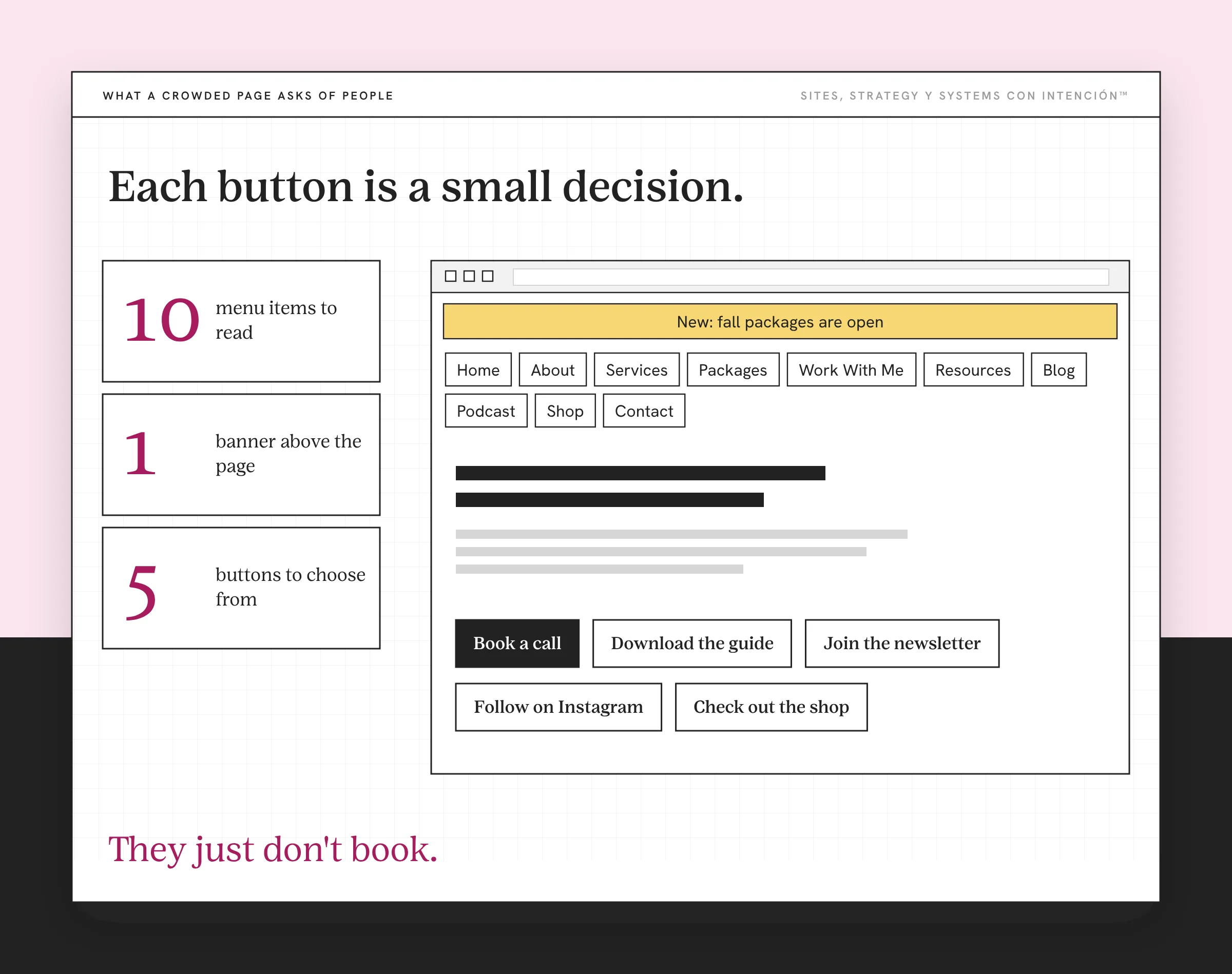
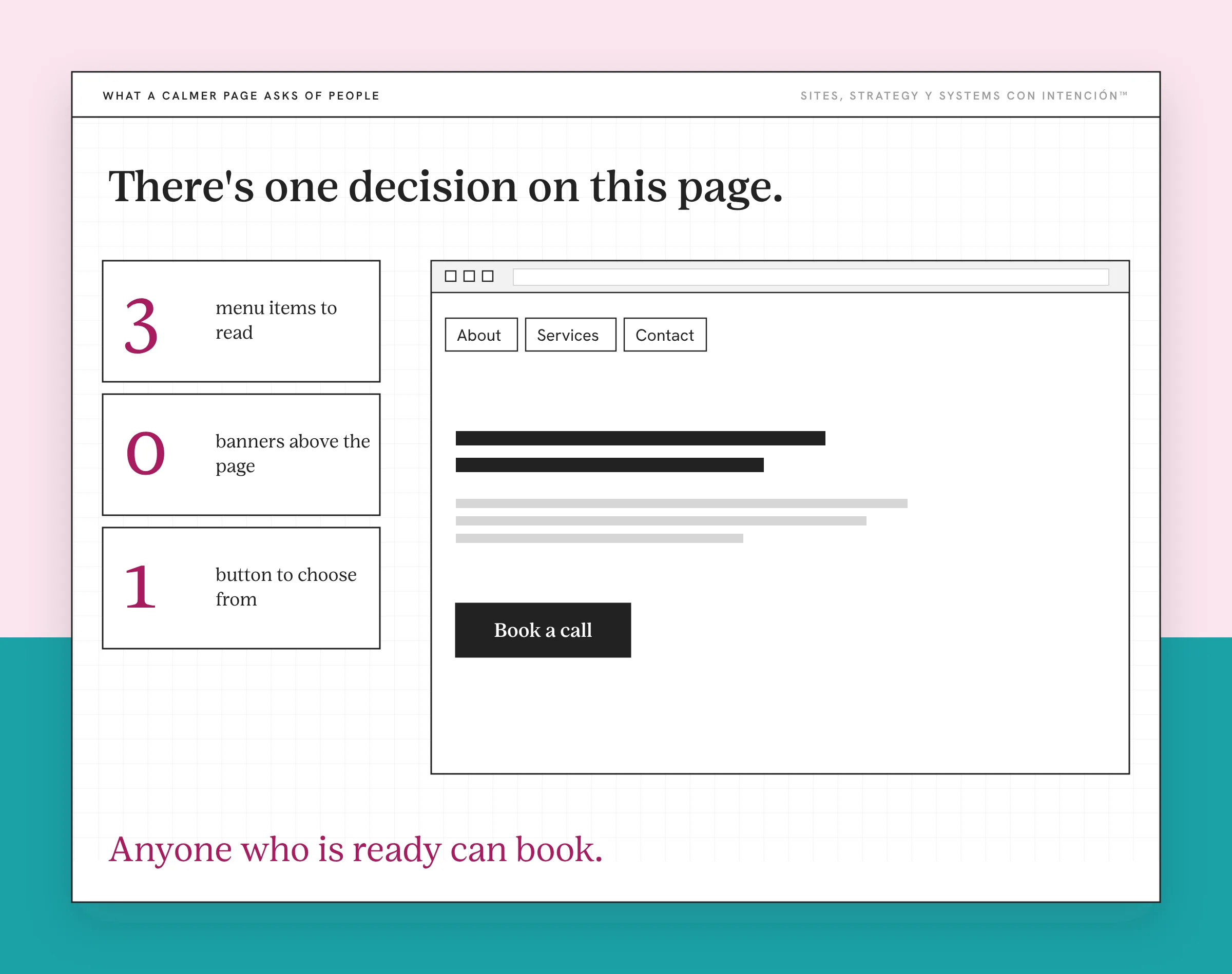
None of these feel like a big deal on their own. That's why it's so easy to miss. Nobody emails you to say your menu had ten items. They just don't book.
How Do You Know Your Visitors Are Overloaded?
You won't see "overwhelmed" in your analytics. You'll see what overwhelmed people do. Too much load can lead to frustration long before anyone says a word.
They scroll fast and click nothing. Traffic comes in, people move down the page and then they're gone. If your numbers show website traffic that isn't converting, the page may be asking for more effort than they're willing to give. That pattern also shows up in why a site that looks great still doesn't generate leads.
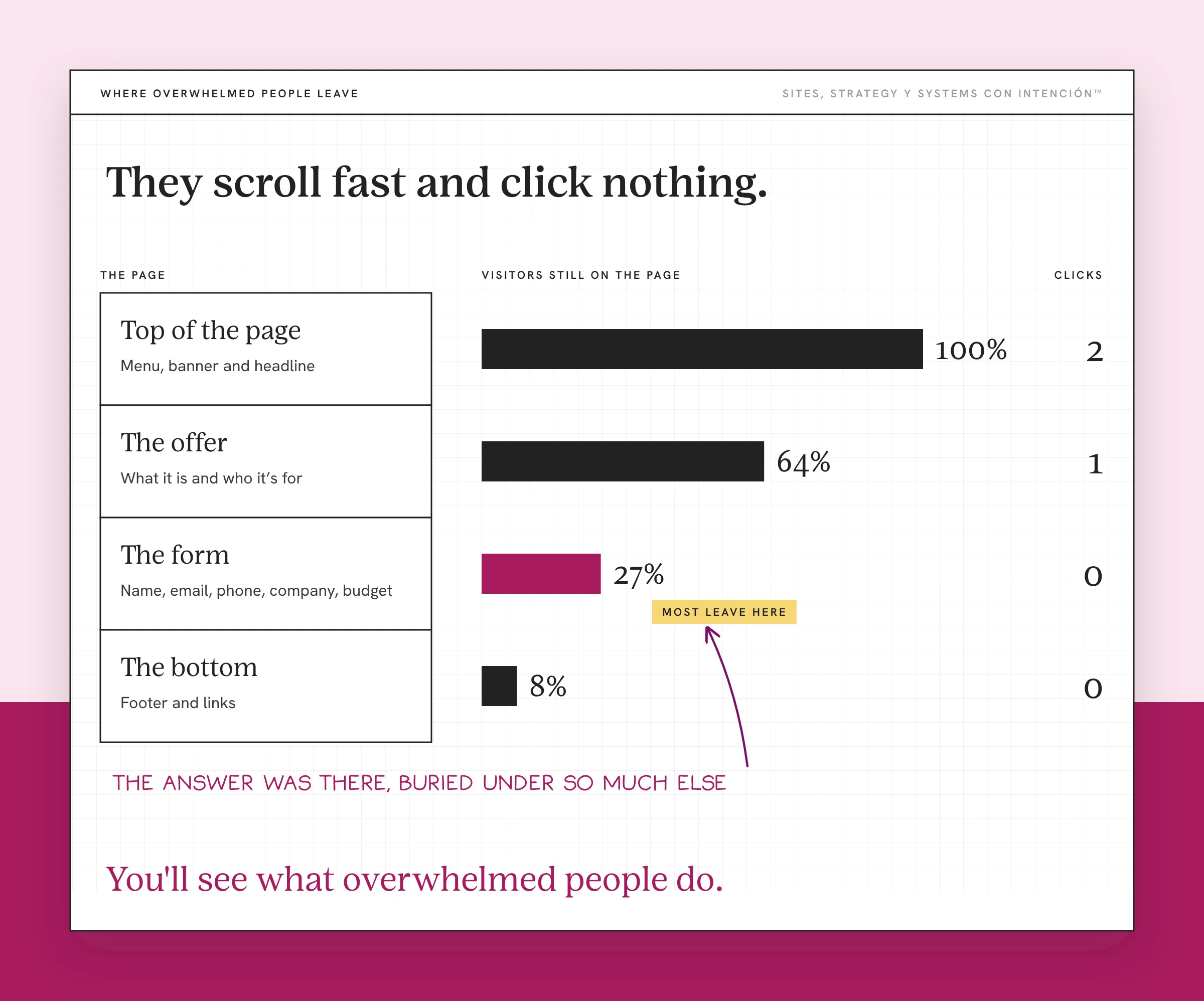
They leave and come back later. A return visit with no inquiry in between can mean interest. It can also mean they ran out of energy the first time and are trying again. Ay bendito, some of them come back a few times before they give up for good.
They ask a question your page already answers. This one hurts because it feels like nobody reads. They read. The answer was there, buried under so much else that they couldn't find it. That's the "What's good here?" moment from the Cheesecake Factory. When people ask you what's on the page, the page has too much on it.
If you see one of these, look closer. If you see all three, o sea, your site is asking too much.
How Do You Reduce Cognitive Load on Your Site?
Cut the choices. Most UX design advice on how to reduce cognitive load gets into visual hierarchy, white space and design principles, which all matter. On a crowded service-business site, though, the biggest gain comes from taking things away until each page asks for one decision.
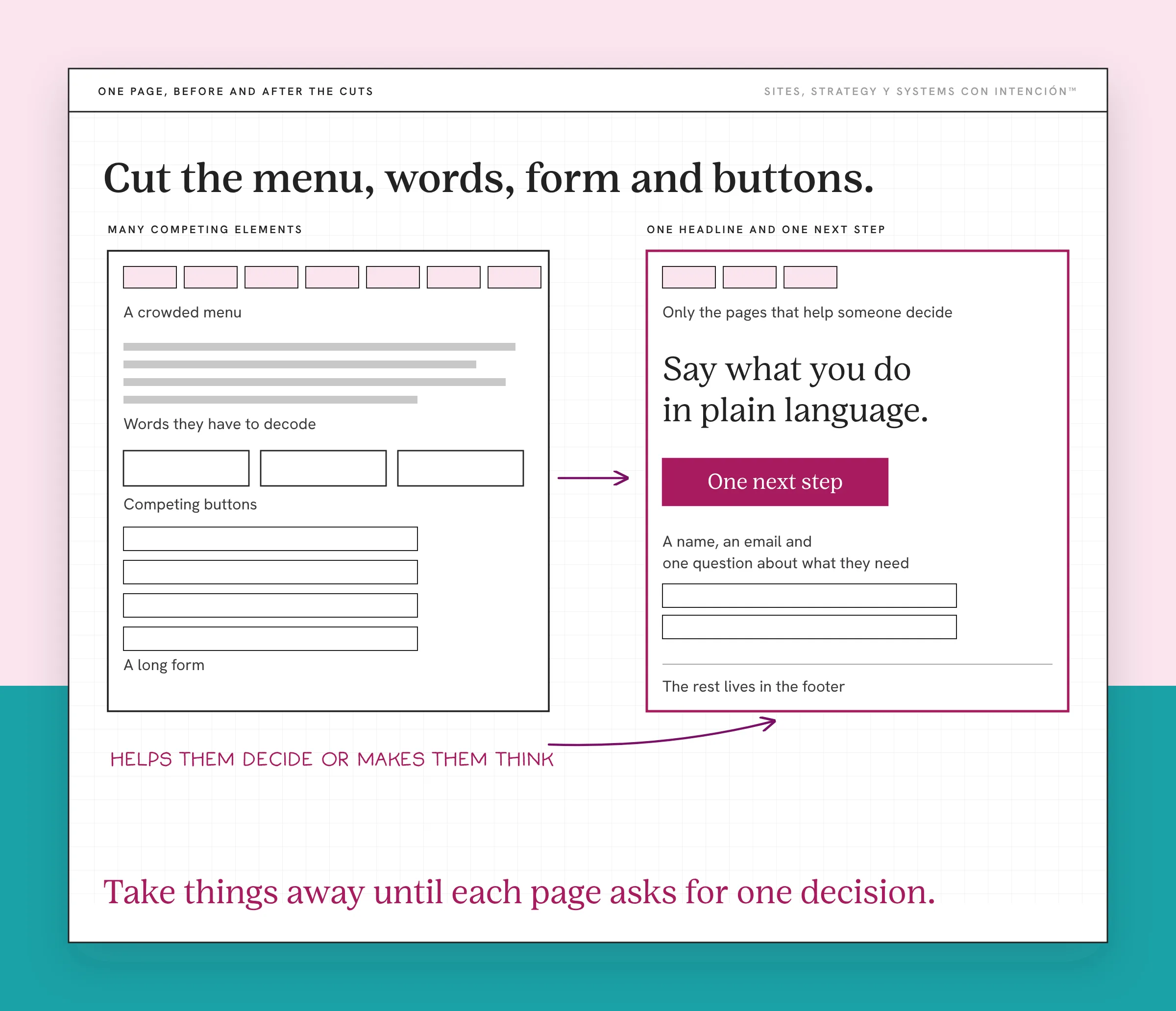
Cut the menu. Keep the pages someone needs to decide to hire you and move the rest to the footer. Your podcast and your shop can live there and still get found. I've done this on a client site. I trimmed a crowded menu down to the pages that help someone decide and moved the rest to the footer. The menu got clearer for their clients, which is the whole point: fewer options to read before they find the one they came for.
Cut the words they have to decode. Say what you do in plain language, in the sentence where they need it. Short sentences reduce cognitive load more than any font choice ever will.
Cut the form. Ask for what you need to reply and save the rest for the call. Nielsen Norman Group's principles for reducing cognitive load in forms start there: every field asks someone to interpret the question, find the information and enter it. A name, an email and one question about what they need will get you further than ten fields.
Cut the competing buttons. A website has one job and so does each page. Pick the one action each page is for and make it the obvious one. Everything else can wait further down or move to another page.
I've watched this work on a single offer page that wasn't getting people to decide. I cut the hedging and the soft invitations. Then I added who the offer was for, who it wasn't for and one direct ask, a call to action people actually click. The inquiries that came in after were a better fit, at the same volume or fewer. The design stayed exactly the same. The page just got easier to decide on and ya tú sabes that's what moves someone from reading to booking.
You don't need a UX degree to improve the user experience on a service business site. You'll just need to look at your own site the way a first-time visitor would and ask, for every element, whether it helps them decide or makes them think. That one question will do more for your site than a new theme. It's also the question I keep coming back to in website strategy.
What to Do This Week
- Count your menu items. If the list runs long, mark which ones a new client needs to decide and move the others to the footer.
- Read your main page outloud. Any sentence you stumble on is one your visitor rereads. Rewrite it shorter.
- Open your contact form and cut one field. Then cut another if you can.
- Pick one button per page. Make that one the strongest and remove or move the rest.
If you're not sure which page to start with, how many pages your site actually needs is a good place to decide what stays.
A lighter site starts with taking one thing away. Do it this week and watch whether people get further before they leave.
Key Takeaways
- Cognitive load in UX is the thinking your site asks for. When there's too much of it, visitors stop deciding.
- Extraneous load, the effort your design adds, is the part you control.
- Crowded menus, copy people have to reread, long forms and competing buttons are the four usual causes on service-business sites.
- Fast scrolling with no clicks, return visits with no inquiry and questions your page already answers mean they're overwhelmed.
- The fix is to cut the choices until each page asks for one clear next step.
Okay, but where is my site asking too much of people?
Take La Digital Rueda. It's free and takes about two minutes. Answer a few questions about your site, your content and your backend and it shows you where the pressure is.
Want more like this in your inbox? Off the Clock is my week-ish newsletter about websites, systems and burnout-free business.
Frequently Asked Questions
What is cognitive load in UX design?
Cognitive load in UX is the mental effort it takes someone to use a site or app. It goes up with every menu item, button, field and confusing sentence they have to process. When it's too high, people get frustrated and leave without acting. Good UX keeps it low enough that the visitor can focus on the decision they came to make.
What are the signs of cognitive overload?
On a website you'll see visitors who scroll fast without clicking, people who come back several times without contacting you and inquiries that ask things your page already answers. In general it shows up as hesitation, mistakes and people giving up on a task halfway through.
What are the different types of cognitive load?
Cognitive load theory names three types. Intrinsic load is the effort the task itself requires. The extraneous kind is the extra effort caused by how information is presented. Germane load is the effort that helps someone understand and remember. In web design, the goal is to cut that extra effort so more attention goes to the decision.
How can cognitive load be measured?
Researchers use questionnaires, task completion times, error rates and tools like eye tracking. For a small business site, you can get a useful read without a lab. Informal user testing works fine here. Watch a few people use your site, note where they hesitate or ask questions and check your analytics for pages where visitors stop.
What is another term for cognitive load?
People also call it mental load, mental effort or cognitive effort. In research, "mental workload" is common. Cognitive psychology uses "working memory load" for the same idea. Information overload describes what happens when the load gets too high for someone to keep going. Whatever you call it, it's the effort a page asks for before someone can act.
About the Author