
The subway map shows you every line in the city, color-coded, beautifully. It tells you almost nothing about whether the 7 train is the one you should be standing on right now. Mira, your nav is the map. The order is the answer to which train.
If you're picking a navigation pattern right now, you're further ahead than most of the people who ask me about this. The question tends to reach me after the site is built, when nothing is converting and the menu is the last suspect anybody checks.
So start with the types, que sí valen la pena conocer. Then I want to tell you about the variable almost nobody adjusts, which I've watched change where visitors end up going.
The Short Answer
There are seven navigation types in regular use and most service businesses need one of them. The choice between a topbar, a mega menu or a sidebar changes less than you'd expect. Once the pages behind the menu are solid, what changes results is the order of what sits inside whichever one you pick, because visitors stop at the first item that looks like an answer.
If You're Reading This Because It's Your Site
Reading more isn't the hard part. La Jugada is $47 and it tells you which layer this is actually sitting in.
Get it, $47What Are the Navigation Types?
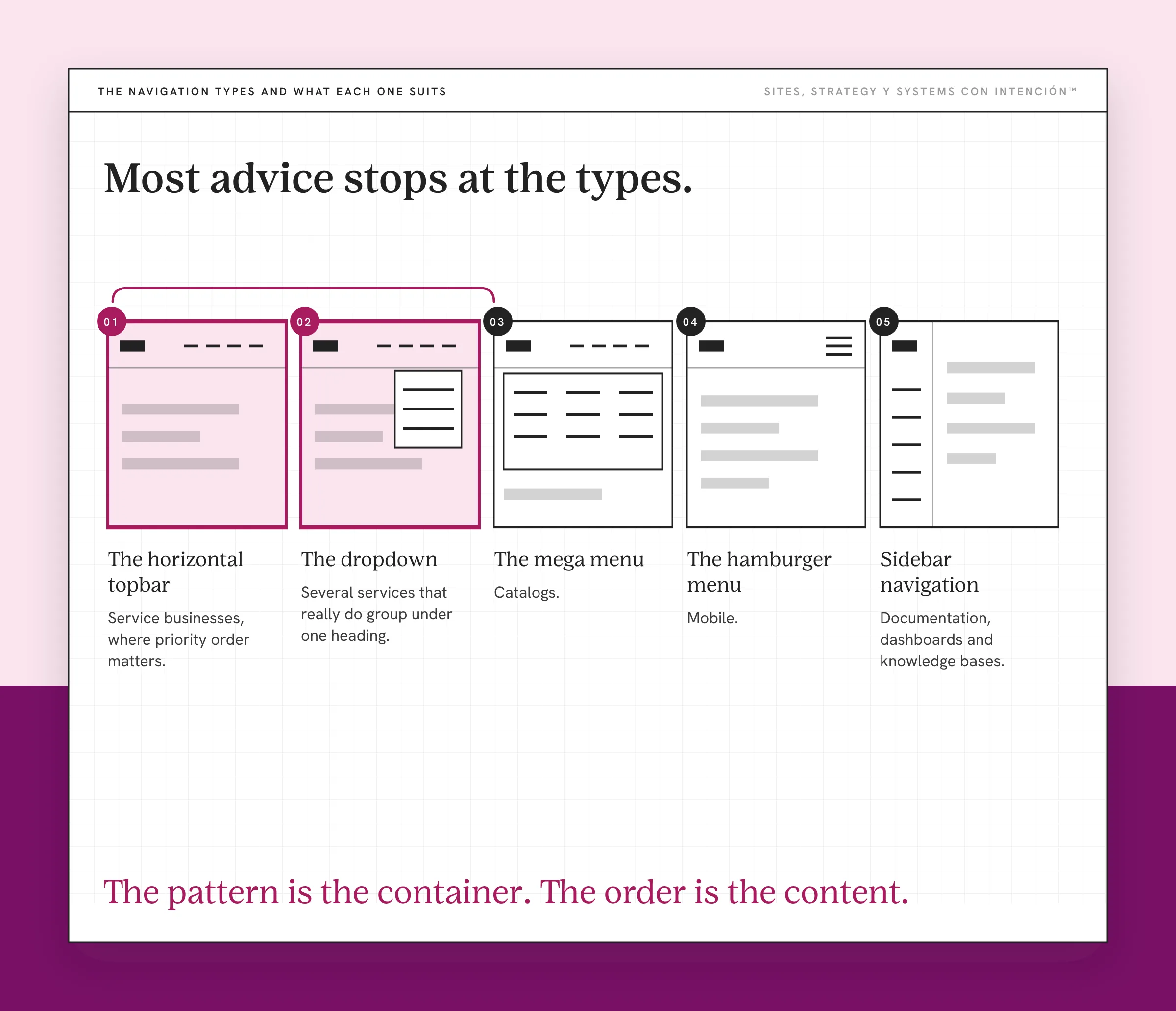
Seven patterns cover almost everything you'll need.
1. The horizontal topbar. Items across the top, typically four to seven of them. The default for a reason. People know where to look. It also forces a short list. Best for service businesses, where the number of pages a website needs is low and the priority order matters. If you're still deciding what belongs where, settle that before you build the menu.
2. The dropdown. A topbar where items expand into a short sub-list on hover or tap. Useful when you have several services that really do group under one heading. It also hides things, which is the tradeoff.
3. The mega menu. A large expanded panel with multiple columns, often with headings and sometimes images. Built for catalogs. If you sell four services, a mega menu makes you look like you sell forty.
4. Sidebar navigation. A vertical menu down one edge. Common in documentation, dashboards and knowledge bases, where someone is working through a body of material.
5. The hamburger menu. The three-line icon that opens a panel. Standard on mobile and still risky on desktop, because it puts one tap between the visitor and every destination you have. Nielsen Norman Group's study of hidden navigation found it cut content discoverability by more than 20%, with the bigger hit on desktop.
6. Sticky or fixed navigation. The menu stays put as the visitor scrolls, usually pinned to the top. Useful on long pages where someone who decides halfway down shouldn't have to scroll back up to act on it, the same problem call to action placement solves. It costs vertical space, which matters more on mobile than anywhere else.
7. Breadcrumbs and footer navigation. Secondary systems. Breadcrumbs show where a page sits in the structure, which helps on deep sites. Footer navigation is where you put the things people look for on purpose: contact, policies, the pages nobody browses to.
Most service businesses are choosing between the first two, with a hamburger on mobile because there's no alternative and sticky if the pages run long. That's the whole decision.
Why the Type You Pick Changes Less Than You Think
Most advice stops at the types y aquí es where it gets interesting.
Two sites can run the same pattern, the same item count, the same clean design and still perform completely differently. The menu does its job based on what a visitor finds when they scan it left to right and stop at the first thing that looks like an answer. Its shape has very little to do with it.
A topbar with the wrong first item fails the same way a mega menu with the wrong first item fails. The pattern is the container. The order is the content.
This is also why nav redesigns so often change nothing, the same way a whole-site redesign can leave you with a website that's still not converting. The menu got cleaner, the hover states got nicer, the spacing improved. The sequence stayed exactly as it was, so visitors kept going exactly where they were going before.
What Actually Changes Things?
Navigation answers one question: where does someone who is ready to take the next step go. It's one link in the route from first click to inquiry, the path a website with no clear next step is missing. The menu is the part of that route the visitor controls.
Everything else in the menu is secondary to that. And the ordering instinct I run into is chronological or emotional. About comes first because introducing yourself feels polite. The blog comes before services because you're proud of the writing. The shop sits third because it was the newest thing you launched.
None of that's how a stranger reads a menu. They have already done the recognition check on your homepage and now they want the page that answers their situation. They scan for the thing that tells them whether you solve their problem. Then they click the first item that looks close. W3C's menus tutorial covers the accessibility side of that: the markup has to match the shape, so the menu a screen reader announces is the same menu everybody else sees.
So the order is a ranking exercise and the ranking that counts is the visitor's. For a service business, put what converts first. Put what explains second. Put what entertains somewhere findable but not in the primary path. Which pages hold which job is how you structure a website for conversions, decided before the menu gets written.
What Happened When One Nav Got Reordered?
A founder's navigation read: About, Services, Blog, Podcast, Resources, Contact.
Her services page was what converted. It's the page where people decided, which is where website visitors become clients on most of the sites I look at. And About was first, because that felt right when she built the site.
So a stranger would land, hit the nav, go to About, read her story, feel good about her, then have to go back up and hunt for what she really sold. Some of them did that. Plenty of them didn't bother, because at that point the site had given them no obvious next step.
So we moved Services ahead of About and changed nothing else about the page. Same copy, same design, the same six items in the menu.
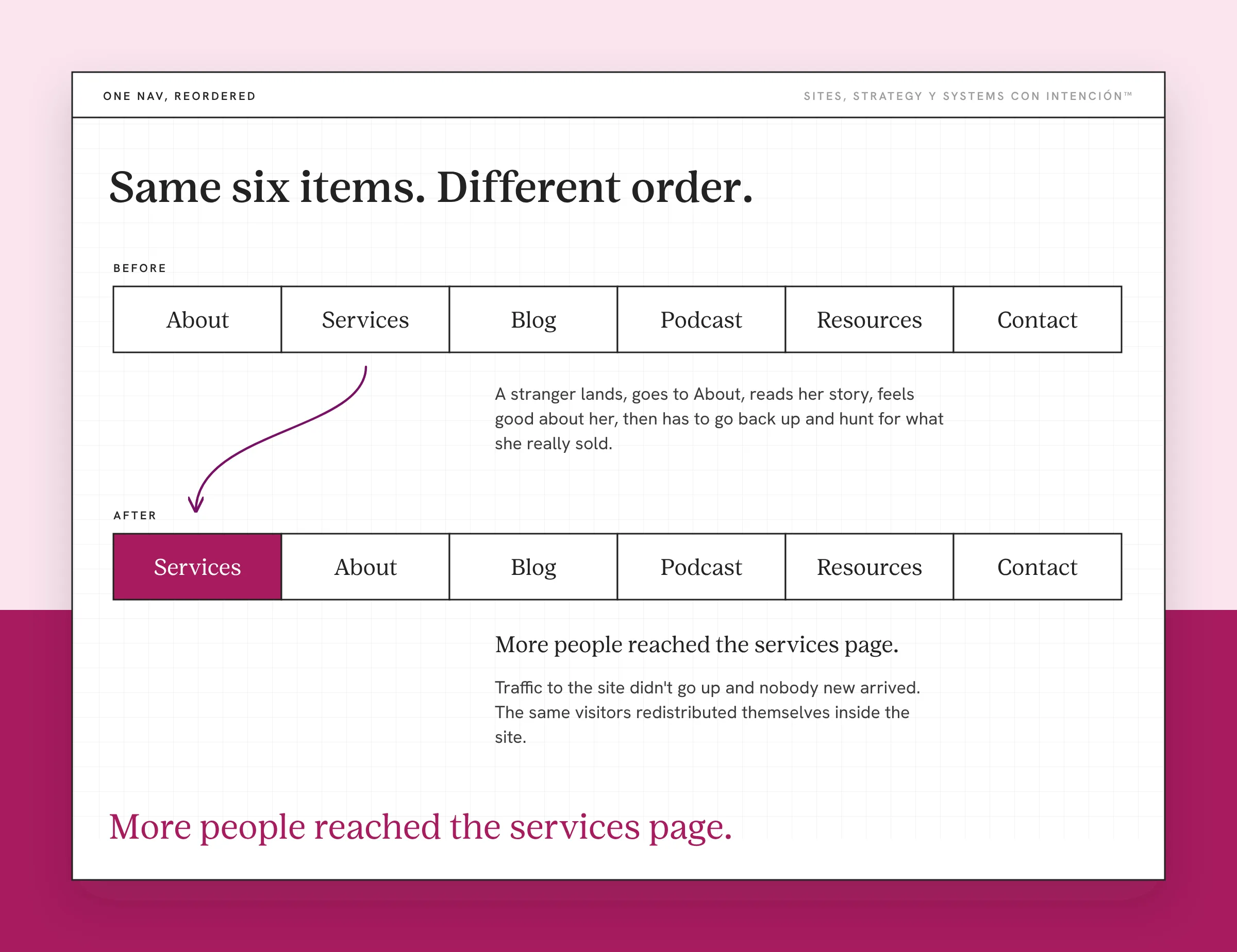
More people reached the services page. Nada más que eso.
That's the whole result and I'm leaving it there, because that's what I can honestly say. Traffic to the site didn't go up and nobody new arrived. The same visitors just redistributed themselves inside the site and more of them landed on the page where the decision happens. Ahí está.
It's a small change with a modest, specific outcome. I bring it up because the amount of effort it took was close to zero. Most of the nav work people consider instead costs a redesign. Low effort with a specific payoff is my favorite kind of website strategy work.
Why Most Important First Is Also a Search Decision
This is the part I find most useful, because it removes a tradeoff people assume exists.
Putting your most important pages first in the navigation is good for visitors. It's also good for Google. Your nav is linked from every page, which makes it one of the main ways a crawler finds the pages you consider central. Google's own guidance on making links crawlable is plain that links are how Google finds new pages to crawl.
So the visitor-optimal order and the search-optimal order are the same order. You aren't balancing two goals. You're making one decision that serves both.
I want to be careful about the size of this claim. The effect is real and it's modest. Navigation order won't outrank better content. I'm not going to give you a percentage either, because anyone who does is guessing. It's a free alignment. You were going to order the menu anyway. Ordering it by importance costs nothing and pays twice.

Two Things I Will Not Put in a Main Nav
There are two of these rules and I hold both of them firmly.
About doesn't go first. It can go second, it can go fourth, it belongs on the site. It doesn't get the position that the page where people decide should have. The only visitor who needs About before services is one who already trusts you. That person will find it.
The blog and the podcast stay out of the primary path. This one gets more pushback and I hold it harder. Content is how most people find you and it can convince them you know your stuff. Knowing you're the right person and knowing how to work with you are two different things. The second one is your services page's job and it takes website copy that helps people decide. A main nav carrying blog, podcast, resources and a shop alongside services asks a visitor to choose between reading and deciding. Reading always wins, because it asks less of them.
Content lives somewhere findable. A clear link in the footer, a section on the homepage, a dedicated page you point to from everywhere. Findable is the requirement. Primary isn't.
The version of this I run into is a site with strong content and no route from any of it to an offer. It's one of the clearest things a website audit surfaces. Ten seconds in the menu is often enough to spot it. The pieces all exist. They aren't connected to each other and the menu is where you can see it.
Quick Navigation Check
Before changing anything, run this against your current menu.
- Is your highest-converting page in the first two items in your navigation?
- Do you have more than seven items in your primary navigation?
- Are content pages (blog, podcast, resources) competing visually with your offer page?
- If a first-time visitor looked only at your menu with no other context, would the right next step be obvious?
If any of those are a no, the navigation is doing work it shouldn't have to do.
Key Takeaways
- Seven navigation types cover nearly everything. Most service businesses need a topbar or a topbar with dropdowns.
- The pattern is the container and the order inside it is the content. Two sites running the same pattern can perform completely differently.
- One reordered nav, Services moved ahead of About, nothing else changed: more people reached the services page.
- Most important pages first serves visitors and search at once, so there's no tradeoff to manage.
- About doesn't go first. The blog and the podcast stay out of the primary path.
Okay, so what do I fix first in my menu?
Share your link and answer five questions. In about 10 minutes La Jugada gives you a read on your site, your marketing and your backend plus the first move worth making, before you touch the menu. $47 and no call.
Want more like this in your inbox? Off the Clock is my week-ish newsletter about websites, systems and burnout-free business.
Frequently Asked Questions
What are the different types of website navigation?
Seven patterns cover almost all of it: the horizontal topbar, the topbar with dropdowns, the mega menu, sidebar navigation, the hamburger menu, sticky or fixed navigation, plus secondary systems like breadcrumbs and footer navigation. For a service business the choice is nearly always the topbar. The interesting decision isn't which pattern you use, it's what order the items sit in.
Which navigation type is best for a service business?
A horizontal topbar, with dropdowns only if your services really do group under headings. It keeps the list short, people know where to look and it forces you to decide what matters most. A mega menu makes four services look like forty. Sidebar navigation suits someone working through material rather than deciding whether to hire you.
Does navigation order matter for SEO?
Yes, modestly. Your nav is linked from every page, which makes it one of the main ways a crawler finds the pages you consider central. It won't outrank better content. What makes it worth doing is that the best order for visitors is also the best order for search, so it costs nothing.
How many items should be in a navigation menu?
Four to seven. Closer to four than seven for most service businesses. The number matters less than whether the order reflects priority. A five-item menu in the wrong sequence performs worse than a seven-item menu in the right one, because visitors stop at the first thing that looks like an answer.
Should About come before Services?
No. About belongs on the site and it doesn't belong in the position that the page where people decide should hold. The visitor who needs your story before your services already trusts you. That person will find About wherever it sits. The stranger scanning your menu is looking for whether you solve their problem.
What is the difference between website structure and navigation?
Structure is which pages exist and how they nest. Navigation is the menu that points at some of them. You can have a sound structure and a menu that hides it, which is the more common of the two failures. Structure gets decided first, because you can't build a menu for pages you haven't settled on. Planning the website structure is its own job and it comes before this one.
Where should the blog go in the navigation?
Somewhere findable rather than in the primary path. A clear footer link, a homepage section or a dedicated page you point to from elsewhere. Content is how people find you and it isn't how they hire you, so a main nav carrying blog, podcast and resources alongside services asks visitors to choose between reading and deciding. Reading wins, because it asks less.
About the Author



