

When a band walks off after the last song, it isn't because the night is over. The encore is planned, it's written on the setlist and everyone in the room is in on it. El truco está en dónde lo pones. The placement is the whole trick.
Mira, picture a homepage that skipped that planning. Book a call, download the freebie, follow on Instagram, read the blog, join the newsletter and buy the course all sit at the same size, in no particular order, with nothing indicating which one someone like them should do first.
They land and can't tell where to go. The site is asking them to make too many decisions at once, before they're ready to make any of them, so they make the only easy one available y se van. My rule for this is short: make sure there aren't too many decisions on the page.
The Short Answer
Call to action placement is a hierarchy question before it's a position question. One primary ask per page, sized to the trust that page has built, with everything else visibly secondary. Where it sits matters much less than whether it's the only thing being asked and whether they can tell what happens when they click it.
If You're Reading This Because It's Your Site
Reading more isn't the hard part. La Jugada is $47 and it tells you which layer this is actually sitting in.
Get it, $47What Are the Two Ways the Ask Goes Wrong?
Everybody knows about the crowded version. The other one is just as common and much harder to spot.
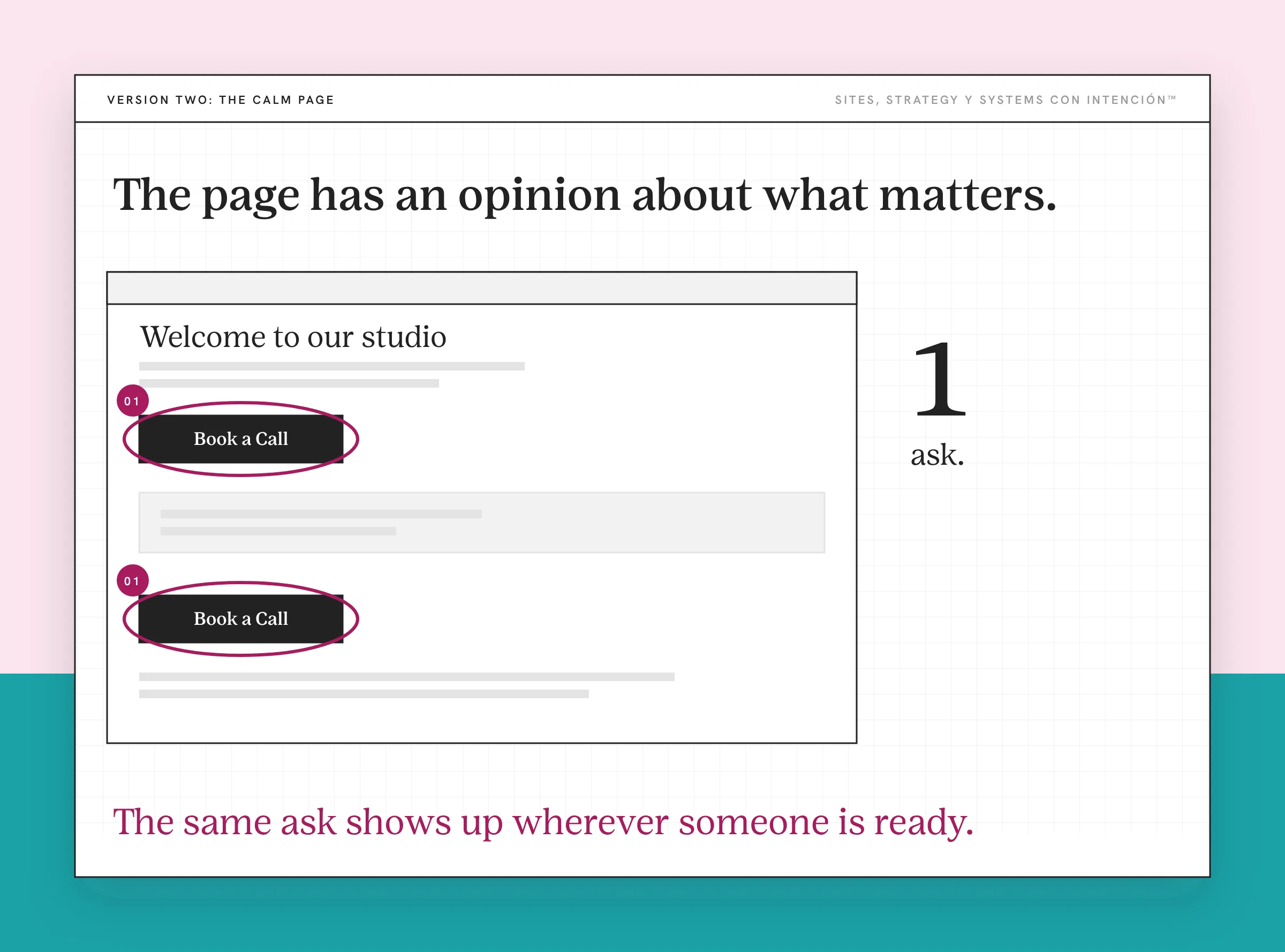
Version one is chaos. Every ask you've ever had, all present, all weighted the same, a textbook case of choice overload. The page has no opinion about what matters, so the visitor has to form one.
Version two is all-or-nothing. No asks anywhere until the very bottom of the page, where there's a contact form. The page taught them something useful, built real trust, then offered exactly one high-stakes next step. For someone interested but not quite ready, there's nowhere to land and no way to become a lead.
Version two feels disciplined, which is why it survives. It looks like restraint, pero no lo es. It's a page with no intermediate option. Y ahí se pierde la mitad. The intermediate option is where most of the interested people were.
How Many Asks Should One Page Have?
The framework is one sentence: one primary call to action per page, based on where the reader is in the journey.
Everything else is secondary. Mentioned when it's relevant, never competing. Secondary means visibly secondary, which means a text link.
The GOV.UK Design System's button guidance puts it plainly: having more than one main call to action reduces their impact and makes it harder for users to know what to do next. Before you add a pile of secondary buttons, their advice is to simplify the page or split it into separate pages. That's a government service manual rather than a conversion blog. It lands on the same rule.
Two asks of equal weight hand them a decision about your website instead of a decision about your work. When the page is built for one reader, that trade isn't worth making.
One client's page had Learn More and Book a Call sitting side by side, competing for the same click. We cut it to one ask, the booking. Now the page asks them to make one decision.

How Big Should the Ask Be?
This is the part that decides everything else. It's also why placement advice with no reference to the page's content is useless.
Early-stage content that names a problem gets a low-commitment next step. They just worked out that something is wrong. They aren't ready to buy anything and asking them to is a waste of the recognition you just earned.
Content that goes deep on one specific problem gets a medium-commitment ask. A diagnostic, an audit, a conversation. They have enough information to want help and enough trust to pay for a smaller version of it.
A page where they're comparing options and ready to buy is where the bigger ask belongs. By this point they aren't being persuaded. They're deciding between you and someone else.
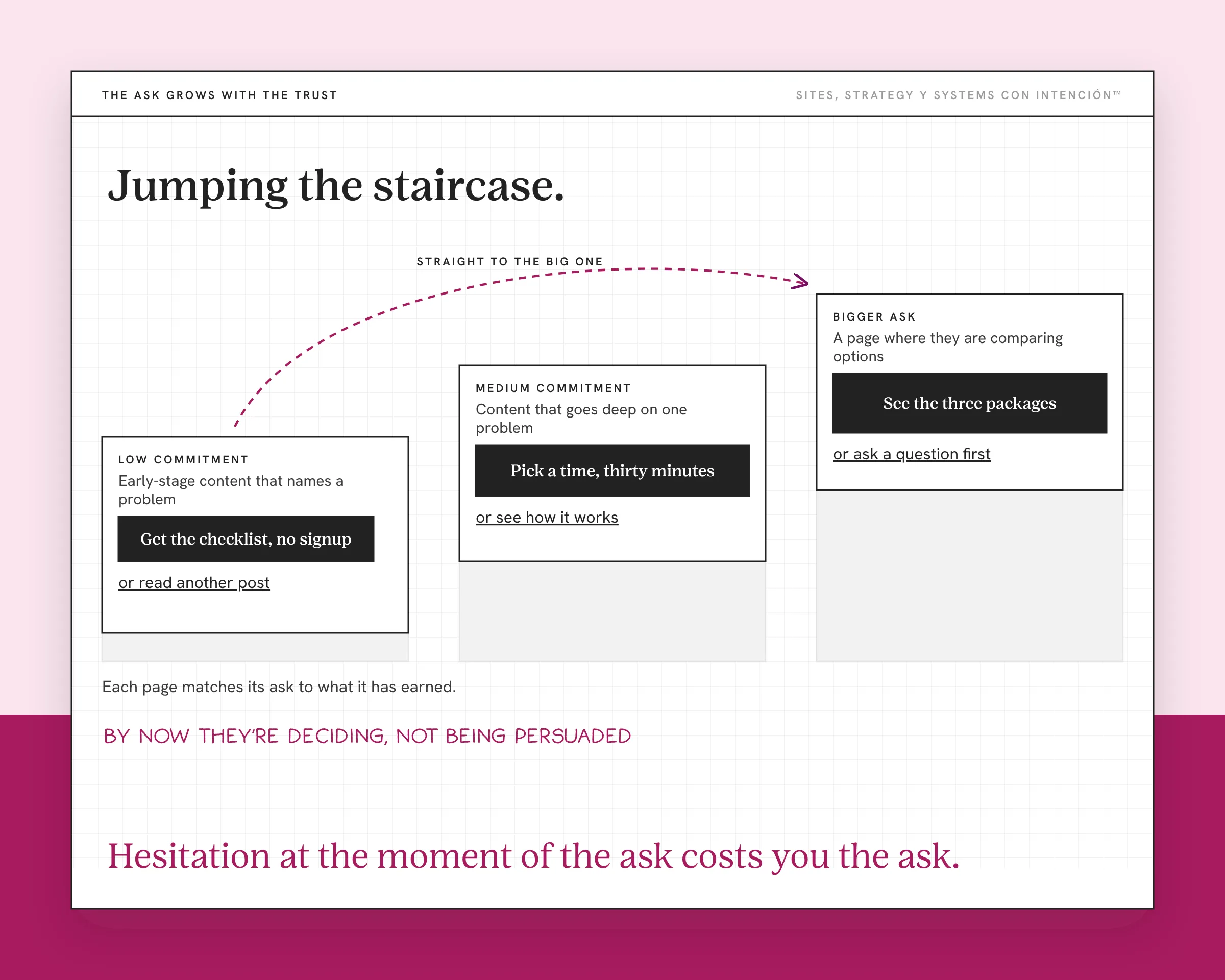
The mistake I see most is jumping the staircase. Sending someone from I just figured out my site isn't converting straight to a high-ticket offer. The trust isn't there yet because you skipped the steps that build it. The page doesn't fail loudly when this happens, which is the problem: they just don't click.
Make the Consequence of the Click Obvious
Clear doesn't mean the action and it doesn't mean the outcome. It means the consequence.
They should know before clicking whether that button fills in a form, picks a time on a calendar, takes payment or loads another page. When they can't tell, they hesitate. Hesitation at the moment of the ask costs you the ask.
That rules out a lot of what sits on service sites. Learn More tells them nothing about what happens. Get Started could mean anything from a newsletter to a contract. Submit describes what the server does rather than what they get.
What works is specific and slightly boring: see the three packages, pick a time, thirty minutes, get the checklist, no signup. Nobody has ever left a site because the button was too clear about itself.
The consequence doesn't end at the click. On one client's site, people submitted the form and got nothing back. Adding an auto-reply email fixed it. The auto-reply email made it seem like the process was beginning.
So Where Does It Actually Go?
Placement, finally. It's simpler than the internet makes it.
After the argument that earns it, then again at the end. One ask can show up more than once on a long page. Three buttons that all lead to the same decision are fine. Different asks competing on one page are what read as pressure.
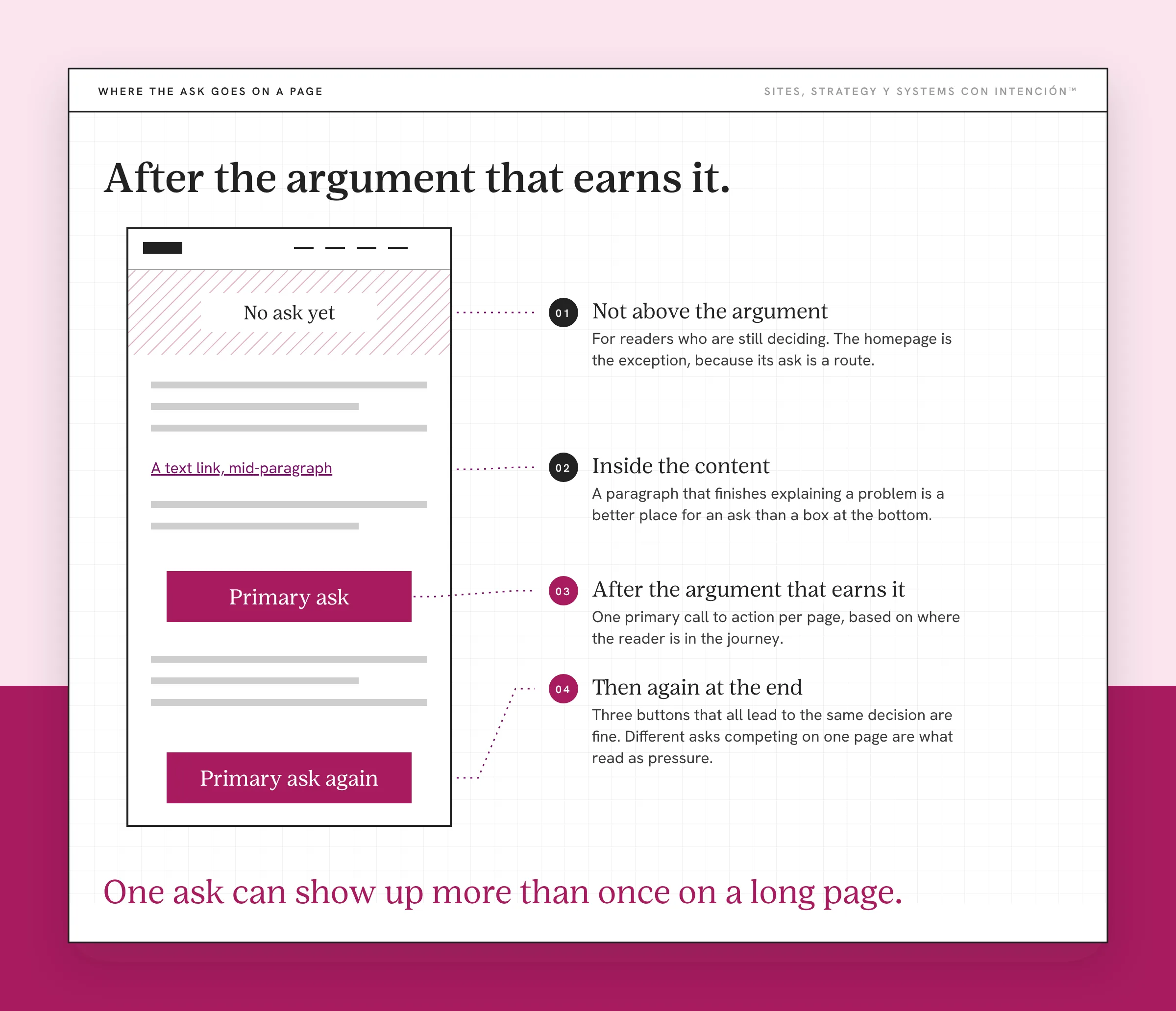
Not above the argument for readers who are still deciding, because an ask in the first screen of a page that hasn't yet named their situation is asking before it has said anything. The homepage is the exception, because orienting and routing is what a homepage is for, so its ask is a route.
Inside the content, when the content naturally arrives there. A paragraph that finishes explaining a problem is a better place for an ask than a box at the bottom, because they're holding the problem right at that moment.
Sales and landing pages run their own rules. One ask, repeated, with no navigation and no alternatives. Those are different pages with a different job, covered in the sales page vs landing page breakdown.
What Fixing the CTAs Will Not Fix
Three things sit underneath this.
If the page hasn't built any trust, a perfectly placed ask is still an ask nobody wants to accept. How you sequence the page for conversions is underneath the placement.
If the copy describes rather than helping someone choose, they reach the ask undecided. No button solves undecided. That's what copy that helps people decide is for.
And if the pages don't connect at all, the ask isn't the missing piece. The route to a clear next step is. Getting that route right is the quiet part of website strategy nobody posts about.
One more, because it's the most tempting fix. Adding the same ask to every page gives you the chaos version with better coverage rather than a hierarchy.
Key Takeaways
- Call to action placement is a hierarchy question first. One primary ask per page, everything else visibly secondary.
- There are two failures. Six competing asks is the obvious version. Nothing at all until a high-stakes form at the bottom is the other.
- Size the ask to the trust the page built. Early-stage content gets a low-commitment step, deep content gets a medium one.
- Jumping the staircase is the most common error. The page doesn't fail loudly, they just don't click.
- Clear means the consequence of the click. That rules out Learn More, Get Started and Submit.
I fixed my buttons and nothing's moving. Now what?
Bring your site, your numbers and whatever's bugging you to one private session from $350. We'll figure out why people still aren't clicking and what to do about it. Notes included.
Frequently Asked Questions
Where should a call to action be placed on a page?
After the part of the page that earns it, then again at the end if the page is long. Never above the argument, because an ask that arrives before the page has named the reader's situation is asking for something it hasn't yet justified. The homepage is the exception, since its ask is a route.
How many calls to action should be on one page?
One primary ask. Secondary options can exist when they're relevant and when they look secondary, which means a text link. Two asks at the same weight hand the visitor a decision about your website instead of a decision about your work.
Should a call to action be above the fold?
Only on a page whose job is routing, which is usually your homepage. Everywhere else, an ask in the first screen shows up before the page has said anything worth acting on. Putting the ask above the fold is an ecommerce habit, because there the visitor already knows what they want.
What makes a call to action clear?
The visitor knows what happens when they click, before they click. Not the action and not the outcome: the consequence. Does this fill in a form, book a time, take payment or load another page. Learn More, Get Started and Submit all fail that test, which is most of what sits on service websites.
Why is nobody clicking my call to action?
Usually because the ask is bigger than the trust the page has built. A thirty-minute call is a lot to offer someone who has read one blog post, so they do nothing rather than saying no. The other common reason is that they can't tell what the click does. Hesitation at that moment costs you the click.
Can I have a call to action on every page?
Yes, as long as it's the right ask for that page. An identical button on a blog post and a services page is wrong on at least one of them, because those two readers are at different distances from a decision. Same ask everywhere is coverage without hierarchy.
About the Author



