Nobody who ever made somebody a burned CD put the tracks on in the order they happened to rip them. You thought about which song opened it, what came after the one that made your point, where the mood had to turn. Mira, the order was the whole gift. Same eleven songs in a different sequence is a different object.
Two versions of this problem show up and they sound completely different.
One is someone building or rebuilding who says I don't know what goes where. The other is someone with a live site who says people aren't reading it. Both of them are asking a layout question about something that's really a priority problem, which is why moving boxes around won't fix it until the priorities are clear.
The Short Answer
To organize website content, work out the order a stranger needs things in, then arrange what you already have to match. Most scattered sites aren't missing content. They're organized by the owner's logic, which is usually by service, by process or by the order things got added. None of those is the order a visitor reads in.
If You're Reading This Because It's Your Site
Reading more isn't the hard part. La Jugada is $47 and it tells you which layer this is actually sitting in.
Get it, $47Why Does Website Content Feel Scattered When Everything Is There?
The content is usually all present. Y ahí es where this gets hard to see.
What happened is that the site got organized from inside the business. By service line, because that's how you think about the work. By process, because that's the order you do it in. Or by whatever got added most recently, since the site grew over years and nobody re-sequenced the whole thing.
Every one of those is a real organizing principle. None of them is the visitor's.
A stranger arrives with a situation and no idea which of your categories it belongs in. They don't know your service names. They haven't read your process. They're scanning for the thing that tells them they're in the right place, the way people read on the web. Your structure is arranged around information they don't have yet.
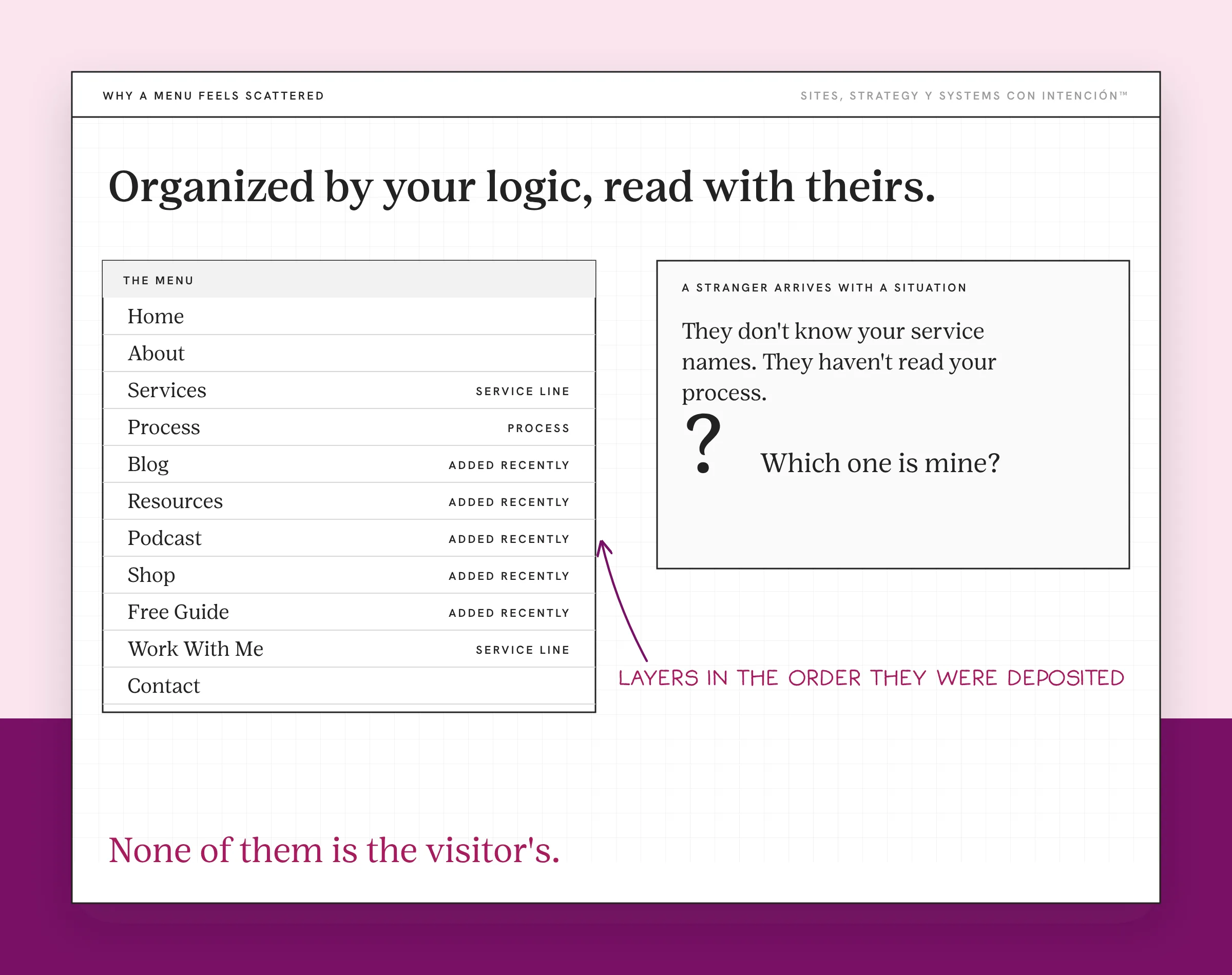
That's the whole problem: the site is organized by your logic while they're reading with theirs.
Why Does Adding More Make Sprawl Worse?
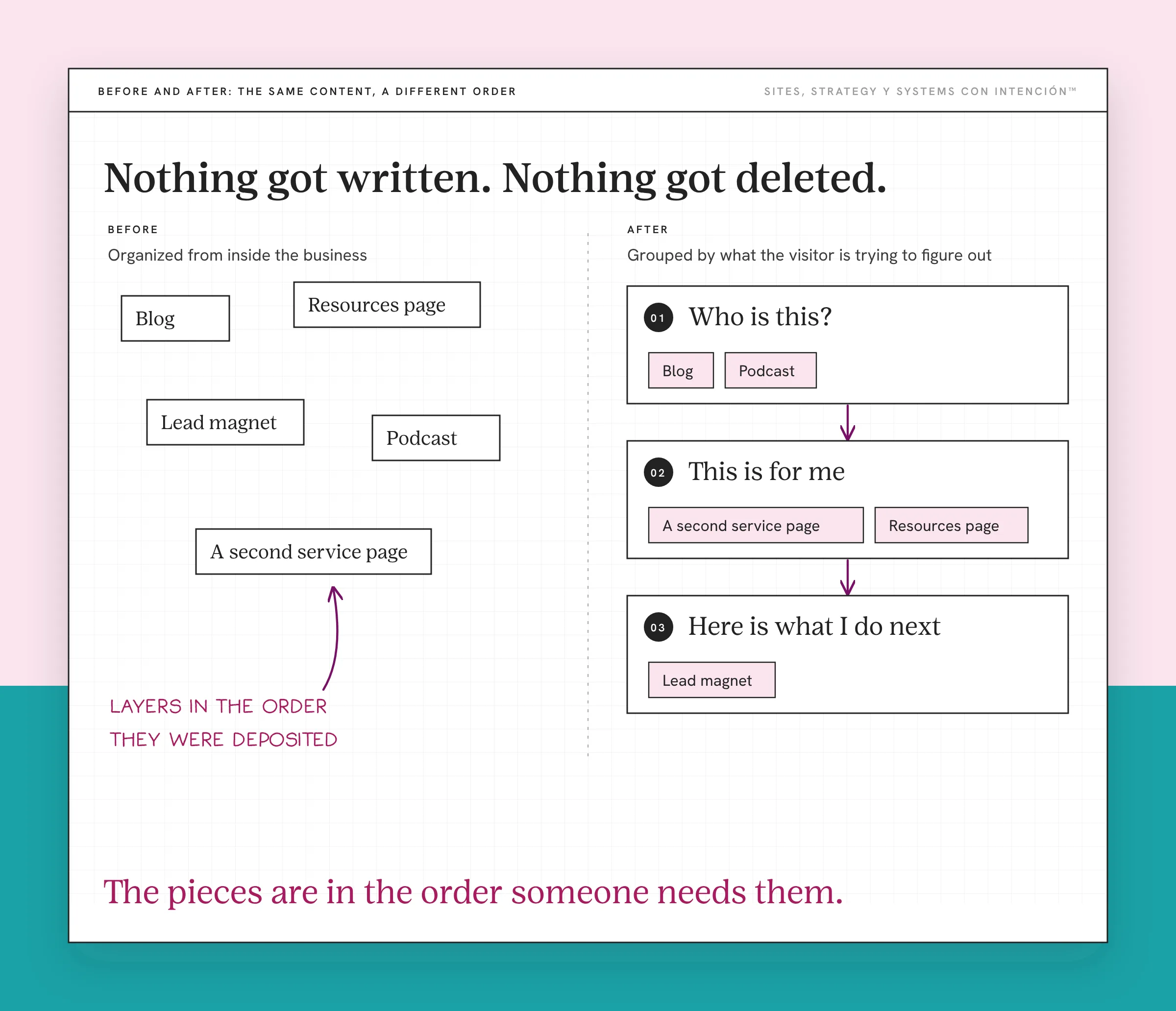
Content accumulates. A blog, then a resources page, then a lead magnet, then a podcast, then a second service that needed its own page.
Each addition was reasonable on its own. Nobody ever went back and re-sequenced the whole, so what you have is sediment, layers in the order they were deposited.
The instinct at this point is to add navigation, add a search bar, add a resources hub. All of that is organizing the symptom. The reader still has to work out what matters and now they have more places to look while they do it.
One client came to me wanting more pages. What their site needed first was a clear message, so that's what we fixed before adding anything. More pages on top of it would have been more sediment.
Five Steps to Organize Website Content
This is the sequence I use. It works the same on a new build and a refresh, though step one feels different depending on which you're doing. On one client site I ran it on the content they already had and wrote nothing new. Everything that was there moved into a different order.
1. Write down the one thing you want a visitor to do. Everything downstream gets ranked against it, so without this the rest is guesswork. If you can't answer it, that's the finding. It matters more than the organizing does.
2. List every piece of content you already have. Pages, posts, resources, downloads. A plain list, no grouping yet, nada de categorías todavía. The point is to see the volume, because organizing from memory is the default and memory omits the things that stopped doing any work.
3. Group it by what the visitor is trying to figure out. That means the question someone would have in their head when they need that piece, whatever service or format it belongs to. This is the step where your logic and theirs come apart, so it's the one worth slowing down on.
4. Rank the groups by what has to be understood first. Someone can't evaluate whether your service fits until they know you understand their situation, which is what an about page is for. They can't decide to reach out until they know what happens next. The order is a dependency chain rather than a preference.
5. Assign each group to a page, then order the pages. Now you're placing things. Doing this before steps three and four is what produces a site that looks organized and reads like a filing cabinet.
Card Sorting: How to Find the Visitor's Order Instead of Guessing It
Step three is the one people get wrong, because you can't easily stop thinking like the person who built the business.
There's an established method for this called card sorting. Nielsen Norman Group documents how it runs. The version below is the low-tech one. You write each piece of content on a card, hand the stack to someone who resembles your client, then ask them to group the cards however makes sense to them. Then you ask them to name the groups.

What comes back is their mental model, y eso vale oro. Sometimes it confirms what you had. More often it splits a group you thought was one thing or merges two you thought were separate. The names they give the groups are better than yours too, because they're the words a visitor would actually search for.
You don't need a research budget. Nielsen Norman Group recommends at least 15 participants for a full study, but even a handful of people who resemble your clients will show you where your grouping and theirs come apart. Index cards work and so does a shared doc.
The reason this matters more than any organizing tool: it's the only step that gets someone else's order into the process. Everything else you can do alone. Doing it alone is what produced the current structure.
What Changes When the Order Is Right?
When the order was the problem, the same content starts working. Ahí está, that's the part that surprises people.
Nothing got written. Nothing got deleted. The pieces are in the order someone needs them, so a visitor who lands cold can get from who is this to this is for me to here is what I do next without doubling back or guessing. That order is what website strategy for a service business looks like in practice.
You'll usually also find things you can cut. Once the groups are named it becomes obvious which pieces were added to fill a gap that no longer exists. That's a side effect of getting it right.
What Organizing Content Will Not Fix
Organizing is a sequencing job. Three things it doesn't touch.
If your copy is losing you clients, order won't save it. Turning visitors into clients is what the copy is for. A well-sequenced set of pages that all describe without helping anyone decide is still a site nobody acts on, which is a copy problem.
If you don't know which pages should exist in the first place, you're earlier than this post. That's planning the structure, which comes before organizing what sits inside it.
If the menu buries the thing that matters, the content underneath can be perfectly sequenced and still go unread. Choosing a navigation type is its own decision.
And if every page reads like a different business, the problem is upstream of all of it. That's your messaging strategy. No amount of rearranging makes inconsistent positioning cohere. That's why messaging sits at the top of any content strategy.
One more, because people ask. Using AI to speed up the grouping is fine as a first pass. What it can't do is know which of your clients you turn away, so treat whatever it gives you as a draft. More on that in how to write website copy.
Key Takeaways
- Scattered content is rarely missing content. It's organized by your logic.
- Organizing by service, by process or by what got added last are all real principles y none of them is how a stranger reads.
- The method: name the one action, list what exists, group by the visitor's question, rank by dependency, then assign to pages.
- Card sorting is the step that gets someone else's order into the process, y it's the only one you can't do alone.
- When the order is right the same content starts working. The cuts become obvious on their own.
My content's all there. Just tell me what to fix first.
Answer five questions and share your link. In about 10 minutes La Jugada gives you a personalized read on your site, your marketing and your backend plus the first move worth making. It's $47 with no call.
Want more like this in your inbox? Off the Clock is my week-ish newsletter about websites, systems and burnout-free business.
Frequently Asked Questions
What is the best way to organize a website?
Start from what you want a visitor to do, then work backwards through what they need to understand before they can do it. That dependency chain is your order. Organizing by service line or by your internal process feels natural and produces a site arranged around information the visitor doesn't have yet, which is why so many well-built sites read as scattered.
What are the key steps to organizing website content?
Five. Name the one action you want, inventory everything you already have, group it by the question a visitor is trying to answer, rank those groups by what has to be understood first, then assign them to pages and order the pages. The grouping step is where the owner's logic substitutes itself for the visitor's, so it's the one worth slowing down on.
What tools and methods can help organize website content?
Card sorting is the one that earns its place. Write each piece of content on a card, hand the stack to a handful of people who resemble your clients, then ask them to group and name them. Their groupings are the visitor's mental model. Index cards or a shared doc both work. No software required.
What is the 3-second rule in website design?
The idea that a visitor decides whether they're in the right place almost immediately, well before they've read anything properly. Treat it as a useful pressure rather than a literal measurement. What it means for organizing is that your first group has to answer "is this for me," because nothing further down the page gets read if that question stays open.
Should I organize differently for a new site versus a refresh?
The method is the same and the starting point differs. On a new build you're working from what you plan to offer, so step one is a real decision. On a refresh you already have content, so the inventory in step two usually reveals more than you expected, including pieces that are doing nothing much. Refreshes tend to produce cuts. New builds tend to produce gaps.
How do I know if my content is organized well?
Read your site as someone who has never heard of you and has one specific problem. Track whether you ever have to go backwards to understand something. If you double back, a dependency is out of order. If you finish and still can't say what the business does for someone like you, the grouping is arranged around your categories.
About the Author