You know what you do. You can explain it on a call without even thinking. Then you open the page editor and your whole business has to fit between a headline and a button.
When someone sends me their services page, I usually hear one of three things. "I don't know what to put on it." "I think it's too much text." "Nobody books from it." This is how to write a services page that fixes all three.
In 12+ years and 100+ sites worked on, the page that struggles most is the one that talks about the owner, never says who it's for and ends without a next step. Our story, our values, a list of everything they offer. Meanwhile the person reading came in with one problem and can't tell if this is for them. Ay bendito, that's a lot of writing with no answer in it.
The Short Answer
To write a service page, start with who it helps and the problem it solves. Write a headline that names that problem, explain what they get, then add your process, proof and a price signal. Finish with one specific next step and check the whole page on your phone before you publish.
If You're Reading This Because It's Your Site
Reading more isn't the hard part. La Jugada is $47 and it tells you which layer this is actually sitting in.
Get it, $47What Should You Know Before Writing Your Service Page?
Before you create a service page, write down the questions someone needs answered to decide if your offer fits. I start with who, what, where, when, why and how. Then we make it fun.
| Question | What Your Draft Should Explain |
|---|---|
| Who? | Who the service is for and what situation they're in |
| What? | What you'll do, what they'll receive and what's outside the scope |
| Where? | Whether the work happens remotely, on-site or in a defined service area |
| When? | When work starts, how long it takes and any recurring schedule |
| Why? | Why solving this problem matters to the client |
| How? | How working together goes and how to get started |
You wouldn't buy concert tickets without checking the date, venue and price just because you love the artist. You can be a huge fan and still need the details. Your potential clients bring the same questions to your service page.
Pull the answers from real conversations. Inquiries, sales calls, the question you keep answering in your DMs. Your client might say, "I never know what I can pay myself." You might call the service "monthly financial reporting." Both go in your notes. They do different jobs in the copy.
Pick one main action for the service page too. A quote, a consultation or a defined package. That choice decides what people need to know before they take it.
If you can't name the client or the problem yet, work on the message underneath the offer before you polish a single sentence.
How Do You Write a Headline That Helps Clients Recognize Their Problem?
Start with the problem they're trying to fix or the outcome they want. Speak directly to that situation. Then use the line underneath to name the service and who it's for.
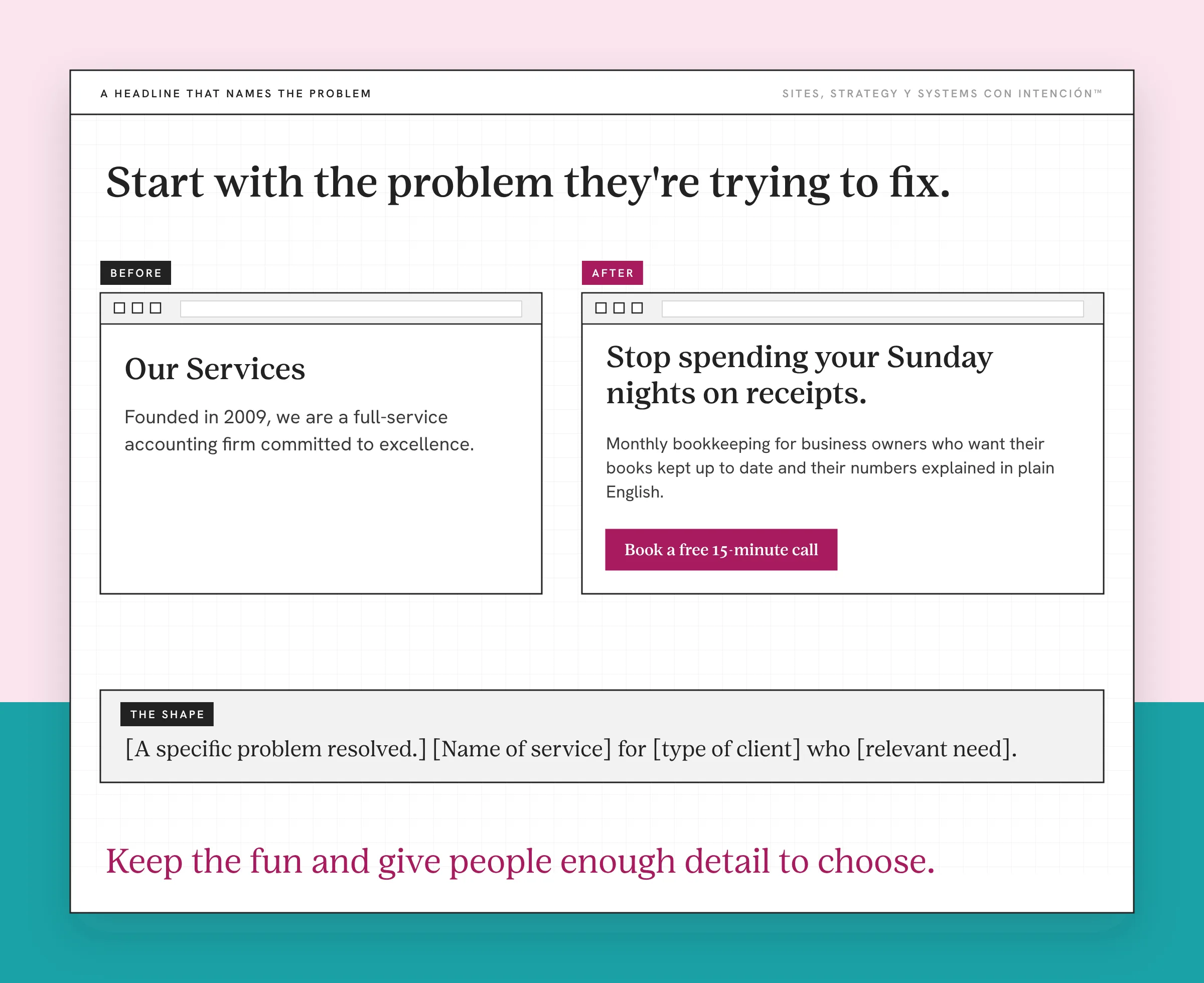
For our service page examples I'm using a fictional bookkeeping firm. The copy and promises below are invented to show the writing. They're not a client case or tested results.
Before:
Our Services
Founded in 2009, Smith & Co. is a full-service accounting firm committed to excellence.
After:
Stop spending your Sunday nights on receipts.
Monthly bookkeeping for business owners who want their books kept up to date and their numbers explained in plain English.
What I changed: The headline names a task the client wants off their plate. The line underneath says what the firm does. A clever headline doesn't have to explain the whole offer by itself.
Draft yours with this shape:
[A specific problem resolved or outcome the client wants.]
[Name of service] for [type of client] who [relevant need or situation].
Say it outloud. If it sounds like something you'd never say to a client, loosen it up. If the fun version hides what you sell, bring the service name back into the line underneath.
Website copy that converts can have personality and be clear. Nobody should need to decode a joke to understand the offer. The same idea carries into writing the rest of your website copy. Clear first, clever second has been a good rule across my content strategy work.
How Do You Explain Your Service, Benefits and Deliverables?
Write the service description in two parts. What changes for the client and what you'll do to make that happen.
Benefits give the work meaning. Deliverables let potential customers judge the scope. The page needs both. Leaving out the benefits is one of the most common website copy mistakes.
Before:
Our team of certified professionals leverages industry-leading software and decades of combined experience to deliver comprehensive bookkeeping, payroll and advisory solutions.
After:
We handle the books each month so you can see where your money is going without spending Sunday night trying to catch up.
What you get:
- Monthly books, reconciled and ready by the 10th - Payroll processed on the agreed schedule - A 20-minute monthly check-in to explain your numbers in plain English
What I changed: Now someone can picture what they're buying. "Comprehensive solutions" leaves them guessing. A monthly check-in has a purpose they understand.
Those details only belong on a real page if the business can deliver them. Don't borrow the 10th-of-the-month promise because it sounds good. Write the commitment you can keep.
For each deliverable ask what it helps the client do, understand or avoid. Keep that answer right next to the item. You don't need a paragraph for every feature.
Name the boundaries too. If tax prep costs extra, say so. If you need documents by a deadline, say that before they book. O sea, clarity includes the parts that keep a working relationship from starting with a surprise.
How Do You Add Pricing, Process and Proof?
Once the offer is clear, show what working with you looks like. This is where the promise meets the practical details.
Give People a Useful Price Signal
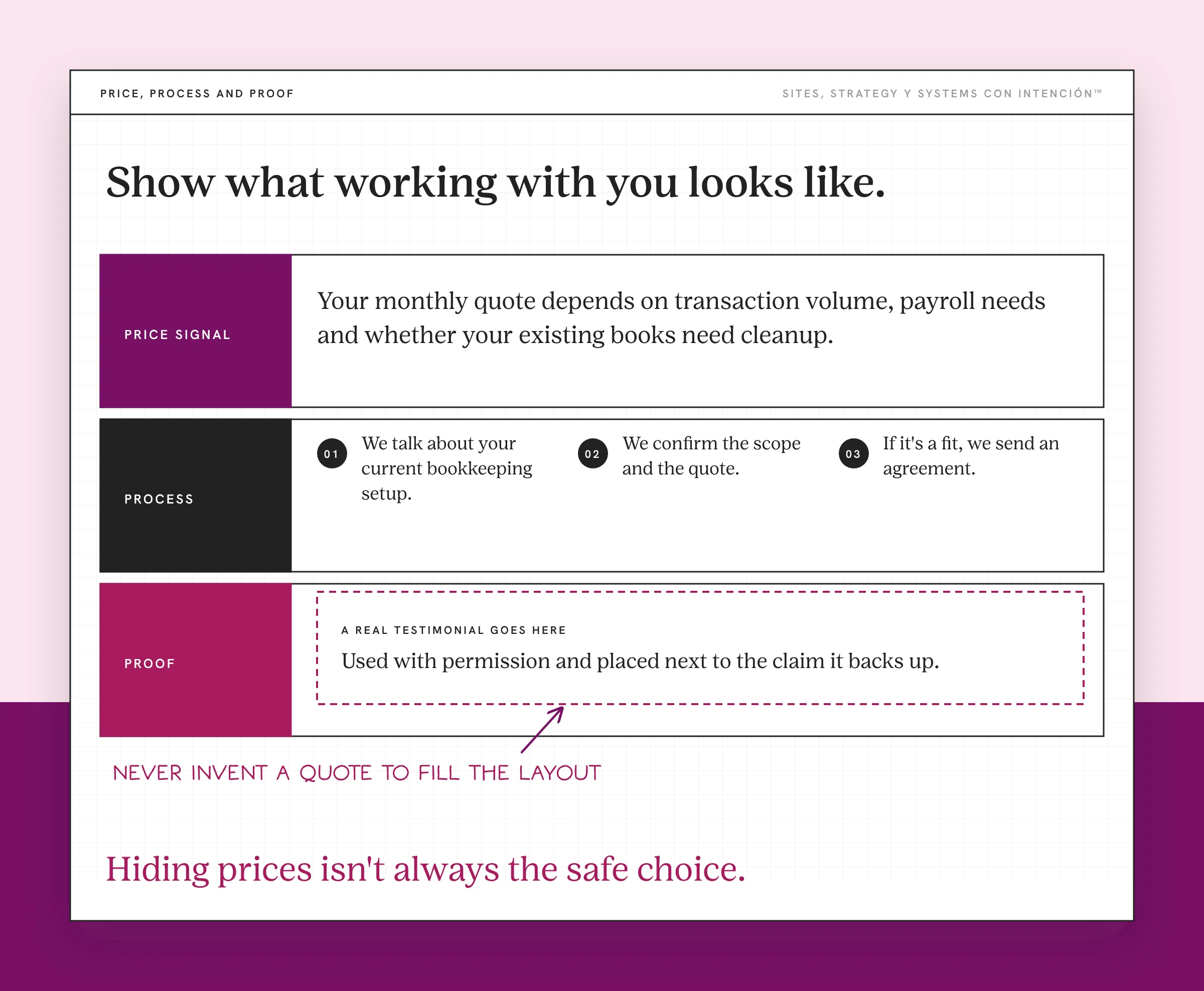
Hiding prices isn't always the safe choice. You don't need a full rate card, but a starting price or a realistic range gives people something to work with.
For custom work, say what drives the cost. Scope, volume, complexity, ongoing support or whatever decides your quote.
For our fictional firm, a draft might read:
Your monthly quote depends on transaction volume, payroll needs and whether your existing books need cleanup. We'll review those details before recommending a package.
What I changed: It explains how pricing works without inventing a fee. If your business has an accurate starting price or range, I'd include that too.
Describe What Happens After the Inquiry
Write a short sequence based on your real process. For example:
First, we'll talk about your current bookkeeping setup. Then we'll confirm the scope and quote. If it's a fit, we'll send an agreement and explain what we need to get started.
Keep it specific enough that someone knows what they're agreeing to. Don't promise a proposal on the call if your process needs a separate review.
Choose Proof That Supports the Offer
A testimonial earns its spot as a trust signal when it backs up a claim you've made. If you promise reports people can understand, find a client's comment about that exact experience.
"Great to work with!" is kind. A testimonial that names the original problem and what changed tells the reader a lot more. Use real wording with permission. Never invent a quote to fill the layout. The FTC's rule on fake reviews and testimonials bans ones that misrepresent who wrote them or what they experienced.
Put proof next to the claim it supports. Case studies carry more context when a short quote can't. If you share a result, say what it refers to and don't imply everyone gets the same one.
That's how you build trust with information someone can check, the same way good about page copy does. A row of decorative stars can't explain your service for you, mija.
How Do You Write a Clear Next Step?
Your call to action should tell the reader what they're about to do. On a service page, "Learn More" frustrates people who already read the offer and are ready to act.
Before:
Learn More
After, for the fictional firm:
Book a free 15-minute call
We'll ask about your current books, answer your questions and explain what we'd need to prepare a quote.
What I changed: The button names the action. The sentence next to it says what the call involves. Only use "free" and the duration if both are true.
A ready visitor will happily book. Someone still comparing providers needs more detail before they take the next step. By the time someone books a call with me, they've usually already decided. The page did most of that work, the way a strategic service business website should. Keep the important answers on it so nobody has to get on your calendar to find them.
Changing the label to "Get a quote" doesn't lower the commitment if it opens the same long application. Look at the actual request. What do they need to share, how long does it take and what happens afterward?
On a longer page you can repeat the same primary action at useful points. Each button should lead where its wording promises, whether that's a contact form or a calendar.
How Do You Make Your Service Page Easy to Skim?
Read your draft on a phone before you call the service page design finished. I look for photos that interrupt scrolling, text that's hard to skim and design choices that bury the point.
A photo can show the person delivering the work or the service itself. But if a big mobile image pushes every useful answer farther down, ask whether it earns that space. In Nielsen Norman Group's scrolling research, most of the time people spend on a page goes to what's above the fold.
Keep related details together so people can find the information they need. If the page keeps growing, organize your website content before you add more. Use headings that say what's underneath, short paragraphs for explanations and bullets where someone needs to compare what's included.
You don't have to strip out your personality. Diache, the goal isn't to make every business sound like the same template. Keep your phrasing and choose images with a purpose. Let the information stay easy to find.
What Could Your First Draft Look Like?
Use this outline to draft your service page content, then adjust the order to the questions your clients bring:
- Headline: [The problem or outcome your client recognizes.]
- Supporting sentence: [Service name] for [client] who [situation or need].
- Benefit: [What becomes easier, clearer or possible through the work.]
- Scope: [Main deliverables, useful details and important exclusions.]
- Process: [How the work happens, where and on what timeline.]
- Price guidance: [Starting price, range or the factors behind a custom quote.]
- Proof: [A relevant, genuine testimonial or case study.]
- Next step: [Specific action] followed by [what happens next].
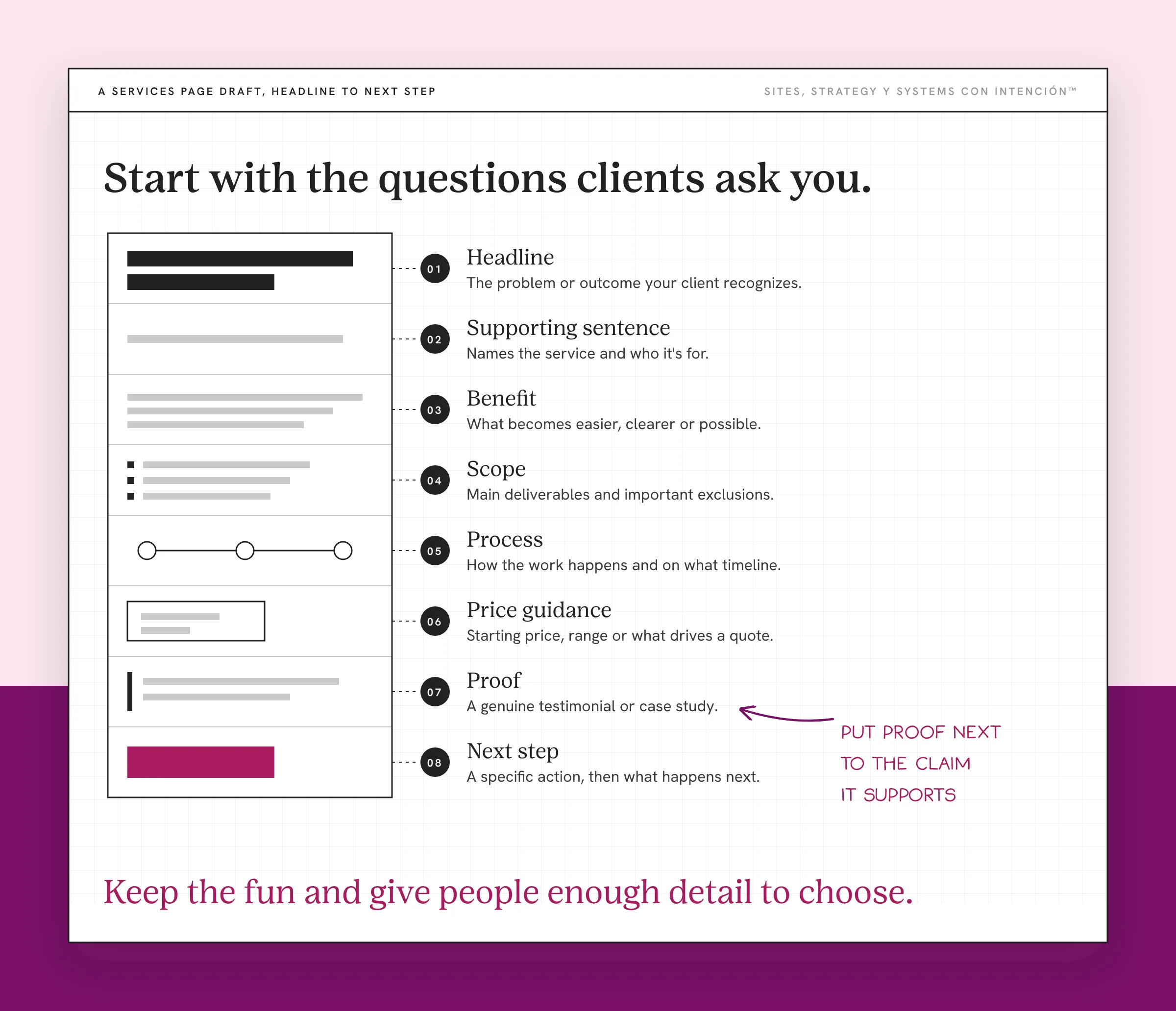
Weave the proof into the sections it supports. Add a short section of frequently asked questions if those answers would otherwise interrupt the main explanation.
What Should You Check Before Publishing?
Test the entire page and the inquiry flow yourself:
- Can the intended client recognize their situation and find the scope?
- Does the funnel sending people here make sense for this offer?
- Does the next step suit the commitment you're asking for?
- Are the price guidance and process clear?
- Does the social proof support a relevant claim?
- Do buttons, forms, calendars and confirmation messages work on a phone?
If your service page is already live, look at analytics alongside those checks before you rewrite everything. When traffic is healthy and people still don't book, I start with the data to see where the website is losing clients before I touch the messaging. A quick exit alone doesn't tell you whether the traffic, the message or the experience caused it.
Start your draft with the questions clients already ask you. Answer them in the order that helps someone understand the offer. Then cut anything that makes those answers harder to find. Keep the fun and give people enough detail to choose.
Key Takeaways
- A services page starts with the client's decision questions: who, what, where, when, why and how.
- A recognizable problem, specific deliverables and clear boundaries help people understand the offer.
- A useful price signal, relevant proof and an explained next step support an informed decision.
- Review the copy and the actual booking experience on a phone before you publish.
Before I rewrite my services page, what should I fix first?
For $47 you answer five questions and share your link. In about 10 minutes you get a personalized read on your site, your marketing and your backend, plus the first move worth making. There's no call.
Want more like this in your inbox? Off the Clock is my week-ish newsletter about websites, systems and burnout-free business.
Frequently Asked Questions
What is a service page?
A service page explains one thing you sell and gives someone enough to decide if they should inquire or buy. It covers who it's for, the problem it solves, what's included and how working together goes. An overview page can introduce several offers while a dedicated page explains each service in detail.
Do I need a separate page for every service?
Give a service its own page when it has a different audience, scope or set of questions. Closely related options can share one page if people can compare them easily. If you offer different services, an overview can send visitors to individual pages for the details. Skip near-identical pages that exist just to have more URLs.
What is the difference between a service page and a landing page?
A service page explains an ongoing offer on your site. A landing page is built around one campaign, audience or action. They overlap, since someone can land on your service page from an ad or a search result. Decide what the page needs to say based on where the visitor came from and what you're asking them to do.
How long should a services page be?
Long enough to answer the questions that affect the decision. Then cut repetition and anything that belongs on another page. A simple service needs less explanation than a custom engagement with several stages. Check it on your phone and see if someone can skim for scope, price guidance and next steps. A short page that skips those still needs work.
How do I make my service page SEO-friendly?
Pick a keyword that matches the service and what potential clients type into search engines. Use clear titles and descriptive headings. Write copy that mentions the phrase where it fits. Link to the service page from related pages so visitors and search engines can find it. Google's SEO Starter Guide backs clear, organized content and useful links. None of it guarantees a ranking.
About the Author