People visit your site and some of them scroll. Then nothing happens, with no inquiry and no email and no "hey, I found you online." Or the inquiries do come and they're from people you were never going to help.
That's when the question shows up: is my website losing me clients? Once the basics work, I'd start with the copy. In 12+ years and 100+ sites worked on, one of the first things I read on a site that isn't getting the right inquiries is the top of the main page, read the way your client would read it. Ay bendito, you can stare at your numbers for weeks while the problem sits in the first few lines.
The Short Answer
If people visit and don't inquire, test the form, the mobile view and the page load first, then start with the copy. Do the same when the inquiries you get aren't a fit. Read the top of your main page as your client would. If you can't tell who it's for, what you offer and what to do next, your site is losing them right there.
If You're Reading This Because It's Your Site
Reading more isn't the hard part. La Jugada is $47 and it tells you which layer this is actually sitting in.
Get it, $47How Can You Tell If Your Website Is Losing You Clients?
Two patterns tell me a site is losing clients. People visit and nobody inquires. Or inquiries arrive from people who aren't a fit.
They look like opposite problems. Both point at a page that isn't telling the right person it's for them.
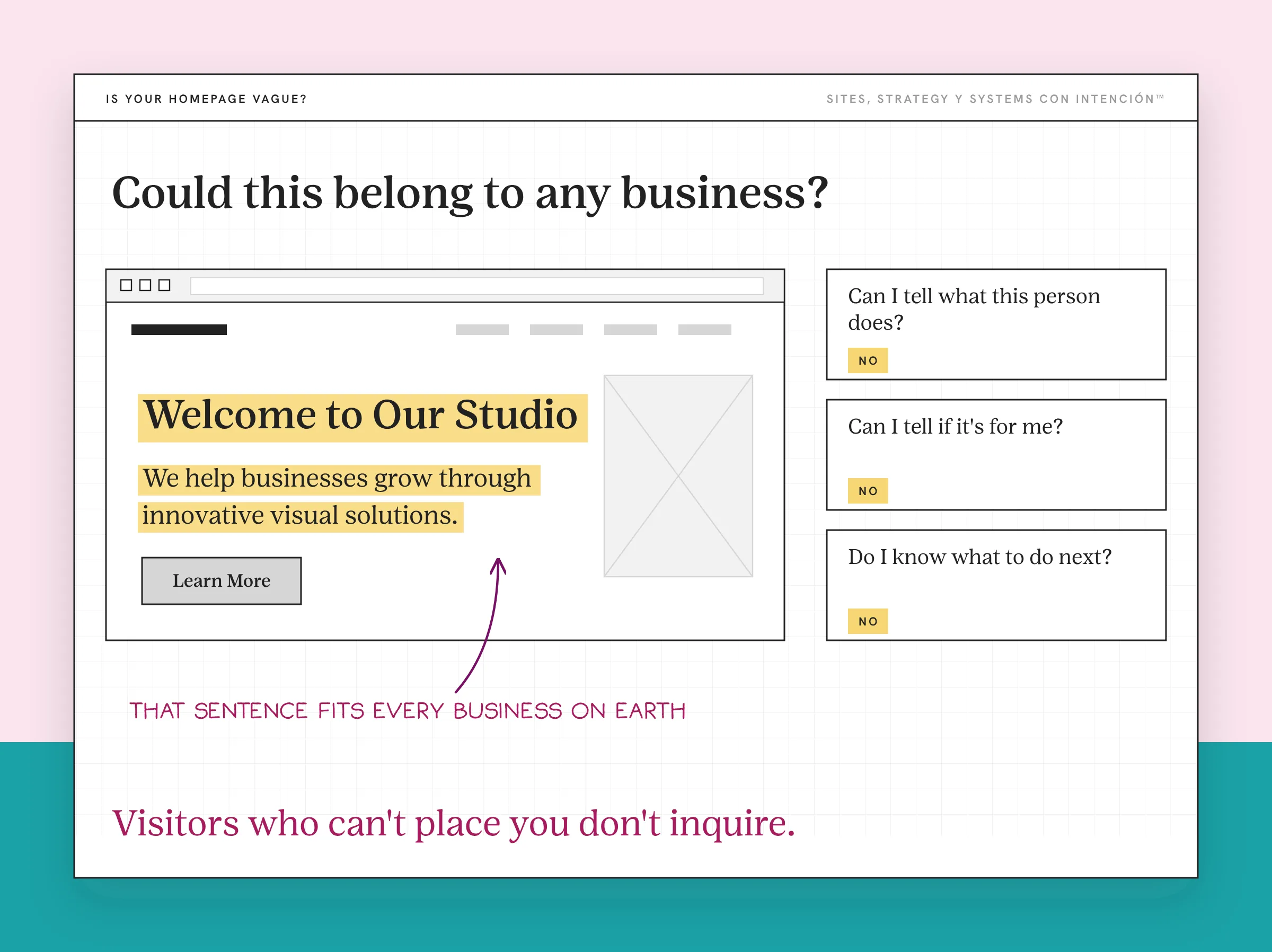
The check takes about a minute. Open your homepage or main offer page and read only the top, from the headline to the first button. That's where most of a visitor's attention goes. Then ask three questions as if you were your own client:
- Can I tell what this person does?
- Can I tell if it's for me?
- Do I know what to do next?
If any answer is no, that's where the page starts losing people.
Here's a fictional before and after of the top of a page. It's invented to show the check and it isn't a client result.
Before:
Welcome to Smith Studio
We help businesses grow through innovative visual solutions.
After:
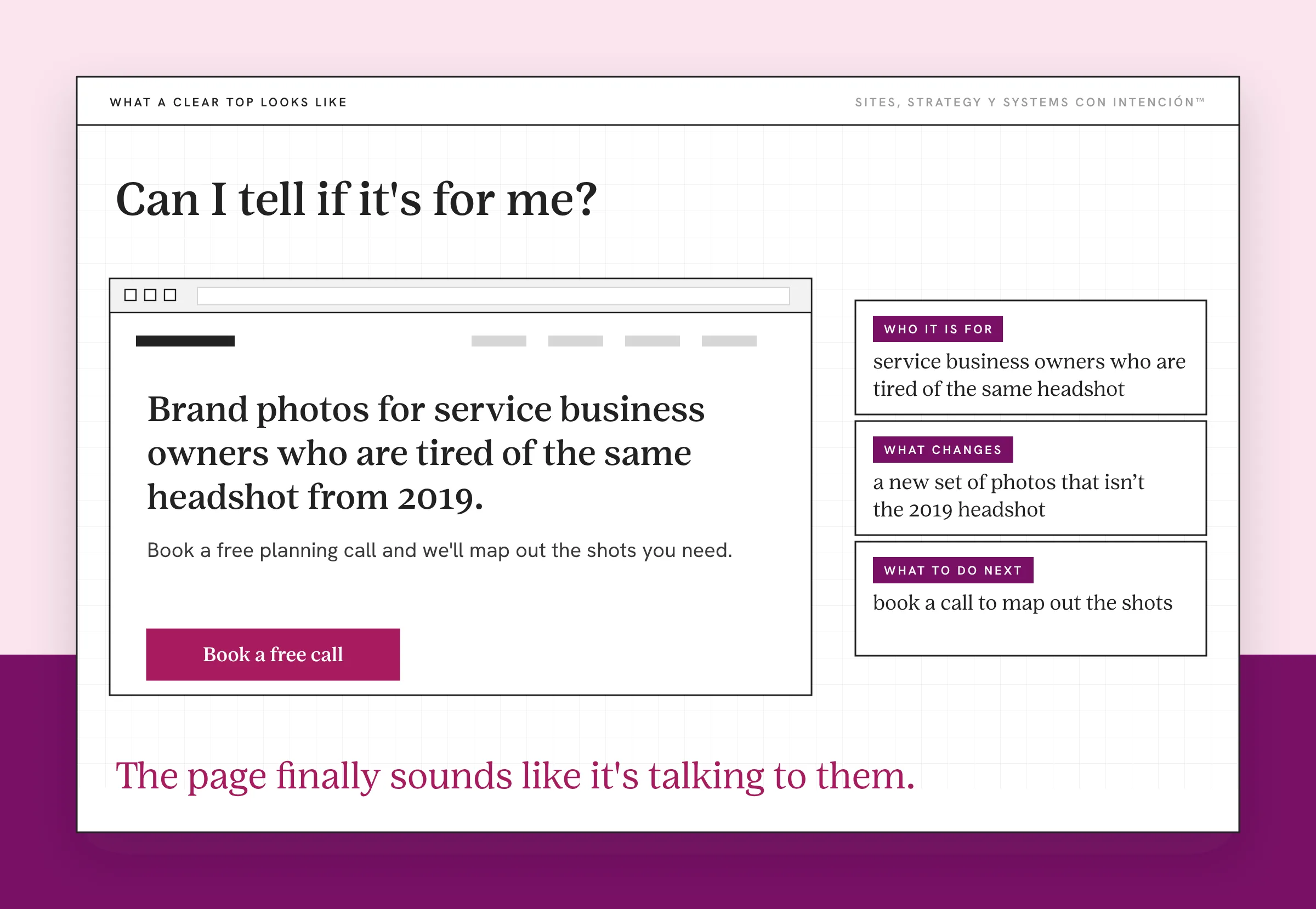
Brand photos for service business owners who are tired of the same headshot from 2019.
Book a free planning call and we'll map out the shots you need.
The first one could belong to any business. The second one tells a visitor who it's for, what changes and what to do next. Only use "free" if it's true.
Think about an AIM away message. In a line or two it told everyone who you were that day and whether to bother you. Your homepage headline has the same job. If your away message said "we help businesses grow," nobody would've known if you were studying or out for the night.
What Are the Signs Your Copy Is the Problem?
Nobody needs another fourteen-point checklist, diache. In my own audits the hero usually comes right after load time and navigation, so these are the four I look for as soon as I get there.
- It talks about the business and skips the client. Count how many times the page says "we" and "our" before it mentions the reader's problem. If the story, the values and the process all come first, your website messaging makes the person reading wait to find out why they're there.
- It uses vague lines like "we help businesses grow." That sentence fits every business on earth, so it tells your client nothing. Say what you do, for whom and what changes. If your lines sound like every competitor's, website copy that sounds like you shows how to fix that.
- It has no clear next step. The page just ends, like a brochure with no website strategy behind it. Maybe there's a contact link in the footer. Nobody knows if you want them to book a call, send a message or keep reading. A clear call to action tells someone exactly what happens when they click.
- You can't tell who it's for. It speaks to everyone, so it lands with no one. A brand-new founder and an owner with ten years behind them read the same sentences and both think "maybe." Maybe doesn't inquire.
That fourth one is also one place wrong-fit inquiries come from. When the page never says who it isn't for, everyone assumes it's for them. For the usual suspects with a before and after for each, see the most common website copy mistakes. Saying who it's for (and who it isn't) is a big part of content strategy for service businesses.
When Is It the Copy and When Is It Something Else?
Copy isn't the only reason a site loses people. Before you rewrite anything, check what else could be going on.

Open your analytics and look at where the right visitors arrive and where they stop. Then match what you see to what to check first:
| What You See | What to Check First |
|---|---|
| Almost nobody reaches the page | Traffic: are the right people finding it? |
| People arrive and leave at the top | The headline and the first lines of copy |
| People read the page but don't act | The next step and the trust signals near it |
| People start the form and quit | How much the form asks for |
If people read but can't find their way to the right page, the problem may be order more than wording, so sort out what content belongs where.
That table is a conversion check done by hand. Where do people stop and what's in front of them when they do? If the contact form is broken, no copy will fix it, so submit it yourself and see what happens. Why a site isn't converting walks through a fuller audit when you need one.
Google's people-first content guidance asks whether your content is written to help the people reading it. That's the same question your copy has to answer before it can do anything for your SEO.
When the copy is the problem, a redesign comes last. A new design can't answer "who is this for?" if nobody wrote the answer. O sea, you can pay for a beautiful page and still lose people at the same sentence. If the copy is clear and people still leave, speed, layout or structure might be the problem. That's when a website redesign starts to make sense.
What Happens When the Copy Says Who It's For?
I once rewrote a single offer page that wasn't getting people to decide. I cut the hedging and the soft invitations. Then I added who the offer was for, who it wasn't for and one direct ask.
We didn't get more inquiries. We got better-fit ones, at the same or lower volume. Wepa, that's the win. It's also why I don't promise "more leads" from a copy fix.
Hedging so everyone feels welcome and inviting people softly are the same move. Both avoid asking for a decision. When the page names the person it's for, the right potential clients recognize themselves and the wrong ones step back before they ever write to you.
That also saves you the call you didn't want to take. The right person feels it right away, mija, because the page finally sounds like it's talking to them.
What Should You Fix First?
Start small. If something's clearly broken, fix that first. Otherwise go in this order:
- Rewrite the top of the main page. Say who it's for, what you do and what changes. Read it outloud to someone who doesn't know your business and ask them to repeat it back, a quick way to review your own website objectively.
- Give the page one clear ask. Pick the next step you want, name it plainly and say what happens after they take it.
- Check the basics that copy can't fix. Test the form, the mobile view and the page load speed before you blame the words.
When you're ready to write the rest, how to write website copy goes step by step. If your services page is the one that's struggling, start with writing a services page that gets people to book.
Open your main page today and read only the top. If you can't tell who it's for, you've found your first fix.
Key Takeaways
- Visits without inquiries and inquiries that don't fit can both point to a top-of-page message that isn't speaking to the right person.
- Read the top of your main page as your client: can you tell what it offers, who it's for and what to do next?
- Check analytics and the contact form before you rewrite and leave the new design for last.
- Copy that names who it's for can bring better-fit inquiries, which beats more of the wrong ones.
Is it my copy or something else losing me clients?
La Digital Rueda asks a few questions about your site, your content and your backend and shows you where the pressure is. It takes about two minutes and costs nothing.
Want more like this in your inbox? Off the Clock is my week-ish newsletter about websites, systems and burnout-free business.
Frequently Asked Questions
Why is my website getting traffic but no inquiries?
Start with the page people land on. If they can't tell what you offer, who it's for or what to do next, they leave without contacting you. Then rule out the basics: a broken form, a slow page or visitors who aren't a fit for the offer. The numbers show where they stop. The copy at that spot is the first thing to read.
How do I know if it's the copy or the design?
Read the page with the design stripped away. If the words alone still don't say who it's for and what to do next, the copy is the problem. If the words are clear and people still struggle to find them or act on them, look at layout, mobile view and speed. Both can be true on one page.
Should I fix my website or redesign it?
If the copy never says who it's for, fix the message first. A new design gives you a new look, but it can't answer questions the copy never answered. If your copy is clear, you can see where people stop and the problem is structure, speed or layout, then a restructure or new design becomes a reasonable next step. Make that call after you've diagnosed the problem.
Can a beautiful website still lose clients?
Yes. A polished design can sit on top of a page that never says who it's for. Visitors may admire the layout and still leave unsure whether you can help them. Good design makes a clear message easier to find. It doesn't replace one, so check the words before you pay for new visuals.
Does fixing my website copy help SEO?
It can help people understand your pages. Google's guidance asks for content written for people instead of search engines. A copy change doesn't guarantee a ranking. Clearer pages can still support SEO because visitors can tell whether they're in the right place. Treat better inquiries and clearer pages as the goal, with search visibility as a possible benefit.
About the Author