Someone landing on your homepage for the first time isn't looking for your bio yet.
They're doing a fast gut check. Does this person understand my problem and is this worth five more minutes of my time? That's the whole transaction and it happens fast, before they've scrolled much. Everything on the page is either helping them answer it or sitting in the way.
Think about standing in Blockbuster on a Friday night, picking off the cover in four seconds. You weren't reading the back. You were checking whether this was your kind of thing. Nobody landing on your homepage is more generous than that.
When I open a site I usually start with load time, navigation, the hero, then the homepage as a whole. The hero gets read twice on purpose, alone and then in context. Those two readings disagree more often than you'd think.
The Short Answer
What should be on a homepage is four things: an answer to "is this for me," a picture of what's possible, the reason it's you and one clear next step. "Is this for me" goes first and the next step shows up at the top too. The rest of the order depends on who's arriving. Most homepages have the right sections. They run in the order the owner thought of them, so a stranger leaves before reaching the ones meant to convert them.
If You're Reading This Because It's Your Site
Reading more isn't the hard part. La Jugada is $47 and it tells you which layer this is actually sitting in.
Get it, $47What Does a Service Business Homepage Have to Do First?
One question, answered in the first scroll. Is this for me.
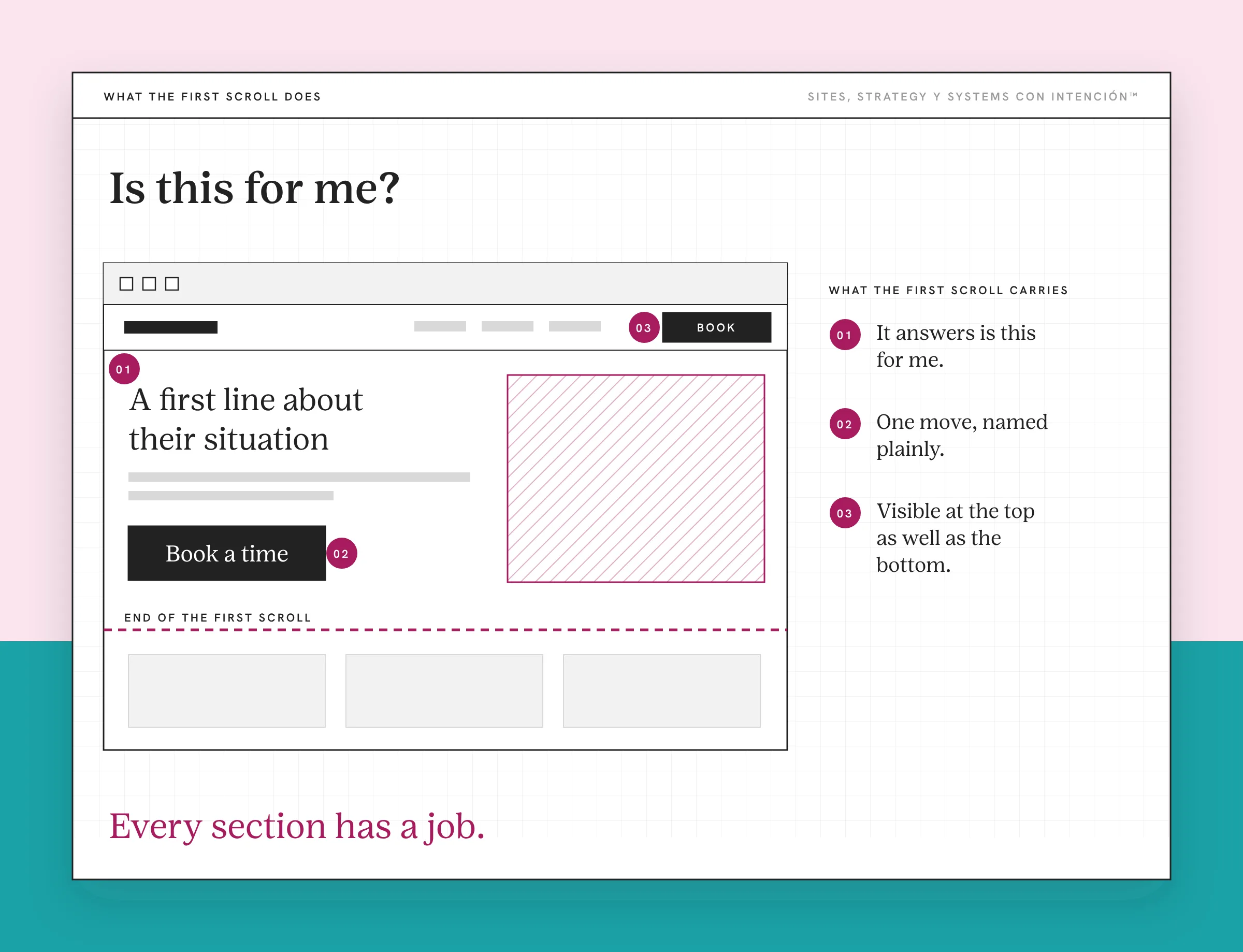
What they're checking is whether the page already knows what their week looks like. For most service businesses, your credentials and your years answer a later question. In trust-heavy fields like health, legal or finance, they may need to show up right away.
Everything people lead with is technically useful. Your name, your photo, your mission, the list of what you offer. It's all real information in the wrong order. None of it answers the question they're holding while they decide whether to keep going.
The Business Card That Went to Web Design School
Built to introduce has a shape you'll recognize.
Name at the top, maybe a photo, a tagline about the mission. A few sections explaining what you do, some icons, a contact form at the bottom. Organized. Nothing moves.
That's a business card that went to web design school, qué cosa. It's a good business card. But a business card goes to somebody who already asked for it. A stranger arriving cold at eleven at night is a different situation.
The reason it's the default is that it feels right while you're building, hermana. You want people to know who you are, so you put who you are first. They didn't arrive to learn who you are. They arrived carrying something. The page has to show them it recognizes what that is before the rest gets interesting.
Nielsen Norman Group's work on the F-shaped reading pattern describes what they're doing while this happens: scanning, heavily at the top, dropping off as they go. A page organized around what you want to communicate loses them above the part that was meant to do the convincing.
What Does Built to Convert Actually Mean?
Built to convert is a system and not a nicer arrangement. Four moves. The first one is fixed. The other three flex around who's arriving.
It answers is this for me in the first scroll. Everything else on the first screen is there to help that answer land.
It shows them what's possible. The after, in terms they'd use. Most visitors want that before any explanation of how you get there. Some need to see the process early to believe the after, so put it where your buyers look for it.
It shows why you specifically. Proof usually lands hardest once they've recognized themselves, because by then they're asking a question it can answer.
It tells them exactly where to go next. One move, named plainly and visible at the top as well as the bottom, with its consequence obvious before the click. They should know whether the button fills in a form, picks a time, takes payment or loads another page. That rules out the pile of competing buttons on most service sites. Where the ask goes is its own decision.
Every section has a job and you can point at any block and say what it's for. If you can't, the block is decoration.
Why Does the Order Matter So Much?
Put proof ahead of recognition and the page can stop working while every section stays technically correct. That's what makes this so hard to see from the inside.
Proof is the clearest case. When somebody reads their own situation described more precisely than they expected, your expertise is already demonstrated. The logos and the certifications then confirm something they believe. Move that same wall of logos above the recognition and it reads as noise. Same asset, same page, completely different result. Ahí está.

The recognition itself is specificity work. A sentence naming the thing they haven't said outloud to anybody does more than a paragraph about your values.
Order isn't the only thing that matters. Weak copy in a good order still loses people. Order is just the part owners rarely think to check. Checking the order costs nothing and it's a website strategy check I run on every homepage.
Why Didn't the Redesign Change Anything?
New photos, cleaner type, a better palette. All of it can make a built-to-introduce homepage look considerably better and none of it changes which job the page is doing.
The cycle goes: redesign, wait, notice nothing moved, decide the copy's the problem, redesign again. Diache. What never got touched is the order in which the page asks a stranger to recognize themselves, trust you and act.
This is also why I won't tell you what's wrong with your homepage from a screenshot. What's an issue for one business is nothing for another, o sea a missing testimonial section matters enormously on a page selling months of work and barely at all on one selling a workshop seat. A finding only becomes a problem once you know what the page is for.
What Changes First When You Fix It?
The expectation needs adjusting here, because the first thing that moves isn't the number.
Rebuild a page around the visitor's decision sequence and the inquiries arrive different. More come from people who already get the scope, the shape of the work and roughly what it costs. Some have answered their own questions. On one client's site, the questions that kept coming up in DMs and on discovery calls got answered on the site itself. Their calls got shorter and better and people booked faster. I've had somebody pause mid-call and say "Wait, you already answered that on your site."
That's the page doing the work the discovery call used to do, at eleven at night, for somebody who's never heard of you.

A smaller number of well-aligned inquiries beats a higher volume of misaligned ones on close rate and on how long it takes. I'm not going to attach a percentage to that. It's a pattern across a lot of sites. I don't have one measured case. The honest version beats a number I'd have to invent.
Cutting a page down to one decision point is the change I'd make first once the first screen is clear. It's also the cheapest one. The same test decides how many pages a site should have.
What Homepage Strategy Won't Fix
Four things sit outside this and three of them come first.
If you don't know which pages should exist, the homepage can't be sequenced against a path nobody's decided yet. Planning the structure is upstream.
If the menu buries the services page where visitors become clients, the homepage can be perfect and still hand them to a dead end. Navigation order is its own decision.
If the words describe instead of helping somebody choose, a better sequence gets them to the same undecided place faster. That's the job of copy that converts.
And if they get stuck further in, the homepage did its job and something else didn't. Where visitors stall in the user experience is a different diagnosis.
One distinction worth making, because it comes up constantly. A homepage serves everybody who arrives. A landing page serves one campaign, one audience, one ask. The rules differ in ways that matter. Homepages, landing pages and sales pages aren't interchangeable.
For the full path from stranger to client, plus where the homepage sits inside it, the path to a clear next step lays out the journey.
Quick Check: Is Your Homepage Built to Convert?
Before you rewrite anything, run this four-question gut check on your current homepage.
- Can someone who's never heard of you tell what you do from your first screen alone?
- Does your first line describe their situation or yours?
- After the first scroll, is there one clear next step or a menu of options they have to choose between?
- Would the right client feel recognized before they scroll past the fold?
If any of those is a no, start there. Sometimes it's the order, sometimes it's the copy and sometimes the page is doing a different job than the one you need.
Key Takeaways
- Homepage strategy for a service business starts from one question the first scroll has to answer: is this for me.
- Built to introduce is a business card that went to web design school. Organized, accurate, nothing moving.
- Built to convert has four moves: is this for me, what's possible, why you specifically and where to go next. Is this for me comes first. The rest flexes around who's arriving.
- Proof placed before recognition can break the page while every section stays technically correct.
- Redesigns change the presentation. What moves first when the sequence changes is inquiry quality.
Okay, so where is my homepage losing people?
Take La Digital Rueda. It's free and takes about two minutes. A few questions about your site, your content and your backend show you where the pressure is.
And if you'd rather have this sort of thing arrive in your inbox, Off the Clock is where I write about building something that keeps working while you're not at your desk.
Frequently Asked Questions
What are the essential elements of a service business homepage?
A first screen that names the visitor's situation, a picture of what's possible, proof that supports what the page has already demonstrated, plus one clearly stated next move. Having the elements isn't enough. Where they sit matters too, starting with the first screen. That's why element checklists disappoint.
Why does homepage strategy matter more than homepage design?
Because design decides how the page looks and strategy decides what job it's doing. A built-to-introduce page can be beautiful and still lose a first-time visitor above the section meant to convince them. Polish makes a well-sequenced page better. It can't make a page guide a decision it was never built to guide.
What are the most common service business homepage mistakes?
Leading with who you are instead of who it's for. Putting the about section above the fold. Listing services comprehensively before anybody's decided to care. Stacking proof on a page that hasn't recognized the reader yet. Ending on a vague invitation to connect. Each one is defensible alone and together they produce a page that introduces well and converts nothing.
How do I build trust on my homepage without a long list of credentials?
Through specificity. When a reader sees their own situation described more precisely than they expected, the expertise is already established and the credentials confirm something they believe. Put the recognition first and the proof second. The same testimonial does very different work depending on which side of that line it sits on.
How do I optimize my homepage for lead generation?
Name one next move and make its consequence obvious before the click. They should know whether the button fills a form, books a time, takes payment or loads a page. Then cut the competing asks. Several equal options hand them a decision about your website instead of your work.
Is a homepage the same as a landing page?
No. A homepage takes everybody who arrives, from any source, at any stage, so it has to orient before it asks. A landing page takes one audience from one campaign with one ask, so it skips the orienting and drops the navigation. Copying landing page rules onto a homepage without thinking about who arrives there is how homepages end up too narrow for the traffic they get.
About the Author