Your competitor has a page for every service, an FAQ section that became its own destination and a blog with more categories than you have offers. Now you're looking at your own site wondering what you're missing.
If you're asking how many pages should a website have, I start with four for a service business: Home, About, Services or Work With Me and Contact. Then we look at what your business needs to explain before someone can choose you.
When someone asks me this, I usually hear one of three things. "My competitor has a page for everything." "Do I need an FAQ page? A blog?" "I don't know what to cut."
In 12+ years and 100+ sites worked on, the issue I run into most is a page trying to handle several different conversations at once. Different offers, changing topics and competing buttons, all on one long scroll. I land on a page like that and start hunting for the one thing I came for. I don't want to scroll for days. Bendito, give each decision somewhere to happen.
The Short Answer
For a service business, start with four core pages: Home, About, Services or Work With Me and Contact. Add separate pages when an offer or audience needs its own explanation, proof or next step. Count applicable policy and functional pages separately. The right total comes from your business. Your competitor's menu doesn't decide it.
If You're Reading This Because It's Your Site
Reading more isn't the hard part. La Jugada is $47 and it tells you which layer this is actually sitting in.
Get it, $47How Many Pages Should a Service-Business Website Start With?
So how big should it be? It depends on your business. Four is where I start. What your offers need decides the rest.
A simple offer can work on a single page. Four is my usual starting structure, for when you can explain your services together on one page. Start planning your business website there, then check what your offers need.
You need more when people buy your services differently. A small consulting engagement and an ongoing advisory relationship call for different explanations of scope, pricing and commitment.
These are illustrative counts, using the same basic structure:
| Offer Setup | Core and Offer Pages | Total Before Policies and Functional Pages |
|---|---|---|
| One offer or closely related offers explained together | Home, About, Work With Me, Contact | 4 |
| Two services that each need their own explanation | Home, About, two service pages, Contact | 5 |
| Three distinct services with an overview to help people choose | Home, About, Services overview, three service pages, Contact | 7 |
The overview in that last example earns its place by helping someone choose a clear next step. Let the number of pages follow that need. A site where nobody has a choice to make doesn't need an overview.
These examples show how a starting site grows from four to five or seven pages. They're not industry averages, a limit or a package to squeeze your business into.
Also keep the counting consistent. A privacy policy is a page even if it isn't in your main menu. A separate booking destination or confirmation page can add to the build, too. Those don't all do the same job as the main pages someone reads before inquiring.
What Job Does Each of the Four Core Pages Do?
Before adding anything, make sure the starting pages carry useful information. Four vague web pages won't become clearer because you add a fifth, which is why clarity usually beats more content. I had a client who wanted more pages. What the site needed was clarity, so we fixed the message first.
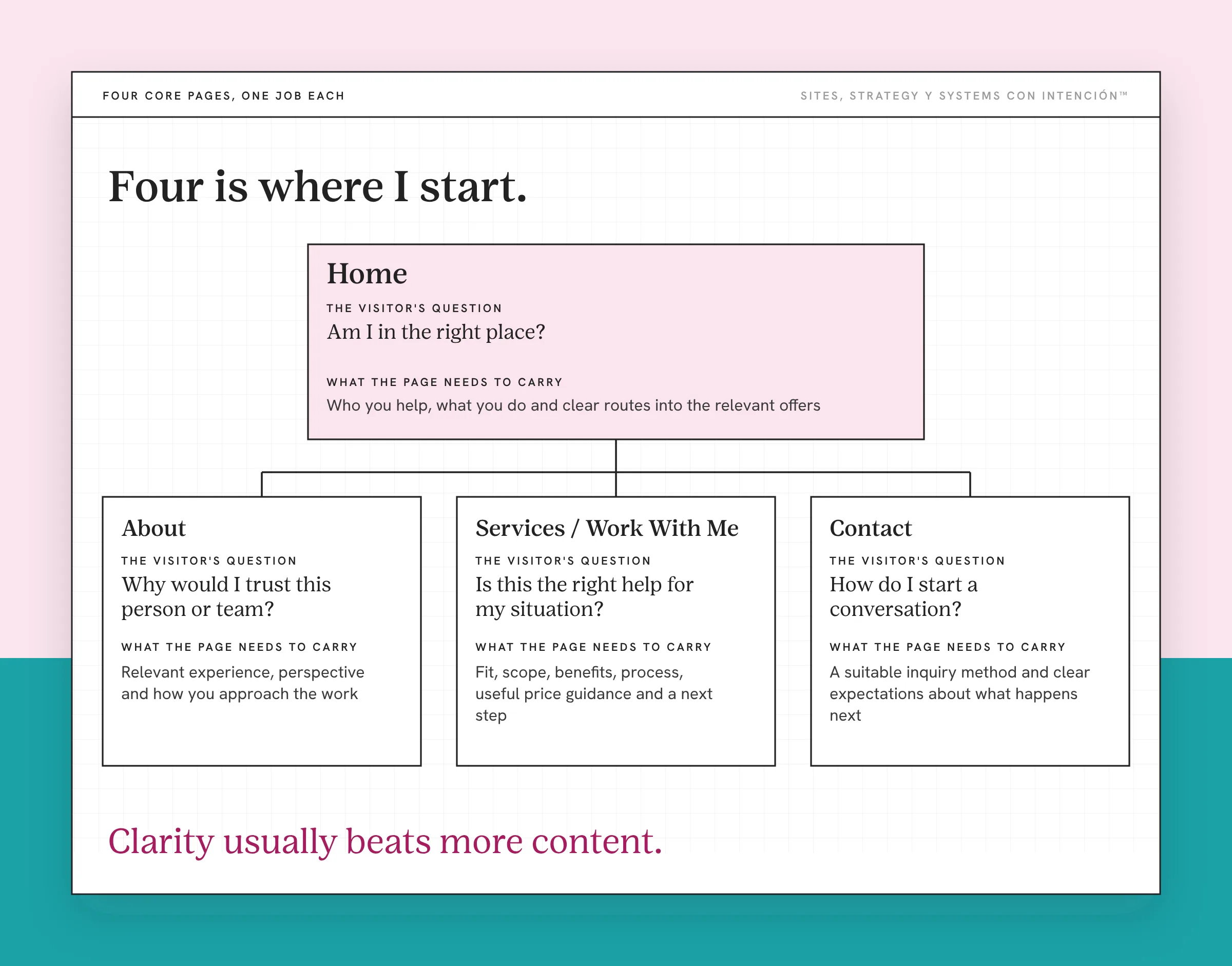
| Page | The Visitor's Question | What the Page Needs to Carry |
|---|---|---|
| Home / Homepage | Am I in the right place? | Who you help, what you do and clear routes into the relevant offers |
| About | Why would I trust this person or team? | Relevant experience, perspective and how you approach the work |
| Services / Work With Me | Is this the right help for my situation? | Fit, scope, benefits, process, useful price guidance and a next step |
| Contact | How do I start a conversation? | A suitable inquiry method and clear expectations about what happens next |
These roles don't mean visitors must read the pages in that order. Someone referred by a past client can arrive ready to inquire. Someone who finds an individual service page through search needs more background, since how you convert visitors into clients depends on who showed up.
Let the pages connect where that background is useful. A well-written About page can build credibility without becoming a required stop before anyone sees the offer.
When you're reviewing your website design, ask whether the important details are easy to find on each page. A page called Services still needs to explain what working together involves. Its label can't do that work by itself. For the details, how to write a services page walks through it step by step.
When Does Something Need Its Own Page Instead of a Section?
My filter is one question: does this need its own decision point?
Different content alone doesn't settle it. Look at whether the reader needs a different explanation to understand the offer and decide what to do.

I've used that question in both directions with clients: splitting a page that was asking for two decisions and merging two pages that were really one.
Are the Services Bought Differently?
Separate offers when they have different price logic, objections or reasons to trust you. A short workshop and a six-month engagement raise different questions even when the same person could buy either.
Two closely related services pitched to the same buyer in the same way can live together. If a separate page just repeats the pitch with a new headline, try sections first.
Does the Audience Need a Different Conversation?
An audience-specific page can make sense when your target audience needs a different explanation or different proof to decide. Replacing one job title with another in otherwise identical copy doesn't give them much reason to need a separate destination.
A founder ready to hire and a founder still figuring out what's broken need different information. Sometimes a relevant section or supporting article covers it. A new audience label alone doesn't earn another page.
Is the Next Step a Different Decision?
Two offers can send people to the same calendar and still need separate pages. One buyer needs to understand a project scope while another needs to evaluate an ongoing commitment.
Two different buttons don't automatically mean two distinct decisions. Look at what someone is agreeing to and what they need to know beforehand, which is how you structure a site for conversions.
Think of a cookbook. You want to find the recipe you're making without scrolling through every dinner in the book. But giving every ingredient its own page would make following that recipe exhausting. Keep what belongs together on the same page. The sazón goes in the recipe, not on a page of its own.
Which Additional Website Pages Need a Clear Purpose?
An extra page should solve a problem you can name. That might be explaining an offer, answering a substantial set of questions or showing relevant work in more detail.
When Does an FAQ Need a Separate Page?
When someone asks me "Do I need an FAQ page?" I ask what it's for. Start by placing answers to the questions your site should answer near the decision they support. Questions about what's included belong close to that offer. Questions about an inquiry belong near the inquiry process.
A separate FAQ page can be useful when the questions become numerous enough or different enough across offers that keeping them all on Home or Services buries the main explanation. You can still keep the essential answers on the relevant offer page.
Don't make someone leave the offer to find out whether it includes the thing they're about to ask about.
When Should You Add a Blog?
A blog is a sequencing decision. Before I make it a priority, I check whether there's a useful destination for the traffic and a way for an interested reader to become a lead. That's what separates blog posts that bring clients from posts that just bring traffic.
Not every article needs to push someone straight to a booking link. Each one does need a next step for the reader: explore a relevant offer, get a useful resource or join an email list.
You can plan content while improving the rest of the site. But if the offer is still difficult to understand, adding articles won't explain it for the people who arrive. Nena, give that traffic somewhere useful to go.
What About Case Studies and Other Supporting Pages?
Create a separate case study when there's enough relevant detail to help someone evaluate the work. A short testimonial can stay beside the claim it supports.
The same purpose test applies to a team page, resources library or detailed process page. What would someone learn or decide there that they can't comfortably do on an existing page?
Keep applicable policies in your plan as well. Count a privacy policy and other policy pages separately from the main sales and inquiry pages. The four-page starting structure isn't a legal checklist.
Can You Have Too Many Pages or Too Much on One Page?
I've seen both. The squeezed-onto-one-page version gets me every time, because every offer and every possible next step lands in one scroll.

Signs I look for:
- The topic changes before the page answers the original question.
- Several calls to action ask people to make unrelated decisions.
- Someone has to scroll past a different offer to reach their own details.
- Sections repeat information because the same pitch has been divided across too many destinations.
On a page like that, competing actions are the problem. A long page can place the same call to action at useful points without asking someone to change direction.
Length alone doesn't tell you to split. Sometimes the fix is to cut repetition, use descriptive headings or improve the layout. But if the page moves from one purchase decision into another, shortening the paragraphs won't resolve that change of subject.
With separate pages, check the opposite problem. If a visitor has to open three destinations to understand one offer, you've scattered information that belongs together. Ay, no. More clicking adds to what Nielsen Norman Group calls interaction cost. It doesn't automatically make the information easier to use.
How Do You Turn This Into a Page Plan for Your Business?
Write a page list before committing to a web design package or expanding your current site. For each proposed page, fill in these details:
| Proposed Page | Question It Answers | Decision It Supports | Proof or Details Needed | Next Step |
|---|---|---|---|---|
| [Page name] | [What the visitor wants to know] | [What they're deciding] | [What helps them evaluate it] | [Where they can go next] |
If you've ever said "I don't know what to cut," this list is where I'd start. Read it for overlap. If two rows answer the same question for the same person with the same explanation, combine them. If one row contains three unrelated decisions, separate it.
Fictional example: a consultant offers a one-off workshop and ongoing advisory work. The workshop has a defined session format. The advisory offer needs an explanation of the longer commitment and support between meetings.
They start with Home, About, Workshop, Advisory and Contact: five pages before applicable policies and any separate functional destinations. An overview becomes a sixth if people need help comparing the two offers. It earns its place through that comparison.
Once the page list makes sense, decide how the pages connect with a plan for your website structure. Your sitemap records the structure; your website navigation gives people the main routes. They don't need identical lists of every URL. Pages and paths get decided together in good website strategy.
Start with the business you have, including the offers and questions that matter now. Add something when you can explain what decision it supports. That gives you a page plan you can defend without borrowing your competitor's entire site.
Key Takeaways
- Start with four core pages when answering "how many pages should a website have?" for a service business, then check what its offers and buyers need.
- Separate pages earn their place when people need different explanations, proof or next steps.
- FAQs can live beside the relevant offer; a blog needs a useful path for interested readers.
- Count policy and functional pages separately from your main pages when planning the build.
Okay, but does my site have the pages my business needs?
La Digital Rueda takes about two minutes and costs nothing. It asks a few questions about your site, your content and your backend and shows you where the pressure is.
Want more like this in your inbox? Off the Clock is my week-ish newsletter about websites, systems and burnout-free business.
Frequently Asked Questions
Can a service business have a one-page website?
Yes. A simple offer can be explained on a single page when people can find the relevant information and take a clear next step. My four-page starting recommendation gives Home, About, Services and Contact distinct places, but it's not a technical requirement. Evaluate whether combining them helps your audience or buries information. Count any separate policy or functional pages when describing the site's total.
Does having more pages help with SEO?
Add a page when it serves a useful purpose and contains relevant information. Don't add pages just to make the site look larger. Google's people-first content guidance emphasizes useful, satisfying content and warns against producing lots of content primarily to attract search visits. A larger page count by itself doesn't tell you whether the site answers its audience's questions well.
Does every service need its own page?
No. A service page can cover related offers when the same audience evaluates them through similar information. Separate them when the buying decision needs different scope details, price logic, proof or objections answered. Both pages can still lead to the same inquiry method. A different service name alone doesn't establish a need for another page. Look at what the client needs to understand before acting.
Should every page appear in the main menu?
No. The main menu should help people find the important routes through your site. Supporting content, policies and confirmation destinations don't all need the same prominence. Make relevant pages reachable through appropriate internal links or footer links where useful. Review whether someone can find the information they need without turning the main navigation into an inventory of the entire site.
Do I need more pages to appear in AI search?
Don't create extra pages solely for that purpose. Google's guidance on its AI search features says existing search practices still apply and there are no special additional requirements for those features. Give useful topics enough explanation, keep important content accessible and make relevant pages discoverable. That guidance concerns Google's features; it doesn't establish requirements for every AI platform or guarantee that your site will be included.
About the Author