Every Glee competition had the same setup. There was the big number everyone remembers and a couple of filler songs that filled time between the scenes that mattered. The filler wasn't bad. It just wasn't what got them to regionals.
Your blog works the same way. That's why some blog posts bring clients and others just traffic. A few posts are the solo that wins: the right reader finds them, trusts you and reaches out. The rest fill time. In 12+ years and 100+ sites worked on, I've seen the difference come down to who the post was for, where it leads and which problem it solves. How well it's written matters less than you'd think.
The Short Answer
Some blog posts bring clients because they answer a buyer's question, link to the offer that solves it and speak to a problem your client already feels. Posts that only bring traffic answer a student's question, end without a next step or talk about your industry instead of your client's problem. Run every post through those three tests.
If You're Reading This Because It's Your Site
Reading more isn't the hard part. La Jugada is $47 and it tells you which layer this is actually sitting in.
Get it, $47Why Do Some Blog Posts Bring Clients and Others Just Traffic?
A post can bring a lot of traffic and still never bring a client. Traffic tells you people found it. It doesn't tell you whether those people could ever hire you.
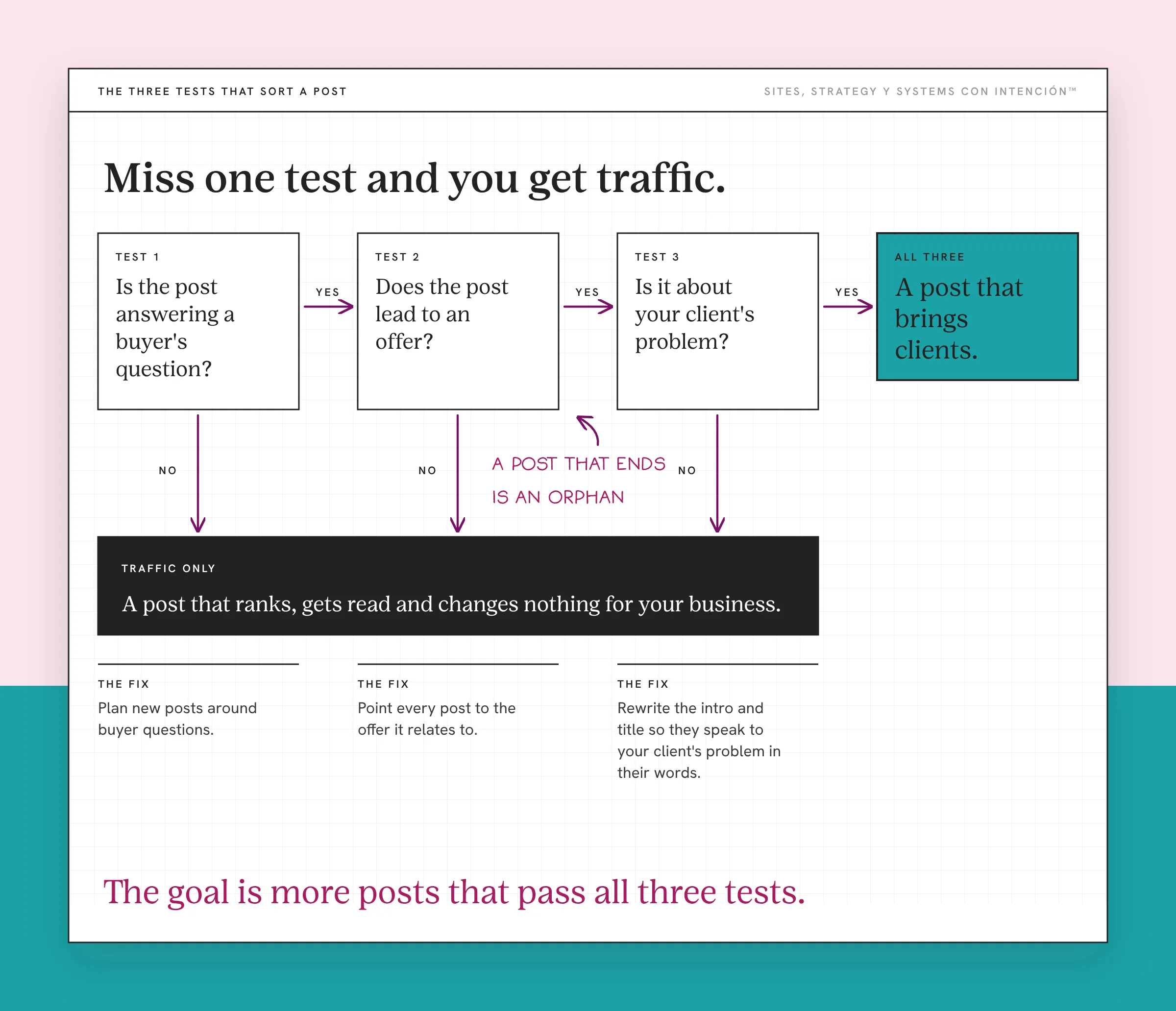
The posts that bring clients pass three tests. They're written for someone who might buy. They lead somewhere. And they talk about the reader's problem in the reader's words. Miss one and you get traffic. Miss all three and you get a post that ranks, gets read and changes nothing for your business.
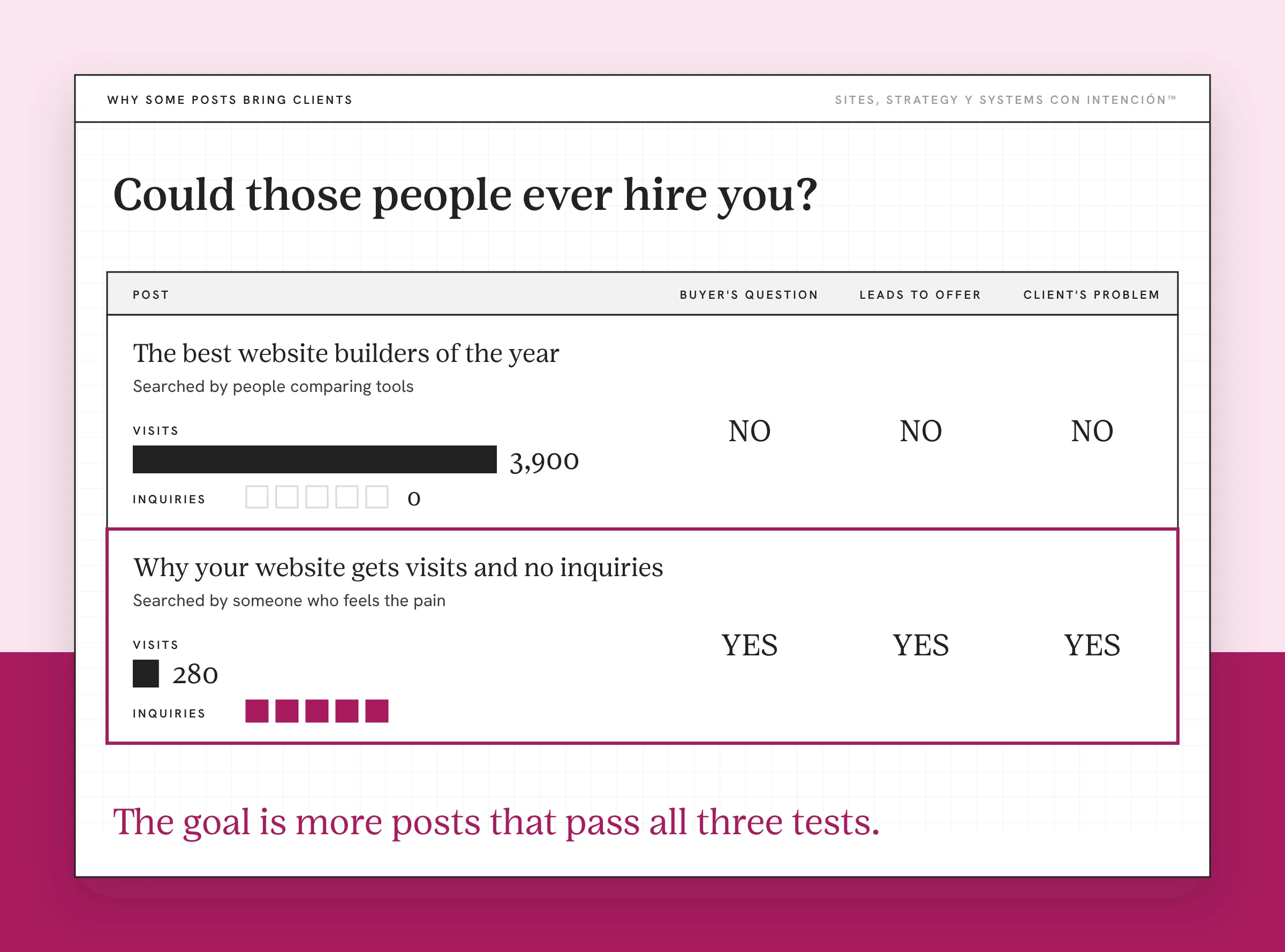
Which posts count as winning also depends on what website success looks like for you. What's an issue for one business is nothing for another. If your goal is to grow your list, a post that brings sign-ups is doing its job even when it doesn't bring calls.
Test 1: Is the Post Answering a Buyer's Question?
Every search has an intent behind it. Google's explanation of how it ranks results puts intent first on its list. Someone typing "what is SEO" is probably learning. Someone typing "why isn't my website bringing in clients" has a problem and might pay to fix it.
Both questions are worth answering. They bring different readers. A post that explains a definition will attract students, other marketers and people doing homework. Ay, mija, those readers can love your post and still never need your services.
I've seen a post do exactly this. It pulled big traffic from DIYers and students who wanted to learn to do it themselves. Traffic was up and none of those readers needed to hire anyone.
Ask yourself who typed the question your post answers. If it's someone with the problem you solve, you're writing for a buyer. If it's someone trying to learn the field, you're writing for a student. You need some of both. Just don't expect the student posts to fill your calendar. Google's guidance on helpful, people-first content makes the same point from the other side: write for the people you're trying to reach.
Test 2: Does the Post Lead to an Offer?
A post that ends is an orphan. The reader finishes, agrees with everything and has no clear next step. Eso sí, that's the most fixable problem on this list.
Every post should point somewhere next. For a post answering a buyer's question, that's usually the offer it relates to. Add a link in the body where it fits and a clear next step at the end. If the reader isn't ready to book, give them something smaller, like a newsletter or a free assessment.

I've had to make that call on my own blog. When I wrote a post about marketing frameworks, I was still figuring out where I wanted to lead people. So I gave it one next step: a freebie that got readers onto my email list. That fit, because it was top-of-funnel content.
Building those paths on purpose is what internal linking is for. And once the reader clicks through, the site has to take it from there. That handoff is its own topic in content brings them in, your website closes the sale.
Test 3: Is It About Your Client's Problem or Your Industry?
This one's sneaky. A post about your industry, like trends, tools or best practices, is interesting to people who already do what you do. A post about your client's problem is interesting to people who need you.
Compare "The best website builders of the year" with "Why your website gets visits and no inquiries." The first attracts people comparing tools, plenty of them other designers. The second attracts someone who already feels the pain.
Use the words your clients use, which is also what Google's SEO Starter Guide recommends. If they say "my website isn't bringing in clients," don't title the post with jargon they'd never search. Diache, the best post in the world doesn't help if your client would never think to look for it.
How Do You Fix the Posts That Only Bring Traffic?
You don't have to delete them, since most can be improved. Improving what you already have is usually the smartest website strategy move.
- List your top posts by traffic and note which ones led to inquiries or sign-ups, since that's the website metric that matters most.
- Run each one through the three tests. Who's it for, does it lead to an offer and is it about your client's problem?
- Add the missing link. Point every post to the offer it relates to, in the body and at the end.
- Rewrite the intro and title of posts that are close, so they speak to your client's problem in their words.
- Plan new posts around buyer questions. When you pick topics, start with the questions clients ask you on calls.
If you're still figuring out what to write about, ideas for your first blog starts with your client's questions. Building a content ecosystem shows how your posts should fit together.
The goal is more posts that pass all three tests, pues.
Key Takeaways
- Traffic tells you a post got found. It doesn't tell you whether the readers could hire you.
- Posts that bring clients answer a buyer's question, lead to an offer and speak to your client's problem.
- Posts that only bring traffic answer a student's question, end without a next step or talk about your industry.
- Fix existing posts by adding links to offers and rewriting titles and intros in your client's words.
Can I talk through which of my posts actually bring clients?
Bring your site, your blog numbers and whatever's bugging you. We'll spend one private session on your real question and you'll get notes. It's from $350. Full audits are available and get quoted first.
Frequently Asked Questions
Why does my blog get traffic but no clients?
Your posts may be attracting readers who can't or won't hire you, like students or other professionals. They may also end without linking to an offer, so interested readers have nowhere to go. Check who each post is written for, whether it leads to a service and whether it talks about your client's problem.
What kind of blog posts bring in clients?
Posts that answer questions your buyers ask, in their words, about problems you solve. They link to the offer that helps and give readers a clear next step. Posts that explain your client's problem and what to do about it tend to bring more inquiries than posts about trends or tools.
How do I make my blog posts convert?
Add a link to the related offer in the body and at the end of each post. Give readers who aren't ready a smaller next step, like a newsletter. Rewrite titles and intros so they match how clients describe their problem. Then check which posts lead to inquiries and update the rest.
Should I delete blog posts that only bring traffic?
Not always. Traffic posts can still build trust and support your other content. Add links to your offers, update the intro to speak to your client's problem or connect them to posts that convert. Delete or merge only posts that are outdated, thin or competing with a better post on the same topic.
How do I know which blog posts bring clients?
Track inquiries and sign-ups as key events in your analytics, then look at which pages people visited before they converted. A landing page report filtered by key events shows which posts start the path. Compare that list with your highest-traffic posts to see where the gap is.
About the Author