The best part of Jane the Virgin is the narrator. The characters say one thing and the narrator tells you what's really going on underneath. Without that voice, you'd be guessing at half the story.
Your traffic numbers are the characters. They tell you how many people showed up. Understanding visitor behavior on your website is the narrator, because it tells you what those people did once they got there. In 12+ years and 100+ sites worked on, I've learned that the count is the least interesting part. What people click, where they hesitate and where they leave is where the real story is.
The Short Answer
Understanding visitor behavior on your website means watching what people do, not just counting them. Heat maps show where they click and how far they scroll. Session recordings show where they get stuck. Together they explain what your traffic numbers can't: why visitors leave without reaching out and what to fix first.
If You're Reading This Because It's Your Site
Reading more isn't the hard part. La Jugada is $47 and it tells you which layer this is actually sitting in.
Get it, $47What Do Traffic Numbers Leave Out?
Traffic numbers answer one question: how many people came? That's useful. It's also where a lot of owners stop.
They don't tell you whether people read your services page or skimmed past it. They don't show that half your visitors never scrolled far enough to see your booking button. They can't tell you that someone tried to fill out your form three times and gave up.

That's the gap. A month with more visitors and no new inquiries looks like a mystery in a traffic report. Watch what those visitors did and the mystery starts to explain itself. If that's the pattern you're seeing, traffic that's up while revenue isn't walks through how to tell what's going on.
How Do You Watch What Visitors Actually Do?
Two tools do most of the work and they're some of my favorite tools for this.
Heat maps show where people click, how far they scroll and which parts of a page get attention. If your call to action sits below the point where people stop scrolling, a heat map will show you. Mija, it's one of the fastest ways to see a problem you'd never spot by reviewing your own site.
Session recordings let you watch real visits as people move through your site. You'll see where they pause, where they scroll up and down looking for something and where they leave. If someone starts your form and stops halfway, a recording shows you where.
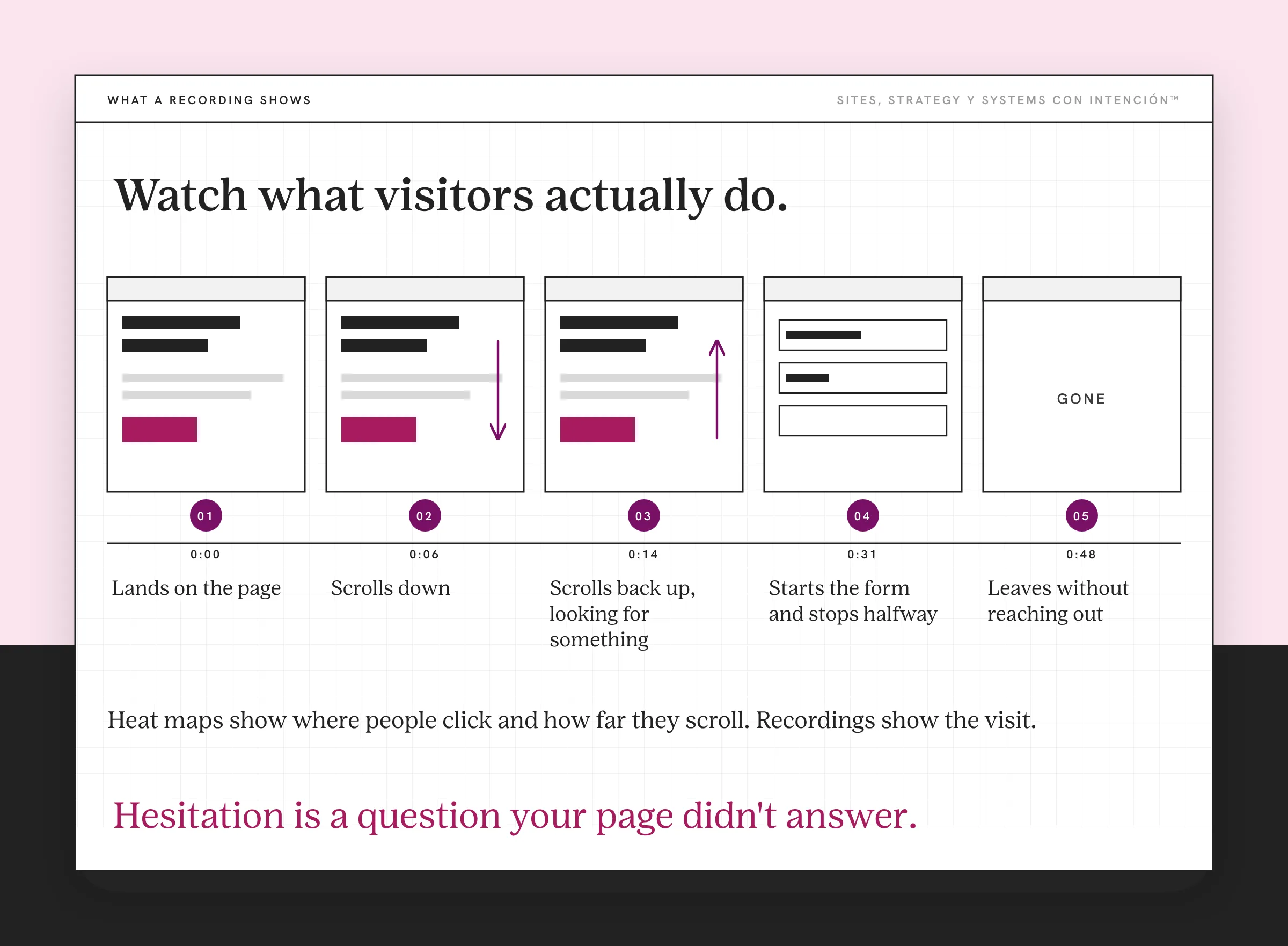
You don't need an expensive setup. Microsoft Clarity is a free tool that includes both heat maps and session recordings. Pair it with your analytics and you have the count and the story. Before you turn it on, mention it in your privacy policy, turn on its consent settings and mask form fields.
What Visitor Behavior Should You Look For?
Once you can see behavior, a few patterns tell you the most.
Where they click. Are people clicking things that aren't links, like images or headings they expect to open something? That's a sign the page is confusing them. Are they ignoring your main button? That tells you something too.
How far they scroll. If visitors tend to stop before your offer, your offer is too far down the page to hold attention or the top of the page isn't giving them a reason to keep going, the same gap behind a high bounce rate.
Where they hesitate. Recordings show people pausing, scrolling back up and hovering. Those are the spots where something isn't clear. Oye, hesitation is a question your page didn't answer. When a page asks too much of people at once, cognitive load is often part of it.
Where they leave. When someone leaves without reaching out, the last page they visit tells you where the path breaks. If it's your pricing page or your contact form, start there. Small stumbles like these add up. Conversion friction covers how to find and fix them one step at a time.
How Do You Turn What You See Into Changes?
Watching is only useful if it changes something, so please don't just collect the data. Use it to make small website changes one at a time:

- Pick one page that matters. Your services page or your homepage is a good place to start.
- Watch a handful of recordings and check the heat map. Note every moment someone hesitates, misses something or leaves.
- Make one change. Move the button up, rewrite a confusing heading or shorten the form.
- Watch again after a few weeks. If you're not testing, you're guessing. See whether people behave differently.
Eso sí, make one change at a time so you know which one made the difference.
On one client site, the recordings showed two things. People stopped scrolling before they reached the part of the page that mattered. They also kept clicking something that looked like a link and wasn't. I moved the important part higher and changed the styling so it stopped looking clickable.
Sometimes the change is even smaller. A founder's nav read "About, Services, Blog, Podcast, Resources, Contact." Their services page was the page that converted, but About sat first because it felt right when they built it. I moved Services ahead of About. More people reached the services page. Same site, same traffic, one change in where people went.
How Does Behavior Fit With Your Other Numbers?
Behavior explains your numbers and works best right next to them. Your analytics still tell you how many inquiries came in and where they came from. The four numbers to start with are in the website metrics that matter. The setup for tracking inquiries lives in what to track in GA4 for a service business. Behavior plus inquiries gives you a website strategy you can actually measure.
Reading your analytics tells you what happened. Behavior tells you why. Nielsen Norman Group draws the same line in quantitative vs. qualitative usability testing: the numbers answer how many and how much, while watching people answers why. Pues, read them together and you're not guessing at half the story anymore, which is exactly what the narrator was for.
Key Takeaways
- Traffic numbers count visitors. Understanding visitor behavior on your website shows what they do once they arrive.
- Heat maps show clicks and scrolling. Session recordings show where people get stuck.
- Look for where people click, how far they scroll, where they hesitate and where they leave.
- Watch one important page, make one change and watch again.
- Use behavior alongside your analytics to explain what the numbers mean.
Where are people actually leaving my site?
La Digital Rueda asks a few questions about your site, your content and your backend. In about two minutes it shows you where the pressure is so you know where to look first. It's free.
Want more like this in your inbox? Off the Clock is my week-ish newsletter about websites, systems and burnout-free business.
Frequently Asked Questions
How do I see what visitors do on my website?
Use a heat map and session recording tool alongside your analytics. Heat maps show where people click and how far they scroll on each page. Session recordings let you watch individual visits so you can see where people pause, get confused or leave. Microsoft Clarity offers both for free.
What are heat maps and session recordings?
A heat map is a visual overlay on a page that shows where visitors click, move and how far they scroll, with brighter colors for more activity. A session recording is a replay of a single visit that shows how someone moved through your site. Together they show behavior that traffic numbers can't.
Why do visitors leave my website without contacting me?
Often something on the page isn't clear or the next step is hard to find. Visitors may stop scrolling before they reach your offer, miss your booking button or give up on a long form. Watching recordings and heat maps of your main pages usually shows exactly where they stall.
Are session recordings an invasion of privacy?
Reputable tools can mask sensitive information like form entries. Mask form fields, turn on the tool's consent settings, mention recordings in your privacy policy and follow the rules that apply where your visitors live.
How often should I review visitor behavior?
Look at behavior whenever you change an important page and on a regular schedule, like monthly. Watch a handful of recordings for your main pages and check the heat maps for anything new. You don't need to watch every visit. Patterns show up quickly.
About the Author