Making a burned CD mix took planning. You had about 80 minutes of space, so you decided what made the cut before you hit burn. Every track on that disc earned its spot because you picked what counted first.
Figuring out how to tell if your website is actually converting works the same way. You can't measure it until you decide what counts. In 12+ years and 100+ sites worked on, I've learned that when an owner can't answer "is my site converting?" it's because nobody has decided what a conversion is for their business. Once you name it, counting it is the easy part.
The Short Answer
To tell if your website is converting, first decide what a conversion means for you: an inquiry, a booked call or an email sign-up. Then count the sessions that include one each month and divide by your total sessions to get a conversion rate. If that number holds or grows and the people converting are a good fit, your site's doing its job.
If You're Reading This Because It's Your Site
Reading more isn't the hard part. La Jugada is $47 and it tells you which layer this is actually sitting in.
Get it, $47What Counts as a Conversion for Your Business?
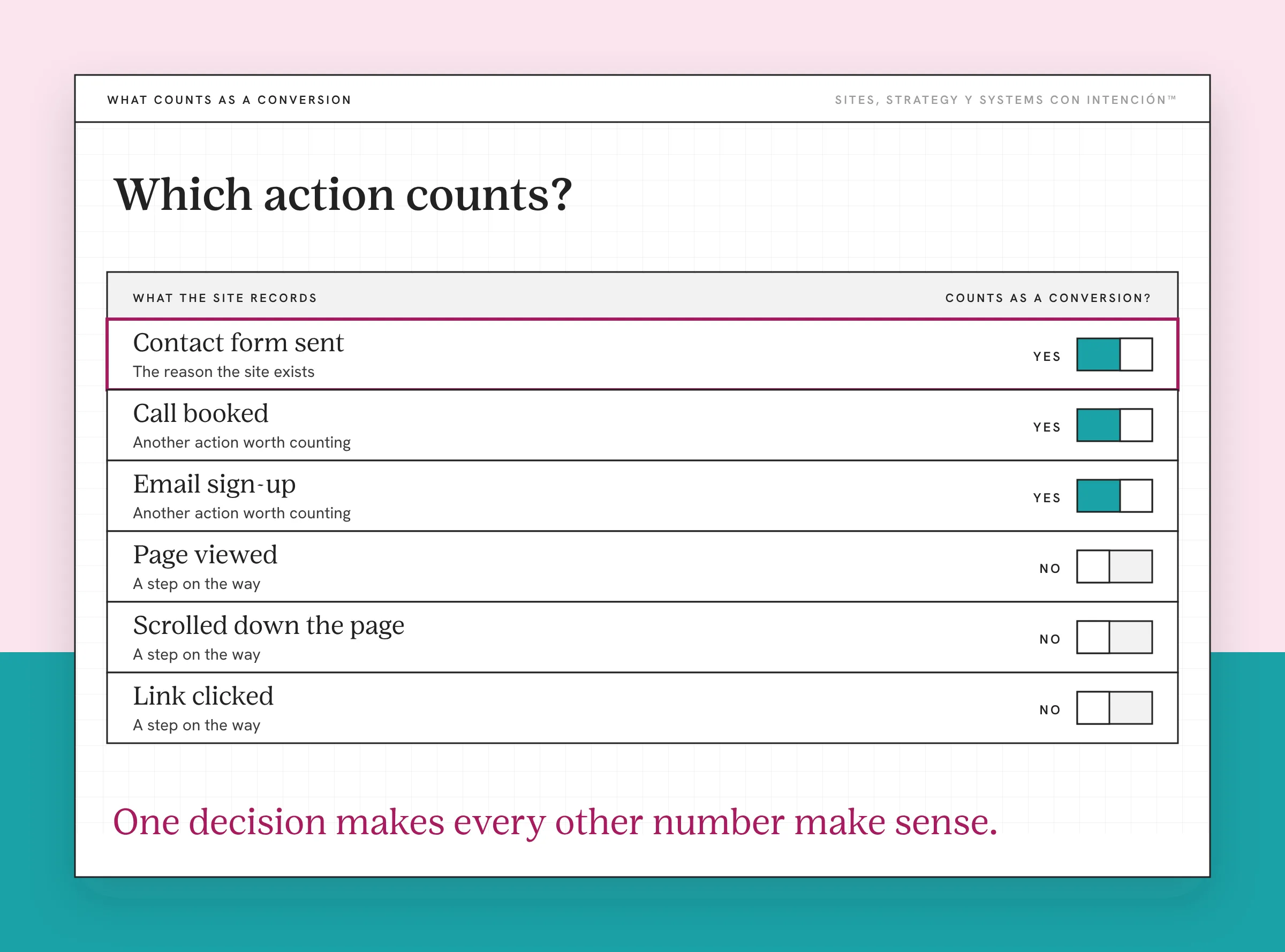
A conversion is the action you want a visitor to take. For a service business, it's one of three things:
- An inquiry. Someone fills out your contact form or emails you from the site.
- A booked call. Someone schedules a consultation through your calendar.
- An email sign-up. Someone joins your list or downloads a free resource.
Which one matters most? That depends on how you sell. When people ask me what to look at first, my honest answer is that it depends on their goals and what website success looks like for them, because what is an issue for one business is nothing for another. A consultant who sells through discovery calls cares about bookings. A coach who sells through a newsletter cares about sign-ups.
Pick your main conversion and write it down, keeping it separate from the micro-conversions that lead up to it. You'll come back to it every month. Ay, mija, this one decision is what makes every other number make sense.
How Do You Count Your Conversions?
Once you know what counts, you need a reliable way to count it.
In Google Analytics 4, set your main action up as a key event. Google defines a key event as an action that's particularly important to the success of your business. Mark your form submission or booking as one and GA4 will count it for you. The setup is covered in what to track in GA4 for a service business.
In your inbox or CRM, count the inquiries that came through the website. This is the check on GA4, since tracking can miss forms or calendars embedded from other tools.
In your booking tool, count calls booked from the site link.
Use the same source every month so you're comparing the same thing. Eso sí, if your GA4 count and your inbox count don't match, trust the inbox and fix the tracking.
Test the form itself too. On one client site the contact form wasn't sending at all and nobody caught it, because a small website problem like a broken form looks exactly like a quiet month. Once it was fixed, inquiries started coming in again.
How Do You Calculate Your Conversion Rate?
The math's simple. Take the number of sessions that included a conversion in a month and divide it by the total sessions in that same month. Multiply by 100 to get a percentage. Definitions of conversion rate vary, so pick one and stick with it. I use sessions and count a session once even if someone sent two inquiries in it.
If 40 sessions included an inquiry out of 2,000 sessions, your conversion rate is 2%. Those numbers are an example, not a benchmark. Your own rate is the one that matters, because it's the one you'll track over time.

You can calculate it for the whole site or for one page. A page-level rate is often more useful. If your services page converts well and your homepage barely does, you know where to look. For what's considered normal, what a good website conversion rate is goes deeper.
How Do You Know If the Number Is Good?
A conversion rate on its own doesn't tell you much. These three quick checks do:
- Is it steady or growing? Compare it with last month and the same month last year. A rate that climbs means your site is getting better at turning visits into action.
- Are the people converting a good fit? Ten inquiries from the right clients beat fifty from people you can't help, which is why more traffic isn't the goal. Pues, count the good ones separately if you can.
- Does it move when you change something? If you rewrite your services page and nothing happens, the problem may be somewhere else on the path and small website changes won't make a difference until you find it. Everything is a test and you just adjust from that.
If traffic keeps climbing while conversions stay flat, messaging is where I look first. The full diagnosis is in why traffic is up but revenue is not. For the other numbers worth watching next to your conversion rate, see the website metrics that matter. Reading those numbers together is where website strategy gets honest.
What If Your Website Isn't Converting?
If you count for a month or two and the answer is "barely," start with the basics. Test your form and booking tool on your phone. Read the top of your main pages as a stranger, the simplest way to review your own site objectively. Check that every page has a clear next step.

A broken form can make a good site look like it isn't converting at all, diache. Rule that out first. Across 100+ sites in 12+ years, I've made most of these mistakes myself. That's the only reason I can spot them quickly now.
What to Do This Week
- Write down your main conversion and any secondary ones.
- Set it up as a key event in GA4 and test that it fires.
- Count last month's conversions from your inbox or CRM.
- Calculate your conversion rate for the site and your top two pages.
Key Takeaways
- Decide what a conversion means for your business before you try to measure it.
- Count it every month from a reliable source and check GA4 against your inbox.
- Conversion rate is sessions with a conversion divided by total sessions, times 100.
- Watch whether the rate grows, whether the people converting are a good fit and whether it moves when you make changes.
Okay, so what do I fix first if mine isn't converting?
Answer five questions and share your link. In about 10 minutes you'll have a personalized read on your site, your marketing and your backend on a private page, plus the first move worth making. It's $47 with no call.
Want more like this in your inbox? Off the Clock is my week-ish newsletter about websites, systems and burnout-free business.
Frequently Asked Questions
How do I know if my website is converting?
Decide what action counts as a conversion, like an inquiry, a booked call or an email sign-up. Count how many happen each month from your inbox, booking tool or GA4. If that number is steady or growing and the people converting are a good fit for your business, your website is converting.
What counts as a conversion on a service business website?
Any action that moves someone closer to hiring you. The most common are contact form submissions, booked consultations and email sign-ups. Choose the one that matches how you sell and treat it as your main conversion. Track the others as secondary actions if they matter to you.
How do I calculate my website's conversion rate?
Divide the number of sessions that included a conversion by the total sessions in the same period, then multiply by 100. For example, 30 converting sessions out of 1,500 is a 2% conversion rate. Calculate it for the whole site and for your most important pages to see where people take action.
Why don't my GA4 conversions match my inbox?
GA4 can miss submissions from forms or booking tools embedded from other platforms. Some visitors also block tracking. Your inbox or CRM shows what arrived. If the numbers don't match, test your key event setup and use the inbox count as your source of truth until the tracking is fixed.
How often should I check my conversion rate?
Monthly works for most service businesses. Compare each month with the previous one and the same month last year so seasonal swings don't fool you. Check more often during a launch or ad campaign, when you need to react quickly.
About the Author