New Amsterdam's doctor walks into every room with the same question: "How can I help?" It works because he listens for what's wrong before he reaches for a fix. Treating the cough without asking why someone's coughing doesn't make anyone better.
If you're dealing with small website changes not making a difference, it works the same way. You changed the button color, swapped the hero photo and rewrote the headline twice. Inquiries didn't move, so now you're wondering what's missing. In 12+ years and 100+ sites worked on, the answer I keep finding is that the changes went after a symptom while the cause sat somewhere else.
The Short Answer
Small website changes stop making a difference when they treat symptoms instead of the cause. A new button color can't fix a page with the wrong message. A new photo can't fix an offer nobody understands. Before your next tweak, find out whether the real problem lives in your site, your strategy or your systems, then fix that.
If You're Reading This Because It's Your Site
Reading more isn't the hard part. La Jugada is $47 and it tells you which layer this is actually sitting in.
Get it, $47Why Aren't Your Small Website Changes Making a Difference?
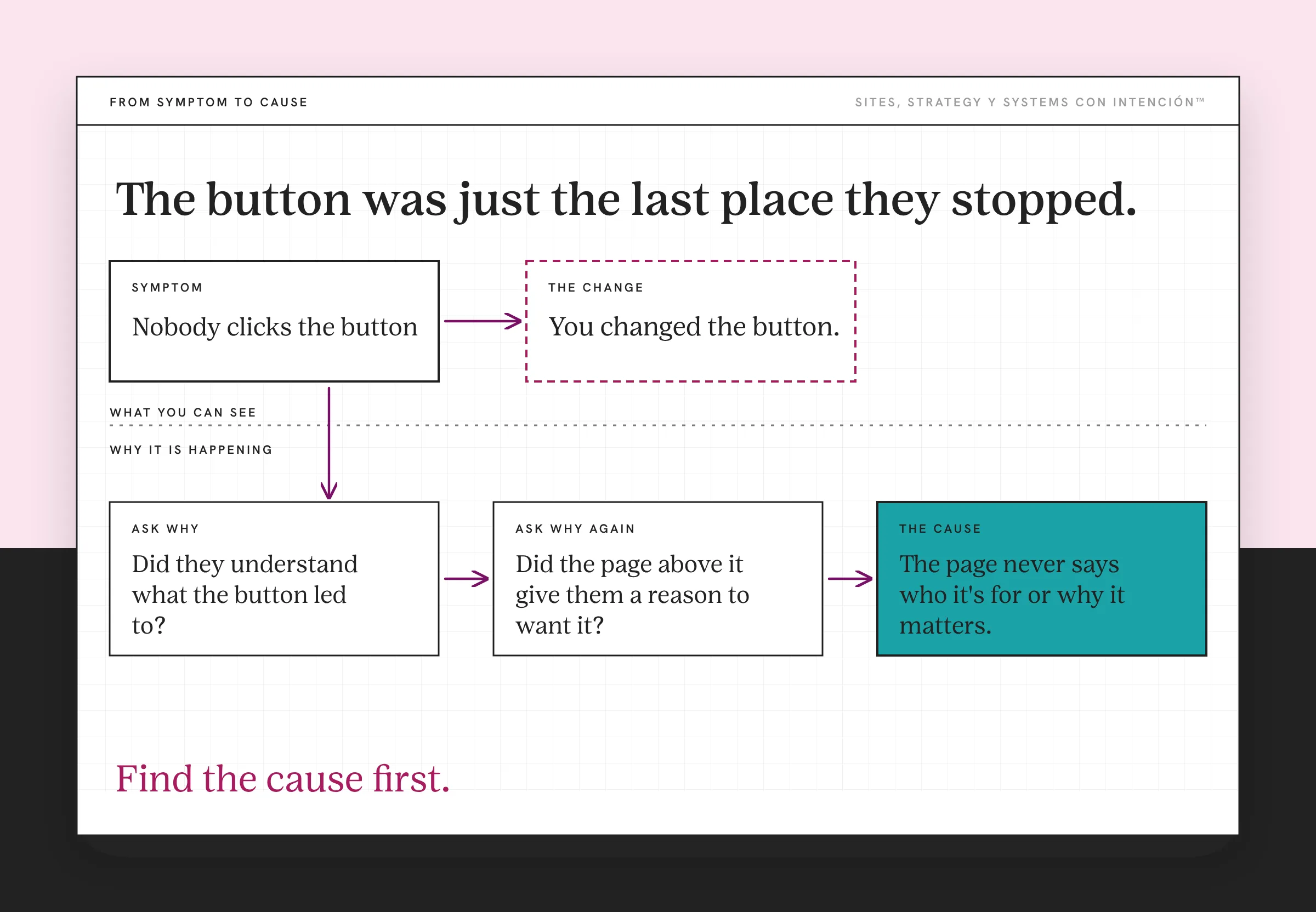
Because the change and the problem are in two different places. You noticed nobody was clicking the button, so you changed the button. That's the obvious diagnosis. I always want to ask the next question: okay, but then what happens? Why weren't they clicking? Did they understand what the button led to? Did the page above it give them a reason to want it? Nielsen Norman Group's research on how long users stay on web pages shows that reason has to land fast.
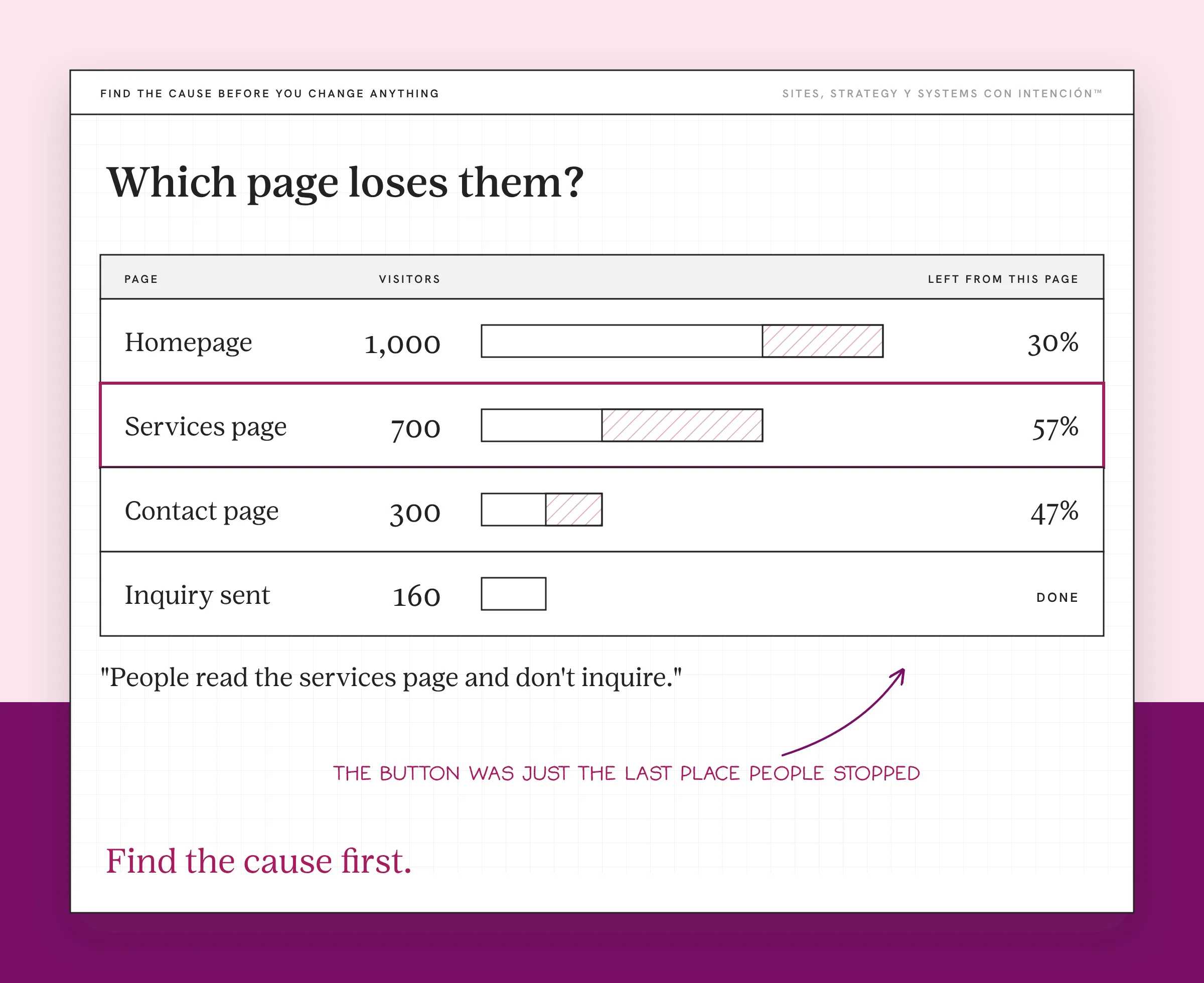
Often visitor behavior shows the button was just the last place people stopped. Ay bendito, you can redesign that button ten times and the people who didn't understand the offer still won't click it.
This is the same trap behind a lot of marketing spend. More traffic, a new font or a fresh photo all work on the surface. If the cause is underneath, no amount of marketing will fix a bad website and no amount of tweaking will either.
What's the Difference Between a Symptom and a Cause?
A symptom is what you can see. A cause is why it's happening.
| What you see (symptom) | What might be causing it |
|---|---|
| Nobody clicks the button | The page never says who it's for or why it matters |
| People leave the services page fast | The offer is confusing or the price is a surprise |
| The form gets started and abandoned | It asks for too much too soon |
| Visitors come back and still don't book | They're not sure it's for them or what happens next |
| Inquiries come in from the wrong people | The copy is vague enough to attract everyone |
Most tweaks happen in the left column. The results are in the right one, nena.
Where Does the Real Cause Usually Live?
Most problems sit in one of three places: your site, your strategy or your systems. You have to look at all three to find which one it is. That's the whole idea behind how I work. It's also why one-off changes to one page so often go nowhere.

Your site. The message, the structure or the path. A page with the wrong message won't convert no matter what color the button is. The usual offenders are in the most common website copy mistakes.
Your strategy. The offer itself, who it's for and how it's priced. Qué lío when the site is fine and the offer is the thing nobody understands. I've had audits where the technical list came back clean or easy to fix and none of it was the problem. The real issue was that there had never been a true content strategy behind the pages. No scan reports that, which is why it's the audit mistake that actually costs you.
Your systems. What happens after someone raises their hand. Diache, if inquiries come in and nobody follows up for three days, the site did its job and a system that isn't ready to scale dropped it. Oye, that never shows up as a website problem until you look.
How Do You Find the Cause Before You Change Anything?
- Write down the symptom in one sentence. "People read the services page and don't inquire."
- Ask why three times. Each answer gets you closer to the cause.
- Look at the numbers before and after. Ojo, if you don't know the page's conversion rate before the change, you can't tell what the change did. Start with the website metrics that matter.
- Change one thing at a time. Otherwise you'll never know which change worked. That's the whole logic behind A/B testing: change one element and any difference in results can be traced to it.
- Check all three places. Site, strategy and systems. Chacho, the cause loves to hide in the one you didn't look at.
I treat everything as a test. You make a change, you read what happens and you adjust from that, ya tú sabes. Small changes work fine when they're aimed at the cause and you're measuring what they do. Testing like that is what keeps website strategy grounded in what visitors actually do.
What Should You Change First?
Start with the message on your most important page. In every audit I've run, the strategic conversion layer is the highest-impact part. Technical fixes on their own rarely move conversion. Make sure the top of the page says what you do, who it's for and what to do next in plain words. That one change touches the cause behind most of the symptoms in the table above.
Then look at the offer. Can someone tell which option fits them and what it costs to start? Then look at what happens after they inquire. Pues, if all three hold up and you still see no movement, why a site that looks great still doesn't generate leads walks through the next layer.
Before you touch the next button, ask the question New Amsterdam's doctor asks: how can I help? Then listen for what's wrong. Find the cause first and the small changes start counting again.
Key Takeaways
- Small website changes stop working when they treat symptoms instead of causes.
- The obvious fix lands where people stopped. The cause is why they stopped.
- The real cause lives in your site, your strategy or your systems. Look at all three.
- Measure before and after, change one thing at a time and treat every change as a test.
I'd rather talk through why none of my changes are working.
Bring your site, your numbers and the list of everything you've already tried. We'll spend one private session on why none of it moved and you'll leave with notes. Sessions start at $350.
Frequently Asked Questions
Why aren't my website changes making a difference?
Because they fix a symptom while the cause stays in place. A new button, photo or headline can't help if the page has the wrong message, the offer is unclear or follow-up after an inquiry is slow. Look for why people stop before you change where they stop.
Why didn't my website updates increase inquiries?
The updates may have been aimed at the wrong problem or there was no baseline to compare against. Check what the page did before the change and what it does now. Then look beyond the page itself at the offer and at what happens after someone reaches out.
What should I change on my website first?
Start with the message at the top of your most important page. Make sure it says what you do, who it's for and what to do next in plain words. Then review your offer and your follow-up process. Those three cover the causes behind most small-change frustration.
How many changes should I make at once?
One at a time, when you can. If you change the headline, the button and the photo in the same week, you won't know which one moved the numbers. Make one change, give it enough time and traffic to show a result and then decide on the next.
How long should I wait to see if a website change worked?
It depends on your traffic. A busy site can show a difference in a couple of weeks, while a smaller site may need a month or more. Compare the same stretch of time before and after the change so a slow week doesn't fool you.
About the Author