When a boy band goes on a reunion tour, nobody expects the 2000 show. Same names, same harmonies you've known since middle school, but the act has grown up. The staging changes, the setlist gets reworked and the guys move like grown men who know what they're doing. Wepa, that's why the reunion works. They didn't try to squeeze into the old outfits.
Your website deserves the same treatment. Knowing when to stop optimizing and rebuild your website comes down to one question: is this site built for the business you run now or the one you ran when you launched it? In 12+ years and 100+ sites worked on, I've learned that a site with your name on it can still be built for someone you used to be.
The Short Answer
Stop optimizing and rebuild your website when your business has outgrown it. If your offers, audience or process have changed and the site's structure can't stretch to fit, every tweak patches a site built for an older version of you. Optimize when the foundation fits and the problems are separate. Rebuild when the foundation itself is the problem.
If You're Reading This Because It's Your Site
Reading more isn't the hard part. La Jugada is $47 and it tells you which layer this is actually sitting in.
Get it, $47What Does It Mean When Your Business Outgrew Your Website?
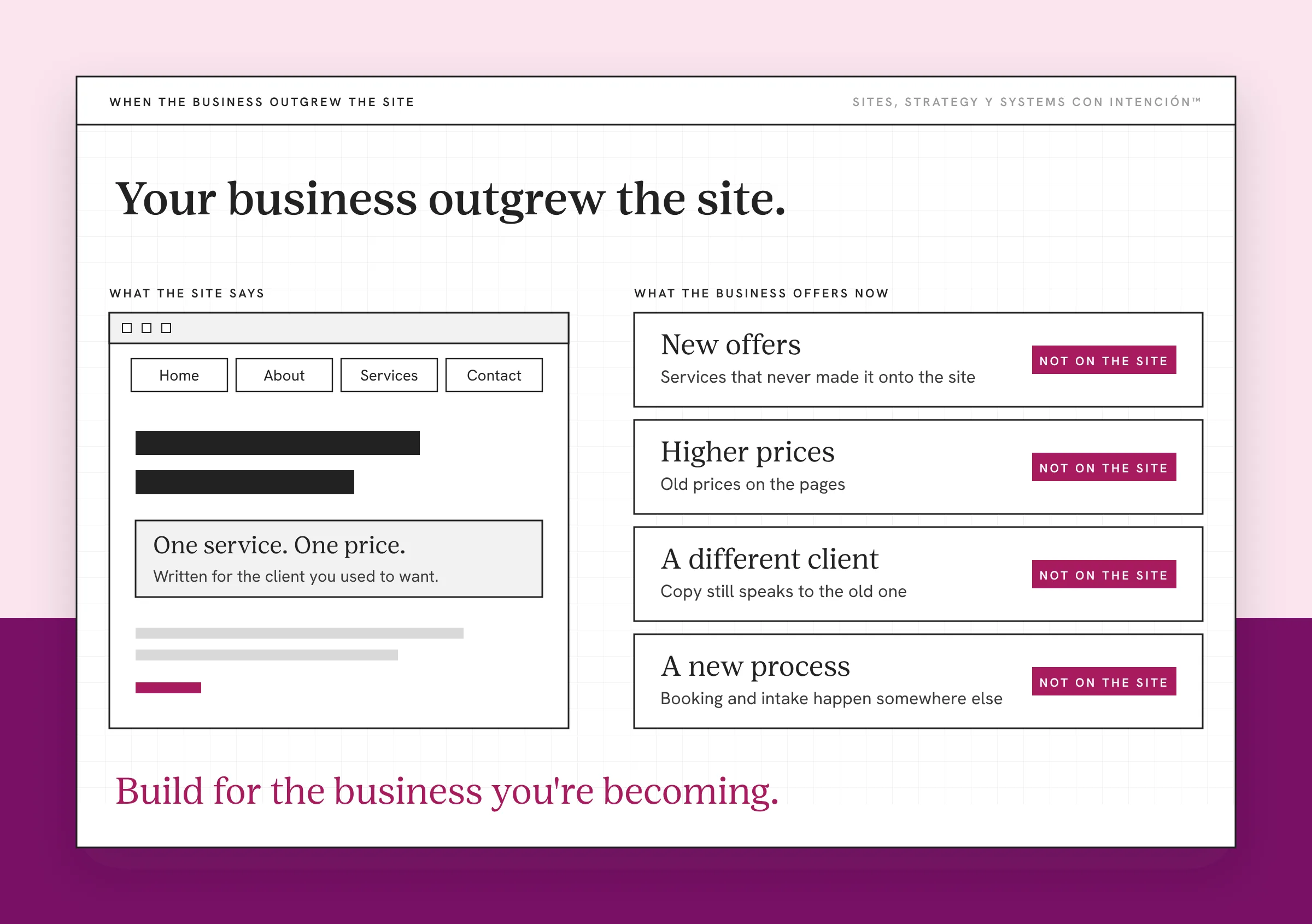
Your site was built for a specific moment. Maybe you launched with one service, a different price point or a different kind of client. The navigation, the pages and the copy all made sense for that business.
Then the business grew. You added offers, raised your prices, changed who you serve or built a new process. The site stayed where it was.
That's what outgrowing your website looks like. Mija, nothing on the site is technically broken. It's just describing someone you aren't anymore.
I've seen it with a client who changed nearly everything: new offers, a new price, a new audience and a new niche. Any one of those was a reason to update a page. All of them together meant the old site was describing a different business.
Why Won't More Optimizing Fix It?
Optimizing works when the foundation fits. You tighten copy, speed up pages, fix a form or move a button and the metrics that matter improve, because the site was built for the business it's serving.
When the business outgrew the site, optimizing turns into patching. A booking tool gets bolted onto a theme that was never built to hold it.
Each patch makes the site a little more confusing, ay bendito. After a while you're optimizing a structure that can't hold what you're putting in it. Créeme, that's when the effort stops paying you back and the question becomes incremental change or radical redesign.
What Are the Signs You've Reached That Point?
My rule for rebuilding is about whether the problems can be separated. When they can, fix them one at a time. When they can't, that's a rebuild. One of the triggers I look for is when what the site says about your business describes an older version of it. That's the outgrown site.
Watch for these:
- Your current offers don't fit the navigation. New services live on orphan pages or buried in a dropdown.
- The copy speaks to a client you don't want anymore. Every page you fix exposes three more written for the old audience.
- Your process changed and the site didn't. Booking, intake or onboarding now happens somewhere the site can't connect to, which tells you your site isn't ready to scale.
- Every fix takes longer than the last. The site resists changes because it was never built for them. If that sounds familiar, a website that needs constant updates goes deeper.
- You'd change most of it anyway. Once you list what's wrong, the list covers almost every page.

If you can't fix one of those without touching the others, diache, you're past optimizing.
When Should You Keep Optimizing Instead?
Keep optimizing when the site still fits the business and the problems are separate from each other. A slow page, a vague headline, a form that asks for too much or a missing call to action are small website problems that can each be fixed on its own. Those are optimization problems and a rebuild would be overkill. Sorting separate problems from tangled ones is where website strategy earns its keep.
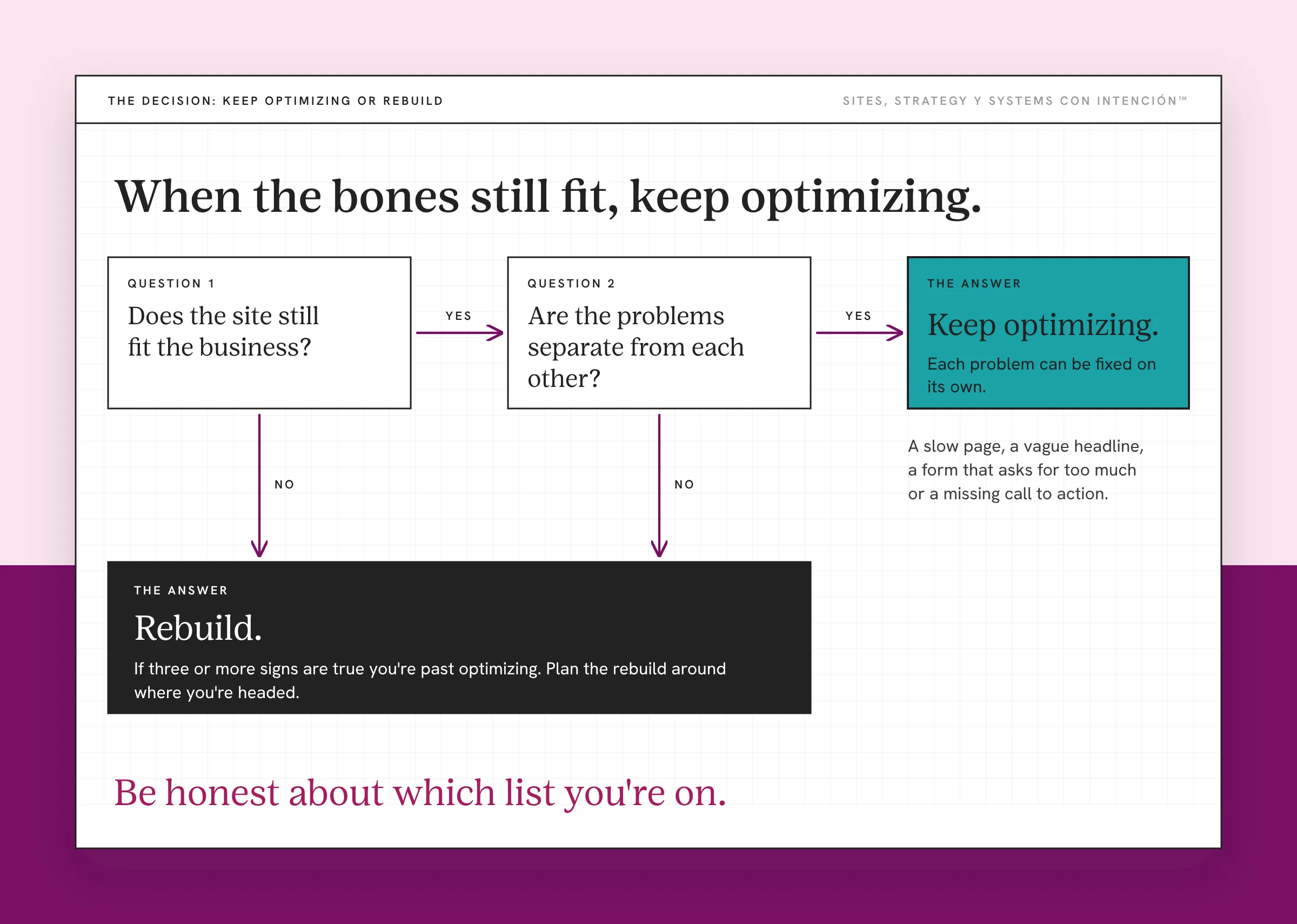
I've reviewed sites where the structure was solid but the design still reflected the business from two years ago. That isn't a rebuild. The bones still fit, so a refresh gets you there.
Be honest about which list you're on, pues. If you're not sure, give the site a performance review with would you fire your website. And if the issue is the look more than the structure, website redesign vs rebuild walks through the difference.
What Should You Do Before You Rebuild?
- Write down the business you run now. Your offers, your audience, your process and your prices today.
- Compare it with the site. Note every place the site describes something that isn't true anymore.
- Sort the list. Separate problems you could fix alone from problems that touch everything. That's the split between a website audit and a redesign.
- Decide. If most of the list touches everything, plan a rebuild. If it doesn't, optimize.
- Plan the rebuild around where you're headed. Build for the business you're becoming so you don't outgrow it again in a year. If any URLs will change, follow Google's guidance on site moves and migrations and set up permanent redirects.
When you're ready for the details, what a website rebuild means covers the process and signs you need a website redesign helps you separate a refresh from a full rebuild. Ya tú sabes, the reunion tour works because it's built for who they are now.
Key Takeaways
- Stop optimizing and rebuild when your business has outgrown your website.
- Optimizing works when the foundation fits. When it doesn't, every tweak is a patch.
- Signs you're there: offers that don't fit the navigation, copy for an old audience, a process the site can't support and fixes that touch everything.
- Keep optimizing when the problems are separate and the site still fits the business.
- Build the new site for where your business is headed.
I'm done patching this site. What would a rebuild look like?
Website con Intención rebuilds your site, content, SEO and backend from the ground up for the business you run now. It starts at $30,000.
Frequently Asked Questions
How do I know when to rebuild my website?
Rebuild when the problems can't be fixed one at a time. That often happens when your business has changed and the site's structure no longer fits your offers, audience or process. If fixing one thing means touching almost every page, that's a rebuild.
Should I keep optimizing my website or start over?
Keep optimizing if the site still matches the business you run and the problems are separate, like a slow page or a weak headline. Start over if the site describes an older version of your business and every fix exposes more pages that need rewriting. Sort your list of problems first and let it decide.
What are the signs my business has outgrown my website?
New offers that don't fit the navigation, copy written for clients you no longer serve, a booking or intake process the site can't connect to and fixes that keep getting harder. If you'd change most of the site anyway, it was built for a business you've outgrown.
Is rebuilding a website worth the cost?
It can be when the site no longer fits your business. Patching an outgrown site costs time and money every month and the results keep shrinking. A rebuild planned around where your business is headed gives you a foundation you can optimize again instead of fighting.
How long should a website last before a rebuild?
There's no fixed number of years. A site lasts as long as it fits the business. Some sites stay solid for years with regular optimization. Others need a rebuild after a big change in offers, audience or process, even if they're fairly new.
About the Author