You have two quotes in front of you and they aren't close. One is a redesign. One is a rebuild. Nobody has explained what makes the difference. The person who wants the bigger number is also the person telling you which you need. Y ahí está el problema.
So you're trying to work out whether a website redesign vs rebuild decision is a real distinction or a sales technique. It's real. After 100+ sites worked on over 12+ years, the line between them is more reliable than it looks. It's also not the line most quotes are drawn along.
Two definitions so the rest of this is clear. Both of them follow from that test rather than from a list of what has to change. A redesign works inside a build that can still hold the business. Layers can be changed one at a time, including structure and content, because the foundation underneath still supports them. A rebuild replaces that foundation, because the changes you need have stopped being separable from each other. Often that means a new platform and a new architecture. The dependency is what defines it. The technology is downstream of that.
The Short Answer
A redesign changes how the site looks and works within what's already there. A rebuild replaces what's underneath. The test is whether your problems can be fixed separately. Severity alone doesn't decide it. Cost matters, but it can't make the call by itself either. When they can't be separated, you're rebuilding whether you call it that or not.
If You're Reading This Because It's Your Site
Reading more isn't the hard part. La Jugada is $47 and it tells you which layer this is actually sitting in.
Get it, $47The Test: Can These Be Fixed One at a Time?
This is the whole decision and it takes about a minute.
In an old building, a paint job and a gut renovation are separated by one question. Can you swap the cabinets without opening the wall behind them? The kitchen can look terrible and still only need paint. Mira, you find out which one you're doing about twenty minutes in and by then the building has decided for you.
If you're still wondering whether anything is wrong at all, the signs you need a redesign come before this decision. They're worth reading first.
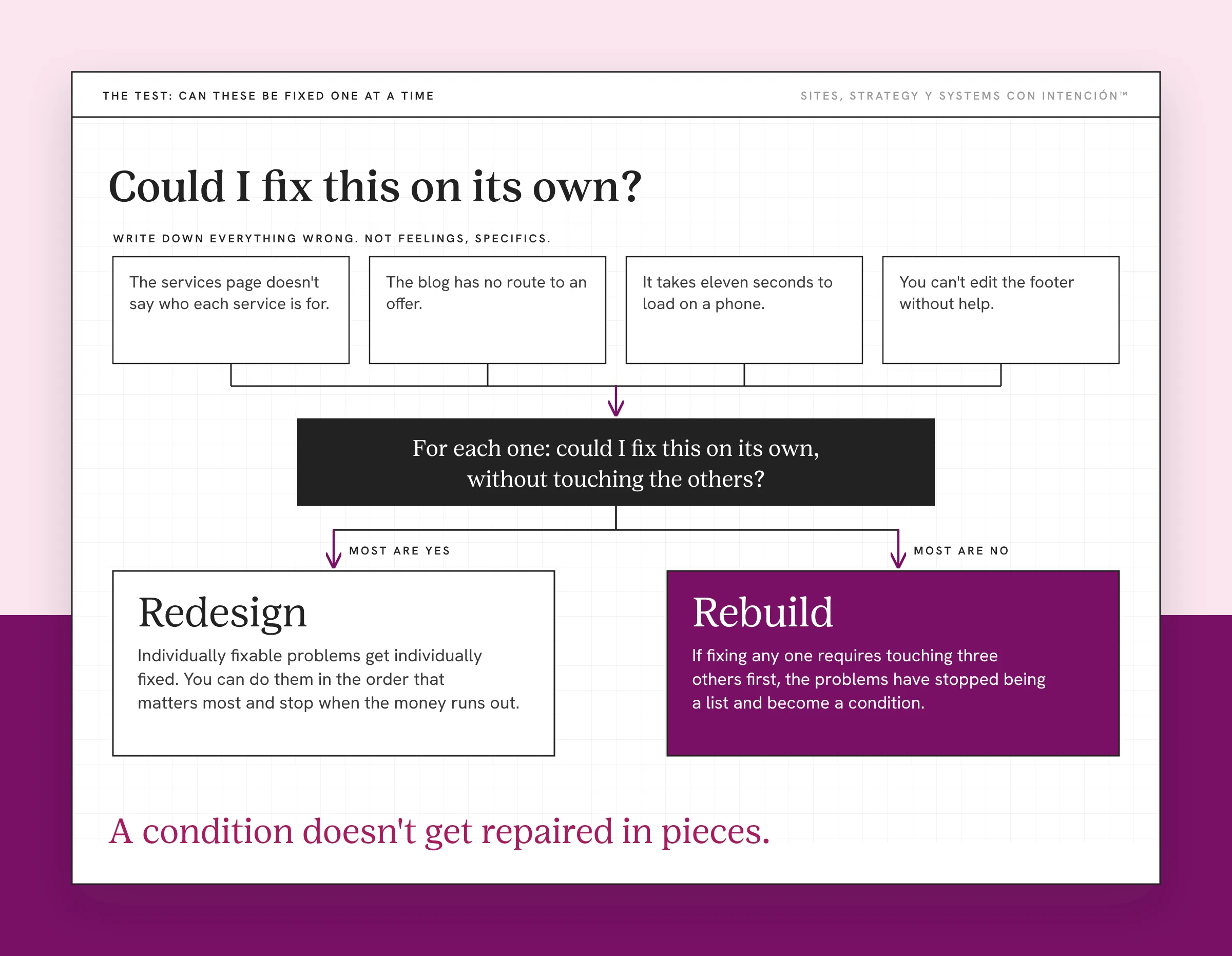
Write down everything wrong with your site. Not feelings, specifics. The services page doesn't say who each service is for. The blog has no route to an offer. It takes eleven seconds to load on a phone. You can't edit the footer without help.
Now go down the list and ask of each one: could I fix this on its own, without touching the others?
If most of them are yes, you have a redesign, maybe not even that. Individually fixable problems get individually fixed. You can do them in the order that matters most and stop when the money runs out. That's also how a site that's hurting your business and capping your growth gets unblocked without a six-month project.
If most of them are no, if fixing any one requires touching three others first, that's a rebuild. No siloed fixes. The problems have stopped being a list and become a condition. A condition doesn't get repaired in pieces. None of this arrives on a fixed redesign timeline either, which is why what starts the conversation is a trigger. Aquí es donde la gente se confunde. They grade the severity of the problems, when the useful thing to grade is whether the problems are separable.
The Five Things That Mean Rebuild
When I look at a site and land on rebuild, it's usually some combination of these.
The backend is broken. Broken in ways that make ordinary changes fail or break something else. Slow and dated are different problems with different fixes.
The theme won't update. This one sounds small and it isn't. The theme is unsupported. Or updating it breaks the layout, so the site is frozen on an old version of everything. That includes the version of WordPress and the plugins underneath it, which WordPress's own security guidance says to keep updated. A site nobody can safely update is a site that'll keep getting worse on its own.
The architecture is wrong. The pages, the hierarchy and the paths were built around a different business. You can restyle every page and the route through them stays wrong. That's why a site with the right pages can still fail to convert visitors.
It's showing an older version of the business, to the point where correcting it touches everything. Not one stale page. Also not the same thing as a site that no longer looks like your brand, which is usually a redesign. The offers, the positioning and the audience have all moved. What the site describes expired a while ago. On its own this isn't a rebuild. Plenty of sites say the wrong thing and can be corrected page by page. It becomes a rebuild when fixing the positioning means changing which pages exist and what order they come in. At that point the changes have stopped being separable.
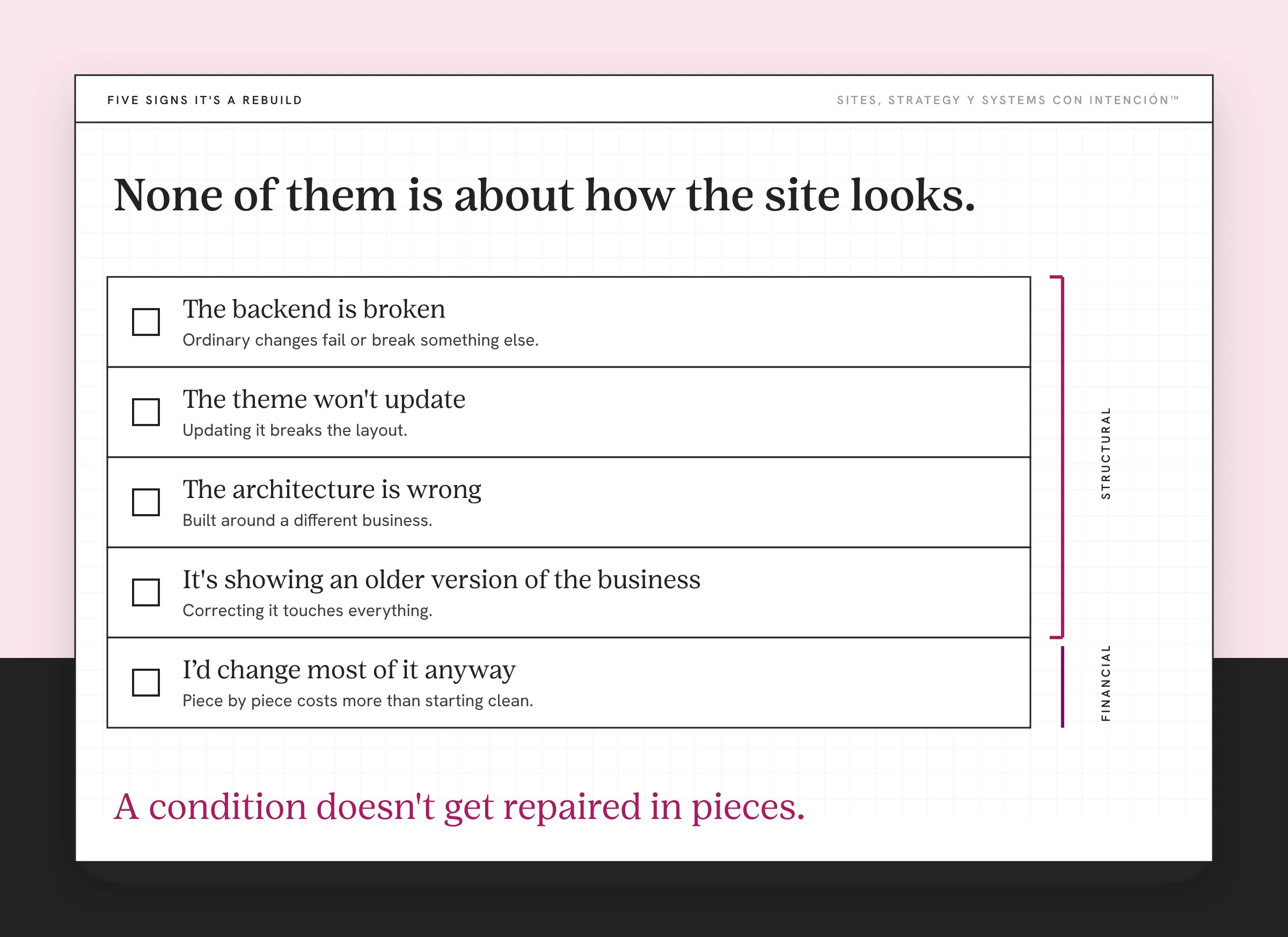
I would change most of it anyway. The quiet one. When the redesign list has grown to cover most of the site, redesigning it piece by piece costs more than starting clean with a rebuild. You end up with a patched old thing instead of a new one.
Notice that four of those five are structural and one is financial. None of them is about how the site looks.
If the list you just read is describing your site, the next question is what a rebuild changes once it's finished. That's the part nobody puts in a quote.
Will It Hurt My SEO?
This is the question I get most and it's the right thing to be afraid of. It's also where the real risk lives, though not where people expect.
Neither a redesign nor a rebuild is inherently bad for your rankings. A rebuild does carry real risk worth planning for. What does the visible damage is losing the connections: URLs that change without redirects, pages that stop existing without anyone noticing. Or a structure search engines had learned, replaced overnight with no map from old to new. Te lo digo por experiencia propia.
Early in my career I moved a domain too early on a project. Two things happened. The client couldn't get their email, which I spotted immediately and which is its own kind of bad morning. And I learned what 301 redirects are for the hard way, by not having them when I needed them. Fixed it inside a day. Nunca más. I've never since treated a URL change as a detail that gets handled at the end.
Google's own guidance on site moves with URL changes says the same thing in more patient language. Map each old URL to its new equivalent, redirect it permanently and keep the redirects for at least a year. So the non-negotiable, whichever you choose: every URL that changes gets a 301 redirect to its closest equivalent, mapped before launch. The closest equivalent page, never the homepage. A redirect map is boring and it's the difference between a rebuild that keeps what you built and one that starts from zero. It's also not the whole migration plan. What else moves matters too, from which pages survive the cut to how the new structure is crawled. A rebuild plans all of it before launch rather than after.
The honest part: a rebuild carries more of this risk than a redesign, because more URLs move. That's a reason to plan properly. It isn't a reason to keep a site that can't hold your business.
What Does Each One Cost You?
In money the answer depends on who you hire and I'm not going to invent a range that sounds authoritative.
A redesign costs less and constrains more. You're working inside decisions someone made years ago, possibly you, possibly a person who has no idea what your business does now. Cheaper, faster, with the ceiling set by what's already there.
A rebuild costs more and takes longer. The real cost is attention. Content migration, redirects, a period where things are half moved, decisions you haven't had to make in years all arriving at once. People underestimate the time and overestimate the money. What actually moves the price is how much of the business the work touches. If the disruption is the part that worries you, weigh it against what another eighteen months on the current site costs you.

And the failure worth naming: a redesign chosen because it was cheaper, on a site that needed a rebuild. That costs the most of the three. You spend, the underlying problems survive, then in eighteen months you pay again for the thing you avoided. Qué dolor.
What If I Redesign and Nothing Improves?
Then design may never have been the primary problem, which is the outcome I see most and the reason this decision matters.
Plenty of pretty sites can't do their job. A site can be beautifully redesigned, load fast, look current, yet still not tell a stranger who it's for or give them anything to do. Design was never the variable. If the diagnosis was wrong, the quality of the execution can't rescue it. Getting the diagnosis right is the part of website strategy that makes the execution worth paying for.
This is why the order matters. Audit before you redesign: find out what's wrong first, then choose the intervention. A real website audit reads the site against your business rather than against a checklist.
Key Takeaways
- A redesign changes the presentation. A rebuild replaces what is underneath and migrates the content.
- The test is separability. If your problems can be fixed one at a time, redesign. If fixing one means touching three others, rebuild.
- Five things point to rebuild: broken backend, a theme that won't update, wrong architecture. Also a site describing an older business and a list so long you'd change most of it anyway.
- Neither option hurts SEO by itself. Losing URLs without 301 redirects does. The map gets made before launch.
- A redesign chosen to save money on a site that needed a rebuild is the most expensive option of the three.
Can someone tell me if I need a redesign or rebuild?
Bring your site, your numbers and the quotes you've already gotten. We'll spend one private session on whether your problems can be fixed one at a time. It starts at $350 and notes are included.
Frequently Asked Questions
What is the difference between a website redesign and a rebuild?
A redesign changes how the site looks and behaves on the foundation that already exists. It can change structure and content too, while keeping the platform. A rebuild replaces the underlying build, often on a new platform, with new architecture and migrated content. The distinction is what gets kept rather than how much visibly changes.
How do I decide whether to redesign or rebuild?
List everything wrong, then ask of each item whether it could be fixed on its own. If most could, it's a redesign. If fixing one requires touching several others first, the problems aren't separable and you're rebuilding. Severity is a poor guide, because a small number of tangled problems needs more than a long list of independent ones.
Will a redesign or rebuild affect my SEO?
Not by itself. Rankings suffer when URLs change without redirects and when pages disappear. They suffer when a structure search engines had indexed gets replaced with no map from old to new. Every changed URL needs a 301 to its closest equivalent, decided before launch. A rebuild moves more URLs, so it needs more planning.
Is a rebuild always more expensive?
In money, usually. In total cost it's less clear. A redesign chosen because it was cheaper, on a site whose problems were never separable, leaves those problems intact and you pay again later. The most expensive path is spending twice to avoid the correct answer once.
Can I do part of it now and the rest later?
If your problems are separable, yes. That's the strongest argument for a redesign: you can sequence it and stop when you need to. If they aren't separable, phasing it tends to mean paying for the disruption of a rebuild without the benefit. The half you did is still sitting on the structure you didn't.
How do I know if it is the design at all?
Ask whether a stranger can tell who the site is for and what to do next. If they can't, visual work alone won't fix that, because it's a positioning and structure problem wearing a design costume. Audit before you choose, since the diagnosis decides which of these two questions you're even answering.
About the Author