Someone told you every two to three years. Possibly a designer, possibly an article, possibly the vague background hum of an industry that benefits from you believing it.
So how often should you redesign your website, really? Across 100+ sites worked on over 12+ years, I've never once made this decision by looking at a calendar. Neither has anybody whose site was actually working.
Quick separation, since the two get used interchangeably. A refresh updates the surface: copy, images, some styling. A redesign changes how the site looks, works and is organized, on the foundation you already have. Replacing that foundation is a rebuild. When a redesign is sold on a schedule, it's often a refresh with a bigger invoice.
The Short Answer
There's no correct interval. Three things trigger a redesign and none of them is time: the business changed, the site can no longer hold the work you need, the platform forced your hand. A five-year-old site doing its job doesn't need a redesign. A young site that can't hold your offers needs work now.
If You're Reading This Because It's Your Site
Reading more isn't the hard part. La Jugada is $47 and it tells you which layer this is actually sitting in.
Get it, $47What Is the Two-to-Three-Year Number Measuring?
Not your business. Wherever the figure started, elapsed time can't tell you whether a site's still doing its job. Nothing about the calendar knows what you sell or who you sell it to.
I'm not being cynical about designers. The number is rooted in something real. Visual conventions do move, so a site built in one era starts to read as belonging to it. That's true and it's also the least important thing about your website. Uno piensa que a dated-looking site is the problem. The dated-looking sites I see are rarely the ones failing. The failing ones are current-looking sites that can't do what the business now needs, which no amount of restyling touches. Ay, qué pérdida de tiempo.
The real cost of the calendar approach is what it does to the decision. You pay what a full redesign costs to rebuild something that was fine. Or you sit still for another eight months on the grounds that it has only been a year and a half. Meanwhile the thing that's broken stays broken.
Trigger One: The Business Changed
The quietest one and nothing about it happens on a schedule.
New offers, different positioning, prices that moved. A client you serve now who isn't the client you built the site for, which is how a website stops reflecting your brand. A service you stopped taking two years ago and never removed.
None of that happens on an anniversary. It happens gradually. Then one day you have an outdated website describing a business you no longer run, which is one of the signs you need a website redesign. The useful question is how long it's been since the site and the business said the same thing. That's rarely the same as how long since the last redesign.
Trigger Two: It Cannot Hold the Work Anymore
This is the one I'd put first if the field agreed on an order. It's the one people don't recognize as a trigger at all.
You need the site to do something new. Take bookings, sell something, sort people into the right service before they reach you. Gate a resource behind an email, hold a waitlist or an application.
The current build can't. Or it can, with so much patching that the site needs constant updates and every change breaks something else. That's the site being asked a question it was never built to answer. It has nothing to do with aging, de verdad. It can happen at eight months or at eight years.
When I see this, it's never one clean cause. It arrives as a combination: the offers changed, the volume changed and the process behind the site changed, all in the same stretch. Which is part of why it reads as a vague feeling.
The part almost nobody sees coming is the offer menu. Offers get added one at a time. Each one seems small on its own, so nobody stops to ask whether the site can still explain the whole set. Then a stranger lands on a services page built to present three things and finds seven. No way to tell which one is theirs. The site didn't break. It ran out of a structure that could hold what the business now sells.
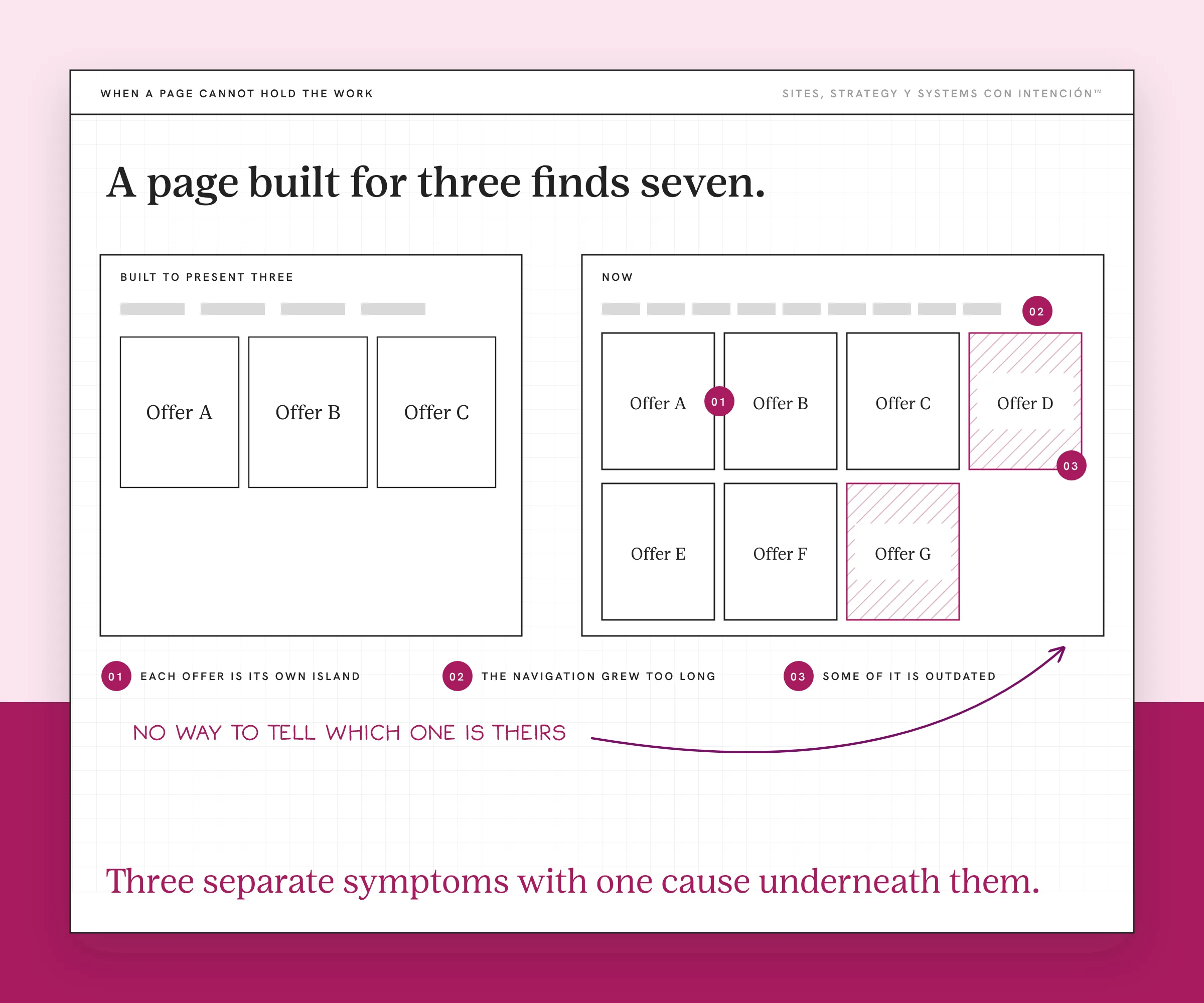
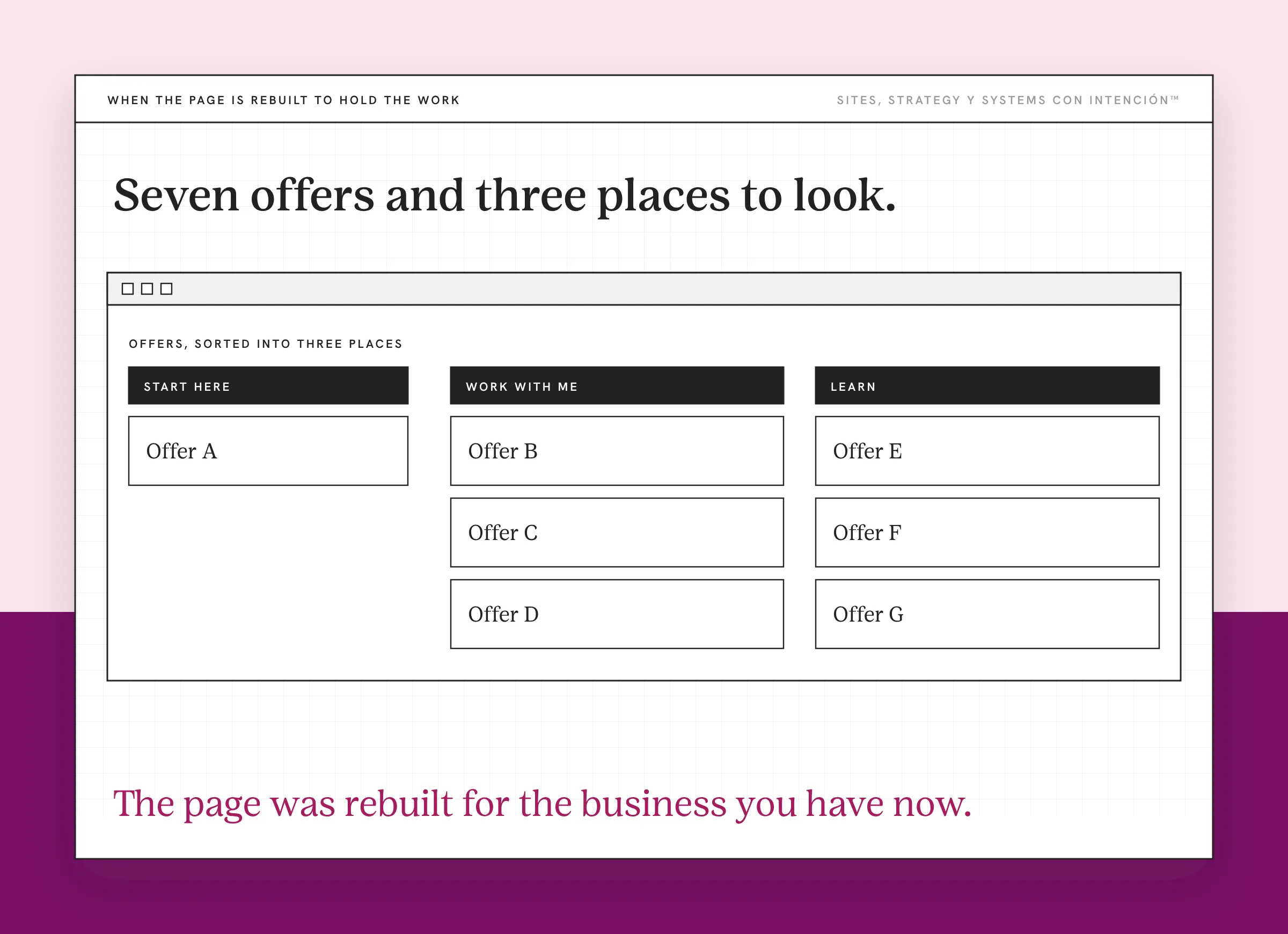
When I open a site at that point, a familiar pattern usually shows up. Each offer is its own island, added on its own, with no route between them and nothing showing how they relate. The navigation has grown too long, because every new thing got its own item in it, which makes choosing a navigation type its own decision. And some of what is still listed is outdated, since removing things is nobody's job. Three separate symptoms with one cause underneath them, ahí está el detalle, which is why fixing any one of them by itself won't hold without restructuring the site underneath.
This is why the timeline framing fails in both directions. The trigger is a new job rather than decay. New jobs arrive when the business decides rather than when the calendar does.
Trigger Three: The Platform Forced It
The least interesting one and the most urgent.
The theme is unsupported. Plugins stopped being maintained. The platform version underneath is old enough that updating it breaks the layout. So nobody updates it and it gets further behind on its own. WordPress's own security guide names old and outdated plugins as a target for attacks. Eventually something breaks and can't be fixed.
I have watched this one arrive. The business could no longer update its own site. That was the whole decision. Nobody sat down and weighed a redesign against the alternatives, because the option to keep going had already closed some time before anybody said the word redesign outloud.
It doesn't have to end there. One client who was stuck like that moved to Webflow with a CMS. They handle their own updates now, small changes don't come with an invoice anymore and their content stays current.
This one has a deadline you don't set, like PHP's supported versions schedule. Google's guidance on site moves with URL changes is worth reading before a forced move. A platform migration done in a panic is where redirects get skipped. A platform nobody can safely update tends to force the decision on its own timing rather than yours. What that decision turns out to be, a redesign or a full rebuild, is a separate question. The platform forces the intervention and it has no opinion about which one you end up doing.
What Do You Do Instead of a Schedule?
Run the three questions instead of the date. I like doing it twice a year because it catches drift before it turns into a project.
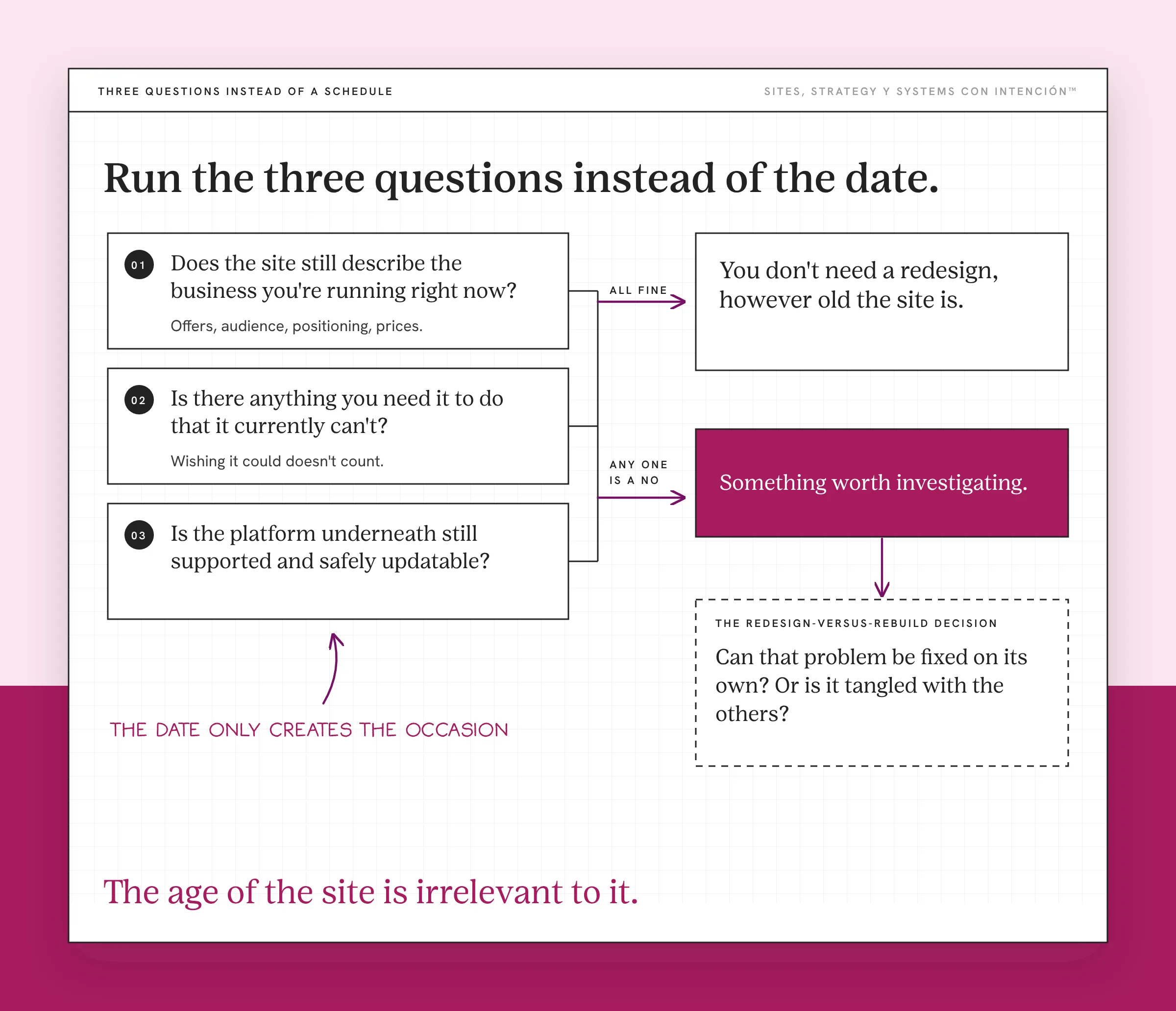
Spring training happens every February and nobody thinks February is what fixes the team. The date only creates the occasion to go and look properly. What comes out of it depends entirely on what you find, which is the whole difference between a check and a schedule.
Does the site still describe the business you're running right now? Offers, audience, positioning, prices.
Is there anything you need it to do that it currently can't? Wishing it could doesn't count.
Is the platform underneath still supported and safely updatable?
If all three are fine, you don't need a redesign, however old the site is. If any one of them is a no, you have something worth investigating. The age of the site is irrelevant to it.
When one does come back a no, the next question is whether that problem can be fixed on its own. Or whether it's tangled with the others. That's the redesign-versus-rebuild decision, which is a different question from this one. If nothing is obviously broken and the numbers are still flat, you may be looking at a site that works and still isn't converting instead. Reading which situation you're in is the real starting point for website strategy.
What About Refreshes?
It's a different thing, different frequency, much less fuss.
Copy gets updated when the offer changes, photos when they stop looking like you, a page when you notice it's answering the wrong question. That's maintenance and it should be continuous, in the same way you don't book an annual appointment to reply to emails.
The warning sign is when a refresh keeps getting deferred because it's hard. If updating a page is unpleasant enough that you stop doing it, the problem isn't the page. A website audit will show you what it is.
Key Takeaways
- There's no correct interval. Every two to three years describes a design trend cycle. Your business is nowhere in that number.
- Three things trigger a redesign: the business changed, the site can't hold the work you need it to do, the platform forced it.
- The second one is the most missed. The trigger is a new job, so it can arrive at any age.
- A five-year-old site doing its job needs nothing. A young site that can't hold your offers needs work now.
- Check the three questions twice a year. If all three are fine, the age of the site is irrelevant.
Is my site actually due for a redesign or not?
Those three questions are hard to answer about your own site. La Digital Rueda is free and takes about two minutes. It asks a few questions about your site, your content and your backend and shows you where the pressure is.
And if you would rather have this sort of thing arrive in your inbox: Off the Clock. It's where I write about building something that keeps working while you aren't at your desk.
Frequently Asked Questions
How often should you redesign your website?
There's no fixed interval. The common "every two to three years" tracks design trends rather than business need. A redesign is triggered by the business changing, by the site being unable to do something you now need, by the platform becoming unsupported. Check those three twice a year and ignore the date.
What is the average lifespan of a website?
Two to three years is the figure usually quoted and I wouldn't plan around it. It describes an average of something. None of the things it averages is whether your site still fits your business. Sites built on solid structure routinely run much longer with maintenance. The ones built on the wrong structure fail early regardless of how new they look.
What is the difference between a website refresh and a redesign?
A refresh updates the surface: copy, images, some styling, usually inside the existing build. A redesign changes the presentation, the experience and often the organization, while the foundation underneath stays viable. Replacing that foundation is a rebuild, which is a different decision again. A refresh should be continuous maintenance rather than a scheduled event. Much of what is sold as a redesign is a refresh with a larger invoice.
Does redesigning regularly help SEO?
No. An unnecessary one can introduce avoidable risk. A redesign that leaves URLs and structure alone is usually safe. The risk arrives when URLs change without redirects or a structure gets replaced with no map from old to new. That's where rankings move. Redesigning on a schedule means accepting that risk on a schedule, for a reason unrelated to whether the site was working.
My site looks dated but it still brings in work. Do I need to redesign?
Probably not yet. Looking dated and failing are different conditions. The sites I see failing are more often current-looking ones that can't do the job. If it describes your business accurately, holds the work you need it to do and sits on a supported platform, the dated look is a preference.
How do I know if the platform is a problem?
Try to make a small change and see what happens. If you can update a page without help and nothing else breaks, the platform probably isn't your constraint yet. If the theme can't be updated, if plugins have been abandoned, if everyone is afraid to touch it, the platform has already become the constraint.
About the Author