Your site is up to date. You can edit it, the forms work and the platform supports what you sell. But people still aren't finding the right offer or taking the next step you expected.
When someone has a site like that, I usually hear one of two things. "Do I need a whole new website?" or "Someone told me I need to rebuild." My answer is "Let's find what's failing before we replace anything." A website restructure is where I look first when the problem is how the information is organized and connected.
In 12+ years and 100+ sites worked on, I've seen plenty of sites that are up to date with nothing technically wrong and still aren't doing the job. It's not the backend stuff. I look at visitor behavior, how the offers are presented and the path to the inquiry. Which one comes first depends on the problem. A working backend can't tell you why someone isn't booking. It does give you a reason to diagnose before you replace it.
The Short Answer
A website restructure changes how pages, content and navigation fit together while keeping the existing platform. It can address disconnected offers, competing routes or information that's hard to find. Review the business goal, visitor behavior and inquiry path first, then plan page changes, protect useful URLs and test the revised experience.
If You're Reading This Because It's Your Site
Reading more isn't the hard part. La Jugada is $47 and it tells you which layer this is actually sitting in.
Get it, $47What Does a Website Restructure Change?
A restructure changes the arrangement of the site: what information belongs together, which pages need to stand alone and how someone gets from one useful explanation to the next.
The work can include regrouping offers, combining repetitive pages, separating competing decisions or changing the navigation. Expect to revise copy and page layouts along the way.
To keep the scope clear, I use these distinctions:
| Type of Work | Main Question | What It Can Change |
|---|---|---|
| Visual refresh | Does the presentation need updating? | Images, typography, colors and other visual details |
| Website restructure | Does the information need a better arrangement? | Page relationships, content grouping, navigation and routes to an inquiry |
| Platform rebuild | Can the underlying setup support the business? | The technical foundation, implementation or platform where needed |
Website redesign is a broader term people use for different combinations of this work. How to tell a redesign from a rebuild covers the bigger decision. Ask what a proposal includes before deciding whether its label fits.
Think of setting the Mets' batting order. You can keep a capable roster and change the lineup. You still need a reason for the change. Moving names around doesn't solve every problem with the team.
The same goes for the site. A restructure has to address something you've identified in the way people find and evaluate the offers.
When Can You Keep Your Existing Platform?
I keep the platform when it's maintained, technically sound and able to support what the business needs. You can manage the content, deliver the required functions and make the proposed changes without fighting a limitation that demands a rebuild on a different foundation.
Being updated is one check. It doesn't establish that everything else is working.
Review whether forms submit successfully, mobile layouts work, necessary integrations function and the people maintaining the site can do their jobs. If a technical problem is causing the poor experience, put that in the audit's diagnosis.
But if the platform does what you need and visitors can't tell which service fits, moving to another system won't answer that question for them. Ay bendito, you can recreate the same confusion on a different platform.
Keeping the platform still takes work: new page layouts, revised menus, content changes and testing. Choose the work the issue calls for. Matching the work to the issue is most of what website strategy comes down to.
What Should You Review Before Moving Pages Around?
Start with what the website needs to accomplish. More suitable inquiries, clearer offer selection and fewer unanswered questions before a call are different goals. Name the outcome before choosing a fix. If you can't name it yet, why a site isn't converting is a good place to start.
Then look at the three areas together. The issue determines where you go deeper.
What Are Visitors Doing?
Use analytics to examine where relevant visitors arrive, which pages they reach and where the intended path stops. Compare that with what the site asks them to do.
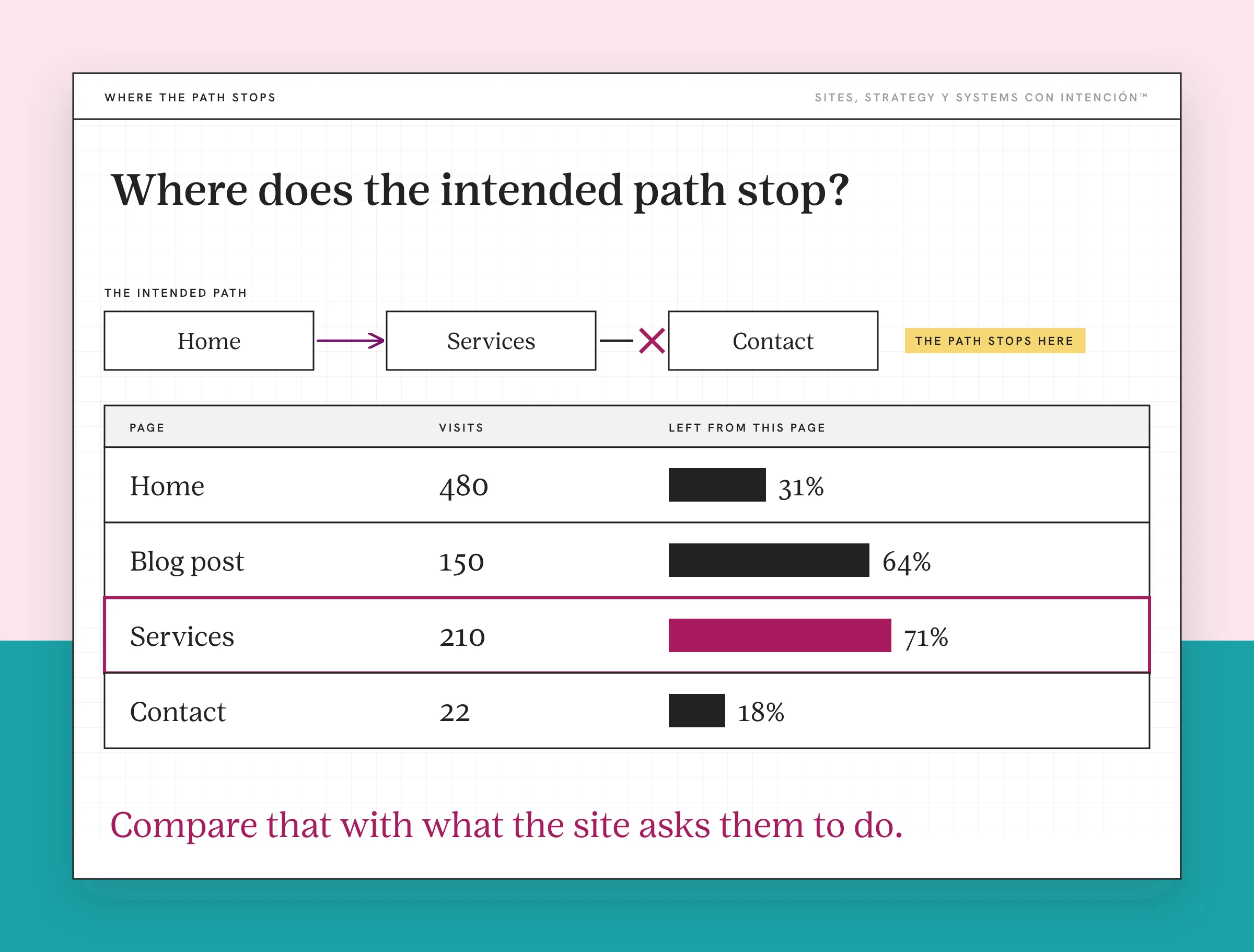
A page with few visits may be hard to discover. It could also have little relevant demand or a tracking problem. A high bounce rate can raise a question, but it won't tell you the cause on its own.
If you have session recordings or feedback, use them to investigate specific moments. Use what you find to choose a specific change worth testing.
Can People Understand the Offers?
Look at how the services are grouped and explained. Can someone tell which one fits their situation? Do similar names hide different commitments? Does each offer sit on its own island without helping people choose between them? Islands like that are one of the triggers that say it's time to redesign.
A website design can look polished while leaving those questions unanswered, so the signs you need a redesign aren't always visual. On the other hand, if one offer needs clearer copy, you might fix that page without changing the wider content structure.
Does the Inquiry Path Make Sense?
Follow the route from an entry page to the relevant offer and through the inquiry. Read the button labels, open the form and check what happens afterward.
If someone needs to compare two offers, give them enough information to make that comparison. If they've chosen one, make the corresponding next step clear. O sea, the route needs to match the decision they're making.
Two offers can lead to the same calendar and still need different explanations before someone gets there. Repeating a booking button is also different from asking people to choose between several unrelated actions.
What Could a Restructure Look Like for a Service Business?
When I restructure a site that already sits on a solid platform, the same things keep showing up. The navigation has grown too long and an offer the business stopped selling is still listed, so the site no longer reflects the brand. The sitemap doesn't make sense from a narrative perspective, so the pages don't follow the order someone would need to understand what you do. Interlinking is usually weak too. When the menu has grown like that, my first move is usually to cut and regroup it. I did that on one client site. The pages that help someone decide stayed in the menu, everything else moved down to the footer and the menu got clearer for their clients.
I've also restructured a client site without moving it off its platform, changing only the menu and the page order. Their offer got easier for people to reach.
The following fictional planning example shows how you'd scope the work. No measured result is implied.
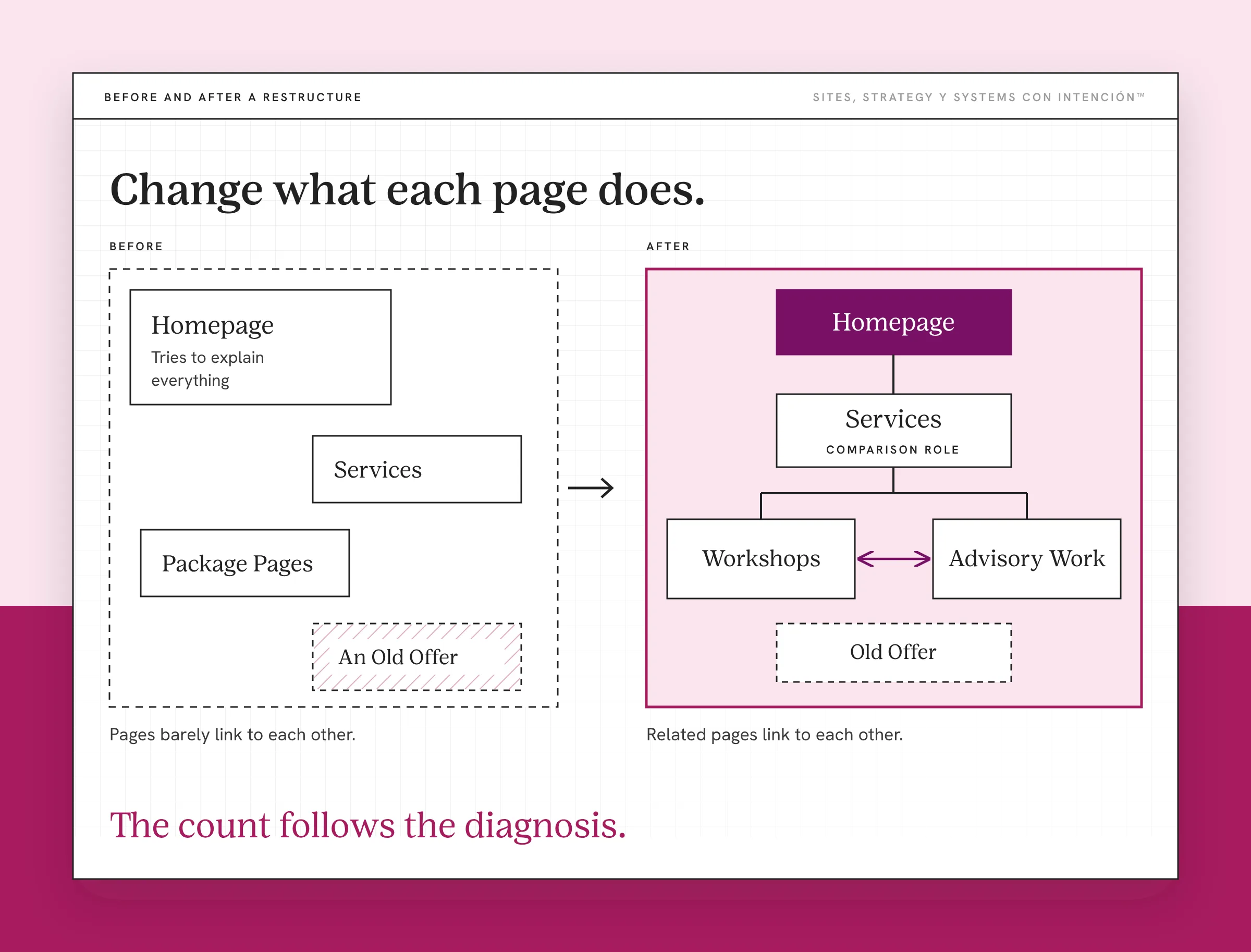
A consultant sells workshops and ongoing advisory work. Over time, the site has accumulated a general Services page, separate package pages, an old offer that's still listed and a homepage that tries to explain everything.
Assume a technical review finds that the existing platform can support the work. The question is how to help people understand the current offers.
| What the Review Finds | Possible Change | Reason for the Change |
|---|---|---|
| Services and package pages repeat the same broad pitch | Give the overview a comparison role and keep offer-specific details on the relevant pages | Readers can choose an offer before digging into its scope |
| Workshops and advisory work raise different questions | Keep distinct offer pages with the relevant process, proof and commitment explained | Each page supports a different buying decision |
| An old offer remains in the menu | Remove it from active navigation and decide what should happen to its page | The menu reflects what the business currently sells |
| The homepage contains the full details of both offers | Keep clear introductions and routes to the offer pages | Visitors can find their route without reading every detail first |
| Pages barely link to each other | Add links between related offers and explanations where a reader would want the next step | People can move from one idea to the next without going back to the menu |
This plan keeps most of the current pages. Another site needs pages combined or added. The count follows the diagnosis.
Notice that the consultant hasn't changed platforms in this example. They've changed what each page does and how the pages connect. Whether that improves inquiries still needs to be tested after implementation, by checking whether the site is actually converting.
How Do You Plan the Changes Without Losing Useful Pages?
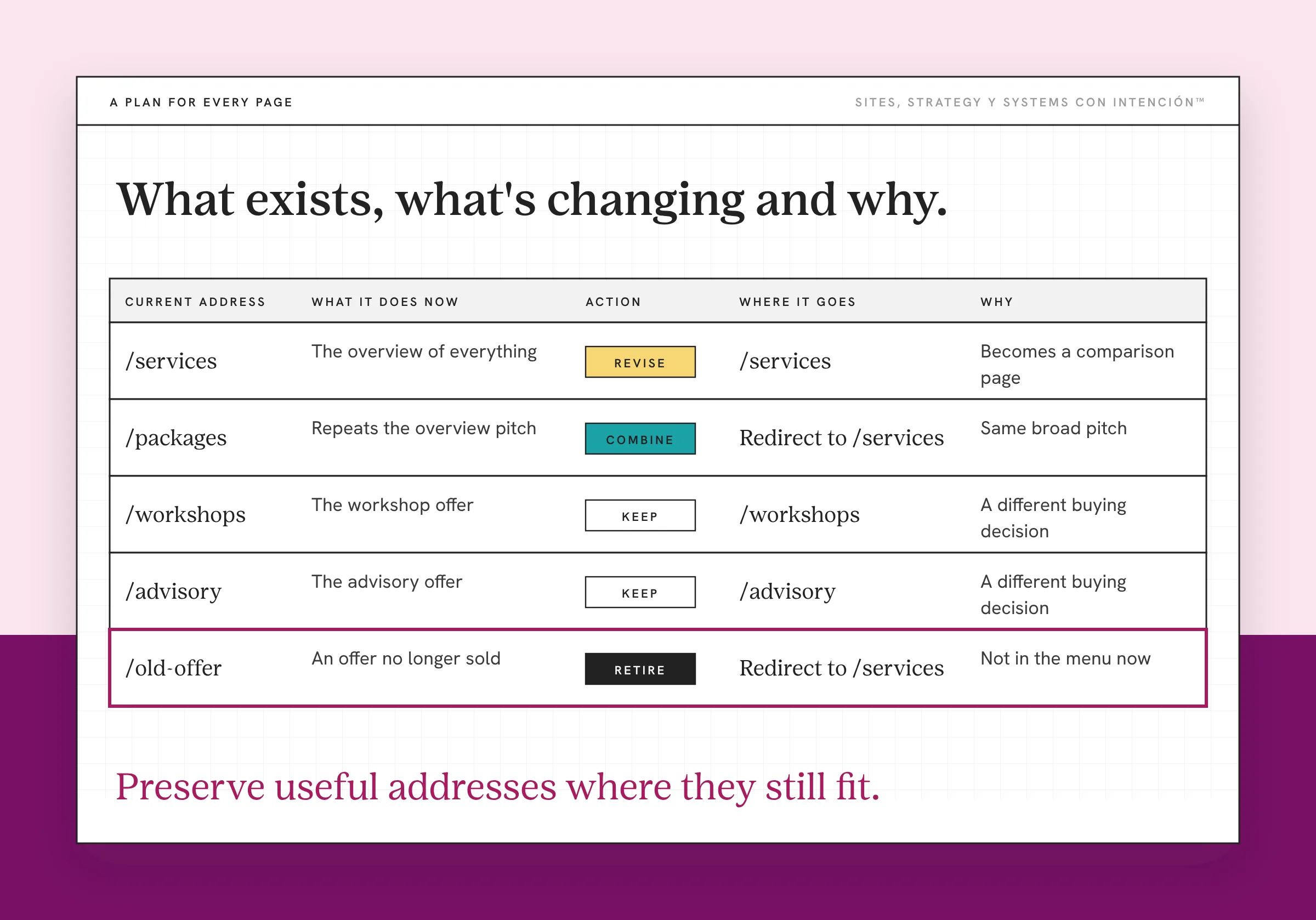
Write down the current arrangement before editing it. If you're mapping it out from scratch, planning a website structure walks through it. A useful plan shows what exists, what's changing and why.
For each affected page, record its purpose, current address, useful content, relevant performance and proposed destination. Then mark the action: keep, revise, combine, separate or retire.
Be precise about the scope. "Make Services clearer" could mean a paragraph rewrite or several new layouts. List the pages and changes so you know what you're agreeing to.
That helps keep project management grounded in actual work. You can discuss design and development needs without turning every discovery into a larger redesign project. Nena, a new visual style shouldn't become the answer before anyone has explained the problem.
What Needs Attention if Page Addresses Change?
Keeping the same platform doesn't mean keeping every URL. Preserve useful addresses where they still fit. For genuine moves or merges, map old pages to relevant replacements and plan permanent redirects.
Google's guidance on URL changes covers mapping, redirects, updated links, sitemaps and monitoring. It also warns that significant changes can bring temporary search fluctuations. Staying on the platform doesn't remove that possibility.
Don't send unrelated old pages to the homepage by default. Decide where the content belongs and what a visitor following an old link should find.
What Should You Test Before Launching?
Check the revised routes on desktop and mobile:
- Navigation labels lead to the intended pages.
- Relevant content and proof remain available.
- Buttons, forms and calendars work through to confirmation.
- Changed addresses and redirects reach the correct destinations.
- Internal links point to the intended pages.
- Tracking still records the actions you plan to measure.
For SEO, the connections matter as well as the page list. Google's link guidance recommends crawlable links with descriptive, relevant text. A page that exists but is difficult to reach needs attention.
You can build and review changes in a staging environment where available. Test whether someone can complete the intended task through the revised pages.
How Do You Check Whether the Restructure Helped?
Return to the goal you named before making changes. If the issue was finding a particular offer, look at whether relevant visitors now reach it. If the issue was the inquiry route, look at progression through that route and completed inquiries.
Use comparable periods and consider changes in traffic sources, campaigns or seasonality. An increase in visits alone doesn't prove the restructure produced better inquiries.
Check that tracking survived the changes before trusting a conversion rate comparison. Also look at inquiry quality: more form submissions aren't necessarily more suitable opportunities.
On one client site, the blog posts and other content got linked to the offers they were about and the site's language was matched to that content. Inquiries went up and the leads that came in were warmer, which is the combination worth looking for.
If people reach the offer but still hesitate, the next investigation might be the message, proof, price expectations or commitment being asked of them. You don't have to respond by moving the pages again. Diache, let the evidence tell you what needs attention.
A website restructure gives you a way to change the arrangement while retaining a foundation that still works. Start by naming what's failing. Decide what each affected page needs to do and test the route you create. Then you have a reason for the scope, whether it stays small or grows. That reason is also what keeps the scope from drifting toward what a full website redesign costs.
Key Takeaways
- A website restructure changes how pages and information connect while keeping a suitable existing platform.
- Review visitor behavior, offer presentation and the inquiry path before deciding what to change.
- A healthy platform can stay, but page changes still need clear scope, implementation and testing.
- Protect useful content and page addresses, then measure results against the original goal.
Okay, but where do I start before I move any pages?
La Digital Rueda is free and takes about two minutes. It asks a few questions about your site, your content and your backend and shows you where the pressure is before you start moving pages around.
Want more like this in your inbox? Off the Clock is my week-ish newsletter about websites, systems and burnout-free business.
Frequently Asked Questions
Is a website restructure the same as a redesign?
They can overlap, so ask what the proposed work actually includes. In this guide, restructuring means changing how pages relate, how content is grouped and how navigation works while you keep the platform. A redesign may include that work alongside visual changes. A visual refresh can update how things look without reorganizing the wider site. The scope matters more than which label a provider uses.
Does restructuring mean I need a different content management system?
No. Keeping a suitable content management system is part of the approach described here. You'll still need changes to templates, menus, content or integrations inside it. If the existing platform can't support the required work, that changes the decision. Review the actual limitations before choosing the scope. A platform switch won't fix an arrangement problem and staying put won't fix a technical limit.
How long does a website restructure take?
The timeline depends on the affected pages, how much content needs rewriting, whether templates change and what needs testing. A navigation adjustment and a multi-offer reorganization are different projects. Ask for a scope that names the pages, deliverables, review responsibilities and technical work. That gives you a more useful basis for a timeline than the word restructure alone.
Can a restructure improve conversions?
It may help when the diagnosed problem is how visitors find, understand or move between offers. But rearranging pages won't resolve every issue affecting inquiries or sales. Establish a baseline, check tracking and evaluate the result against the original goal. Look at suitable inquiries as well as completed actions. Account for changes in traffic or campaigns when interpreting the comparison.
Do I need to change all my page addresses?
No. Reorganizing menus or improving links can happen while useful page addresses stay the same. Other changes, such as combining pages, may require a new destination and a redirect plan. Review each affected page and skip renaming everything just for consistency. Keep the plan tied to the content people need to find and test the resulting routes before launching the changes.
About the Author