
Almost everybody starts this with a page list.
Home, About, Services, Contact, maybe a blog. Then the question becomes how to nest them, which feels like the planning and is really the last five percent of it.
I take the LIRR into the city and nobody designed that line by picking stations first. They decided where people needed to get to, then put stops where the route needed them. Your site is the same shape. The route is the thing you're planning and the pages are just where it stops.
The Short Answer
To plan a website structure, map the path a stranger takes to becoming a client, then decide which page serves each point on that path. Four structure types exist and a service business needs the hierarchical one. A one-page site for a single offer is the exception. Picking the type is the second decision. The first one is the sequence a visitor moves through.
If You're Reading This Because It's Your Site
Reading more isn't the hard part. La Jugada is $47 and it tells you which layer this is actually sitting in.
Get it, $47What Are the Four Website Structure Types?
It's worth knowing, because the vocabulary comes up and because one of them is almost certainly your answer.
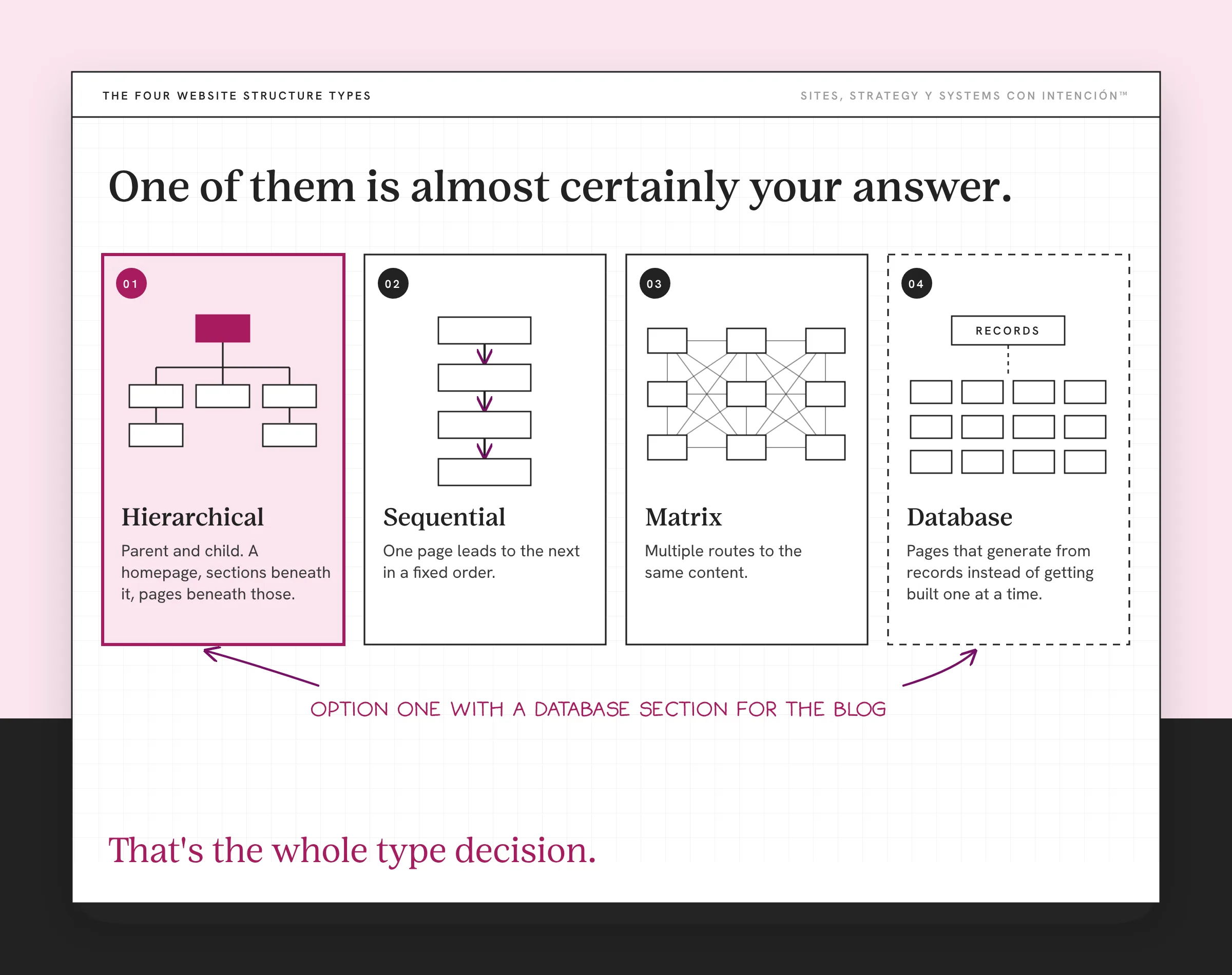
1. Hierarchical. A homepage at the top, sections beneath it, pages beneath those. Parent and child. This is the service business answer and it's the default for good reason: people already understand it, search engines map it easily and it scales without a rebuild when you add a service.
2. Sequential, sometimes called linear. One page leads to the next in a fixed order. It's built for a process someone moves through once: an application, a checkout, an onboarding flow. It's wrong for a site someone browses, because it takes away their ability to choose.
3. Matrix. Multiple routes to the same content, with the visitor picking their own way through. Filter by category, by price, by use case. Built for catalogs and large libraries. On a four-service site it produces a lot of navigation for very few destinations.
4. Database, sometimes called dynamic. Pages that generate from records instead of getting built one at a time. A blog is this. So is a directory or a resource library.
For a service business with a handful of offers, the answer is usually option one with a database section for the blog. That's the whole type decision and it takes about a minute. It's worth naming outloud, though, so the blog doesn't get planned as if it were a page.
Why Does the Order You Decide In Matter More Than the Type?
Two sites can both be cleanly hierarchical. One works and the other doesn't, because hierarchy only tells you how things nest. It says nothing about which pages should exist or how many and nothing about what a visitor has to understand before they can understand the next thing.
That's the part that decides whether your structure holds. Skip it and you get a site that's tidy and unusable: nesting that's technically correct, About buried under three submenus, a services page listing everything with no signal about which one fits which situation. Ay fo. Everything's in its place and they still can't find their way to a decision, which is where converting website visitors into clients breaks down.
Design is how the site looks. Architecture is how it works. And architecture is a question about sequence, the order that structures a website for conversions, which is why a sitemap drawn before anybody's decided what the site is for is just a diagram of an assumption.
Plan the Route, Then Decide Where It Stops
So the method runs backwards from the way I usually see it done.
Map the path first. A stranger arrives, reads what's on your homepage and does the is-this-for-me check without thinking about it. If that lands they want to know whether you solve their specific thing and not just the category. Then they're working out whether they trust you enough to take a step. Then they need a step that's proportionate to how much trust they've built. That's the route a visitor actually takes and it's close to identical on every service site I've worked on. Without it, the website has no clear next step.
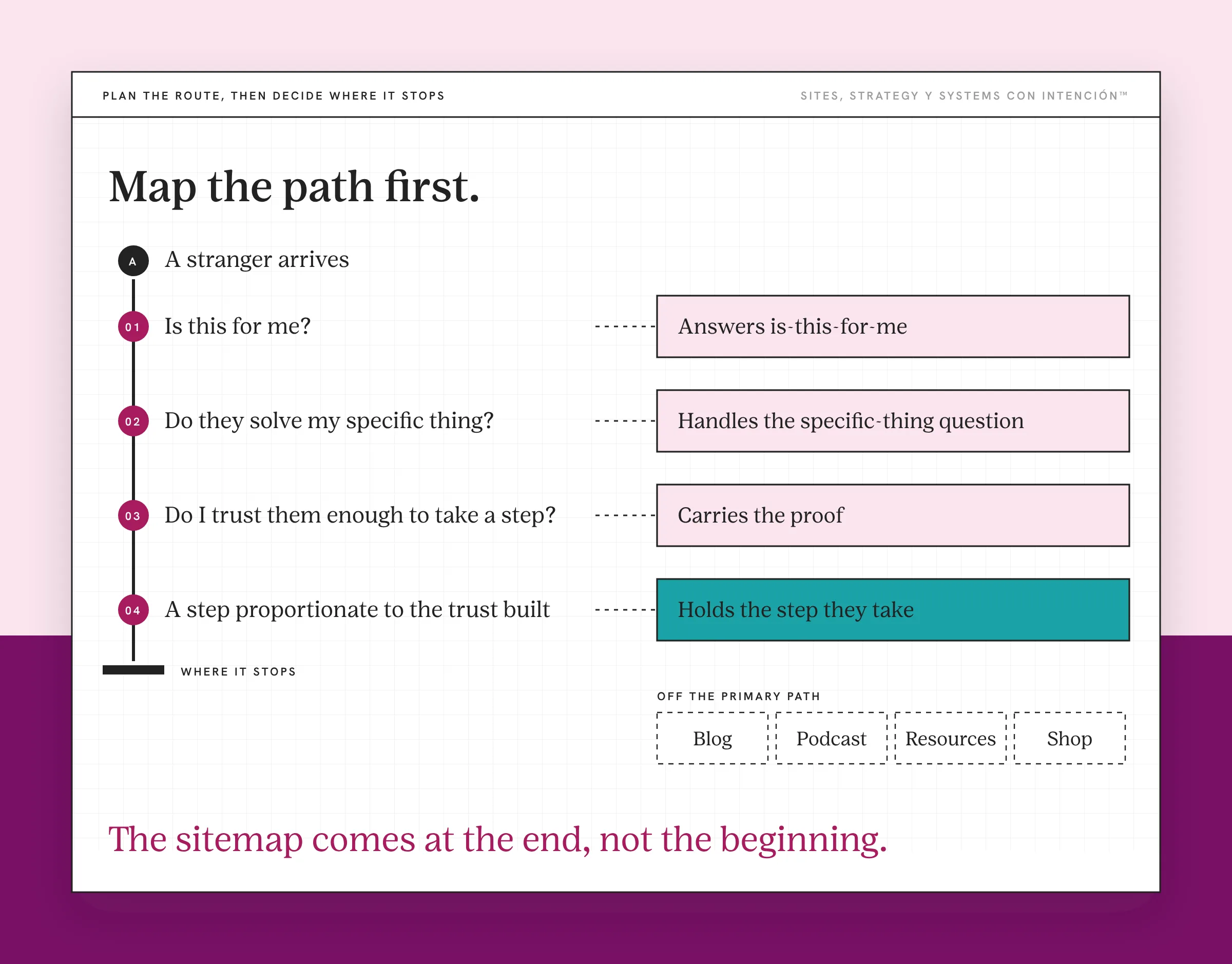
Then decide which page serves each moment. One page answers is-this-for-me, another handles the specific-thing question, another carries the proof and one holds the step they take.
Then nest what's left over. By this point your hierarchy is a consequence instead of a decision, because you're grouping pages that already have jobs.
The test for whether a page belongs: name the moment on the path it serves. If you can't, that page exists because sites usually have one. It's how a services page ends up describing four offerings with no way in and how a resources section grows for three years without sending anybody anywhere. Both of those pages pass a nesting check.
I've re-planned a client site this way. Once the path was mapped, some of their pages couldn't name a moment on it and they got cut.
How Do You Map It Without a Tool?
Paper's fine. So is a shared doc.
Draw the path as a line with the four moments marked along it. Nothing else yet.
Write each page you think you need on its own sticky or row. Don't arrange them.
Place each one on the line at the moment it serves. Anything that won't place is your finding, de verdad. There are usually two or three of them and they're the most valuable thing the exercise gives you.
Count the stops. From the homepage to the page where someone decides. Two clicks is fine. Three wants a reason. Four means the thing that matters is buried and your hierarchy is working against you. It's the express-versus-local question: how many stops before the one they came for.
Then draw the nesting. Last step, five minutes, mostly obvious by now. The sitemap comes at the end, mija, not the beginning.
If the site already exists and needs re-sequencing instead of planning, the job is organizing the website content that's already there, which starts from an inventory of what you have.
Two Rules I Hold When Planning a Structure
Both of these get pushback and I'm holding them anyway.
About doesn't go first. It belongs on the site. It doesn't get the position that the page where people decide should have. The only visitor who needs your story before your services is someone who already trusts you and they'll find it wherever it sits, punto. The receipt for this one is why nav order beats navigation pattern.
The blog and the podcast stay out of the primary path. Content is how people find you, which is a different job from getting your website to convert. It isn't how they hire you. A structure that puts blog, resources, podcast and shop at the same level as services asks a visitor to choose between reading and deciding. Reading wins, because it asks less of them. Ya tú sabes how that ends: six months of traffic and an empty inbox. Findable is the requirement. Primary isn't.
The version I run into most is a site with strong content and no route from any of it to an offer. Every piece exists. Nothing connects, which is the clearest thing a website audit turns up. On one client's site we linked the blog posts and the rest of their content to the offers each piece was about and matched the site's language to that content. More inquiries came in and the leads were warmer.
What Does Structure Do for Search and AI Retrieval?
There are two effects here and the second one's newer.
For search, your structure is the map a crawler uses to work out what the site's about and which pages you treat as central. Depth matters, because a page four clicks from the homepage reads as less important than one that's two. Google uses crawlable links to find new pages, so a page nothing links to is a page that's a lot harder to find. Your internal links and your sitemap are how that map gets read.
For AI search and answer engines, the same structure does a second job. A retrieval system pulling an answer out of your site has to find the page that answers one question cleanly. A page with a single job makes that easier than a page that covers four things adequately. A structure planned around one moment per page happens to be the structure that gets retrieved well. That's a useful accident. It isn't a reason to restructure.
I'm not going to give you a number for either. Anybody quoting a percentage on crawl depth or retrieval is guessing. Plan the structure so it's shallow and single-purpose and both effects follow.
What Planning the Structure Won't Settle
Three layers sit around this one and the structure doesn't touch them.
The words on each page are a separate job. A well-planned structure full of pages that describe instead of helping someone decide is still a site nobody acts on, which is the job of website copy that helps people decide.
The menu isn't the structure. Nielsen Norman Group draws the same line between information architecture and navigation. You can plan this soundly and then build a nav that hides the result, which is an easy failure to miss. Planning the structure and the navigation together saves a lot of website strategy headaches later.
And what happens inside a page once they land is its own problem. Friction after the click is a user experience question.
Two page types sit outside the hierarchy on purpose. When a sales page or landing page exists to hold one decision, it often carries no navigation. Pages built that way don't get planned into the structure, so leave them off the map you're drawing. The sales page vs landing page distinction is its own post.
Quick Check: Is Your Website Structure Working?
Once the map is drawn, run it through these four before anybody builds a page.
- Do your pages have a clear order or can a visitor land anywhere and have no sense of what to read next?
- Can someone tell where to go next from every page without hunting for it?
- Does your content connect directly to an offer or does a visitor have to make that leap themselves?
- If you removed all your navigation labels, could a stranger still figure out how to reach out?
If any of those land as a no, you're looking at a structure problem.
Key Takeaways
- Four website structure types exist. Almost every service business is hierarchical with one database section for the blog and that decision takes a minute.
- The type matters far less than the order you decide it in. Two cleanly hierarchical sites can behave completely differently.
- Map the route first, decide which page serves each moment, then nest what's left. Your hierarchy becomes a consequence instead of a decision.
- The test for whether a page belongs is naming the moment on the path it serves. If you can't name one, that page exists because sites usually have one.
- About doesn't go first. The blog and the podcast stay out of the primary path.
What should I settle before I plan a single page?
Share your link and answer five questions. You'll get a personalized read on your site, your marketing and your backend, plus the first move worth making, on a private page. It's $47, takes about 10 minutes and there's no call.
Want more like this in your inbox? Off the Clock is my week-ish newsletter about websites, systems and burnout-free business.
Frequently Asked Questions
How do you create a plan for a website?
Start with the path instead of the pages. Map how a stranger becomes a client, which for most service businesses runs from the is-this-for-me check, through whether you solve their specific problem, through working out whether they trust you, to a next step that matches that trust. Then decide which page serves each moment. Nest them last, because by then the grouping is mostly obvious.
What are the different types of website structures?
Four. Hierarchical, which nests pages under sections under a homepage. Sequential or linear, which moves someone through a fixed order. Matrix, which offers multiple routes to the same content. And database or dynamic, where pages generate from records. Most service sites are hierarchical with one database section handling the blog.
Why is website structure important for user experience and SEO?
For a visitor, structure decides whether the page they need is where they'd look for it and how many clicks sit between them and a decision. For search, it's the map a crawler uses to work out which pages you treat as central and depth reads as unimportance. Both come from the same choice, so you don't optimize them separately.
What is the difference between website structure and navigation?
Structure is which pages exist and how they nest. Navigation is the menu pointing at some of them. You can have a sound structure and a menu that hides it, which is the more common failure of the two. Structure gets decided first, because you can't build a menu for pages you haven't settled on yet.
How do you map a website structure?
On paper, in about an hour. Draw the visitor's path as a line with the key moments marked. Write each page you think you need on its own sticky note or row without arranging them. Place each one at the moment it serves. Anything that won't place is your finding. Then count the clicks from your homepage to the page where people decide.
How many levels deep should a website structure be?
Shallow enough that the page where someone decides sits two clicks from the homepage. Three wants a reason. Four means the thing that matters is buried. Depth reads as unimportance to visitors and to crawlers. The number of levels matters less than where your decision page sits inside them.
What are common mistakes when planning a website structure?
Starting from a page list instead of a path. Drawing a sitemap before deciding what the site is for, which diagrams an assumption. Giving About the first position. Putting the blog, resources and podcast at the same level as services. And building a page because sites usually have one when no moment on the path needs it.
About the Author



