Your website is already closer than you think. Someone found it last week, read one page, decided you were good at your job and then closed the tab without doing anything about it. That visitor was a lead you almost got.
Most advice about how to turn website visitors into leads hands you a list of categories: define your goals, improve your UX, incorporate lead generation. None of that's wrong. It's also not a set of instructions. Nobody can do any of it on a Tuesday afternoon between two client calls.
What follows is the eight changes I make, in the order a visitor meets them, which is the part most lists leave out. That order is how you walk the page to find where people stop. What you fix first is wherever the most people stop.
The Short Answer
To turn website visitors into leads, walk the page in the order they meet it: load speed and navigation, then whether the page they landed on carries your whole story, then one clear decision per page, then a button whose result is obvious before they click it, then a way to act besides booking a call. Then fix first wherever the most people stop, which is often the step closest to the inquiry.
If You're Reading This Because It's Your Site
Reading more isn't the hard part. La Jugada is $47 and it tells you which layer this is actually sitting in.
Get it, $47Why Walk the Eight Moves in Order?
A visitor meets your site in a sequence: they arrive, they orient, they read, they decide and then they act. Each of those depends on the one before it. Lo que pasa es que most conversion advice treats the eight moves as a menu you can order off in any direction. So people start with the one that's easiest to see. Y ahí se pierde el tiempo.
Usually that means rewriting the button. Then nothing changes. The conclusion becomes that the website is just not a lead source for a business like theirs.
The button was probably fine, pobrecito. It was sitting downstream of four things that weren't.
That's what the order is for. Walk it top to bottom and you'll see where people actually stop. Then fix that spot first, even when it's the form at the bottom, because the steps closest to the inquiry cost you the most. Polishing a part of the page people already get through won't help the ones quitting further down.

What If They Never Saw Your Homepage?
Two moves here. Both happen before the visitor has formed a single opinion about your work.
1. Load Time and Navigation
This is usually where I start when I open a site, ahead of anything about design or copy. Google's own threshold for a page loading well is a Largest Contentful Paint of 2.5 seconds or less, measured at the 75th percentile of page loads and segmented across mobile and desktop. Worth knowing because it's a number you can check today. A page that takes too long on a phone on mobile data has already lost the visitor who was going to be your best inquiry this month. You'll never see them in any report as anything other than a number that went up by one.
Navigation is the second check for the same reason. A visitor who can tell in one glance how to get from where they are to the thing they came for will keep going. One who has to build a mental map of your site first won't bother, because they didn't come to study your architecture.
Neither of these is glamorous work. Both of them gate everything else on this list.
2. The Page They Landed on Has to Work as a First Page
This is the one almost nobody accounts for. If this is where your visitors get lost, it's where I'd put your attention first.
A meaningful share of your traffic never touches your homepage. Depending on how people find you it can be most of it. They come in from a search result or a link in bio, straight onto one blog post or one service page. Whatever page they hit is your landing page whether you designed it as one or not. It's the entire website as far as they're concerned. They'll judge whether to keep going based on a page you designed as a middle chapter.
So the interior page can't assume anyone read the homepage first. It needs to still have a cohesive story. Who you are, what this is, why it matters and where to go next, all present on a page you've probably never looked at as an entry point.
The harder half is that it has to be the same story. When the blog post, the service page and the homepage each introduce a slightly different version of the business, the visitor doesn't consciously notice the mismatch. They just recalibrate instead of reading. Recalibrating costs them the attention they were about to spend on your offer. Ahí está the leak. One holistic narrative that holds across every page is doing more conversion work than any button on the site.
They Can Read Every Word and Still Not Know What You Do
By this point they've stayed. Now the question is whether the user experience makes the page legible to someone who doesn't already know your business. This is usually where a site with traffic that doesn't convert is losing people.
3. What the Page Says, Before What It Looks Like
When traffic is healthy and conversion isn't, the messaging on the page is where I look first. Message clarity is one of the highest-leverage things I can change on a page. It's consistently cheaper than the redesign people reach for instead.
The tell is that the copy makes sense to you. Of course it does. You wrote it knowing what you meant. A visitor gets one pass at it with none of that context. Nielsen Norman Group's research on how people read on the web found 79% of test users always scanned a new page and only 16% read word by word. A sentence that requires your background to decode reads as a sentence about nothing.
Worth saying what clear copy does to your numbers, because it isn't only that more people convert. Clearer copy also filters. A smaller number of well-aligned inquiries beats a higher volume of misaligned ones on both close rate and time-to-close. I'd rather have that than a better conversion rate on people who were never going to be a fit. Say who this is wrong for and some visitors will leave. Those weren't qualified leads. The ones who stay arrive already understanding what they're hiring you to do.
4. One Primary Decision per Page
When a page is asking for too many decisions, cutting it down to one has done more than almost anything else on this list. Y ya. It's one of the highest-return edits I know and it's almost always subtraction.
One primary decision means one thing you want them to do. Three buttons that all lead to that same decision are fine. A smaller second route for the person who isn't ready yet is also fine, which is move 7. Competing decisions are the problem: a newsletter box, a free guide, a calendar link and a contact form, each of which made sense as its own good idea on its own good day, now sitting on one page asking them to choose between four different projects, which is classic choice overload.
A lot of people answer by leaving. You read the result as a traffic problem.
A Button That Makes Them Guess Is a Button They Do Not Press
They understand what you do and they're considering it. These two moves are where considering becomes doing.
5. The Button Has to Say What Happens When They Click It
Clear means people aren't guessing what clicking the call to action will do when they see the button. That's a stricter standard than it sounds. It rules out most of what sits on a service business website right now.
"Learn more" doesn't say whether they're about to read a page, watch a video or land in a form. "Submit" doesn't say what happens to what they just typed. Nielsen Norman Group looked at "Get started" across several usability sessions and called it ambiguous, able to apply to almost any goal a user might have. That ambiguity is what makes it read as the obvious path right up until it drops them into a signup flow they had not agreed to. Every one of those makes them do a small risk calculation before clicking. The calculation is where they stop.
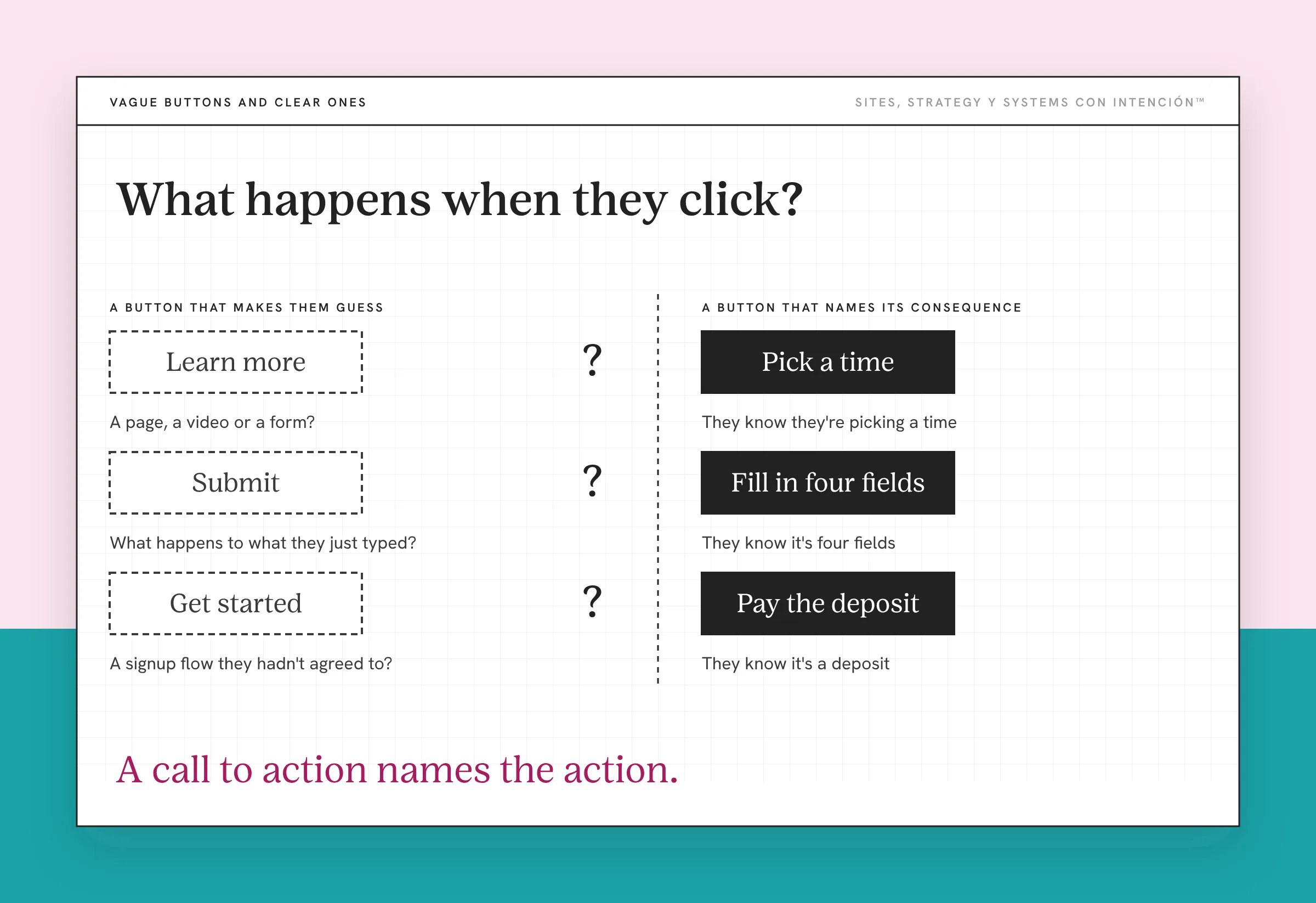
A button that names its own consequence removes the calculation. They know whether they're picking a time or filling four fields or paying a deposit before they commit to anything. That certainty is most of what makes a high-converting website.
Which is the whole job of a call to action. Worth saying plainly, since the term mostly gets used to mean "the button." A call to action names the action. If yours could be lifted onto a competitor's site without changing a word, it's decoration sitting where the ask should be.
6. Answer the Objection Before They Have to Ask for It
I've had someone pause in the middle of a call and say "Wait, you already answered that on your site."
That's the goal. A call that opens on logistics rather than convincing means the page did the work the call would otherwise have to do. The page gets there with trust signals like pricing range, process, timeline, what they need to have ready and who this is wrong for. Every question they can answer without emailing you is one less reason to close the tab.
Te lo digo con cariño: the objections you're protecting by leaving them off the page are being answered anyway, by them, on their own, with worse information than you'd have given them.
Believing You and Being Ready Are Not the Same Week
The last two moves are for the visitor who believes you and isn't going to act today. They're a real share of your qualified traffic and a lot of sites have nothing for them at all.
Nobody bought the boyband album the first time they heard the single on the radio. They learned the words first and decided this one was theirs. The buying came later. A lead is that middle part, ese ratito where somebody is already yours and hasn't spent anything yet. Most sites have nowhere for that person to stand.
7. Somewhere to Go That Is Not the Calendar
A lead isn't always a call. If they land, read, believe you and are still three months out from hiring anyone, a calendar link is the only available action and it doesn't fit. So they leave with nothing. You have no way to reach them when their timing changes.
An opt-in worth the email address solves this, as long as it's worth the email address. Lead capture gets a bad name because most of it is a discount code attached to nothing. The test is whether the thing you're offering would be useful to them this week even if they never hire you. This one is a recommendation. I can't hand you numbers on it, so take it as the recommendation it is. It's also worth remembering that a website and a sales funnel are doing different jobs. This move belongs to the website.
8. Let Them Book and Pay on the Site
Service businesses can transact on the page. With a CRM behind it the package is selectable, the contract and the invoice fire automatically, then the booking completes without an email from you sitting in the middle of it. I set these up. They aren't exotic.
How far you take this depends on what you sell. A defined package or a deposit can reasonably be bought off the page. Custom work at a higher price usually shouldn't be. For that the honest transaction point is a deposit collected after the call. The move is that whatever step comes next can be completed without you, at whatever stage that step sits.
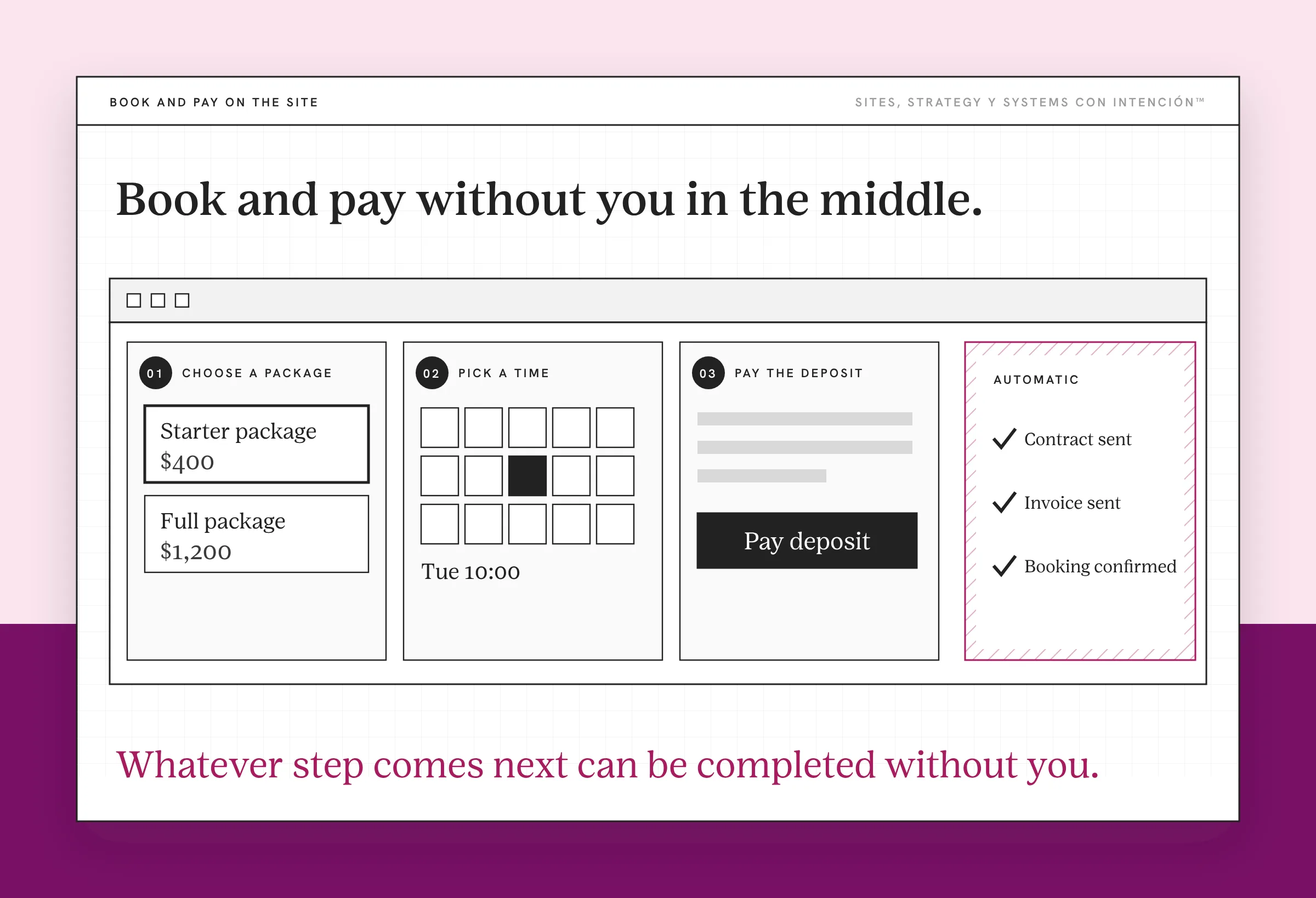
What this fixes is bigger than the checkout. When every path still ends with you, growth is limited by your time, your attention and your availability. More traffic doesn't change that. Neither does better copy. If you're still the connective tissue between an interested visitor and a signed client, the site is generating introductions rather than leads. You're the bottleneck the systems behind it were supposed to remove.
What Changes When the Order Is Right?
These aren't all the same size of job. Cutting a page to one primary decision is subtraction and you could do it this afternoon. Ponte pa' eso. Others are real work: load performance turns technical fast, rebuilding the story across every entry page is a project and wiring contracts and payments into a CRM takes implementation time. What they have in common is that you can tell which one you're looking at before you start paying for it. Knowing that up front is what website strategy is for.
What you get is a site that keeps the visitor long enough to be understood, makes one thing obvious to do and tells them what pressing it'll cost them. Then it has an answer for them whether they're ready today or in April. That's the whole mechanism. A visitor becomes a lead when nothing between arriving and acting asks them to do work they didn't sign up for. That work is conversion friction.
Your traffic is probably fine. The eight places it's draining out are all findable, which is the part you were missing.
Key Takeaways
- You turn website visitors into leads by walking the page in the order a visitor meets it, then fixing first wherever the most people stop.
- A meaningful share of your visitors never touch your homepage, so every interior page has to carry the whole story on its own. It also has to be the same story.
- Cutting a page down to one primary decision has outperformed every other change on this list. It's almost always subtraction.
- A button should name its own consequence. If they have to guess whether clicking costs money or opens a form, they do the math instead of clicking.
- Plenty of qualified visitors aren't ready to book today, so a site whose only action is a calendar link has nothing at all for them.
Okay, which of these eight is costing me leads?
Answer five questions and share your link. You'll get a private page with a read on your site, your marketing and your backend plus the first move worth making. It takes about 10 minutes and costs $47. No call.
Want more like this in your inbox? Off the Clock is my week-ish newsletter about websites, systems and burnout-free business.
Frequently Asked Questions
How many CTAs should one page have?
The number that matters is one primary decision. Repeat the same ask three times down a long page and you've helped. Put a newsletter box, a guide and a contact form beside it and you've asked the visitor to choose between projects. Anything pointing at the same decision can stay. A second, clearly subordinate route for someone who isn't ready is also fine.
Does page speed really affect leads?
Yes. It affects them before anything else on your site gets a chance to. A visitor on mobile data who leaves during load never sees your copy, your offer or your button, so every downstream improvement you made is invisible to them. They show up in your analytics as a number, which is why slow sites look like traffic problems instead of speed problems.
Can a service business take payment on the website?
Yes. A CRM lets a client select a package, sign a contract and pay a deposit in one flow, with the invoice generated automatically. For many service businesses the deposit is the honest commitment point. Collecting it on the page removes several days of back and forth. Booking without payment is a lighter version of the same move.
What do I do about someone who likes my work but is not ready to hire?
Give them something to take that's useful this week whether or not they ever hire you, then stay in touch. A calendar link is the wrong ask for someone whose timing is six months out. It's frequently the only option a service site offers. Without an alternative you lose the contact entirely and they restart their search later with someone else.
How do I know which of these eight is my actual problem?
Walking the order and checking where people stop surfaces it more often than not, because a problem high on the list makes everything below it hard to measure. If you've worked through it and conversion still hasn't moved, the one I'd look at next is story continuity between pages, which is difficult to see on a site you built yourself. An outside read helps there, which is what La Jugada is for.
Should I fix all eight before I expect anything to change?
No. Walk them in order, fix the spot where people drop off and stop when the problem stops. A move high on the list can be making the ones below it impossible to evaluate, which is the whole reason for the sequence. What the order gives you is a way to tell whether a fix did anything, since you're no longer changing four things at once. How fast that shows up depends on your traffic volume, because a page with forty visitors a month takes a long time to tell you anything.
About the Author