
You're at the front of the line at the concert gate. The ticket's on your phone, the screen's too dim, the app wants you to log in again and the people behind you are getting loud. You pinch, you scroll, you pinch again. The whole time you're thinking, why is this so hard?
That's what a site that won't work on a phone feels like to the person trying to hire you. In 12+ years and 100+ sites worked on, one of the first things I do with a client's site is open it on my phone. Plenty of them look great on a laptop and fall apart on a phone. The owner approved it at a desk. Their clients meet it standing in some line of their own, one thumb free and no patience to spare.
The Short Answer
If your website is not mobile friendly, people who find you on their phone can't read it, can't tap the right button and can't finish your form. Many of them leave and don't come back. Open every page of your site on your phone. Anything you have to pinch, zoom or fight with is costing you clients.
If You're Reading This Because It's Your Site
Reading more isn't the hard part. La Jugada is $47 and it tells you which layer this is actually sitting in.
Get it, $47What Does It Mean When a Website Isn't Mobile Friendly?
A mobile-friendly website adjusts to the screen it's on. The text is readable without zooming, the buttons are big enough to tap and the layout stacks into one column on a phone. Most modern sites do this with responsive design, which means the same site rearranges itself for every screen size.
A site that isn't built for phones shows the desktop layout shrunk down to phone width. You've seen it. Ay fo, the text is tiny, the menu runs off the edge and you're zooming in and out just to find the phone number.
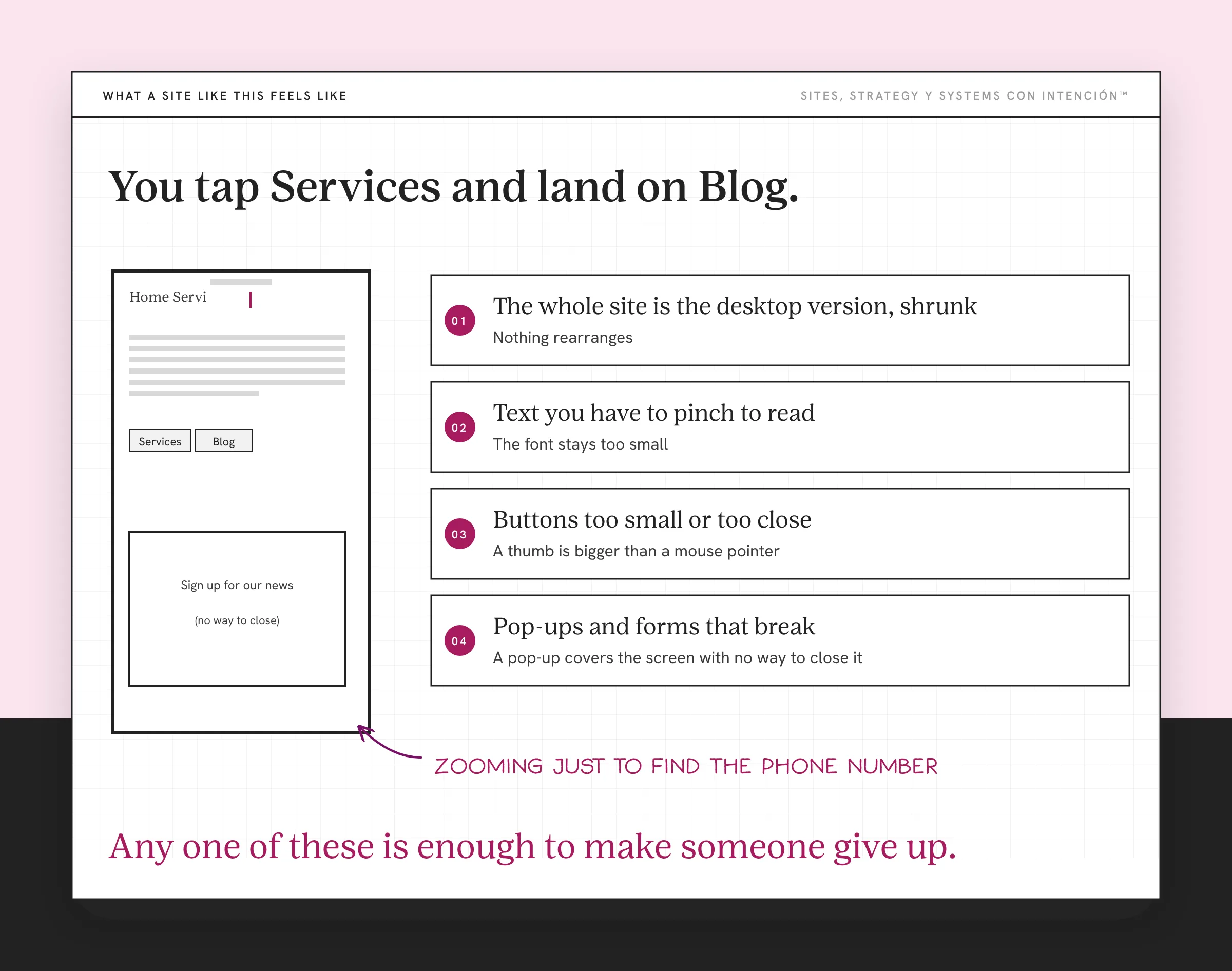
These are the four things I see most when I open a client's site on my phone:
- The whole site is the desktop version, shrunk. Nothing rearranges. You pinch to read every paragraph and pull back out to find where you are.
- Text you have to pinch to read. Even when the layout adjusts, the font stays too small for a phone.
- Buttons too small or too close together. You tap "Services" and land on "Blog." Pues, you try again and again.
- Pop-ups and forms that break. A pop-up covers the screen with no way to close it. Or the form won't scroll to the submit button.
Any one of these is enough to make someone in a hurry give up.
What Is a Non-Mobile-Friendly Site Costing You?
More web traffic comes from phones than from desktops. Worldwide, Statcounter's device market share data had mobile at about 59% of web traffic in September 2026. In the US, Statcounter's US data shows something closer to an even split, with mobile at 49.1% and desktop at 48.5%. Your own numbers will vary, so check your analytics to see how many of your visitors are on phones.
Even at an even split, that's half the people who visit you. And on a service-business site the cost shows up in three places.
People find you on their phone first. Someone sees your post on Instagram, gets your name in a text from a friend or finds you in a Google search while they're waiting for their cafecito. Their first impression of your business is your site on a phone and that's where your design has to build trust. Mija, if that first impression needs a magnifying glass, there isn't a second one.
It looks like you don't care. A site that breaks on a phone reads as outdated. Visitors decide the business is behind or careless or closed. That's the same judgment people make about an outdated website and it happens in seconds.
They can't take the next step. This is the one that hurts the most. Someone already decided they want to talk to you, then the booking calendar won't load, the form won't submit or the button's too small to tap. Bendito, they were ready. If you want to see what happens when that step goes missing, look at what happens when a website has no clear next step.
There's an SEO cost too. Google says it uses the mobile version of a site's content for indexing and ranking. The version of your site Google reads and ranks is the phone version, whether you designed for it or not.
When I was Web Director on a full redesign for a multi-offer experience brand, mobile was one part of the scope, along with the UX flow, content structure, navigation, SEO and integrated ticketing. In the first 90 days after the relaunch, bookings for a core experience went up 60%. That's a result of the whole project and the whole team. A booking path that works on a phone was one piece of it. The full story lives in how the website conversion funnel works.
How Do You Check If Your Website Is Mobile Friendly?
Open every page on your phone. Wepa, that's the whole test and you can run it right now.
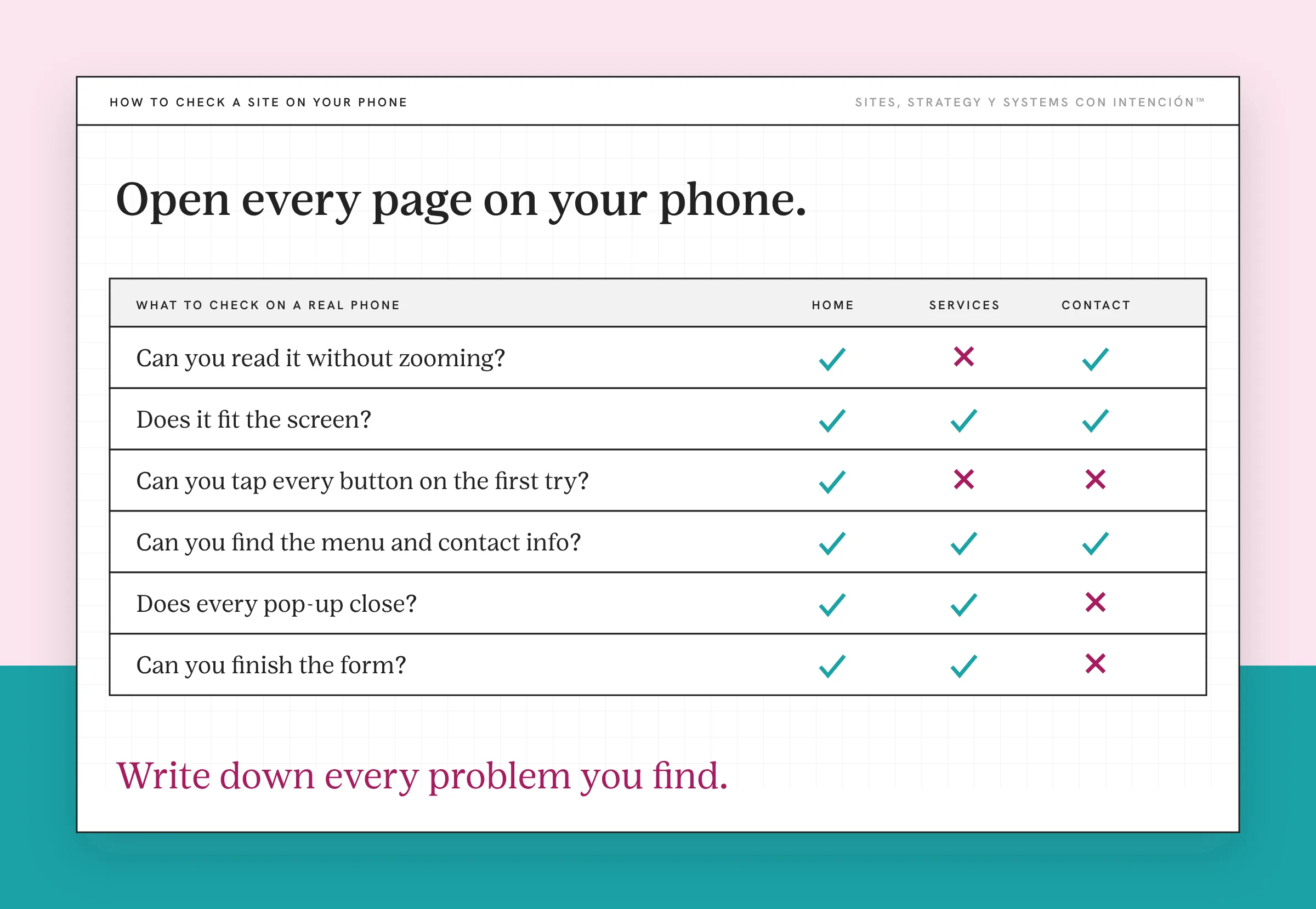
Don't do it on your laptop with the window dragged narrow. Use the actual phone in your hand, the way a client would. Go through each page and look for these:
- Can you read it without zooming? If you pinch, the text is too small.
- Does it fit the screen? If you can scroll sideways, the layout is broken.
- Can you tap every button on the first try? If you hit the wrong one, they're too small or too close.
- Can you find the menu and the contact info? Both should be easy to reach with a thumb.
- Does every pop-up close? If one covers the page with no way out, it's costing you.
- Can you finish the form? Fill it out and send it, then check that it arrived.
Write down every problem you find, page by page. That list is your fix list. Dale, start with whatever's broken on the booking path, then the pages that get the most traffic.
If you see a lot of pinching and scrolling sideways, look at the build first. If the layout works and it still feels like a lot, it might be cognitive load in UX, where too much is crammed onto a small screen.
How Do You Fix a Website That Isn't Mobile Friendly?
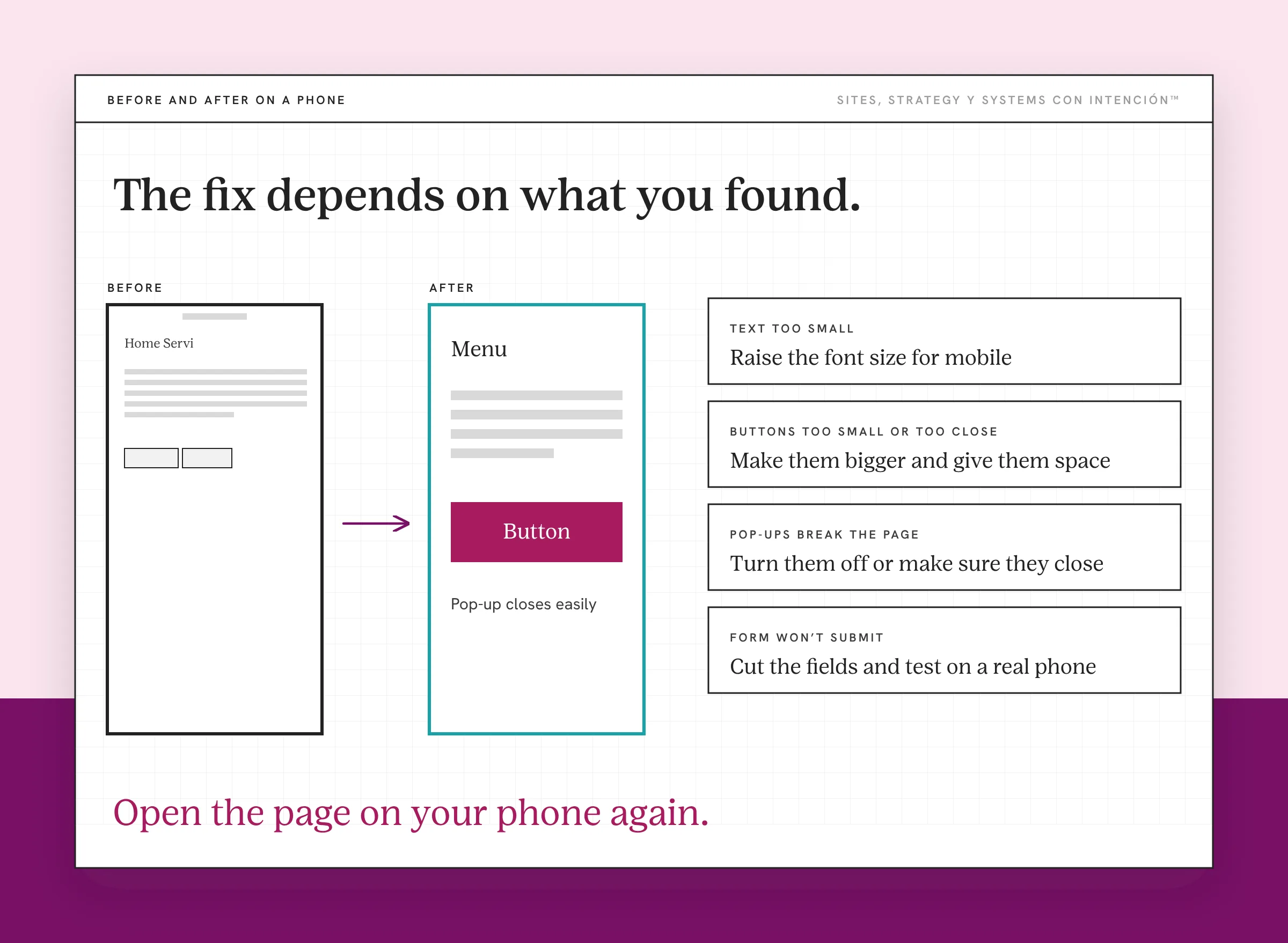
The fix depends on what you found.
If the whole site is the desktop version shrunk, the site wasn't built as a responsive website. A site that doesn't adjust at all points to an older build or an old theme. Ay, nena, that's often the moment to talk about a rebuild instead of patching every page of a site that needs constant updates.
If the layout works but the text is small, raise the font size for mobile. Body text should be readable at arm's length without zooming.
If the buttons are too small or too close, make them bigger and give them space. Your main button should be easy to hit with a thumb.
If pop-ups break the page, turn them off on mobile or make sure they close easily. Google's guidance is to avoid intrusive interstitials and a pop-up that blocks the screen isn't worth the email address anyway.
If the form won't submit, cut the fields that add friction and test it again on a real phone. Shorter forms are easier to finish on a small screen anyway.
After each fix, open the page on your phone again. Check it on a second phone if you can, since screen sizes vary. Checking on real phones is a step website strategy should never skip.
What to Do This Week
- Open your homepage, services page and contact page on your phone.
- Write down anything you have to pinch, zoom or tap twice.
- Fill out your own form on your phone and make sure it arrives.
- Check your analytics for how many visitors come from mobile.
If your site traffic isn't converting, mobile is one of the first places to look. It's also one of the problems in why a site that looks great still doesn't generate leads.
Your clients are meeting your business on a phone whether you planned for it or not. Make that version the one you'd be proud to hand them.
Key Takeaways
- A site that doesn't work on a phone forces people to pinch and fight to read or tap anything.
- Worldwide, most web traffic comes from phones. In the US it's about an even split.
- People often meet your business on their phone first. A broken phone experience reads as careless.
- The biggest cost is people who wanted to book and couldn't finish the step.
- Open every page on your phone, write down every problem and fix the booking path first.
Is my site losing people when they find me on their phone?
La Digital Rueda asks a few questions about your site, your content and your backend. In about two minutes it shows you where the pressure is. It's free.
Want more like this in your inbox? Off the Clock is my week-ish newsletter about websites, systems and burnout-free business.
Frequently Asked Questions
What happens if my website is not mobile friendly?
Visitors on a mobile device have to pinch and zoom to read, tap tiny buttons and fight with forms that don't fit the screen. Many give up and leave. It can also hurt your search visibility, since Google uses the mobile version of your content for indexing and ranking. For a service business, the biggest loss is people who wanted to contact you and couldn't.
How do I check if my website is mobile friendly?
Open every page on your actual phone. Check that you can read the text without zooming, that nothing scrolls sideways, that buttons work on the first tap and that pop-ups close. Then fill out your contact form and confirm it arrives. Do it the way a client would, one-handed, from the homepage to a sent message.
Does a website that isn't mobile friendly hurt SEO?
It can. Google uses the mobile version of a site for indexing and ranking, so content or links that don't work on mobile may not count the way you expect. A mobile-friendly site doesn't guarantee better rankings. A broken one makes it harder for both search engines and people to use your pages.
What is the difference between responsive design and a mobile site?
Responsive design means one site that rearranges itself to fit any screen. A separate mobile site is a different version built just for phones, often on its own address. Most modern sites go responsive because there's only one site to maintain and every visitor gets the same content.
Why is my website not mobile friendly?
It was likely built before mobile-first web design was standard. Sometimes the theme just wasn't responsive. It can also happen when custom code, oversized images or pop-ups ignore the screen size. Open it on your phone to see where it breaks, then fix the build, the font sizes or the elements causing the problem.
About the Author