Everyone in Queens knows someone with the car that's always in the shop. One week it's the brakes, the next it's a weird noise and the week after that the check engine light comes back on. They've spent more keeping it running than it would cost to replace it. They still can't trust it on a road trip.
A website that needs constant updates is that car. Every change waits on someone else, every update breaks something new and you're never sure it'll start in the morning. In 12+ years and 100+ sites worked on, I've learned that a site like this was built without a system. What looks like a maintenance problem is a build problem in disguise. This post covers why it happens, what it's costing you and how to decide between fixing it and rebuilding.
The Short Answer
A website that needs constant updates was built without a system. Every change needs a developer, plugins break each other and the theme won't update. It costs you hours, money and confidence. The fix is a platform you can edit yourself or a designer you trust to set up a CMS and templates. If nothing can be fixed separately, rebuild.
If You're Reading This Because It's Your Site
Reading more isn't the hard part. La Jugada is $47 and it tells you which layer this is actually sitting in.
Get it, $47Why Does Your Website Need Constant Updates?
Four causes come up again and again.
Every change needs a developer. You want to update a price, swap a photo or add a testimonial and you can't do it yourself. So you email someone, wait a few days and pay for ten minutes of work. Ay, Dios, multiply that by every small change in a year.
Too many plugins and patches. A plugin for the form, one for the gallery, one for SEO, one to fix what the last one broke. Learn WordPress names plugin and theme conflicts as a common reason a site breaks. Each update is another chance for one, so updates get skipped. Diache, then the skipped updates become the problem.
Built page by page with no system. When there are no templates, every page is its own custom thing. Changing your phone number means editing it in twelve places by hand. Adding a new service means building a page from scratch.
The theme won't update. This is one of my rebuild triggers. When the theme is so old or so customized that updating it would break the site, you're stuck on an outdated version that gets harder to maintain every month.
What Is a High-Maintenance Website Costing You?
Hours every week. Time spent fighting the site, waiting on fixes or doing manual updates is time you're not spending on clients and it comes straight out of your website's ROI.

Money on fixes. Small changes that should take you two minutes become invoices. Over a year, those add up to a real line in your budget, the same as any other business asset.
Fear of touching it. When one change might break everything, you stop making changes. Mija, that fear is the most expensive part, because it leads to the next one.
You stop updating it at all. The prices go out of date, the services change and the site still says what it said three years ago, which undercuts the trust good design builds. A site that's too hard to update becomes an outdated website and visitors notice. A site you can update yourself is an underrated website strategy decision.
What Does a Low-Maintenance Website Look Like?
A low-maintenance site is one you can keep current without dread. There are two good ways to get there.
A platform you can edit yourself. Modern website builders let you change text, swap images and add pages without touching code. If you can update your own site in a few minutes, you'll actually keep it current.
A designer you trust, with a CMS and templates you like. If you'd rather not do it yourself, work with someone who builds your site on a content management system with templates. A CMS lets you add a blog post, a testimonial or a new service by filling in fields while the design takes care of itself. Change something once and it updates everywhere it appears. Eso sí, make sure they show you how to use it before they hand it over.
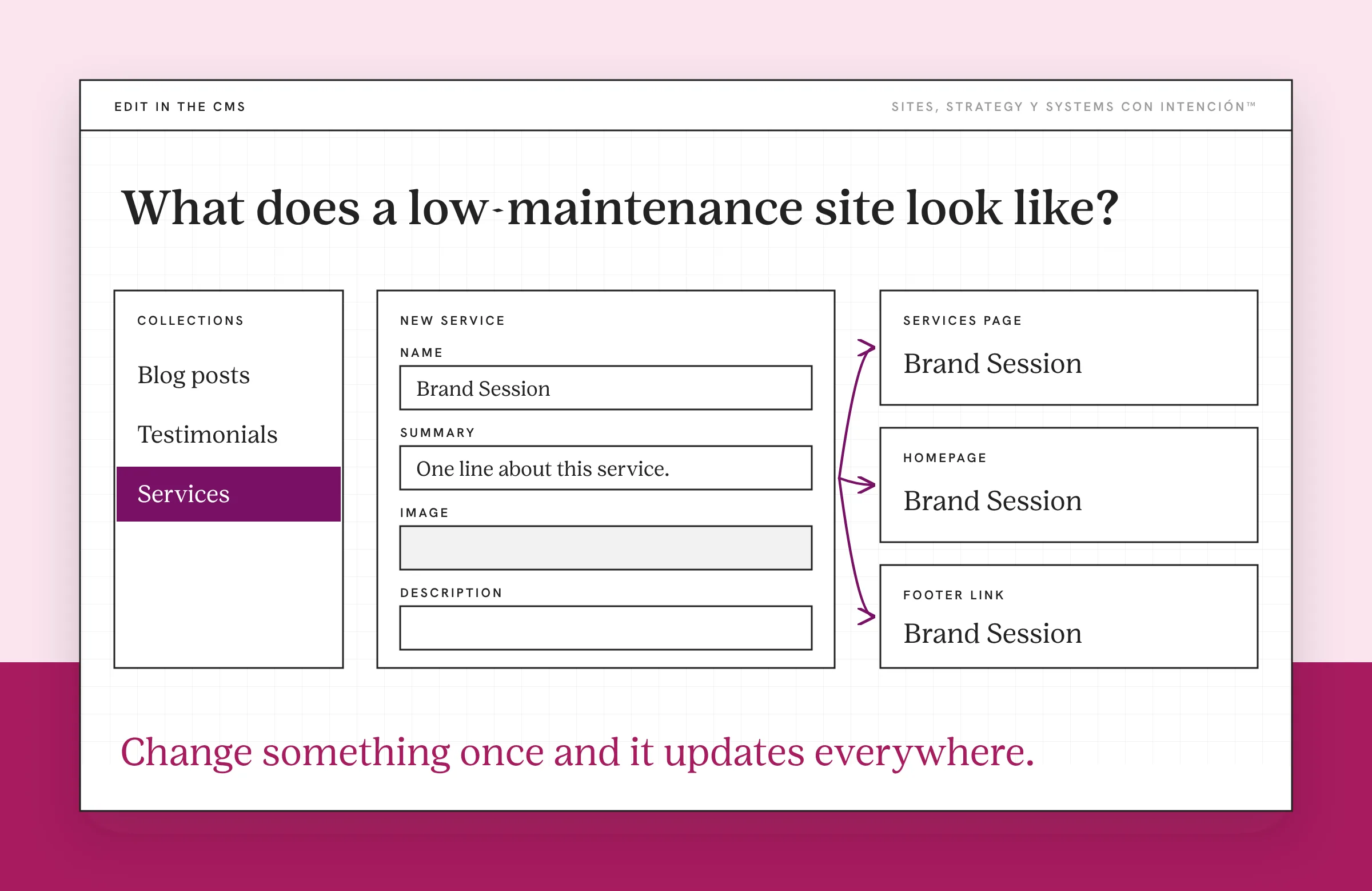
I moved a client who couldn't touch their own site onto Webflow with a CMS. Now they make their own updates, they've stopped paying someone for every small change and they're finally keeping their content current.
Either way, keep the build simple. Fewer plugins means fewer things to break. Whatever platform you use, back up the site before any big update. Even WordPress's own guide on updating WordPress tells you to back up before you get started.
Should You Fix It or Rebuild?
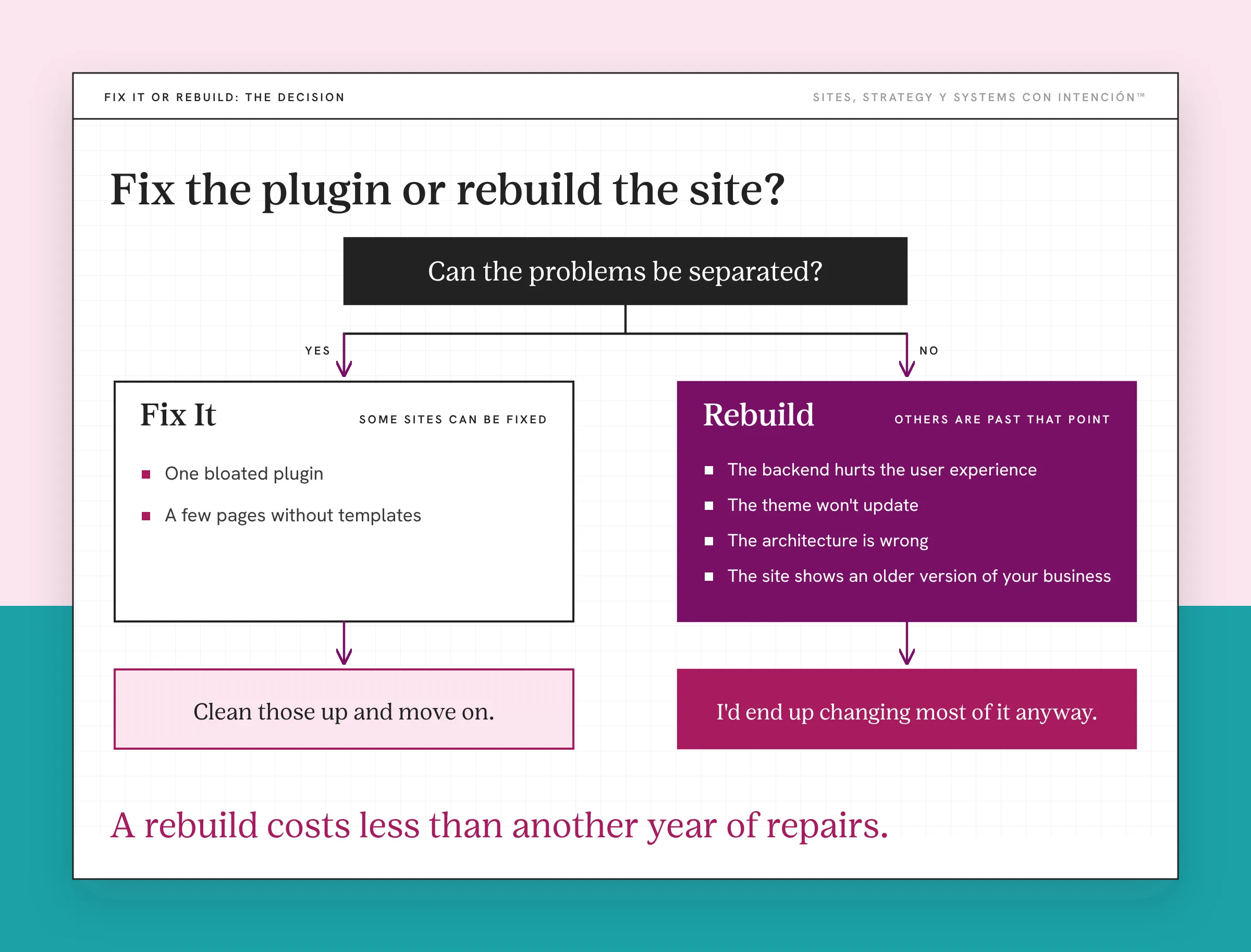
Some high-maintenance sites can be fixed. If the problem is one bloated plugin or a few pages without templates, clean those up and move on.
Other sites are past that point. My rule is about whether the problems can be separated. When the backend is broken enough to hurt the user experience, the theme won't update, the architecture is wrong and the site shows an older version of your business, I'd end up changing most of it anyway. It's not siloed fixes at that point. That's when a rebuild costs less than another year of repairs.
A rebuild needs care too. Early in my career I moved a client's domain too early and their email stopped working. I caught it right away and fixed it. I learned 301 redirects the hard way in the same stretch. Early career problems, fixed within a day. Plan your email, your 301 redirects and your forms before you switch anything over.
If you're not sure which one you need, website redesign vs rebuild walks through the difference. And if you want an honest gut check on whether the site is pulling its weight at all, run it through would you fire your website. If it's easy to update and still sends you nothing, start with why your site isn't generating leads.
Keeping the old car running feels cheaper every single week, pues. It's the year that tells you the truth.
Key Takeaways
- A website that needs constant updates was usually built without a system.
- The usual causes are a developer for every change, too many plugins, pages built one by one and a theme that won't update.
- It costs you hours, money and the confidence to touch your own site. Then the site goes stale.
- Choose a platform you can edit yourself or a designer you trust to set up a CMS and templates.
- When the problems can't be fixed separately, rebuild.
Can I talk through whether to fix this or rebuild?
Bring your site and whatever keeps breaking. We'll spend one private session on that real question and the notes are included. Sessions start at $350. Full audits are available and get quoted first.
Frequently Asked Questions
Why does my website need so many updates?
It comes down to how it was built. Sites with lots of plugins, heavy custom code or no templates need more attention, since each update can break something else. If every change also needs a developer, small updates pile up into constant work. A simpler build on a system you can edit cuts most of that.
Why is my website so hard to update?
It may not have a content management system or reusable templates, so every change is manual. It may also rely on plugins or a theme that's too old to update safely. Ask whoever built it to show you what you can change yourself. If the answer is almost nothing, that's the real problem.
Should I rebuild a website that's hard to maintain?
Rebuild when the problems can't be fixed one at a time, like a broken backend, a theme that won't update and a structure that doesn't fit your business anymore. If it's one plugin or a few pages, fix those instead. Compare the cost of a year of repairs with the cost of rebuilding.
What is a CMS and do I need one?
A content management system (CMS) lets you add and edit content by filling in fields instead of editing code or design. It keeps things like blog posts, testimonials and services consistent across your site. If you update your site regularly or want to without a developer, it's worth having.
How often should a website be updated?
Update the content whenever your business changes, like new services, prices or team members. Keep the platform, theme and plugins updated on a regular schedule and back up before big updates. A well-built site should make these updates quick and low-risk.
About the Author