Anyone who sold candy in middle school understood ROI before they knew the word. You bought the bag, sold it by the piece and knew by Friday whether the whole thing was worth it. Nobody had to explain the math. You could feel it in your pocket.
Your website deserves the same Friday check. Most service businesses never give it one. Website ROI gets treated like a mystery because clients usually book on a call or in your DMs, so the site never gets credit or blame. After 12+ years and 100+ sites, I can tell you the site is almost always doing one of two things: earning its keep or quietly costing you.
The Short Answer
Website ROI is what your site brings in compared with what it costs you to run. For a service business, that means the clients who found or chose you through the site against hosting, tools, fees and your own time. If the return is higher than the cost, the site is an asset. If it isn't, it's a liability.
If You're Reading This Because It's Your Site
Reading more isn't the hard part. La Jugada is $47 and it tells you which layer this is actually sitting in.
Get it, $47What Makes a Website an Asset or a Liability?
A business asset works for you when you're not looking. A liability keeps asking for money and attention and gives very little back.
Your site is probably an asset if:
- People reach out already knowing what you do. They've read the services page and they show up with real questions.
- It does part of the selling. By the time someone books a call with me, they've usually already decided. That's the site doing its job before I ever say hello. If yours isn't there yet, your website is your best salesperson shows what that looks like.
- You can send people to it without a disclaimer. No "ignore the old pricing" on the call.
- You own it. I've worked with service brands whose social numbers cratered overnight. The site and the email list were still standing.
Your site is probably a liability if:
- It costs you every month and you can't name a single client it brought in.
- Every update needs someone else or eats your weekend. That's a site that needs constant updates.
- People find you, look around and leave. Traffic shows up in your reports and inquiries don't. That's website traffic that isn't converting.
- You've stacked tools to fix problems the site created.
I've seen that last one up close. A client's site was costing more than it returned. Most of that cost wasn't even the hosting bill. It was the stack of tools and plugins they were paying for every month, plus their own time keeping it all running. Ay, bendito, nobody had ever added those hours to the bill. Once you count your time, mija, a lot of "cheap" sites stop looking cheap.
If you want a fuller performance review, would you fire your website gives it four questions.
How Do You Calculate Website ROI?
The formula is the same ROI calculation you'd use for anything else:
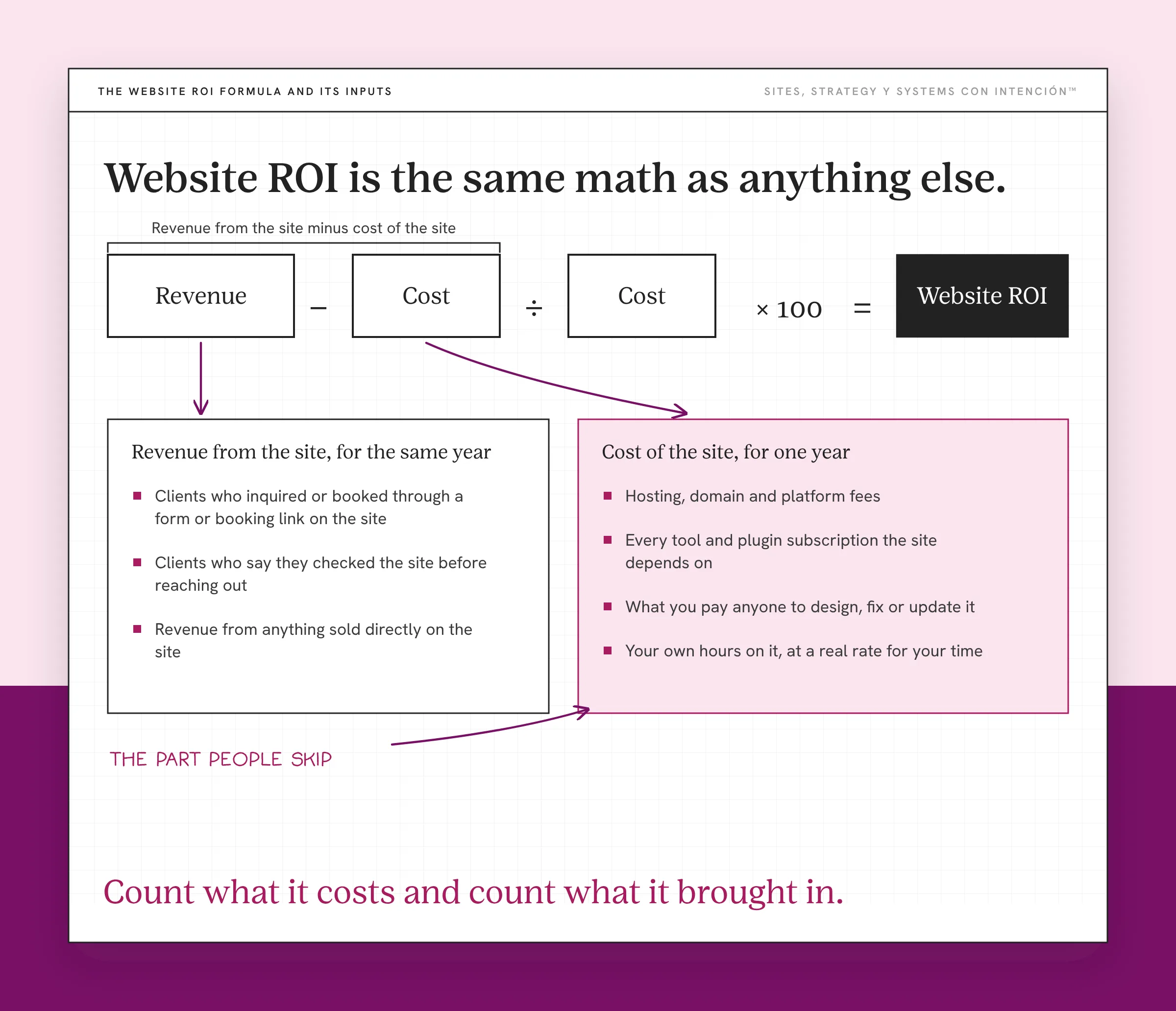
Website ROI = (revenue from the site − cost of the site) ÷ cost of the site × 100
The math is easy. Filling in the two numbers honestly is the part people skip.
Cost of the site, for one year:
- Hosting, domain and platform fees
- Every tool and plugin subscription the site depends on
- What you pay anyone to design, fix or update it
- Your own hours on it, at a real rate for your time
Revenue from the site, for the same year:
- Clients who inquired or booked through a form or booking link on the site
- Clients who say they checked the site before reaching out
- Revenue from anything sold directly on the site
A made-up example makes the math easy to follow. Say the site costs you $3,000 a year once you count everything, including your time. It brought in two clients this year at $2,500 each. That's $5,000 in revenue, so the ROI is ($5,000 − $3,000) ÷ $3,000 × 100. That's about 67%. The site is an asset. If it brought in one client, it would be under water.
In that example, fíjate, the whole answer depends on counting the clients correctly. That's where most service businesses get stuck.
How Do You Measure Website ROI When Clients Book Off the Site?
Most service clients don't buy from a checkout page. They read your site, then they DM you, email you or book a call. So the site does the work and something else gets the attribution credit.
Three habits fix most of that:
- Track the actions that matter. Set your form submissions and booking clicks up as key events in Google Analytics 4. Google describes a key event as an action that's particularly important to the success of your business. What to track in GA4 for a service business walks through the setup.
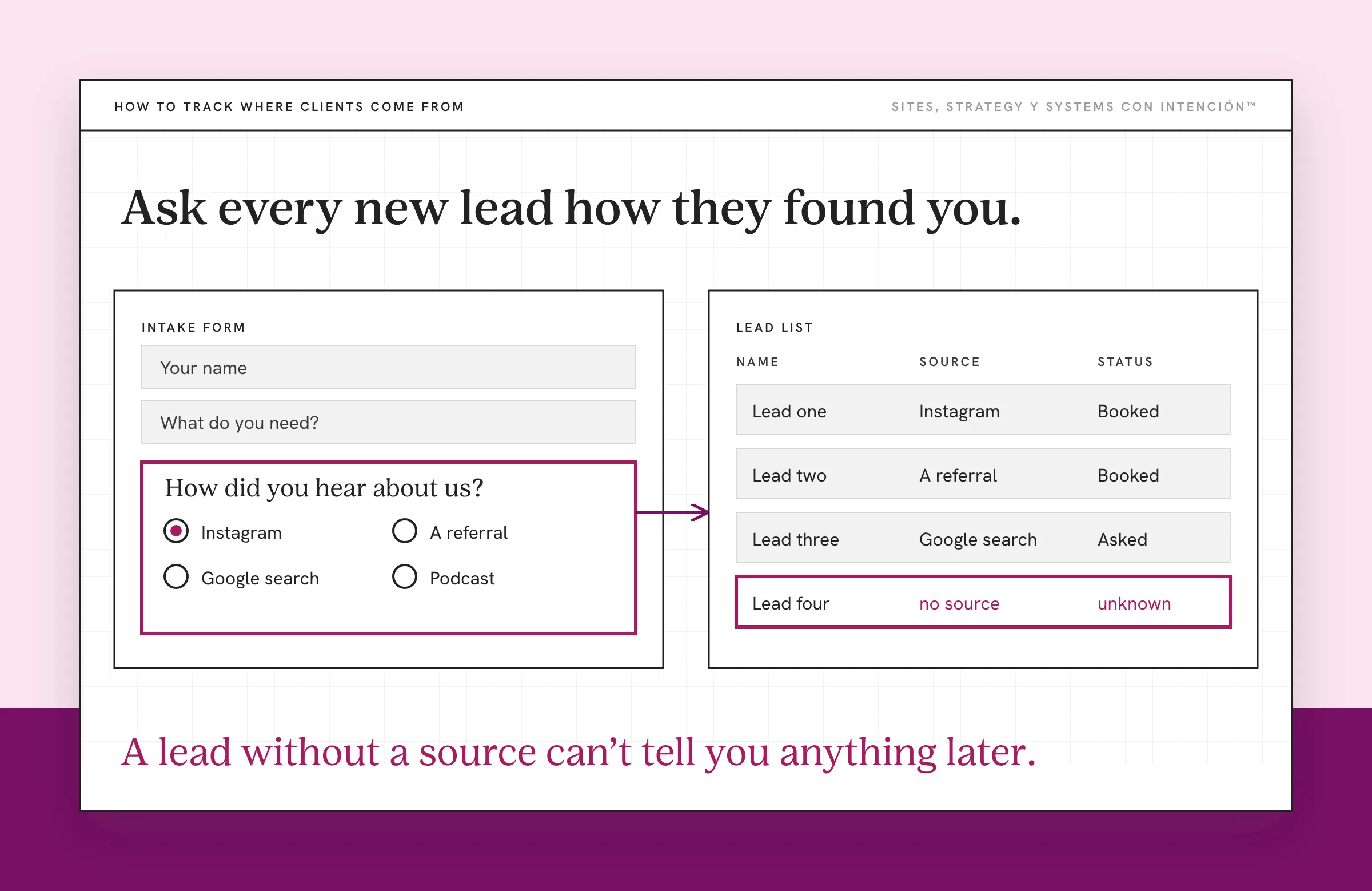
- Ask every new lead how they found you. Put it on your intake form or ask on the first call. "Your website" counts even when they messaged you on Instagram first.
- Write it in your CRM. A lead without a source can't tell you anything later.
Then look at it monthly, along with the website metrics that matter. After a few months, you'll know which clients the site helped bring in and roughly what they were worth.
Your blog belongs in this math too. When posts lead readers to an offer, they pull their weight, which is the whole point of content bringing them in and the site closing the sale.
What Should You Do If Your Site Is a Liability?
If you're paying for tools nobody uses, start with the cost side, because it's the fastest win. Cancel the tools nobody uses. Count your hours honestly and decide which updates actually need to happen.

Then look at the return side. If people visit and don't reach out, find out why before you spend more to send them there. Spending more on traffic first is the trap in why no amount of marketing will fix a bad website. Check what a normal conversion rate looks like too, so you know whether yours is actually low. And if the site looks finished but sends nothing your way, why your website isn't generating leads is the place to start.
Some sites can be turned around with a few fixes. Others were built for a business you don't run anymore. Eso sí, you won't know which one you've got until you've put real numbers next to it. Putting numbers next to the site is where website strategy starts paying for itself.
Your site should earn like an asset. If you've never done the Friday check, do it this month. Count what it costs, count what it brought in and look at the two numbers side by side.
Key Takeaways
- Website ROI compares what your site brings in with everything it costs, including your own time.
- An asset sells for you, holds up when other channels drop and doesn't need a disclaimer. A liability costs money and attention every month without bringing in clients.
- Use the formula (revenue − cost) ÷ cost × 100 and count tools, fees and hours on the cost side.
- For a service business, track key events, ask every lead how they found you and log the source in your CRM.
- Cut the costs first, then fix why visitors aren't reaching out before you spend more to send them there.
I did the math. Can someone help me read it?
Bring your site, your numbers and the math you just did to one private session on your real question. You'll leave with notes. Sessions start at $350. Full audits are available and get quoted first.
Frequently Asked Questions
How do I calculate the ROI of my website?
Subtract what the site cost you this year from the revenue it brought in, divide by the cost and multiply by 100. Count hosting, domain fees, tools, plugins, anyone you pay to update it and your own hours. On the revenue side, count clients who booked or inquired through the site or checked it before they reached out.
Is my website an asset or a liability?
It's an asset if it brings in clients, does part of the selling and lets you share it without apologizing. It's a liability if it costs you every month and you can't name a client it brought in. Count your time on the cost side, because that's usually what tips a cheap site into a costly one.
How do I measure website ROI when clients book off the site?
Set your form submissions and booking clicks as key events in Google Analytics 4. Ask every new lead how they found you and note the answer in your CRM. Count "I looked at your website first" as a site-assisted client, even if they reached out on social media or by email.
What is a good ROI for a small business website?
Any return above zero means the site pays for itself. Anything well above it means the site is an asset. There's no single benchmark for service businesses because prices vary so much. One extra client a year can cover the whole cost of a site for a high-ticket service, so track your own number over time.
Should I spend more on my website if it isn't bringing in clients?
Hold off until you know why. Cut tools you don't need first, then find out whether people aren't finding the site or aren't reaching out once they're there. Spending on traffic before you fix the reason visitors leave usually raises the cost without raising the return.
About the Author