You know how the whole apartment smells like Fabuloso and you'd swear the floors are clean? Then you look closer and you only sprayed it near the door. It smells like work got done, but the floor tells a different story.
Website traffic works the same way. The chart goes up, the visits look healthy and it feels like the site is doing its job. Then you check your inbox and nobody's reaching out. When you've got website traffic not converting, the smell of progress is hiding a floor nobody mopped. I've looked at this exact problem on a lot of the 100+ sites I've worked on in 12+ years. The fix always starts with one question.
The Short Answer
When your website traffic isn't converting, first figure out whether you have the wrong people or the wrong pages. Compare how different traffic sources behave. If even your warmest visitors don't reach out, the site is the problem. Start with anything broken, then wherever the data shows people dropping off: speed, navigation, the first screen, your key pages and whether everything works.
If You're Reading This Because It's Your Site
Reading more isn't the hard part. La Jugada is $47 and it tells you which layer this is actually sitting in.
Get it, $47Is It the Wrong Traffic or the Wrong Site?
This is the first fork in the road. It's an easy one to skip. Most people start rewriting pages when the real problem is who's showing up. Or they buy more ads when the pages are what's broken, y ahí se va el dinero.
The simplest test I know is to look at your traffic by source in Google Analytics 4 and compare how each one behaves.
Your direct visitors are your control group. These are people who typed your URL in or used a saved link, often because a client told them about you. They arrive warm. GA4's Referral channel is different. It counts clicks from other websites, so check which sites those are before you treat them as warm. If even your direct visitors look around and leave without reaching out, the site is the problem, because the people were already halfway to yes.

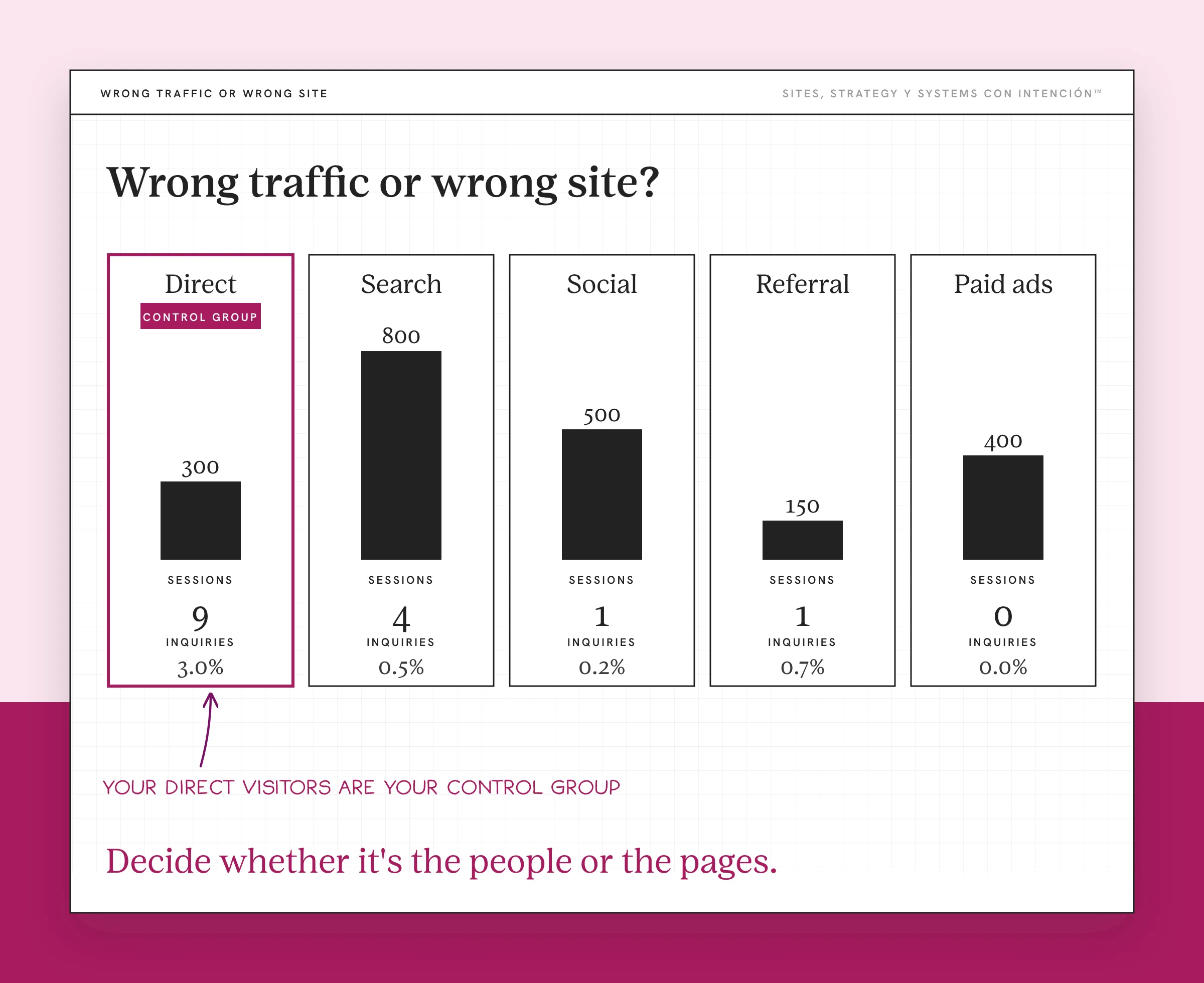
If warm traffic converts and everything else doesn't, look at the people first. Maybe a blog post is pulling readers who want to learn the skill themselves. Maybe your ads are reaching a broad audience that likes the content and has no reason to buy. More traffic is not the goal goes deeper on that side. If the people check out, look at the message and the page they land on next.
If nobody converts from any source, look at the pages. That's when the order below matters.
Before you decide either way, check what a normal conversion rate looks like. A service business with a low-looking number can be doing fine. Knowing that saves you from fixing something that isn't broken.
What Should You Check First on the Site?
When the pages are the problem, my usual order is load time, navigation, the hero, the homepage as a whole, SEO, then the individual pages, whether everything works and whether any of it is connected. The data decides where I actually start. That order checks whether the site functions before it checks whether it's good.
For a site with traffic and no conversions, these five checks are where I'd start:
- Speed. Run your main pages through Google's PageSpeed Insights and check the mobile result. Slow pages lose people before they read a word. Google's web.dev reports the BBC lost an additional 10% of users for every additional second its site took to load. If the phone version fights them too, see what a site that isn't mobile friendly is costing you.
- Navigation. Can someone find your services and your contact page in one click? If your menu reads like a filing cabinet, people won't dig.
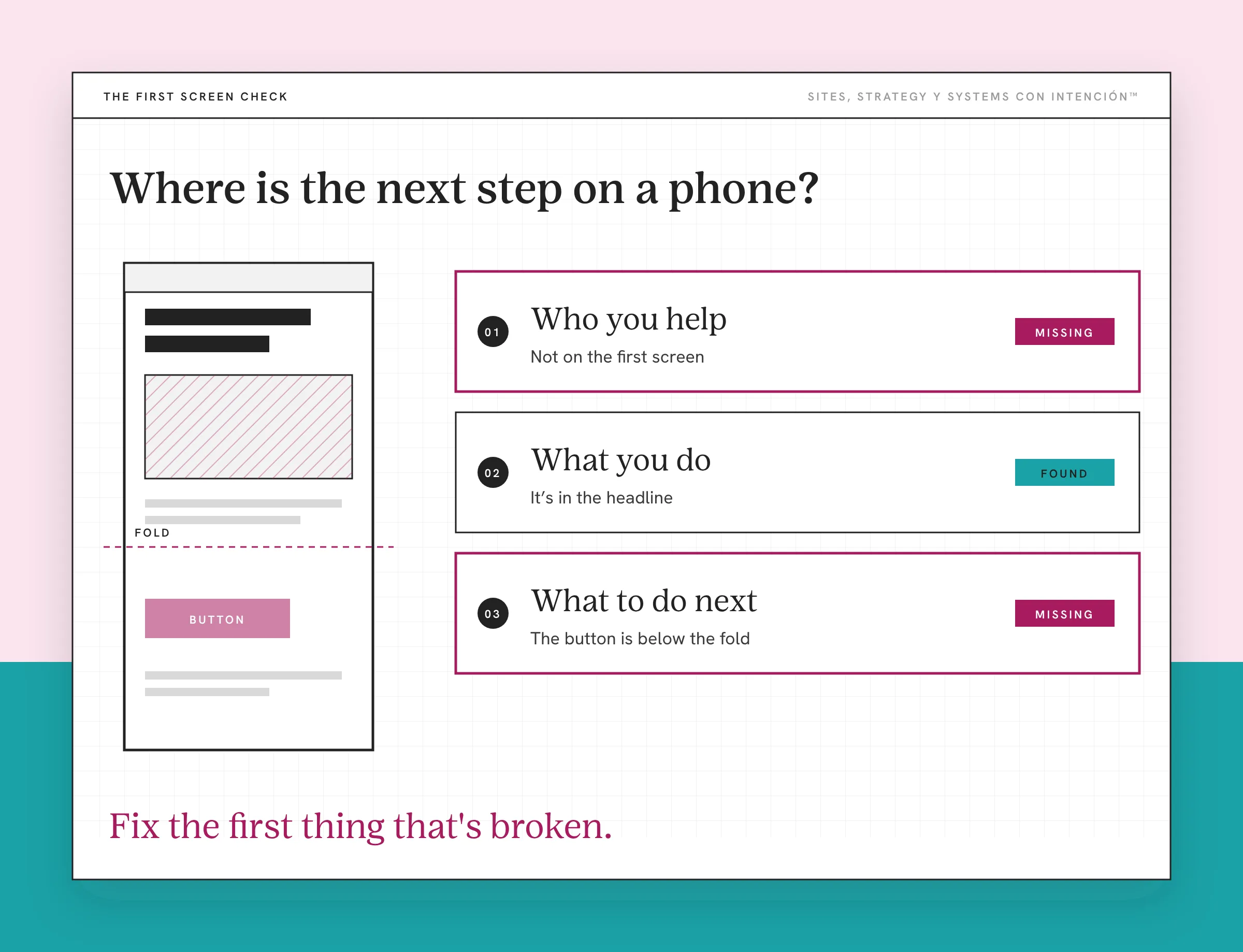
- The first screen. Does the top of your homepage say who you help, what you do and what to do next? If someone has to work to figure that out, the cognitive load of a busy page is doing the damage.
- Your services page. This is where people decide. Check that it says who each offer is for, what's included and what happens next. Then check whether there's proof near the ask, because the trust signals that hold up belong right there.
- The path to inquiry. Fill out your own form on your phone. Book your own call. Make sure it arrives and that something tells the person it worked.
That last one catches more than people expect, diache. Broken forms don't announce themselves.
Why Do Some Sites Get Traffic and Still Not Convert?
Across every audit I've run, the strategic conversion layer is the part with the biggest impact. When nothing is broken, technical fixes alone rarely move conversion. Speed matters, but a fast page that doesn't say who it's for still won't get anyone to reach out.
I've also watched founders run a full funnel with paid ads, a lead magnet, a five-email nurture and a calendar link that still didn't convert. Every piece looked fine on its own. The problem lived in the handoffs between them, qué lío, where the ad said one thing and the page said another. What happens right after the click is where that usually breaks.
What counts as a problem also depends on your goals. A slow blog post might not matter much for a consultant who gets most clients from referrals. A broken booking form matters for everyone. The checklist is the same every time, but the verdict changes with what the site is supposed to do. That's why I don't believe in one-size website strategy.
What If You Fix the Basics and It Still Doesn't Convert?
Then the friction is probably smaller and spread out. Long forms, unclear buttons, a step that asks for too much too soon. A conversion friction audit walks through how to find them one by one.
It's also worth checking your high bounce rate page by page. If one key page loses people much faster than the rest, start there, pues.
And if your traffic keeps climbing while revenue stays flat, look at what the site is actually costing you. Website ROI helps you put real numbers next to it, so you can decide whether to keep fixing or start planning something bigger. When the design looks finished and nothing's coming in, why your website isn't generating leads is the bigger picture behind all of this.
Traffic that doesn't convert is information. Decide whether it's the people or the pages, check the site in order and fix the first thing that's broken before you touch the second.
Key Takeaways
- When website traffic isn't converting, first decide whether it's the wrong people or the wrong pages.
- Referrals and direct visitors are your control group. If even warm traffic doesn't reach out, the site is the problem.
- Check the site in order: speed, navigation, the first screen, your services page and the path to inquiry.
- Technical fixes alone rarely move conversion. The messaging and the path to reaching out usually matter more.
- Test your own form and booking link on your phone, because broken forms don't announce themselves.
Can someone just look at my traffic and my pages with me?
Bring your site, your numbers and whatever's bugging you. We'll work through it together in one private session and you'll get notes after. It's from $350. Full audits are available and get quoted first.
Frequently Asked Questions
Why is my website getting traffic but no conversions?
Usually it's one of two things: the traffic isn't the right audience or the pages aren't giving those visitors a clear reason and path to reach out. Compare how different traffic sources behave in Google Analytics 4. If referrals and direct visitors don't convert either, the site is the problem.
What should I check first when my website isn't converting?
Start with speed on a phone, then your navigation, then the first screen of your homepage. After that, check your services page and the path to inquiry by filling out your own form. That order finds the problems that stop people before the smaller ones that slow them down.
How do I know if I have the wrong traffic?
Look at where your visitors come from and what they read. If one blog post or ad brings most of your traffic and almost none of it reaches out, that source may be attracting people who were never going to hire you. Warm sources like referrals converting while cold ones don't is another sign.
Can a website get too much traffic?
It won't hurt the site, but too much of the wrong traffic can hide what's working. It drags down your conversion rate and makes the site look broken when it isn't. Focus on bringing in the people you can help, then measure what they do.
How long should I wait to see if my changes work?
Give each change about a month of normal traffic before you judge it. Change one thing at a time so you know which one made the difference. Compare the same pages and the same traffic sources before and after.
About the Author