The anatomy of a high converting website starts with how it feels to use. If your pages are slow, your buttons are tiny or nobody can tell what to do next, people leave faster than Bad Bunny tickets sell out. You've been on that ticket site, so you know how fast that is.
That feeling is user experience and it's the part service businesses skip when they build. In 12+ years and 100+ sites worked on, every time I've cut a page down to one decision point, that change outperformed everything else on my list combined. This post covers what UX means on a service site, why pretty isn't enough, the three things high-converting sites share and a test you can run with your tío this week.
The Short Answer
A high-converting website feels easy to use. People can tell what you do, find what they came for and take the next step without thinking hard about it. That feeling is user experience and it matters more than how the site looks. Every bit of friction, from a slow page to a confusing menu, is a reason to leave.
If You're Reading This Because It's Your Site
Reading more isn't the hard part. La Jugada is $47 and it tells you which layer this is actually sitting in.
Get it, $47What Is UX, Really?
User experience is how people feel when they interact with your website. That's it. Nielsen Norman Group puts it more formally: user experience covers every part of someone's interaction with a company, its services and its products. On your site, it's the difference between "this person gets me" and "I'm out."
Good UX feels like walking into your favorite coffee shop. They already know your order, the vibe is right and everything is where it should be. You don't have to think. You just move through it and enjoy it.
Bad UX feels like hunting for the bathroom in a restaurant that thought it was too cool for signs. Ay, por favor. You're peeking into doors and wondering whether to just leave.
Your visitors are having one of those two experiences on your site right now. Hardly anyone tells you which one, so it's on you to spot how UX fails on a service site.
Why Isn't a Pretty Website Enough?
I don't care how beautiful your website is. If it loads like dial-up, if visitors get lost clicking around or if booking a call feels like solving a Rubik's cube, people leave. Qué horror, all that design work and nobody stays long enough to see it.
A pretty site can still be a confusing one. The design catches the eye, then the visitor has to figure out what you do, who it's for and where to click. Every one of those questions is work. When the work piles up, they stop.

That's why the sites that convert aren't always the ones with the fanciest design. You don't need fancy design. You need clarity, flow and function. Chacho, a plain site that's easy to use will beat a gorgeous one that's confusing every time someone needs to make a decision.
If your site looks great and still isn't bringing in leads, look at the UX before you touch the design. Start with why a great-looking site isn't generating leads.
How Does Friction Cost You Conversions?
Friction is anything that makes the next step harder than it needs to be. It's a page that takes too long to load, a menu with too many items, a button you can't tap on a phone or a form that asks for your life story. Oye, none of these feels like a big deal on its own.
They stack up, though. Each one costs the visitor a little patience and patience runs out. I've been that visitor. I was trying to buy something once with my card already out. The checkout kept freezing until I gave up and closed the tab. People give up even when they're excited and ready to buy. In Baymard Institute's cart abandonment research, 17% of US online shoppers who abandoned a cart for a reason other than just browsing said the site had errors or crashed.

That's the part owners miss. Five small problems that each felt too minor to fix can lose you more people than one big one. Mija, every friction point you leave in place is one more reason for someone to go.
What Do High-Converting Websites Have in Common?
When you look at the anatomy of a high converting website, the same three things show up: clarity, flow and function. The specific moves vary by business, but they all serve those three.
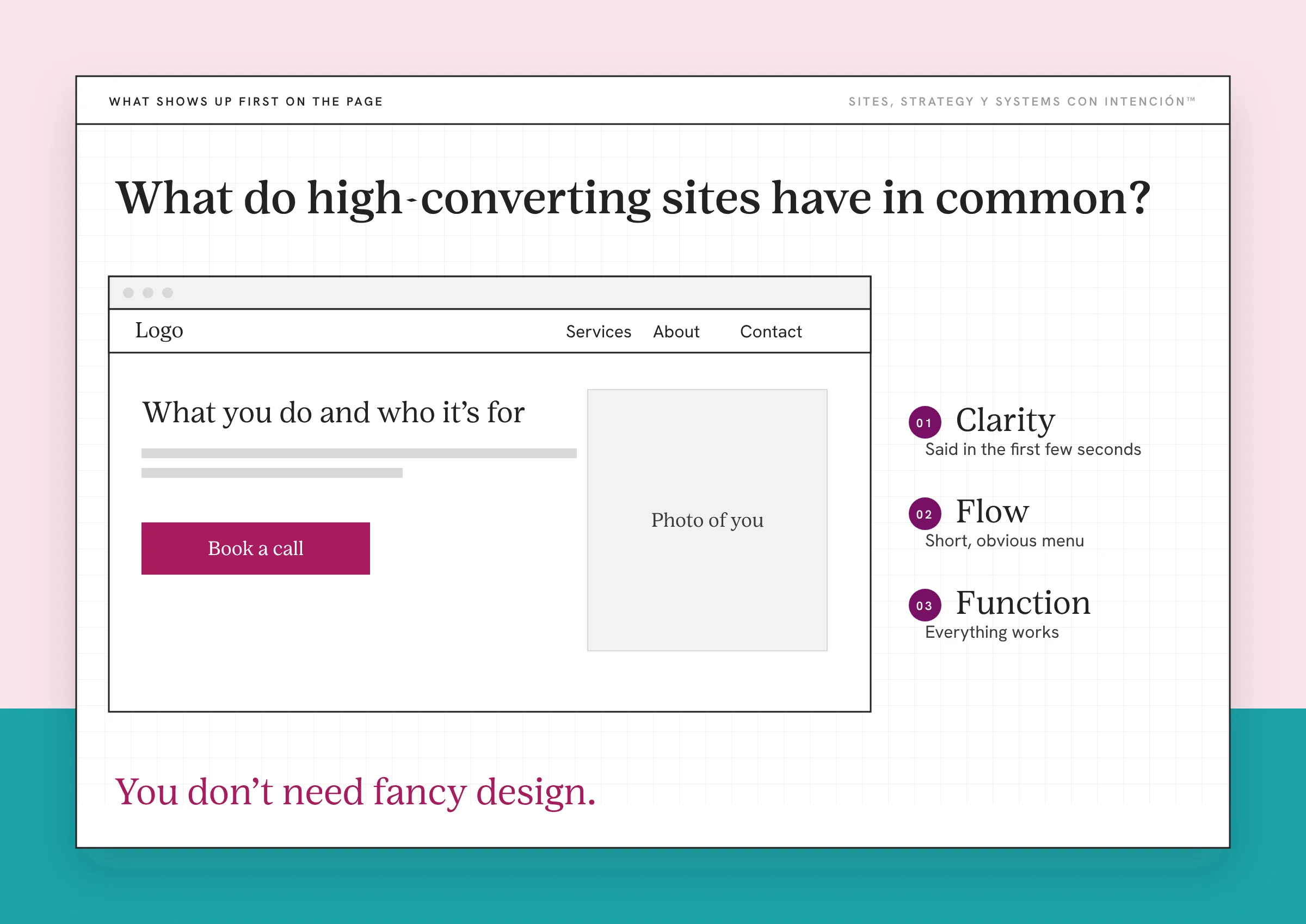
Clarity. Someone can tell what you do, who it's for and why it matters within the first few seconds. The copy speaks to their problem in plain words. Labels say what they mean. Your homepage headline and value proposition do most of that work. When there's too much on the page to take in, cognitive load may be part of it.
Flow. The site guides people from "I'm curious" to "I'm ready" without dead ends. The menu is short and obvious. My rule is to put the most important pages in the nav first. Keeping them in the main nav also helps Google see which pages matter most. I won't put About first and I won't let a blog or podcast sit in the main nav when they compete with the path to booking. Each page points to a next step with one clear CTA, so the layout leads people toward the conversion you want. If people are getting lost, start with the navigation types that keep a menu simple.
Function. Everything works. Pages load fast, buttons are easy to tap on a phone and forms submit. Pues, this is the least glamorous part and the one that hurts your conversion rate the most when it breaks. I've seen a client site where the contact form simply wasn't sending. Nobody knew, because a broken form doesn't announce itself. Once it was fixed, inquiries started coming in again. If your site isn't built for phones, see what a website that isn't mobile friendly is costing you.
Underneath all three is trust. People need to feel safe before they reach out. Design helps build trust and so does social proof like reviews and client stories. The details live in how website design builds trust. And when it's time for the ask, why people don't click call to action buttons covers what's going on in their head. Put together, that's what website strategy looks like when it's working.
Would Your Tío Find What He Needs?
My favorite test is simple. Picture your tech-challenged tío, the one who still types "Google" into the Google search bar. Hand him your site on his phone and ask him to find how to book a call with you.
If he can do it in seconds without asking you for help, the path to booking is in good shape. If he scrolls up and down, taps the wrong thing or hands the phone back confused, you've found your friction. Dale, try it this week with a real person who doesn't know your business.
Then fix what tripped them up, one thing at a time. Ya tú sabes, you don't have to redo everything at once. Pick the biggest stumble, fix it, then test again.
Key Takeaways
- UX is how people feel on your site. It decides whether a visit becomes an inquiry.
- A pretty site can still be a confusing one. Clarity, flow and function matter more than fancy design.
- Friction stacks up. Small annoyances add up to a closed tab.
- The anatomy of a high-converting website comes down to clarity, flow, function and the trust they build.
- Test your site with someone who doesn't know your business and fix what trips them up first.
Could a first-time visitor find what they need on my site?
La Digital Rueda is free and takes about two minutes. Answer a few questions about your site, your content and your backend and you'll see where the pressure is.
Want more like this in your inbox? Off the Clock is my week-ish newsletter about websites, systems and burnout-free business.
Frequently Asked Questions
What makes a website high converting?
A high-converting website is easy to understand and easy to act on. Visitors can tell what you do and who it's for in seconds, find what they need without hunting and take the next step without friction. Fast pages, a short menu, clear copy and a working form matter more than any single design trend.
Why does UX matter for conversions?
UX shapes how people feel while they're on your site. When it feels easy, people stay long enough to decide. When it feels frustrating, they leave, even if they were interested. Every confusing label, slow page or broken button gives someone a reason to stop before they reach out.
Can a beautiful website still not convert?
Yes. A site can look polished and still be hard to use. If visitors can't tell what you offer, where to click or how to book, the design doesn't help. Clarity and function decide whether people act. Good design makes a clear site feel better and can't rescue a confusing one.
How can I improve my website's UX without a redesign?
Start small. Shorten your menu, rewrite unclear labels, cut fields from your contact form and test every button on your phone. Then watch someone who doesn't know your business try to book a call and fix whatever trips them up first. Many UX improvements cost time more than money.
How do I know if my website has a UX problem?
Look for traffic without inquiries, people who leave quickly and questions from clients that your site already answers. Then test it with a real person on a phone. If they hesitate, get lost or can't finish a task, you've found the friction that's costing you conversions.
About the Author