Remember waiting on a LimeWire download? The bar crawls to 99% and sits there while you wait and refresh. Eventually you give up and the song you wanted never shows up.
That's conversion friction. A conversion friction website audit is how you find where your site does the same thing to the people trying to hire you. In 12+ years and 100+ sites worked on, the sites losing inquiries often don't have one dramatic problem. They have a string of small ones: a slow page, a confusing label, a form field nobody wanted to fill out. Each one costs a little patience until someone stops at 99%. This post walks you through where friction hides and a six-step audit you can run on your phone.
The Short Answer
Conversion friction is anything on your site that makes the next step harder than it needs to be. Small frictions add up until people quit. To audit it, walk through your site step by step the way a new visitor would and write down every place you hesitate. Then fix the ones closest to the inquiry first.
If You're Reading This Because It's Your Site
Reading more isn't the hard part. La Jugada is $47 and it tells you which layer this is actually sitting in.
Get it, $47What Is Conversion Friction?
Conversion friction is the effort, confusion or doubt that sits between a visitor and the action you want them to take. Some of it is technical, like a slow page or a broken button. Some of it is mental, like copy they have to reread or a choice they can't make. Some of it is emotional, like worrying a call means getting pitched.
None of it looks like much on its own. Qué lío when it stacks, though. A visitor can survive one slow page. They might push through a confusing menu. By the time they hit a long form after both, they're done.
That's why a friction audit looks at the whole path instead of one page at a time.
Where Does Friction Hide on a Service-Business Site?
Friction shows up at a handful of steps:
- Arriving. The page loads slowly or looks broken on a phone. See what a site that isn't mobile friendly costs you.
- Understanding. The top of the page doesn't say what you do or who it's for, so people have to dig. Sometimes the answer is already on the page and they still can't find it.
- Deciding. Too many options, look-alike packages or a crowded menu. Hick's Law and cognitive load both live here.
- Trusting. Website trust signals are missing: no proof, no face, no sense of what happens next.
- Acting. A vague button, a long form or a booking tool that won't load. That's where why people don't click call to action buttons comes in.
- After acting. No confirmation, no idea if the message arrived and nothing that says what happens now. That's a broken post-click experience.
Ojo, the steps closest to the inquiry cost you the most. Bendito, someone who quits on your form already decided they wanted to talk to you.
How Do You Run a Conversion Friction Website Audit?
You don't need special software. You need your phone, a notebook and the willingness to see your site like a stranger.
Step 1: Pick the Path That Matters Most
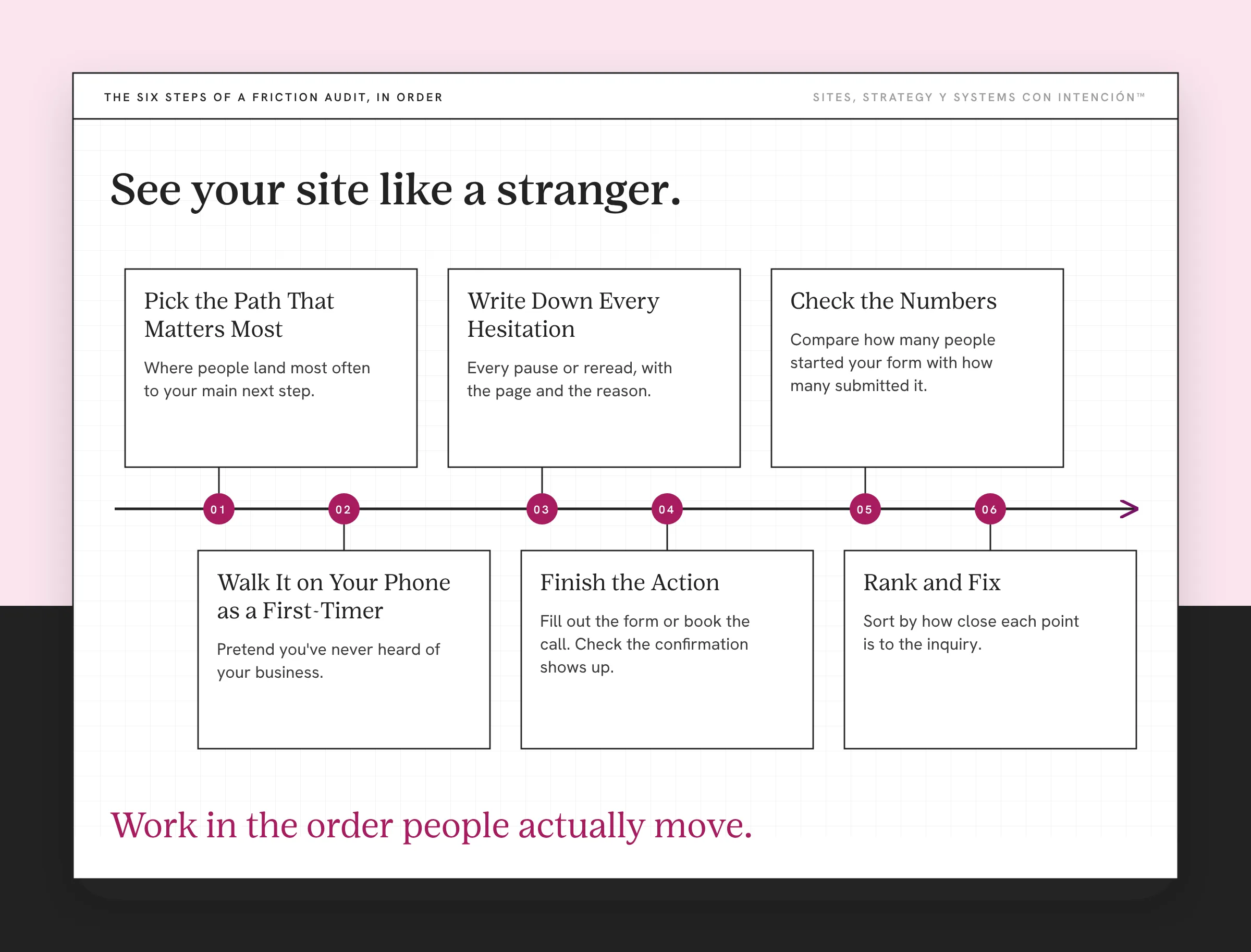
Choose the route from where people land most often to your main next step. For most service businesses, that's homepage or a blog post, then a services page, then the contact form or booking calendar.
Step 2: Walk It on Your Phone as a First-Timer
Pretend you've never heard of your business. Go page by page. Don't skip anything because you already know where it is.
Step 3: Write Down Every Hesitation
Every time you pause, reread, scroll back up, zoom in or wonder where to tap, write it down with the page and the reason. Mija, be picky here. The small stuff is the point.
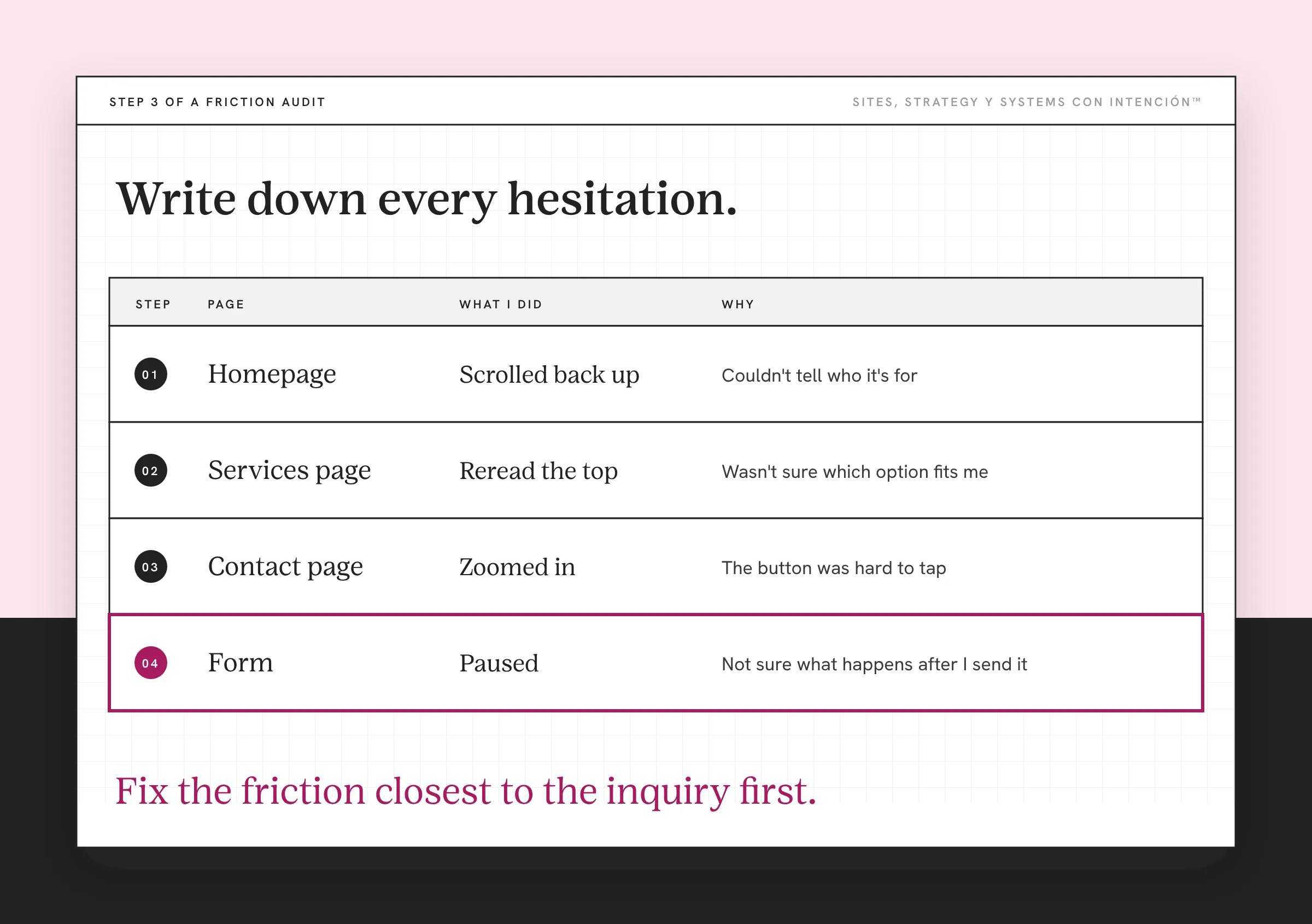
Step 4: Finish the Action
Actually fill out the form or book the call. Check that the confirmation shows up and the message lands in your inbox. Is it working functionally? Is everything connected? Those two questions close every website audit I run. Créeme, they catch problems no design review will.
Owners skip this step and it's where a lot of friction hides. On one client site, the form wasn't submitting or reaching the right inbox. The site looked fine from the outside, so nobody caught it. Once it was fixed, form submissions went up.
Step 5: Check the Numbers
If you use GA4, enhanced measurement can collect a form_start and a form_submit event. If your form is embedded from a booking tool, check that both events actually fire before you trust the gap. Compare how many people started your form with how many submitted it. A big gap means the form itself is friction. The other numbers worth watching are in the website metrics that matter.
Step 6: Rank and Fix
Sort your list by how close each friction point is to the inquiry. Fix the form, the button and the confirmation before you touch the homepage design. Looks are rarely why a site isn't generating leads. Then walk the path again. Working in the order people actually move is how I approach website strategy in general.
What Are the Most Common Friction Fixes?
- Speed up the slowest page on the path, starting with compressing images and cutting plugins you don't need.
- Rewrite the top of each page so it says what you do, who it's for and what to do next.
- Cut your form to the fields you need to reply, using Nielsen Norman Group's web form design guidelines as a check.
- Name the result on your button so people know what they get.
- Say what happens after the click, right next to the button.
- Add a confirmation that tells people their message arrived and when they'll hear back.
- Give every page one clear next step. Pages with no path forward are dead ends. See what happens when a website has no clear next step.
Ay, Dios, plenty of these take an afternoon. Dale, start with the one closest to the form.

What to Do This Week
- Walk your main path on your phone and write down every hesitation.
- Fill out your own form and confirm it arrives.
- Compare form starts and submits if you track them.
- Fix the friction closest to the inquiry first, then walk the path again.
Key Takeaways
- Conversion friction is anything that makes the next step harder than it needs to be.
- Small frictions add up. A string of small problems can cost you more than one big one.
- Audit the whole path on your phone as a first-timer and write down every hesitation.
- Fix the friction closest to the inquiry first, then test again.
I found where people hesitate. Which one do I fix first?
Bring your site, your numbers and the spots where people stall to one private session from $350. We'll work out what to change first. Notes are included. Full audits are available and get quoted first.
Frequently Asked Questions
What does conversion friction mean on a website?
Conversion friction is anything that slows someone down or makes them hesitate on the way to acting on your site. Sometimes it's technical, like a slow page or a broken form. Sometimes it's mental, like confusing copy or too many choices. And sometimes it's emotional, like not knowing what happens after they click.
How do I find friction on my website?
Walk through your main path on your phone as if you've never seen the site. Write down every moment you pause, reread, zoom or wonder where to tap. Then fill out your own form and check that it arrives. If you track form starts and submissions, compare them to see where people give up.
How do I reduce friction on my website?
Start with the friction closest to the inquiry. Shorten the form, make the button say what people get, explain what happens next and add a confirmation. Then speed up slow pages and make the top of each page clear about what you do and who it's for. Test the path again after each change.
Is friction always bad?
Not always. A question that filters out people who aren't a fit can save you time on calls that go nowhere. The goal is to remove friction that stops the right people while keeping anything that helps the wrong ones self-select out.
How often should I audit my website for friction?
Walk your main path every few months and any time you change your offer, your form or your booking tool. Small changes can add friction without anyone noticing. A quick check on your phone catches most problems before they cost you inquiries.
About the Author