Watch the line at any coffee shop for five minutes. The regulars walk up and order without looking at the board. They know their cafecito order the way they know their own name. Then someone new gets to the front, looks up at thirty drinks in four sizes with six kinds of milk and freezes. Half the time they say, "What do you recommend?" The other half, they order a plain coffee they didn't want.
That's choice overload. Hick's Law explains the slow part: more options mean a slower decision, on a menu board or on a website. Your conversion rate depends on which of those two people you're designing for. The regulars will find you no matter what. The new person is the one deciding whether to hire you. They're standing in front of your packages, your pages and your contact options trying to figure out where to start.
In 12+ years and 100+ sites worked on, one of the first things I look for when I land on a site is whether I can tell who they are and what they do. If I have to dig around to figure that out, I'm out. Your visitors are no different.
The Short Answer
Choice overload happens when visitors face more options than they can easily compare, so they put off deciding or leave. On service sites it shows up as too many packages, look-alike offers, pages and contact options. Lead with one recommended path, say who each option is for, cut what you can and give people a way to ask.
If You're Reading This Because It's Your Site
Reading more isn't the hard part. La Jugada is $47 and it tells you which layer this is actually sitting in.
Get it, $47What Is Choice Overload?
Choice overload is what happens when having more options makes it harder to choose. Instead of feeling free, people feel stuck. They worry about picking wrong, they put the decision off and sometimes they walk away.
The most famous example is the jam study from 2000. Researchers Sheena Iyengar and Mark Lepper set up a tasting table in a grocery store with either 24 jams or 6. The big display drew more people in, but only about 3% of the people who stopped there bought anything. At the small display, almost 30% did.
That study gets quoted everywhere as proof that fewer options always sell more. The research since then is messier. One review of choice-overload studies found the average effect across all of them was close to zero. Some studies found more options helped and some found they hurt.
So, pues, it depends. That's the honest answer and it's the one I'd give you about almost anything on your site.
Is Choice Overload the Same as Hick's Law?
They're close relatives with different jobs. Hick's Law comes from psychologists William Hick and Ray Hyman and dates to the early 1950s. It says the time it takes someone to decide goes up as the number of choices goes up. It's about speed. Choice overload is about what happens at the end of that slow decision: people stall or leave.
On a website, Hick's Law is why your menu, your packages and your contact options each have to pass one test. Can a stranger find the next move without reading everything first? Every extra link in the nav or tier on the pricing page adds a little decision time and a little more conversion friction. A little at a time is how a visit turns into a bounce.
The law doesn't tell you the right number of options. It only says more options slow people down. What's right for your site depends on how much they already know when they land.
When Do More Options Mean Fewer Clients?
A 2015 meta-analysis by Alexander Chernev, Ulf Böckenholt and Joseph Goodman found four factors that predict choice overload: how complex the set of options is, how hard the decision is, how sure people are about what they want and what they're trying to accomplish.
Those line up with what I see on service-business sites. Four causes come up again and again.
They don't know what they need yet. Someone can't pick between your Starter, Growth and Premium packages when they can't even name the problem. They came to your site with a feeling that something's off. Your packages assume they already know the answer.
The options are hard to compare. Each package has a different name, a different list of deliverables and no clear explanation of how it's different from the one next to it. Qué lío. People end up reading the same three columns over and over and still can't see the difference.
Everything is offered to everyone. When nothing says who each option is for, every visitor has to work it out alone. They have to read everything and imagine themselves in every scenario. That's exhausting and plenty of people stop trying, which is one reason a great-looking site gets no leads.

They're afraid of picking wrong. Hiring a service provider costs money and there's no easy undo. Mija, when someone's worried about making the wrong choice, more options just give them more ways to be wrong.
Notice that none of these are about the number alone. Three options can overload someone if they're confusing. Ten can work fine if they're clearly organized and the visitor knows what they want.
Where Does Choice Overload Show Up on Your Website?
On service-business sites, it hides in four places.
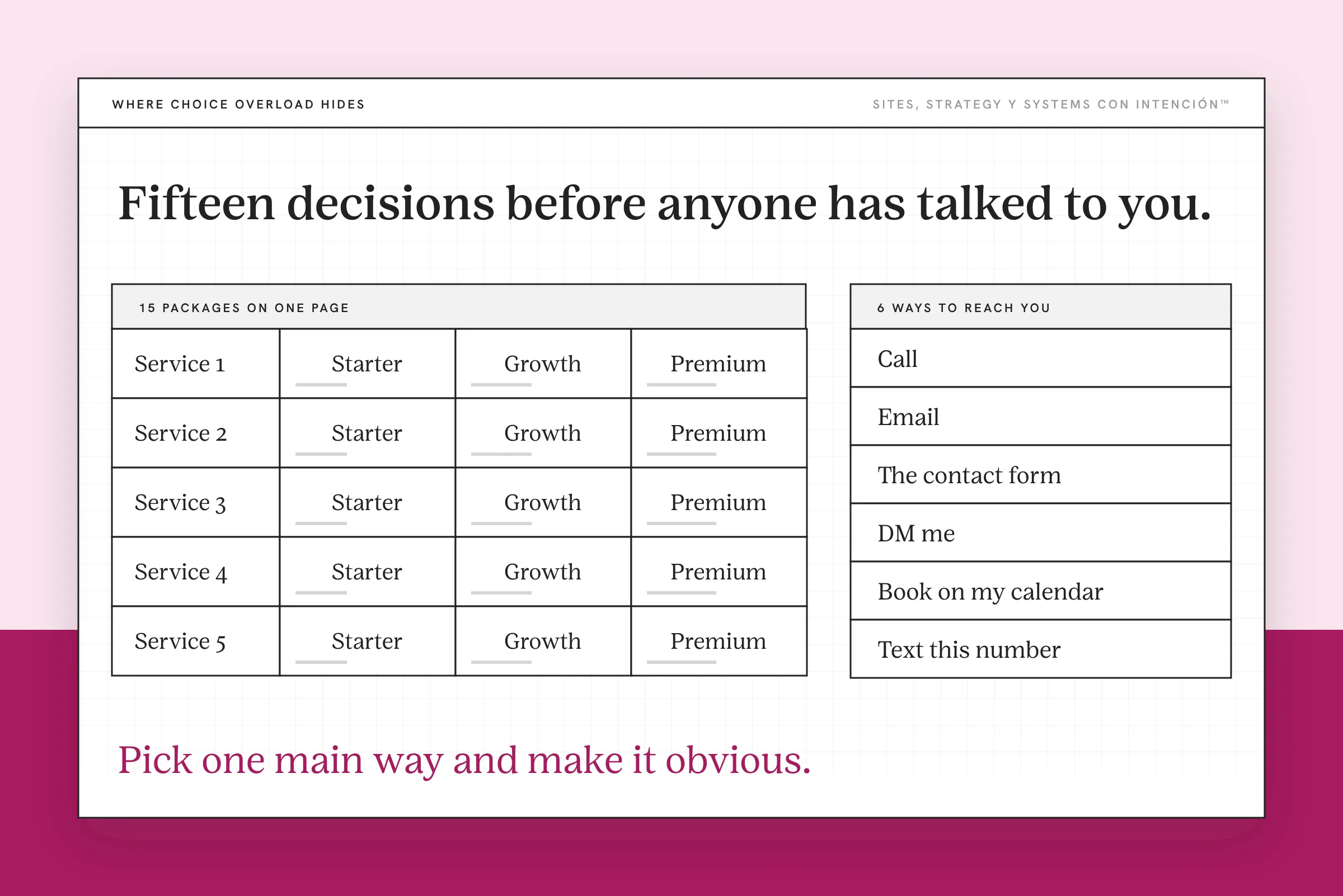
Too many offers or packages. Five services with three tiers each is fifteen decisions before someone's even talked to you. Diache, a pricing page shouldn't need its own table of contents.
Packages that look the same. When every option lists similar deliverables with slightly different numbers, the visitor can't tell what they're actually choosing between. This is one of the most fixable problems on a services page.
Too many pages and links. A main menu with ten items, a footer with forty links and a sidebar of related posts all compete for the same attention. Every link is a small decision. The crowding adds up to cognitive load and that slows everyone down.
Too many ways to contact you. Call, email, the contact form, DM me, book on my calendar, text this number. Bendito, they just want to talk to you and now they have to choose how. Pick one main way and make it obvious.
How Do You Help People Decide?
You don't have to cut your business in half. You have to make the choice easier to make. These four changes do most of that work.
Lead with one recommended path. Tell people where you'd like new clients to start. "Not sure where to begin? Start here." Then show the other options for people who know what they want. The barista who says "if you like it sweet, try the cortadito" is doing exactly this.
Say who each option is for. Lead with a description of the person each option fits, then list what's included. "For founders who have a site and need it to start bringing in inquiries." Visitors can see themselves in a description much faster than they can compare deliverables. Eso sí, be specific. "For growing businesses" describes everyone.
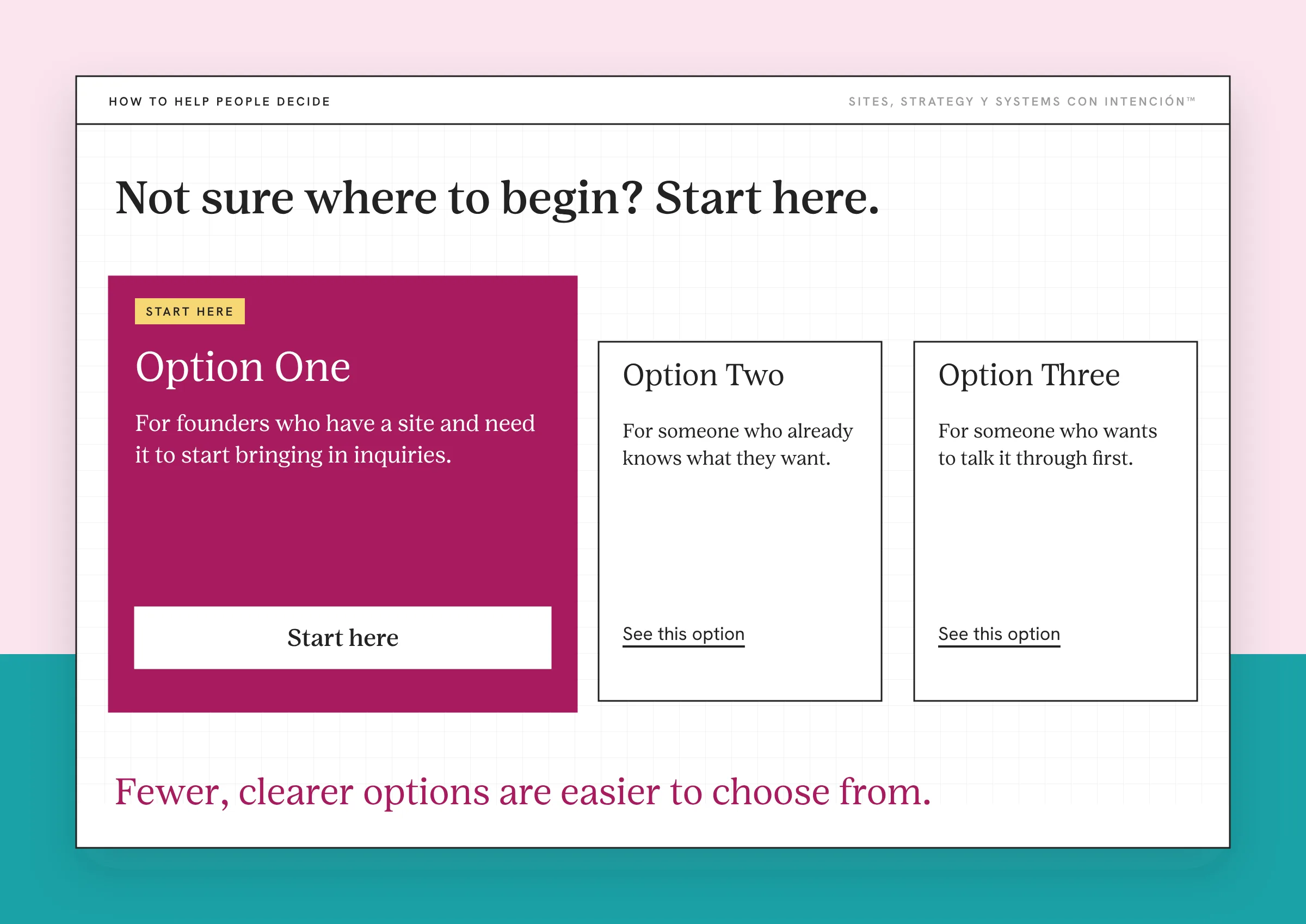
Cut or combine offers. If two packages are nearly the same, merge them. If one barely sells, ask whether it needs to be on the page at all. Fewer, clearer options are easier to choose from and easier for you to sell.
Give them a way to ask. Some people won't be able to decide alone no matter how clear your page is. Give them a low-pressure way to ask, so the choice becomes a conversation. If the button for that step is getting ignored, why people don't click call to action covers what might be going on in their head.
What Else Drives the Decision?
Choice overload is one piece of how people decide. A few other things shape whether someone books. They all came up when I talked through the psychology of decision making on the podcast. Every one of them is a website strategy decision before it's a design one.
First impressions happen in seconds. Before anyone compares packages, they decide whether to stay, which is where design builds trust or loses it. If they can't tell who you are, what you do and what to do next, the number of options won't matter because they're already gone.
Trust has to be real. People lean on proof from other people, like reviews and client stories. Scarcity can motivate too, but only when it's true. Don't say a spot is almost gone when you could just add more. People notice when the cart keeps closing and magically opening again and you lose their trust fast. The full take on that lives in website trust signals.
Giving first works. A free guide, an assessment or a useful resource lets people understand how you think before they buy and it's one way to turn website visitors into leads. Dale, give them something real. It builds the trust that makes the bigger decision feel safer.
People often need more than one visit. Plenty of clients visit, leave, follow you and come back several times before they reach out. Your site has to support every one of those visits, which is part of how a website conversion funnel works.
Watch the data. Heat maps and session recordings are some of my favorite tools for this. You can see where people click, how far they scroll and where they stall on your pricing page. If you use them, say so in your privacy policy, turn on the tool's consent settings and mask your form fields. If you're not testing, you're guessing. And please don't just collect the data. Use it. Así mismo.
What to Do This Week
- Count the decisions on your services page. Every package, tier and button counts.
- Write one line for each option that says who it's for.
- Mark one option as the recommended starting place.
- Pick one main way to contact you and make it the obvious one on every page.
Key Takeaways
- Choice overload happens when options are hard to compare, the decision is hard or people don't know what they want.
- The research says it depends, so the fix is about clarity as much as cutting.
- On service sites it hides in packages, look-alike offers, crowded menus and too many contact options.
- Lead with one recommended path, say who each option is for, cut or combine offers and give people a way to ask.
I can't tell which of my offers to cut or lead with.
Bring your offers, your site and your numbers to one private session from $350. We'll talk through which ones to cut, combine or lead with. Notes included.
Frequently Asked Questions
Can too many options hurt website conversions?
They can. When visitors face options that are hard to compare, especially when they aren't sure what they need, many put off deciding or leave. Research shows the effect depends on the situation, so more options don't always hurt. On service-business sites, confusing packages and crowded pages are the first places to look.
How many packages should a service business offer?
There's no perfect number. What matters is whether a visitor can tell the options apart and see which one fits them. Two or three clearly different options with a recommended starting point is a good place to begin. If you offer more, organize them by who they're for so visitors only compare the ones that apply to them.
What is Hick's Law for websites?
Hick's Law says the more choices you show someone, the longer they take to decide. For a service site that means a shorter menu, fewer look-alike packages and one clearly recommended next step. It tells you more options slow people down. It doesn't give you a magic number.
What is the jam study?
In a 2000 study, researchers set up a grocery store tasting display with either 24 or 6 jams. More people stopped at the bigger display, but about 3% of them bought jam compared with almost 30% at the smaller one. Later research found the effect doesn't show up everywhere, so treat it as a useful example with limits.
How do I help website visitors decide?
Lead with one recommended path, describe who each option is for and remove options that overlap. Make sure the page answers their main questions before asking them to choose. For people who still can't decide, give them an easy way to ask you directly.
Is choice overload the same as cognitive load?
They're related. Cognitive load is the mental effort it takes to use your site at all. Choice overload is what happens when the decision itself has too many options to weigh. A crowded page increases both, which is why simplifying your pages and your offers often helps at the same time.
About the Author