Remember picking up a movie at Blockbuster, flipping it over to read the back and putting it right back on the shelf? Blockbuster never knew why. Maybe the cover lied, maybe you'd already seen it or maybe you found exactly what you needed in ten seconds and went to grab the one next to it.
A high bounce rate is that same moment on your site. The number on its own can't tell you which one happened. I've spent 12+ years and 100+ sites reading these reports. The first thing I check is whether people understand what the number measures now. It's easy to get wrong, because Google Analytics 4 changed it.
The Short Answer
In GA4, a high bounce rate means a large share of visits weren't engaged. An engaged visit lasts longer than 10 seconds, has a key event like a form submission or views two or more pages. A bounce is everything else. Whether a high bounce rate is a problem depends on what the page is supposed to do.
If You're Reading This Because It's Your Site
Reading more isn't the hard part. La Jugada is $47 and it tells you which layer this is actually sitting in.
Get it, $47What Does Bounce Rate Mean in GA4 Now?
In the old version of Google Analytics, a bounce was a visit where someone saw one page and left. Someone who read your whole post for five minutes and closed the tab still counted as a bounce. Qué injusto.
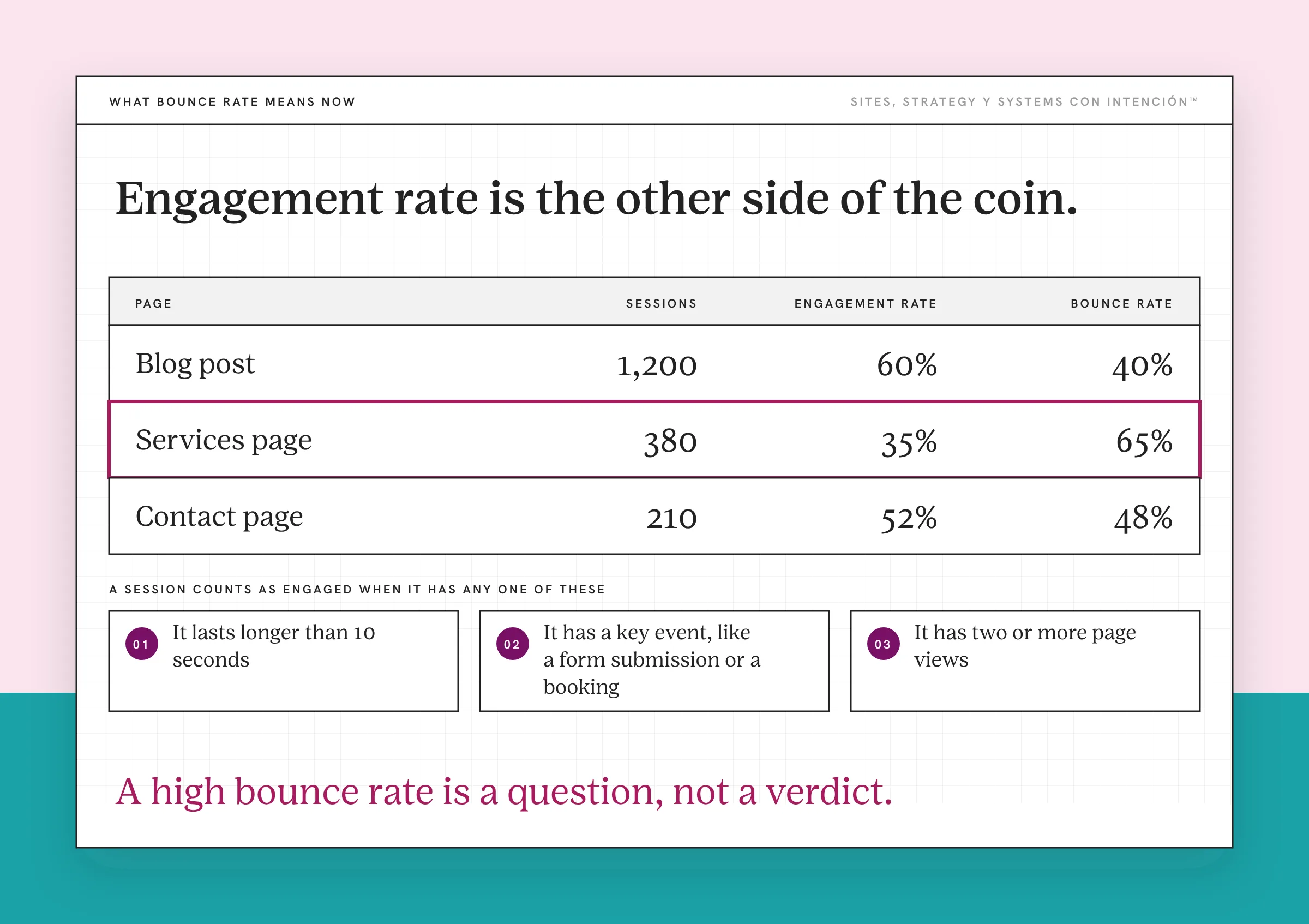
GA4 flipped the logic. Google defines bounce rate as the percentage of sessions that were not engaged. A session counts as engaged when it meets any one of these:
- It lasts longer than 10 seconds
- It has a key event, like a form submission or a booking
- It has two or more page views
So in GA4, o sea, the person reading your post for five minutes is engaged and doesn't count as a bounce. The person who lands, glances and leaves within ten seconds without doing anything does. Engagement rate is the other side of the same coin: if 60% of sessions are engaged, your bounce rate is 40%.
Be careful with older advice. Ojo, a lot of what's written about bounce rate was written for the old definition, so the numbers and the panic don't always apply anymore.
What Is a Good Bounce Rate?
There isn't one number that's good for every site. A bounce rate that's fine for a blog post that answers a quick question would be a real problem on your services page.
The more useful comparison is your own pages against each other. Pull bounce rate (or engagement rate) by page and look for the pages that sit far above the rest. Those are where people are putting the cover back.
For a sense of what healthy can look like, I was part of the team on a multilingual lead generation site that held its bounce rate under 50%, with a 2.4-second load time. That was one site with a specific job and a team behind it, so treat it as an example and leave it out of your benchmarks.
If looking at all of this makes your chest tight, why checking your analytics stresses you out is worth a read first. Tranquila, it's one number on one report.
When Is a High Bounce Rate Fine?
A high bounce rate is fine when the page did its job fast.
- Your contact page. Someone grabbed your email or phone number and left to call you.
- A blog post that answered a quick question. They got the answer in a few seconds and they're happy.
- A page someone came back to look something up. Your address, your hours, your booking link.

Watch for one trap here. If people tap your phone number or email link, GA4 won't know that was the point unless you tell it. Set those clicks up as key events and those visits stop counting as bounces. What to track in GA4 for a service business covers how.
Why Do People Leave Your Site Right Away?
When a page that's supposed to move people forward has a high bounce rate, it's usually one of these:
The page is slow. Someone on a phone waits a few seconds and gives up. Google's web.dev article on why page speed matters cites the BBC, which lost an additional 10% of users for every extra second its site took to load. If the site also fights them on a small screen, what a non-mobile-friendly site costs you shows how much.
The page doesn't match what they clicked. The ad, post or search result promised one thing and the page opens on another. That gap is the whole subject of what happens right after the click.
The first screen doesn't say what you do. If someone has to work to figure out who you help and what to do next, the ones who weren't already sold on you won't bother. Nielsen Norman Group's 2011 research found people often leave a page within 10 to 20 seconds. The mental cost of a busy page is real.
The traffic was never a fit. Sometimes the page is fine and the visitors were never going to hire you. More traffic is not the goal explains why that happens.
The important part sits below where people stop. On one client site, session recordings showed people stopped scrolling before they reached the part of the page that mattered. I moved it higher. Qué susto when you watch that for the first time, because the page looked fine to everyone who already knew where to look.
How Do You Lower a High Bounce Rate?
- Look page by page. In GA4, check engagement rate for each page and sort for the ones that sit far below the rest.
- Ask what each high-bounce page is supposed to do. If it's a contact page doing its job, leave it alone. If it's your services page, keep going.
- Watch what people do. Session recordings and heat maps show where people stop and what they ignore. Understanding visitor behavior on your website walks through it. If you add one of these tools, mention it in your privacy policy, turn on its consent settings and mask form fields.
- Fix the first screen if that's where the problem is. Say who you help, what you do and what to do next before anyone scrolls.
- Set your key events. Forms, bookings, phone taps and email clicks should all count. Send the event, never the person: no names, emails or phone numbers go into GA4.
- Check again in a month. One fix at a time, so you know which one worked.
Bounce rate is one of several numbers worth watching. The website metrics that matter shows where it fits. How to read website analytics without feeling overwhelmed keeps the routine short. When you're ready to check the bigger question, how to tell if your website is actually converting is the next step. Bounce rate is one small signal inside a bigger website strategy picture.
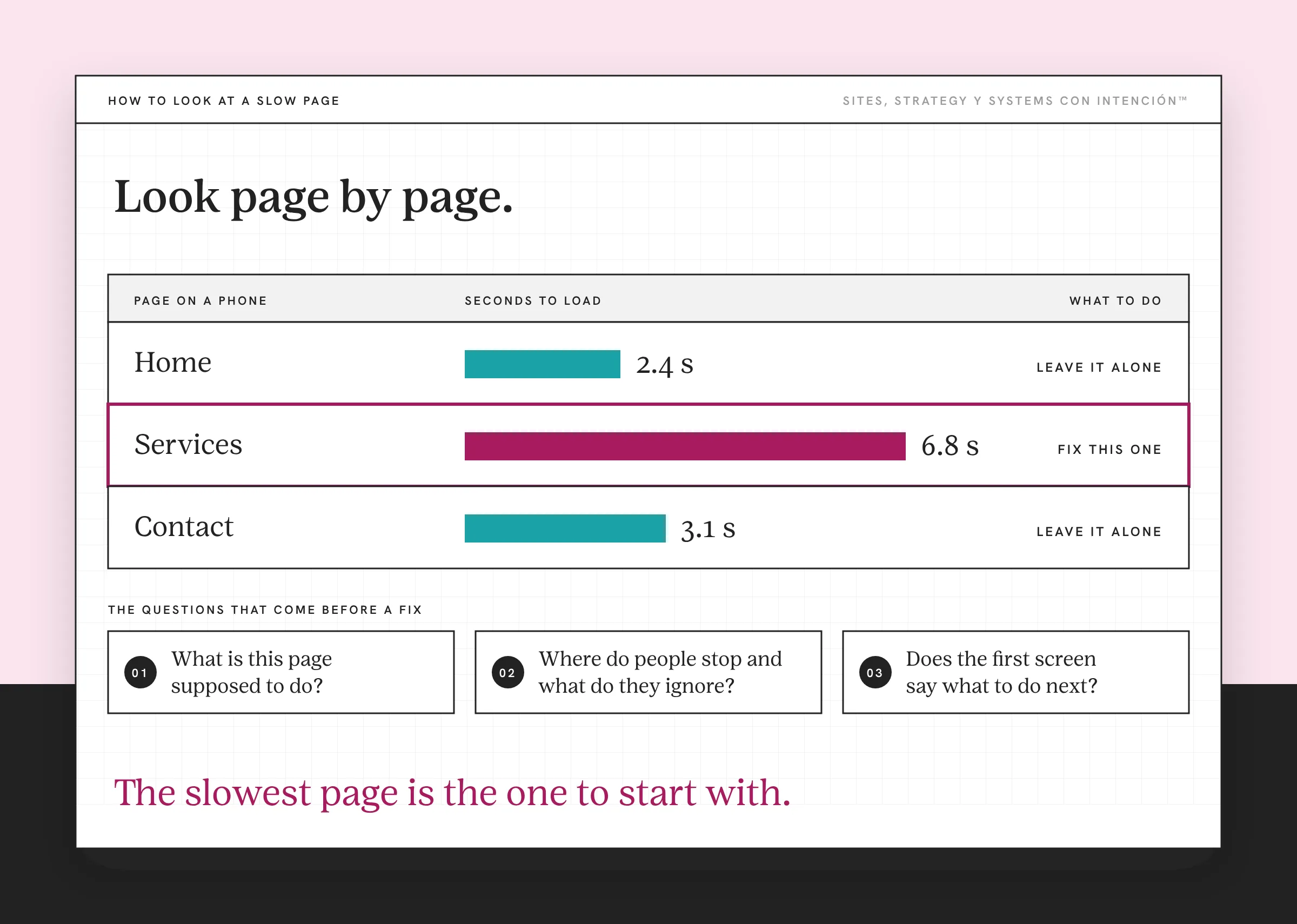
A high bounce rate is a question, not a verdict. Find the pages where it matters, figure out why people put the cover back and fix the first screen they see.
Key Takeaways
- A high bounce rate in GA4 means a large share of sessions weren't engaged: 10 seconds or less, no key event and only one page view.
- GA4 changed the definition, so a lot of older bounce rate advice doesn't apply anymore.
- There's no universal good bounce rate. Compare your own pages and look for the ones far above the rest.
- A high bounce rate is fine on pages that do their job fast, like a contact page or a quick-answer post.
- Slow pages, mismatched clicks, an unclear first screen and the wrong traffic are the usual reasons people leave right away.
Okay, so why are people leaving my site so fast?
Start with La Digital Rueda. In about two minutes and for free, it asks a few questions about your site, your content and your backend. Then it shows you where the pressure is.
Want more like this in your inbox? Off the Clock is my week-ish newsletter about websites, systems and burnout-free business.
Frequently Asked Questions
What does a high bounce rate mean in GA4?
It means a large share of visits weren't engaged. GA4 counts a session as engaged if it lasts longer than 10 seconds, includes a key event like a form submission or has two or more page views. A bounce is a session that meets none of those, so a high bounce rate means many people left quickly without doing anything.
What is a good bounce rate for a website?
There isn't one number that fits every site or page. A contact page or a quick-answer blog post can have a high bounce rate and still do its job. A services page with a high bounce rate is usually a problem. Compare your own pages against each other and focus on the ones that sit far above the rest.
Why do people leave my website right away?
The most common reasons are a slow page, a page that doesn't match what they clicked, a first screen that doesn't say what you do and traffic that was never a fit. Session recordings show which one it is, so watch a handful before you change anything.
How do I lower my bounce rate?
Find the pages with the highest bounce rate that are supposed to move people forward, like your services page. Fix the first screen so it says who you help and what to do next, speed up the page and make sure it matches what people clicked to get there. Set phone and email clicks as key events so real contacts stop counting as bounces.
Is bounce rate the same as exit rate?
They measure different things. Bounce rate looks at sessions that weren't engaged. Exit rate looks at how often a page was the last one someone viewed before leaving, even after a long visit. A page can have a low bounce rate and a high exit rate, which is normal for a thank-you page or a contact page.
About the Author