Before any big concert, the venue posts an FAQ. What time do doors open? What bag can I bring? Where do I park? They answer it ahead of time because they know thousands of people are about to ask. If the page doesn't answer, the inbox explodes.
Your website has the same job. Everyone who lands on a service business site shows up with questions and the questions your website should answer are mostly predictable. In 12+ years and 100+ sites worked on, one of the first things I look for when I land on a site is whether I can tell who they are and what they do. If I have to dig around to figure that out, I'm out. Your visitors are doing the same thing.
The Short Answer
The questions your website should answer are the ones every visitor brings: What do you do? Is it for me? Can I trust you? What does it cost? What happens next? Add the questions you keep answering in DMs and put each answer where someone is looking for it.
If You're Reading This Because It's Your Site
Reading more isn't the hard part. La Jugada is $47 and it tells you which layer this is actually sitting in.
Get it, $47What Questions Does Every Visitor Have?
People don't read a service site from top to bottom, which matches Nielsen Norman Group's research on how little users read. They scan for answers to a handful of questions:
- What do you do? In plain words a stranger would use.
- Is it for me? Who you help and what kind of problem you solve.
- Can I trust you? Proof, experience and signs there's a real person behind the business, one of Stanford's web credibility guidelines.
- What does it cost? A price, a starting point, a range or at least how pricing works.
- What happens next? The step to take and what it looks like.
I said it on my podcast and I'll keep saying it: your visitors want clarity, trust and a clear next step. If they can't find it fast, it's game over. Miss the first two questions and people leave within seconds. Miss the last three and they might stay, then leave anyway, because they can't picture working with you. Oye, a visitor who can't find the answer doesn't email to ask. They just go and that silence is the expensive part. You never find out who almost hired you.
Why Do Your DMs Matter Here?
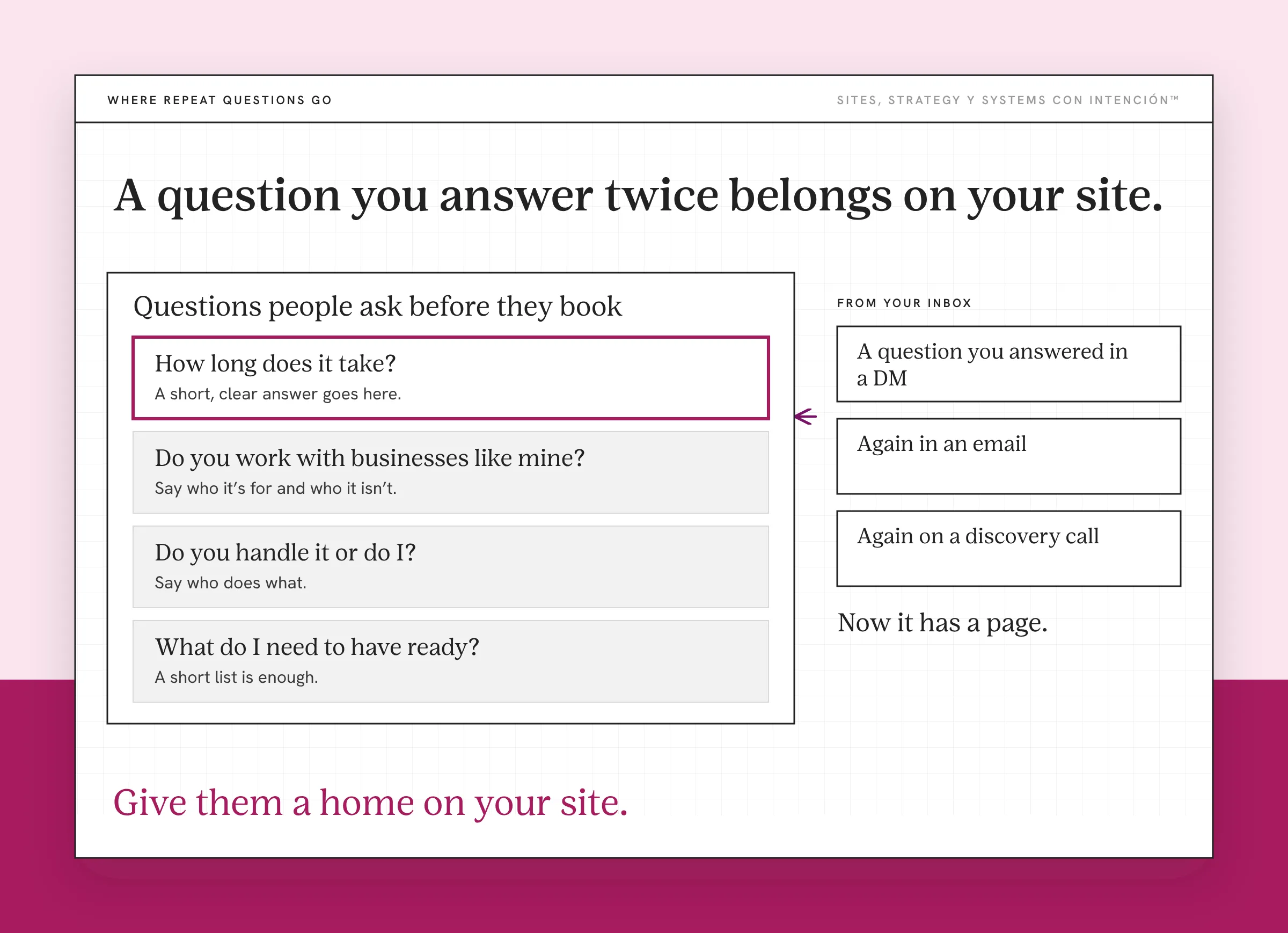
The fastest way to find what your site is missing is to look at your inbox. Every question you answer more than once in a DM, an email or on a discovery call is a question your site should have answered first.
Write them down for a couple of weeks. You'll start to see repeats. How long does it take? Do you work with businesses like mine? Do you handle it or do I? What do I need to have ready? Those repeats are your missing content and they're specific to your business in a way no template can be.
This is also the most honest research you'll ever do, mija. Those are the exact words your clients use, which makes them the exact words that belong on your site.
My own conversations work the same way. I once talked with someone who kept buying course after course and framework after framework, each one promising to be the answer. That conversation is what made me write my post on marketing frameworks. The questions people ask you outloud are the content you haven't written yet.
Where Should Each Answer Live?
An answer only works if it's where someone is looking for it. The first place they look is your homepage, so it has to answer all five questions or at least lead to the page that does. Then each inner page carries the full answer.
Your homepage answers what you do and who it's for. When I review a site, the hero is one of the first things I check, because the top of the page has to make both clear before anyone scrolls. If it doesn't, the rest of the site barely gets a chance. Further down, it gives them a reason to trust you, shows that pricing exists and where to find it and ends on one clear next step. Nobody should leave your homepage wondering where an answer lives. Is your website losing you clients walks through how to check yours.
Your services page answers what's included, who each offer is for, what it costs and what happens next. This is where pricing questions belong, even if all you share is a starting point. How to write a services page covers it step by step.
Your about page answers whether they can trust you and whether they'd like working with you. Real photos, your experience in plain language and how you work all belong here.
An FAQ section catches what's left: timelines, process, what to prepare, payment and the questions from your DMs that don't fit anywhere else. Put it on your services page or near your contact form, where the last-minute questions come up.
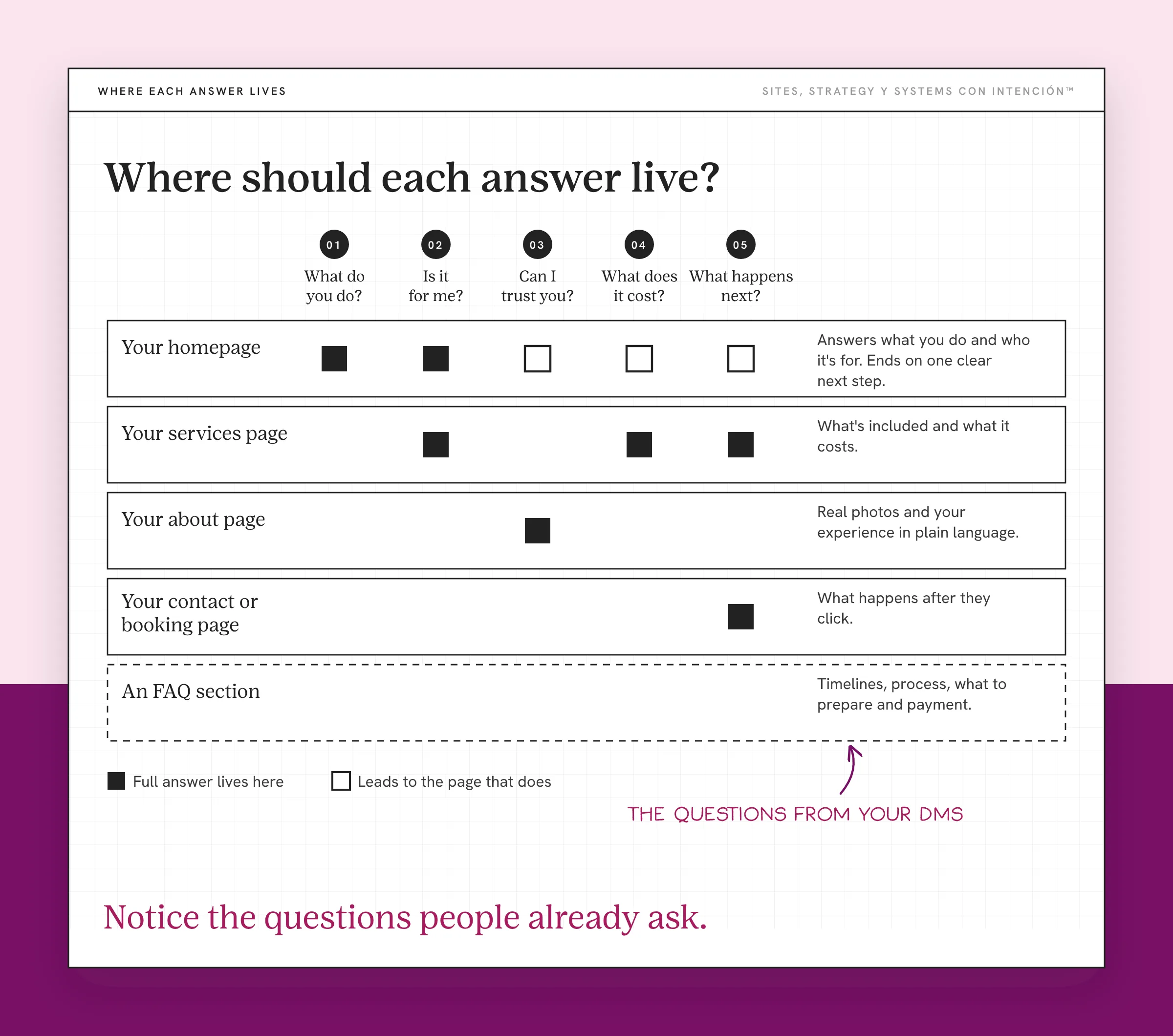
Your contact or booking page answers what happens after they click. How long until they hear back? What's the call like? Is there any pressure? Eso sí, this is the page owners forget to explain. It's also the last place someone can talk themselves out of reaching out.
What Happens When Your Site Answers Them?
When the answers are on the page, two things change.
The people who reach out show up more informed. Referrals land somewhere that backs up what their friend told them, because what your site says about your business matches what they heard. They already know what you do, roughly what it costs and whether they're a fit, so your calls start further along. The people who aren't a fit see that on their own and don't book.

I've watched this on a client site. We pulled the questions they kept getting in DMs and on discovery calls and answered them on the site. Their calls got shorter and better. People also booked faster, because the back-and-forth had already happened on the page.
You also answer fewer of the same questions by hand. That's time back every week, which is what website success actually looks like and a big part of what makes your website your best salesperson. Google points in the same direction. Its guidance on creating helpful, people-first content asks whether your page leaves readers feeling they've learned enough to reach their goal.
Ay bendito, the answers don't need to be long. A clear sentence in the right place does more than a page of copy nobody can find. Putting the right answer in the right spot is most of website strategy on a good day.
How Do You Check Your Own Site?
Open your site on your phone and pretend you've never heard of you, the fastest way to look at your own site objectively. Then go through the five questions one at a time and time yourself on each:
- Can you tell what the business does from the top of the homepage?
- Can you tell who it's for without scrolling far?
- Can you find proof, a face and a real name?
- Can you find a price or a starting point?
- Do you know exactly what happens after you click to contact or book?
Any question that takes more than a few seconds to answer is one your visitors may be giving up on, which shows up in the site metrics that matter. Then hand your phone to someone who doesn't know your business, like the tech-challenged tío from the UX test for a high-converting website and watch where they hesitate. If trust is the weak spot, how website design builds trust is a good next read.
What to Do This Week
- Run the five-question check on your own site from your phone.
- List the questions from your DMs over the last month.
- Match each question to a page and add the answer where it belongs.
- Add an FAQ section for anything that doesn't fit elsewhere.
You can do all of this without a redesign. Notice the questions people already ask and give them a home on your site, starting with the one you answered most this month.
Key Takeaways
- Every visitor asks the same five questions: what you do, whether it's for them, whether they can trust you, what it costs and what happens next.
- The questions you answer over and over in your DMs are the content your site is missing.
- Your homepage answers every question or leads to the page that does, so put each full answer where someone's looking for it.
- When your site answers these first, you get better-informed inquiries and fewer repeat questions.
So which of these questions is my site not answering?
La Digital Rueda is free and takes about two minutes. It asks a few questions about your site, your content and your backend so you can see where the pressure is.
Want more like this in your inbox? Off the Clock is my week-ish newsletter about websites, systems and burnout-free business.
Frequently Asked Questions
What questions should my website answer?
At minimum, what you do, who it's for, why someone should trust you, what it costs and what happens next. Then add the questions people ask you most often in DMs, emails and calls. Those repeat questions are specific to your business and often point to the biggest gaps on your site.
What information should be on a service business website?
A clear description of what you offer and who it's for, proof like testimonials or results, a real photo of you, pricing or a starting point, your process and an obvious way to contact or book. An FAQ section helps with timelines, preparation and the details people need before they commit.
Should I put my prices on my website?
Sharing at least a starting price or range helps people decide if you're a fit before they reach out. It also cuts down on calls with people whose budget doesn't match. If your work is custom, say how pricing works and what affects it so visitors aren't left guessing.
How do I know what to put on my website?
Look at the questions you answer over and over. Write down what people ask in DMs, emails and discovery calls for a few weeks, then group the repeats. Those questions, plus the basics every visitor needs, tell you what your site should cover and where each answer should go.
Do I need a separate FAQ page?
Not always. An FAQ section on your services page or near your contact form often works better because people see the answers at the moment they're deciding. A separate FAQ page makes sense when you have a lot of questions across several offers.
About the Author