You've written the caption, made the video and figured out what to say about the same problem again. Then tomorrow's content is waiting. It's a hamster wheel of content. Building a content ecosystem starts with looking at what all that work could become together.
When you're marketing your own service business, you can spend a lot of time explaining things you already know. The frustrating part is opening your content calendar and packaging that knowledge from scratch, otra vez. Another post goes out, but you still can't see how it's helping someone get closer to working with you.
When someone is stuck on that wheel, I hear "I'm always creating new content." "I have all this content but don't know where to start." "I post a lot but nothing leads anywhere."
I've had a blog sitting there with more to give, too. My post about marketing frameworks became infographics, a post and a video once I went back to it. The idea was already there. I needed to give it somewhere else to go.
The Short Answer
A content ecosystem is a connected group of content pieces that help your audience understand a topic and take a relevant next step. Your blogs, emails, videos and social posts each have a job. Building one starts with identifying what you already have, adapting it thoughtfully and connecting the pieces.
If You're Reading This Because It's Your Site
Reading more isn't the hard part. La Jugada is $47 and it tells you which layer this is actually sitting in.
Get it, $47Why Does Publishing Keep Feeling Like Starting Over?
Why does it feel like you're spinning your wheels and getting nowhere? Because every piece starts from zero.
Writing a short social post means making a lot of decisions in a small space. Pick the idea, find the opening, decide what context someone needs and work out what to ask them to do. Repeat that for the next post. Then the next.
When every piece gets planned separately, you're doing that thinking over and over. Even a full content calendar can leave you with a pile of posts that don't lead anywhere together. That gets tiring, mija.
Part of the problem is that content gets posted one by one by one. Most of it lands on social media and not on a channel you own, where you could take the long form and chunk it down. Content creation like that has no clear role in your marketing strategy. Someone who has just discovered a problem needs a different explanation from someone comparing ways to solve it. If you're only thinking about what to publish today, it's easy to skip where that person might need to go afterward.
A content marketing ecosystem lets you look at a topic across your site, email marketing and social media channels and decide which piece introduces it, which explains it further and which offers a next step.
Social media posts can help you learn what people care about along the way. A question in the comments might reveal something you haven't explained well. A conversation about one caption might give you a topic worth developing on your site. Finding content that resonates takes work. If those posts helped you hear what people need, eso cuenta. You have something to build on, even if you didn't begin with a blog.
The problem comes when you keep creating small pieces that never get used anywhere else. Your audience's questions keep coming back, but the answers stay scattered across individual posts.
Where Should You Start With the Content You Already Have?
Before I tell you what system to build, I want to know what types of content you have.
A collection of blogs that haven't been optimized gives us a different starting point from a phone full of videos and a year's worth of social captions. Both contain material you can work with. The next move depends on what's there.
If you've already written blogs, open one and reread it. Look at the explanations, examples and questions inside it. Some stand on their own with a little context. Others need a visual or a fuller explanation before they're useful somewhere else.
If most of your digital content lives on social media, look for ideas people have asked you about or responded to thoughtfully. A caption that started a useful conversation could become a section of a blog. Several videos answering related questions could help you see the shape of a longer article.
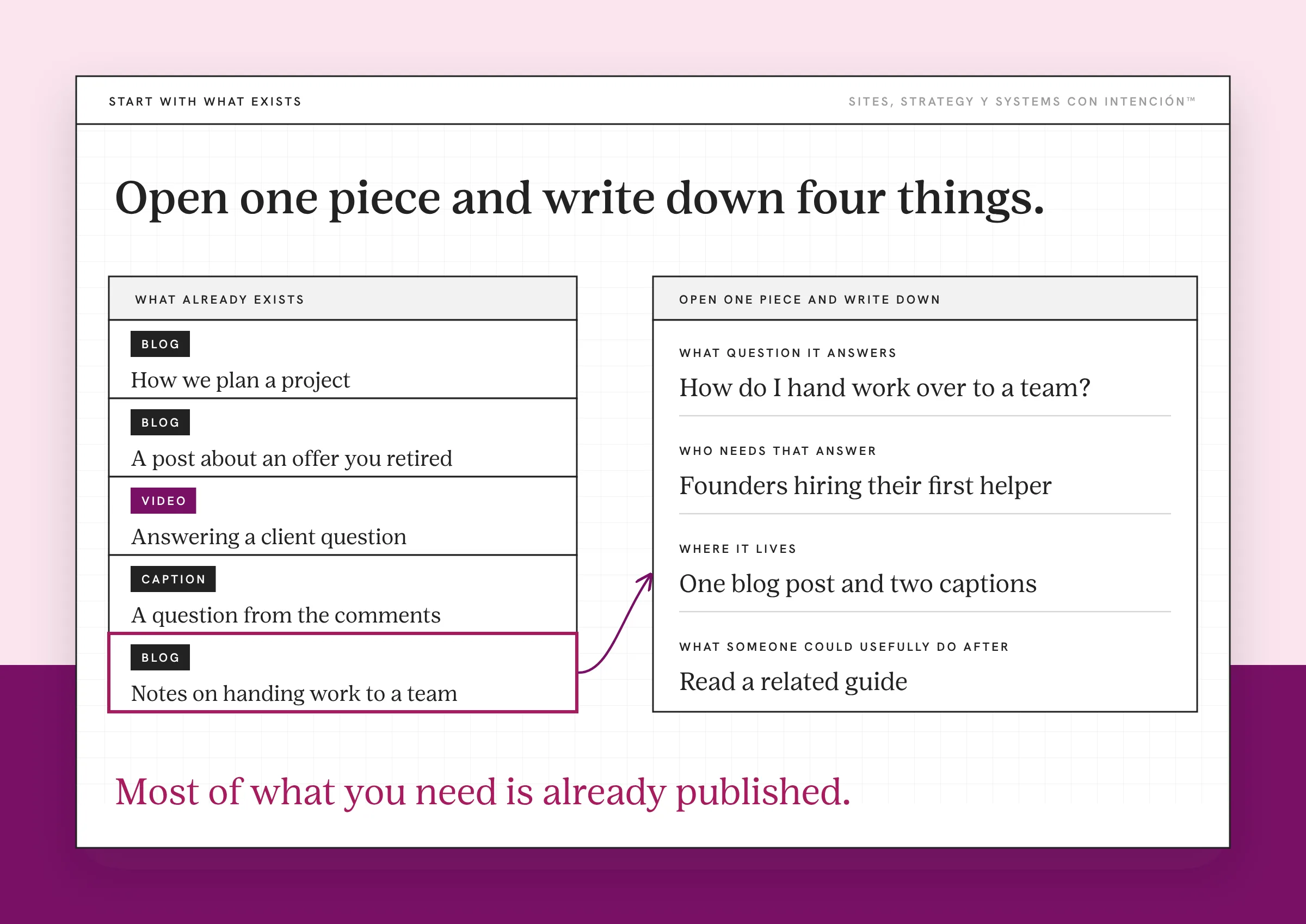
You're looking for material that still reflects what you know and what you do. An old post about an offer you've retired needs a different kind of attention from an explanation you still give clients every week.
You don't have to turn your entire archive into a project today, de verdad. Open one piece and write down:
- What question it answers.
- Who in your target audience needs that answer.
- Where it currently lives.
- What someone could usefully do after reading or watching it.
Those notes give you the beginning of a content plan. They also make the work easier to see: you can distinguish an idea worth developing from a piece that needs updating before you share it again.
Your existing content holds explanations you've already worked through. Building from those explanations lets more of your expertise show up together on your site. That consistency is part of how repurposing can build brand authority.
What Can One Existing Blog Become?
I'd written a blog about marketing frameworks and hadn't done much with it beyond publishing it. When I went back, I started adding infographics. Those gave me material for a post and a video, depending on where the content was going.
At the time, I was still solidifying my own content direction. The next step I wanted people to take was getting a freebie and joining my email list. That gave the pieces a purpose beyond having something to publish.
The important part was taking one main idea and figuring out how it could benefit the audience in another format.
A concert makes sense to me here. You go to see your favorite artist knowing you're probably going to hear songs you already love. You already know the setlist and you're still there ready to sing every word, con ganas. A different arrangement or a change in the order can give you another way to experience familiar material.
Your content can work that way, too. A useful idea can hold up across formats, but you still have to keep the purpose, the audience and the place you're posting in mind.
Pulling a one-liner out of a blog doesn't automatically make it a useful social post. Someone reading the full article has context. Someone coming across that line on its own might have no idea what you're talking about. They might need an example, a clearer setup or a different opening.
Otherwise, you've given yourself another caption to fix. Ay fo, that's more work again.
When I reread a post to work out what I can chunk down, I keep the post open. I work from the long-form pieces to the smaller ones: newsletter, social content and then the short text posts. You can see what one repurposed blog post becomes in that process. That sequence is how I work. Your available content and the way you prefer to work should shape your own workflow.
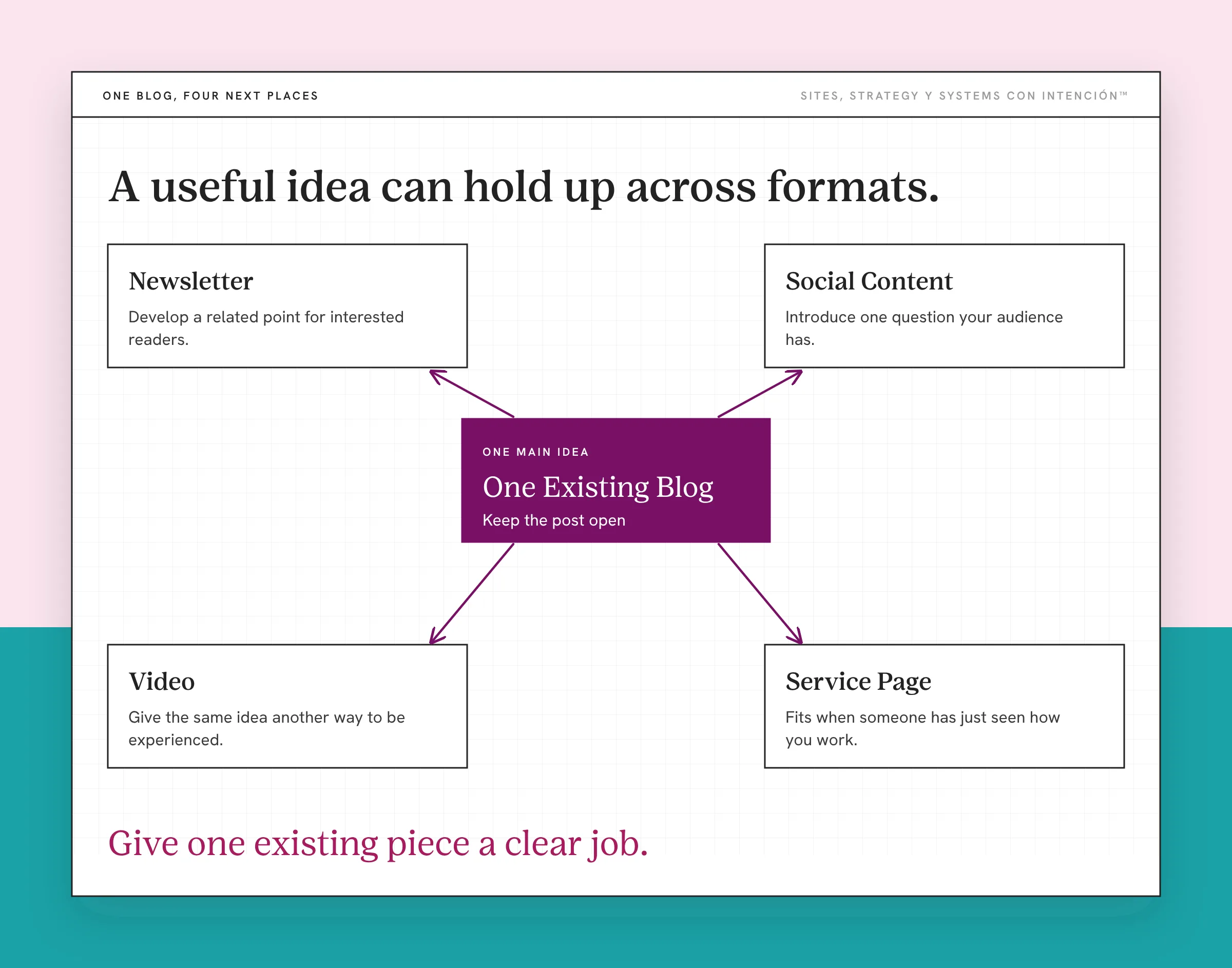
The goal is to preserve the useful idea while giving it the context its new audience needs. Repurposing still takes judgment.
How Do You Connect Each Piece to a Next Step?
A content ecosystem needs connections someone can follow. A blog can explain the question that a short video introduces. An email can revisit a specific point for people who want to hear more from you. A relevant resource can help someone apply what they've just learned.
In my marketing frameworks example, the freebie was the next step toward my email list. I wasn't asking someone who had just encountered that idea to make a big buying decision.
You can use top, middle and bottom of the funnel to think about readiness. At the top, someone is naming their problem for the first time. In the middle, they're exploring approaches. Near the bottom, they're deciding whether your service fits. The call to action should fit the question that piece answers.
Keep it specific. If you've introduced a problem, a fuller explanation may be useful. If you've helped someone understand how you work, a relevant service page might make sense. You don't need to push every reader toward booking a call.
A content ecosystem map makes those choices visible. You can start with a table like this. This is a planning example you can adapt:
| Piece | Its Job | A Relevant Next Step |
|---|---|---|
| Short video or social post | Introduce one question your audience has | Read a blog that explains it further |
| Blog on your site | Give the question a fuller answer with examples | Use a resource that helps apply the idea |
| Free resource | Help with a specific task | Join the email list with clear signup expectations |
| Develop a related point for interested readers | Read another useful article or explore a relevant service |
People can enter through any of those pieces. Someone on your email list might read the blog first. Someone searching for an answer might discover the blog without seeing your social posts. The map helps you provide a sensible route from wherever they arrive.
Read through that route yourself. Does the next page deliver what the link promises? Does the freebie answer the question the post raised? Can someone tell what they're signing up for?
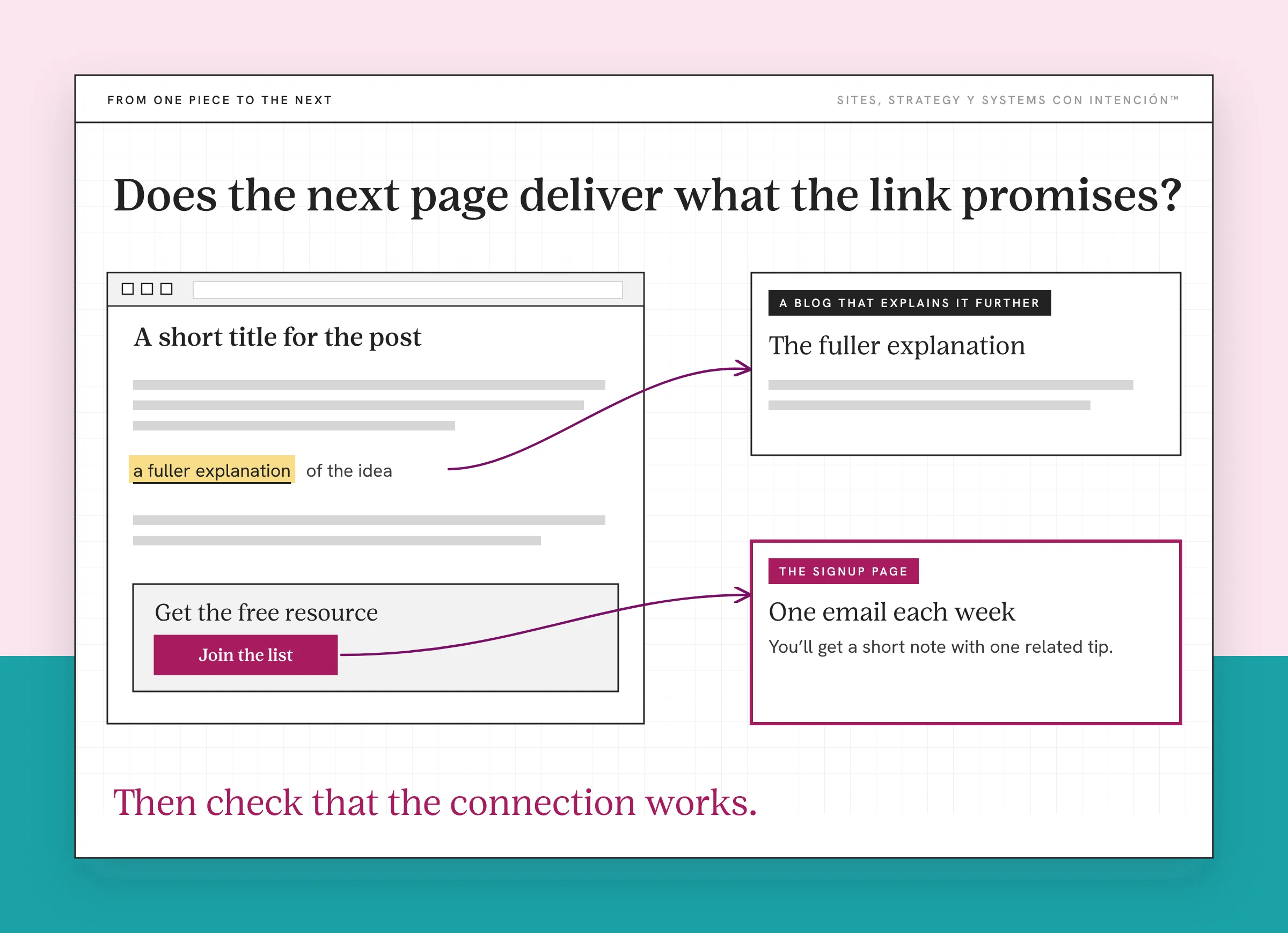
That's a more useful way to review content distribution than checking whether the same idea appeared across platforms. You can see what each of your distribution channels contributes and where a connection is missing.
Your site also gives you somewhere to develop answers beyond the space of a caption. That's part of the different jobs your website and social media can do. Google's people-first content guidance asks whether content offers original information and first-hand expertise. Your examples and explanations belong in that work. Turning an idea into a blog should add something useful for the person reading it.
What Should You Do With Your Existing Content Next?
You have a treasure trove of content. It needs a system that fits its current shape. Some ideas will become longer articles. Some will become visuals or videos. Some pieces will need updating before they can do anything useful again. Giving each piece a job is most of what content strategy means for a service business.
Choose one existing piece of content and give it a clear job. Decide who it's for, adapt it for the place you're sharing it and connect it to a next step that makes sense. Then check that the connection works.
That gives your next content decision somewhere to begin. The explanations you've already written can keep contributing as your business develops, with a visible place in how people discover you and get to know your work.
Key Takeaways
- A content ecosystem connects your content through a shared purpose and relevant next steps.
- Identify the blogs, captions, videos and other material you have before choosing a system for using them.
- Social conversations can reveal ideas worth developing into fuller answers on your site.
- Adapting an idea requires attention to its audience, context and platform.
- A content map helps you see what each piece does and whether its next step makes sense.
I've made all this content. Where do I even start with it?
La Digital Rueda is free and takes about two minutes. It asks a few questions about your site, your content and your backend so you can see where the pressure is before you make another post.
Frequently Asked Questions
How is a content ecosystem different from a content strategy?
A content strategy guides choices about who you're helping, what you're communicating and how that supports your business objectives. The ecosystem is the connected content and channels through which those choices take shape. Your strategy might prioritize answering a particular buyer question. Your blog, video, related email and next-step resource are the pieces that carry that answer to people.
What are the core components of a content ecosystem?
For a service business, start with useful content, places to publish it and connections that help someone continue. That might mean your site, blog, email list and the social channels you use. Give each piece a purpose and identify its next step. Your approach to content should fit what you can maintain. Add channels when they have a clear role.
Can I build this if most of my content is on social media?
Yes. Review the questions and explanations already in your captions and videos. Look for related ideas you can develop into a fuller article on your site. Keep the original audience's questions in mind as you add context, examples and detail. From there, you can connect the social content to the fuller answer and decide what would help someone after they've read it.
Will reusing content bore my audience?
Repeating an idea can be useful when you're answering a question people still have. Check whether the new piece offers the context and treatment its audience needs. An infographic, a longer example and video content can help people understand the same subject in different ways. If you're copying a line without making it useful in its new setting, revisit the piece before publishing it.
Can this help my content appear in Google and AI search?
Developing useful answers on your site creates pages people may find through search. Google's guidance on AI features says its foundational search engine optimization practices also apply to AI Overviews and AI Mode. That includes helpful content and making pages findable through internal links. Those practices don't guarantee indexing or inclusion. A connected content ecosystem gives you a structure to work on; visibility still depends on the content and site.
About the Author