You've heard that linking your pages together helps SEO. So you add a related post when you remember, include a few links that seem relevant and hope you've done enough. Meanwhile, another useful page sits on your website with barely anything leading to it.
Then an SEO checklist tells you to add more. Diache, how many more? You still haven't got a clear reason for choosing one destination over another.
When I open a post to check its links, I find a link that says "click here" or repeats the post's own title, a link jammed in just to have one and a great page with nothing pointing to it.
When I build an internal linking strategy for a post, I start with one question: where does the reader go next? If they're still figuring out the problem, it's a related article. If they're sizing you up, it's the service page. Where the post sits in the funnel tells me which.
The Short Answer
An internal linking strategy connects pages on the same website for a clear purpose. Choose destinations that relate to the topic and help the reader take an appropriate next step. Use descriptive anchor text, keep important pages accessible and review existing links so useful information doesn't sit disconnected from the rest of your site.
If You're Reading This Because It's Your Site
Reading more isn't the hard part. La Jugada is $47 and it tells you which layer this is actually sitting in.
Get it, $47What Do Internal Links Help Readers and Search Engines Find?
An internal link takes someone to another page on the same website. An external link takes them to a different website. Both can be useful, but they do different jobs within the page.
For a service business, internal links help someone move between explanations, examples and information about working with you. Your navigation, page copy and footer can all provide those connections.
The main types of internal links you'll work with include:
| Type | Where It Appears | What It Can Help Someone Do |
|---|---|---|
| Navigation link | Main menu or other site navigation | Find important pages from different entry points |
| Contextual link | Within relevant page copy | Explore a question or next step where it comes up |
| Footer link | At the bottom of the site | Find supporting information and recurring destinations |
In one founder's navigation, I moved Services ahead of About and more people reached the service page.
Contextual links deserve the same thought about where you're sending someone. If a post explains a problem your service solves, the service page is a natural link. If the reader needs more background first, a related explanation is the better destination at that point.
For search engines, links help with finding pages and understanding their relevance. Google's link guidance covers crawlable links, meaningful link text and connections between related pages. Google also recommends that every page you care about receive a link from another page on your site.
That helps explain why internal linking matters for SEO. It doesn't establish that adding a particular link will produce a ranking increase.
Your internal link structure should make useful pages easier to reach. Start with that purpose before treating it as another technical SEO task to check off.
Where Should This Reader Go Next?
Think about a subway station in New York. The sign doesn't explain the whole system. It tells you which train and which direction so you can decide in two seconds. A link does the same job. Someone arrives with a question and the link has to tell them what's on the other side before they click.
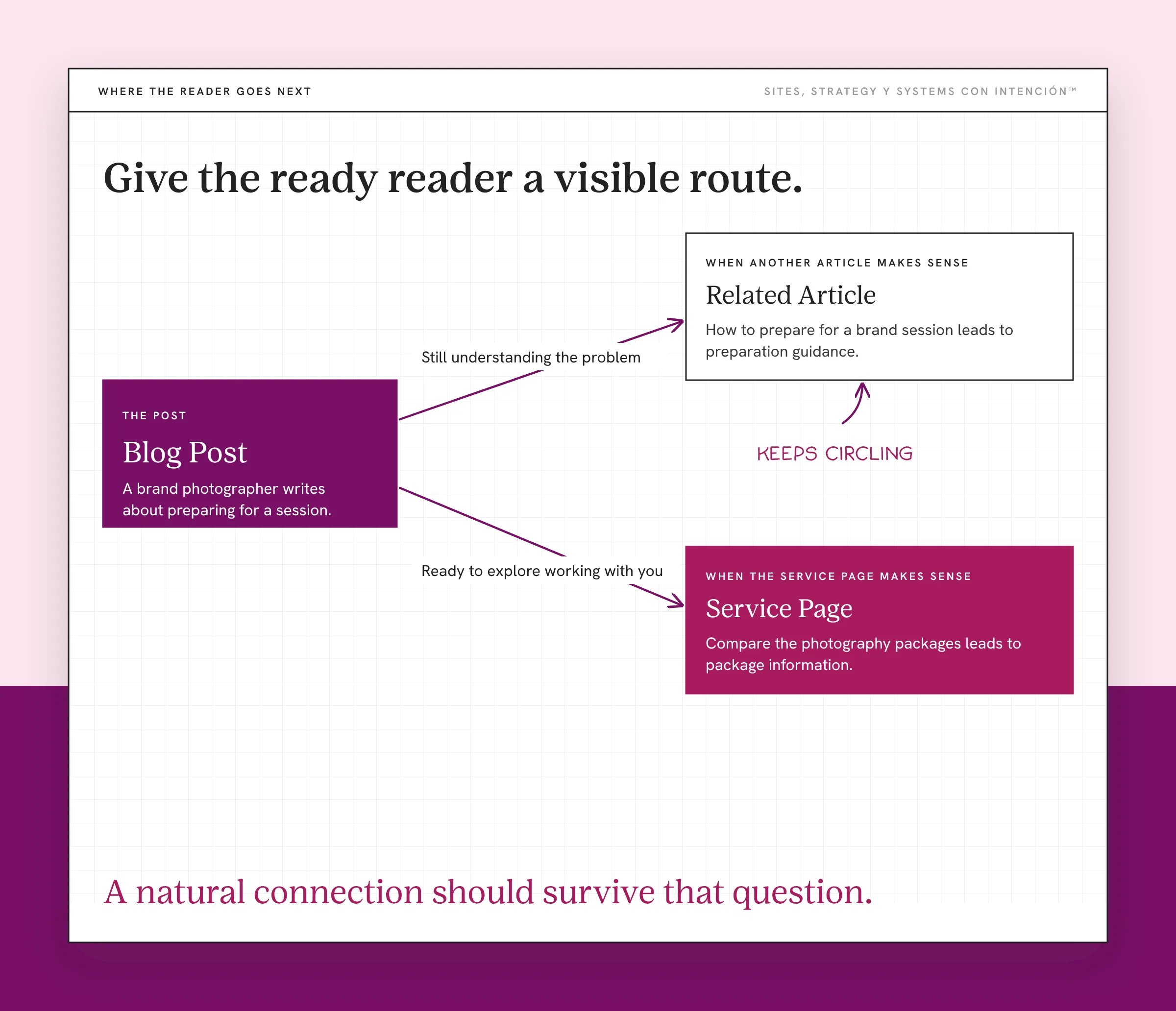
That's why I look at both the topic and the post's place in the funnel.
When Does Another Article Make Sense?
A related article can help someone who's still understanding a problem or comparing possible approaches. It can explain something that would interrupt the current page if you tried to cover it in full.
For example, imagine a brand photographer has a post about preparing for a session. A relevant article could explain how to choose locations or plan outfits. Those connections help the reader act on the preparation advice.
A pillar page can also give readers a broader starting point, with supporting articles answering more specific questions. The connections should make sense in both directions where they're useful.
If your articles only link to other articles, a reader who's ready to hire you keeps circling and can't find a way to work with you. Someone who's ready to explore working with you should be able to do that.
It's frustrating, mija, to find an explanation that makes sense and then have to search the whole website to figure out who can help. Give the ready reader a visible route to the relevant offer.
When Does the Service Page Make Sense?
A service page earns the link when it answers the question the post just raised: what's included, who it's for, how working together goes.
Take an illustrative post comparing brand photos with standard headshots. The reader is weighing which service fits. A contextual link to the relevant package lets them look at that option.
That doesn't require treating every visitor as ready to book. The service page can provide decision information, with its own clear next step for those who are ready.
You can use a well-placed call to action to connect that explanation to the action. A booking link that takes someone to another company's domain is an external destination, even if the booking is for your service.
The funnel helps you think about what the reader needs. People can still arrive through referrals, return visits or a service search with different levels of knowledge. Keep useful choices available so nobody has to follow a set reading order.
How Do You Choose Anchor Text and Place Links Naturally?
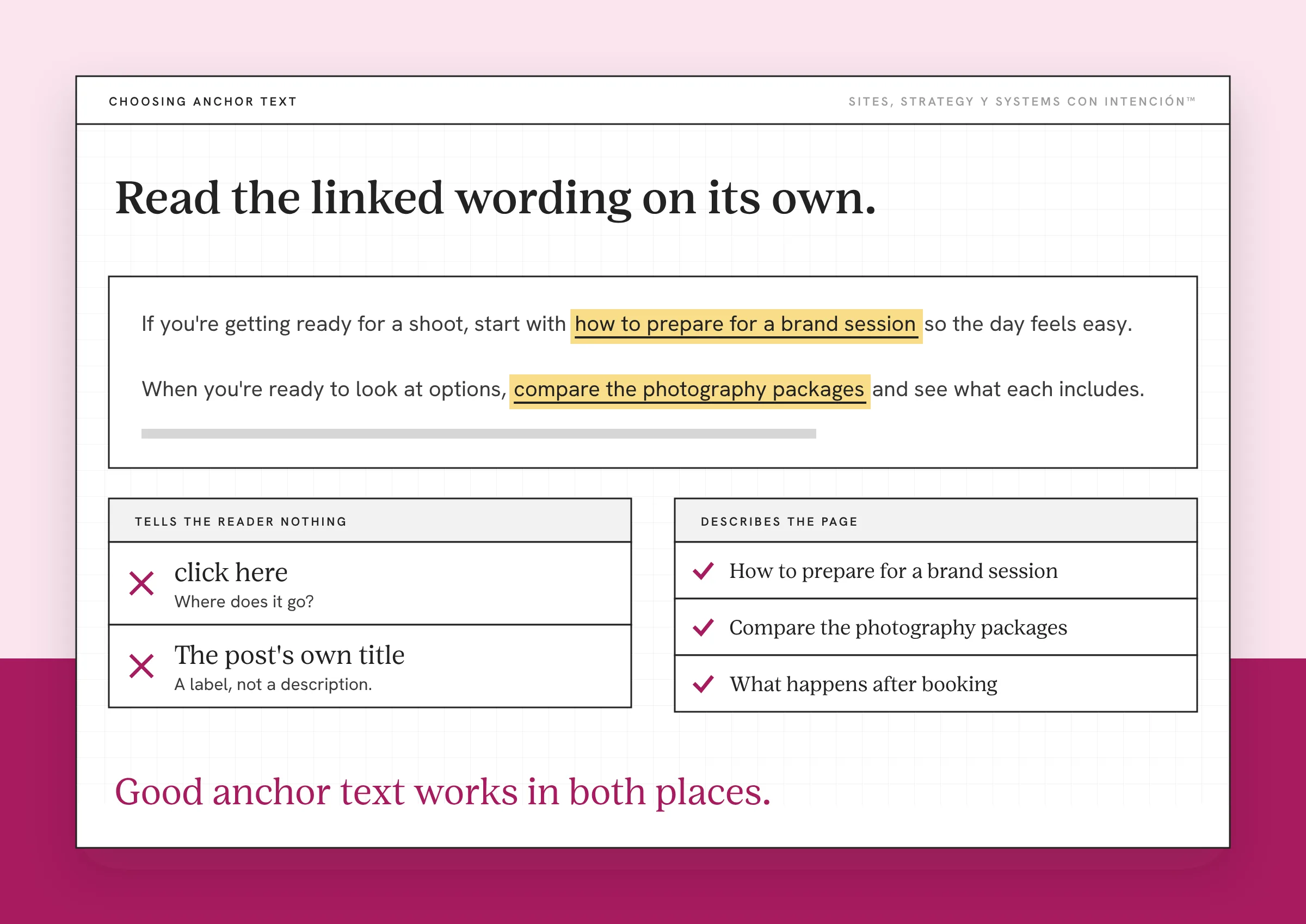
Anchor text is the visible wording someone selects to follow a link. It should help them understand the destination before they click. When I check posts, the two I see most are "click here" and the post's own title. Neither tells the reader what's on the other side.
Google recommends descriptive, concise and relevant anchor text. It also warns against cramming in every keyword related to the page.
For the photographer examples, these phrases would give a reader a useful expectation:
- How to prepare for a brand session leads to preparation guidance.
- Compare the photography packages leads to package information.
- What happens after booking leads to a process explanation.
Those phrases illustrate possible destinations for the photographer's site. The words should fit both the sentence and the destination.
Read the linked wording on its own. Then read the surrounding sentence. Good anchor text works in both places.
It can be tempting to make a link sound more exciting than the page behind it. You want people to click, de verdad. But if the wording promises pricing and the destination never explains cost, you've given the reader another question to solve.
Place contextual internal links where the information would help. If you mention a process that has its own explanation, that's a natural spot. If the connection needs a paragraph of justification, it doesn't belong there.
When you organize the information across your website, you can see which subjects deserve their own pages. That makes choosing relevant destinations easier than searching for something to link because a paragraph looks empty.
How Many Internal Links Should a Page Have?
Google says there's no magical ideal number of links for a page. I agree and I don't use quotas to decide whether a link belongs.
Look at whether each link helps the reader, whether the destinations differ meaningfully and whether the page remains readable. A long, detailed guide may need more connections than a short service description. Adding the same destination repeatedly doesn't automatically make the path clearer.
A link count only catches the extremes, like a page with none or a paragraph buried in them. It can't tell you whether the destinations were the right ones. A link jammed in just so the post has one doesn't connect to the sentence around it.
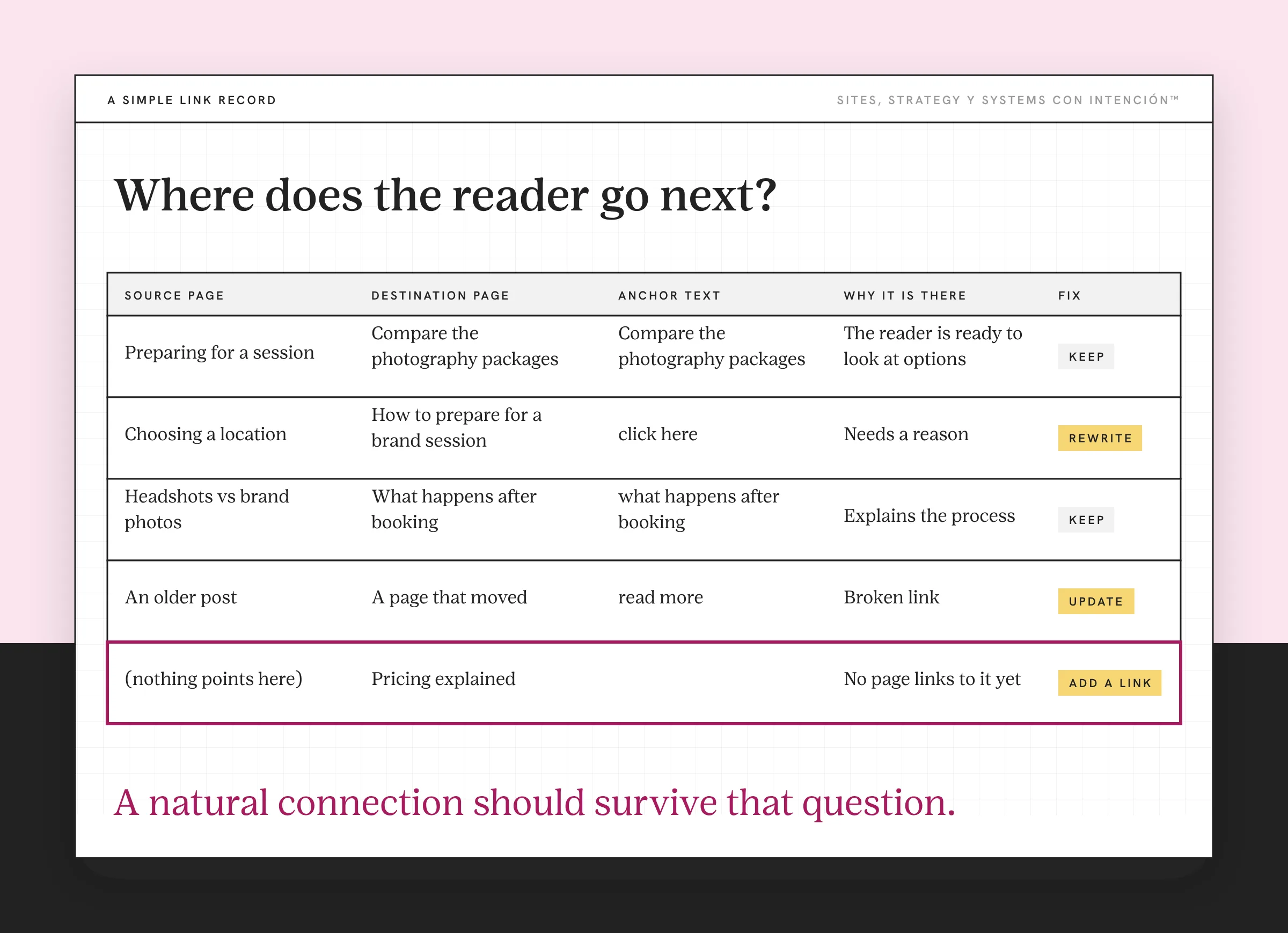
For me, that is the best practice worth keeping: explain why the link is there. A natural connection should survive that question.
How Can You Improve the Links in a Post You Already Have?
Open one existing post and start with the question I'd ask: where does the reader go next?
You can examine the link structure without rewriting the whole article. Look at what the post helps someone understand and then follow the paths you've provided.
Use this review as a starting point:
- Name the post's job. Is it introducing a problem, helping someone compare approaches or supporting a service decision?
- Review the destinations. Follow the existing internal links. Check whether the linked page answers the question the wording suggests.
- Look for the page with nothing pointing to it. A related explanation or service page may already exist without a single link to it where readers would need it.
- Check the link text. Make anchor text specific enough to communicate the destination while keeping the sentence natural.
- Test the links. Fix broken links or update outdated destinations. Review whether the replacement still serves the same purpose.
- Check the return path. An older article can have a good reason to link to a newer page. Check both pages instead of only adding links to the latest post.
A simple record can help: source page, destination page, anchor text and reason for the connection. You can add notes about what needs fixing without building an elaborate tracking system.
For example, if a post discusses website messaging but never explains what makes copy persuasive, a post on website copy that converts could provide useful background. The reason for that connection should come from the subject you're discussing.
This can feel tedious, bendito, when you've already spent time writing the article. Start with a page that matters to your business and follow its links as a reader would. You're making the work you've already published easier to use.
If you've got a larger site, a crawl report can help identify broken internal links and pages with few incoming connections. Check the actual pages before deciding what to change. A report can flag a connection; you'll still need to judge whether it helps someone.
When you add a new page, ask where existing readers could use it. Build that check into publishing and review links again when services, URLs or content change. Effective internal linking is easier to maintain when those checks belong to the work you're already doing. Links are the part of content strategy people forget is there until a reader gets stuck.
Pick one page that matters, send people where they'd go next and click your own links to check each one keeps its promise.
Key Takeaways
- An internal linking strategy should connect related pages around useful reader next steps.
- The content's place in the funnel helps you choose between more explanation and information about a service.
- Descriptive anchor text helps readers understand a destination before selecting it.
- Link counts don't replace judgment about relevance, placement and readability.
- Review existing connections when publishing new pages or changing important content and URLs.
So where is my site losing people between pages?
Answer a few questions about your site, your content and your backend. La Digital Rueda shows you where the pressure is in about two minutes and it's free.
Frequently Asked Questions
What's the difference between internal and external links?
An internal link points to another page on the same website. An external link takes someone to a different website. A link from your blog to your service page is internal. A link to a third-party source or an off-site booking platform is external. Choose either because it helps the reader and make the destination clear in the surrounding context.
Should every blog post link directly to a service page?
A relevant service link can be useful, but the destination should fit the topic and what the reader needs at that point. Someone learning about a problem may benefit from another explanation. Someone evaluating an approach may want service details. Review the wider path so readers who are ready to explore an offer can find it without searching through unrelated content.
How many internal links should you add to a page?
There isn't one ideal count for every page. Look at the page's purpose, the relevant information available elsewhere on your site and how easily someone can read the content. A detailed guide and a short service page may need different connections. Ask whether each link adds context or a clear next step. Skip any that only exist to hit a quota.
Can internal linking guarantee better SEO rankings?
No. Links can help search engines discover pages and understand their relevance, but an individual change doesn't guarantee a position in search results. Your content, the wider website and other ranking considerations still matter. Evaluate your links for useful, accessible connections and monitor what happens without attributing every traffic change to the links you most recently added.
How do you find internal links that need fixing?
Start by following the links on an important page and checking that the destinations work and match their descriptions. A site crawl can help review broken URLs and incoming links across a larger collection of pages. Use those findings to investigate the content itself. A working URL can still lead to outdated or unhelpful information, so technical checks need editorial judgment.
About the Author