Every month SEO sits on your to-do list, someone searching for exactly what you do lands on another business's page. You already know it matters. Your business works, people refer you and you've probably poked at a plugin or a keyword tool at some point. It still keeps getting pushed, because in your head SEO is a pile of rules, a keyword research project you don't know how to start and one question sitting under all of it: how does Google even find me? Te entiendo full. It's a lot to carry around as one big job.
It's the same feeling as standing in front of a full fridge convinced there's nothing to cook. You're usually closer than you think. The first steps are checks on what's already on your site and you can run most of them yourself.
I've worked on 100+ sites over 12+ years. The order I check things in barely changes: indexing first, then local, then whether each page fits the search it's meant to win.
The Short Answer
SEO basics for small business come down to three checks before anything else: whether Google can index the pages that matter, whether local search applies to your business and whether your existing pages match what people searching want to find. Most of the early work is improving what you already have. Publishing more comes later.
If You're Reading This Because It's Your Site
Reading more isn't the hard part. La Jugada is $47 and it tells you which layer this is actually sitting in.
Get it, $47Can Google Index the Pages That Matter?
When someone tells me they want Google to find them, my first question is always the same one: can Google even INDEX you?!
Getting found happens in stages. Google has to discover a page, decide to store it in its index and only then decide where it shows up for a search. A page that never made it into the index can't rank for anything, however good the writing is. So I check this before anyone says the words keyword research.
Most SEO advice puts keyword research first and I think that order is backwards. When people start there, I watch the same things happen. They write for keywords on pages Google can't see and chase terms the site can't win yet. The keyword spreadsheet turns into the project while the site stays exactly as it was. When the numbers stay flat, they blame the keywords and redo the research. The site itself still doesn't get checked.
I've run into both of the common versions of this. One is a site that launched with the setting that tells search engines to stay away still switched on. The other is pages that dropped out after a platform migration, which is what happened when a photographer's platform migration wiped out their search visibility.
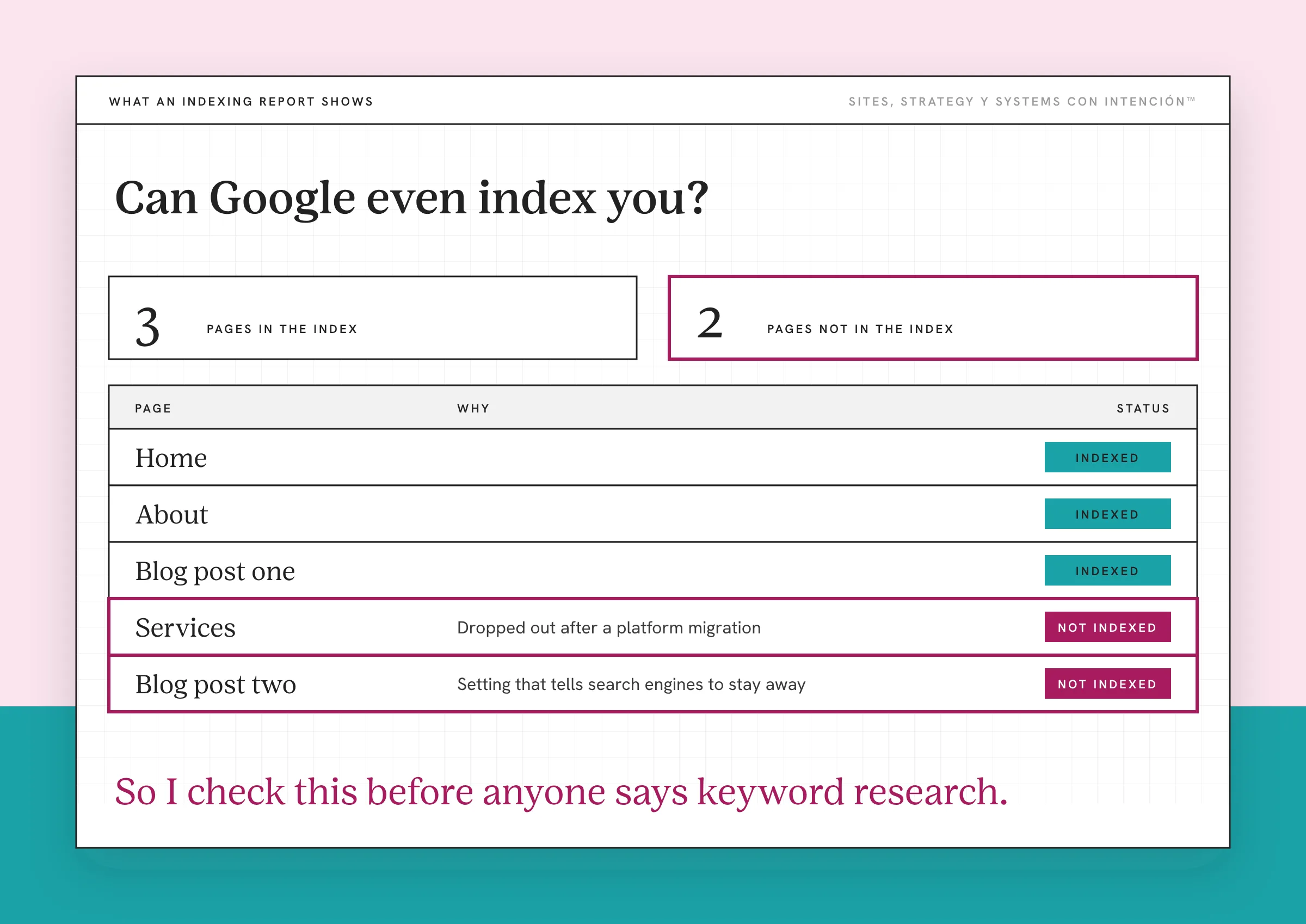
Check one page in Search Console. The URL Inspection tool in Google Search Console tells you whether a specific page is in Google's index. The verdict reads "URL is on Google" or "URL is not on Google." What you're looking at is the most recently indexed version, so a page you edited last week may not show the edit yet.
Run a live test after you change something. The live test checks the page as it stands right now. If it passes, you can request indexing. Google says plainly that a request "does not guarantee that the page will appear in the Google Index," so treat it as a nudge and check back.
Use a site: search as a quick clue. Type site:yourdomain.com into Google and you'll see a sample of what's indexed. It's handy for spotting a page that's clearly missing. Google says the site: operator doesn't return every indexed URL, so a short list there isn't proof something's broken. Search Console is where you confirm it.
If it's mostly your blog posts that are missing, that points at the site underneath the blog. That's its own diagnosis. I cover it in why an evergreen content strategy stalls when the site is the problem.
Does Local Search Matter for Your Business?
Once indexing checks out, my next question is whether you're local. Local search is the map results and the near-me searches. It matters a lot to some service businesses and barely at all to others. Figure out which one you are before you do any local work.
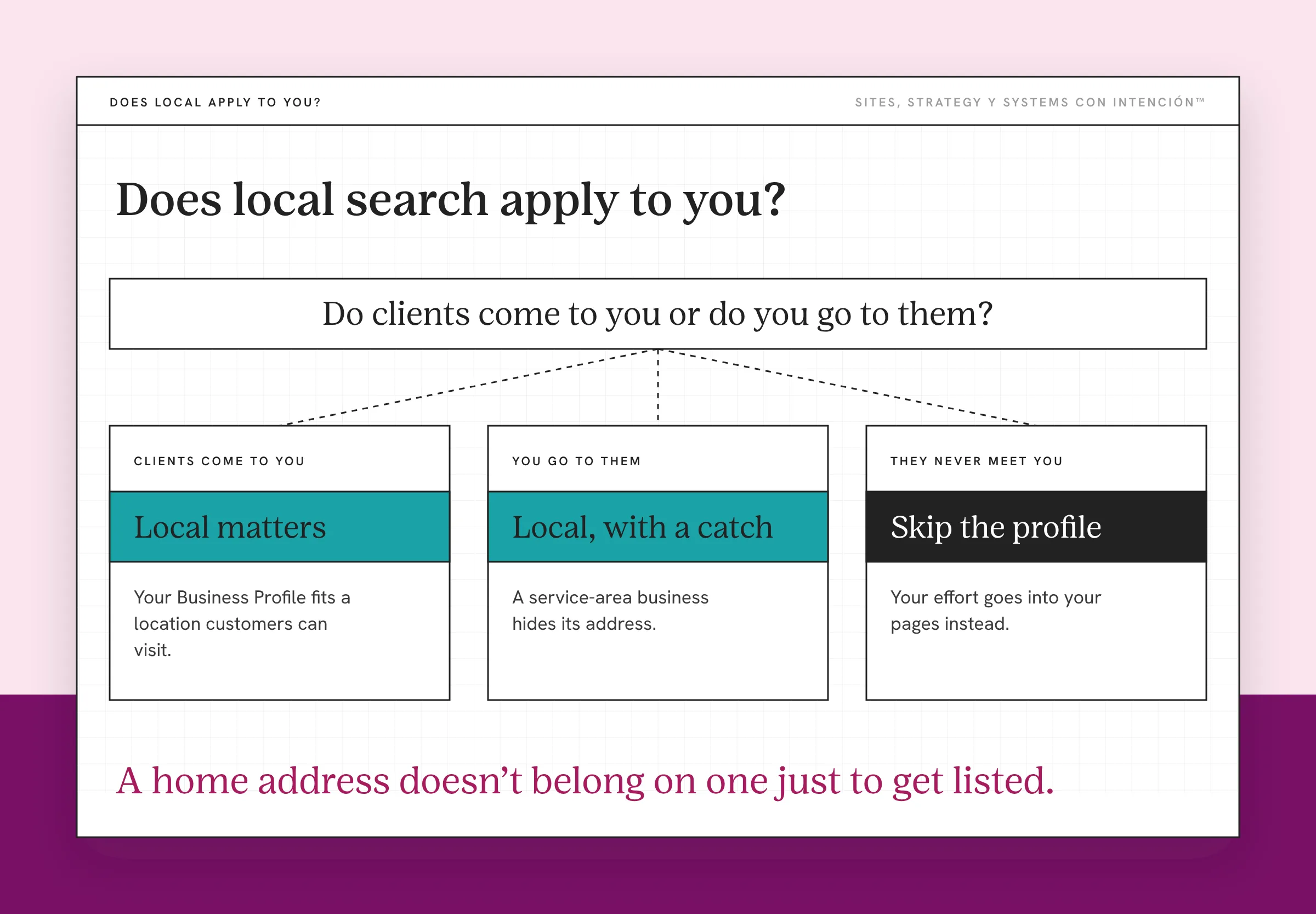
If clients come to you or you go to them, it matters. Google's Business Profile guidelines are written for businesses with a physical location customers can visit and for businesses that travel to their customers. If you're the second kind, a service-area business, Google says to hide your address. A virtual office doesn't qualify unless it's staffed during business hours.
Your NAP has to match everywhere. NAP is your business name, address and phone number. Keep it identical on your site, your Business Profile and every directory you're listed in. It's one of the easiest things to fix and one of the easiest to miss, because few people reread their own footer. I've cleaned this up for a client whose name, phone number and an old address all varied from listing to listing. There were duplicate listings on top of that. Google had more than one version of the same business to pick from.
If you're fully remote, skip the profile. If clients never meet you at a location and you never travel to them, a Business Profile isn't built for you. A home address doesn't belong on one just to get listed. Your effort goes into your pages instead.
Local is one of the four kinds of SEO a service business works in and it's a full discipline of its own. For a first pass, deciding whether it applies to you is the whole job.
Do Your Existing Pages Match What Searchers Want?
My answer to this one is short: look at the SERP. That's the search engine results page, the first page Google shows for a search. Pick the search you want a page to show up for, run it and read page one before you touch anything on your own site.
I'm looking for three things:
- What format ranks. Step-by-step guides, lists, service pages, videos or a map. Whatever fills page one is Google's best read of what people searching want.
- Who else shows up. Other small businesses like yours, national directories or big publishers. That tells you who you're competing with for this particular search.
- What the results are for. Learning something, comparing options or hiring someone. A services page has a hard time winning a search where everybody wants a how-to.
I ran this check on an informational blog post I'd written for a client. The top results for that search were the ones with infographics and ours didn't have one. So we added an infographic to the post itself. The writing stayed. The shape changed to match what that search rewards.
Say your services page describes what you do and every result for your target search is a checklist. That's a mismatch you can spot before you write a single new word. A lot of the "SEO isn't working" frustration I hear starts right here. Y ahí es where it breaks: a good page answering the question in a different shape than the search expects.
What Can You Improve Before Creating More Content?
Before you buy more groceries, you check what's in the pantry. SEO works the same way. The pages you already have are the ingredients and most of them can do more than they're doing.
The advice I'd tell you to stop worrying about is the pressure to pump out more content with AI. My position is quality over quantity. Google's own guidance on using generative AI content warns that using it to "generate many pages without adding value for users may violate Google's spam policy on scaled content abuse." AI can still help you draft. Volume for its own sake is what that warning is about. So if you've been staring at an empty content calendar feeling behind, ay bendito, put it down for a minute.
Take one page that matters to your business and check four things:
- The topic matches the search. The page answers the question behind the search you want it to win, in the format that search rewards.
- The headings tell the story. Someone skimming only the headings should know what the page covers. The basics of optimizing a blog post for search apply to service pages too.
- The explanations are useful. Every section helps someone decide something. If it only describes, it's doing half the job. Website copy that helps people decide is its own skill.
- The page leads somewhere. It links to the next page a reader needs. That's an internal linking strategy and it's an easy one to skip.
That list is close to what moved a small local business I worked with as their solo SEO lead. The work was page titles, meta descriptions, internal links and cleaning up existing content around long-tail and local searches. Ranking keywords went from 121 to 310+ in under six months and organic traffic grew 400%+ year over year, with no paid ads.
How Can You Tell Whether Your SEO Work Is Helping?
Four signals tell you different things and it helps to keep them separate:
- Indexed is a yes or no. It means the page is eligible to show up at all.
- Impressions mean people saw the page in search results.
- Clicks mean people saw it and chose it.
- Inquiries mean people contacted you. That's the one that pays.
Search Console shows the first three. Inquiries come from your site and wherever your leads land. A ranking on its own doesn't book anything, which is why some posts bring clients while others only bring traffic. I break that down in why some blog posts bring clients and others just traffic. For the site side of the numbers, start with what a service business should track in GA4.
Then give it time. SEO is more like simmering a good sofrito than following a TikTok trend. The case above moved in under six months and that was focused work on pages that already existed. Check in once a month, because looking every week mostly measures your patience.
So Where Do You Start This Week?
With one page: the one that brings you the most business when it works. Run it through URL Inspection. If it's indexed, decide whether local applies to you and make your NAP match everywhere. Then search the term you want that page to win and hold page one up against what you have.
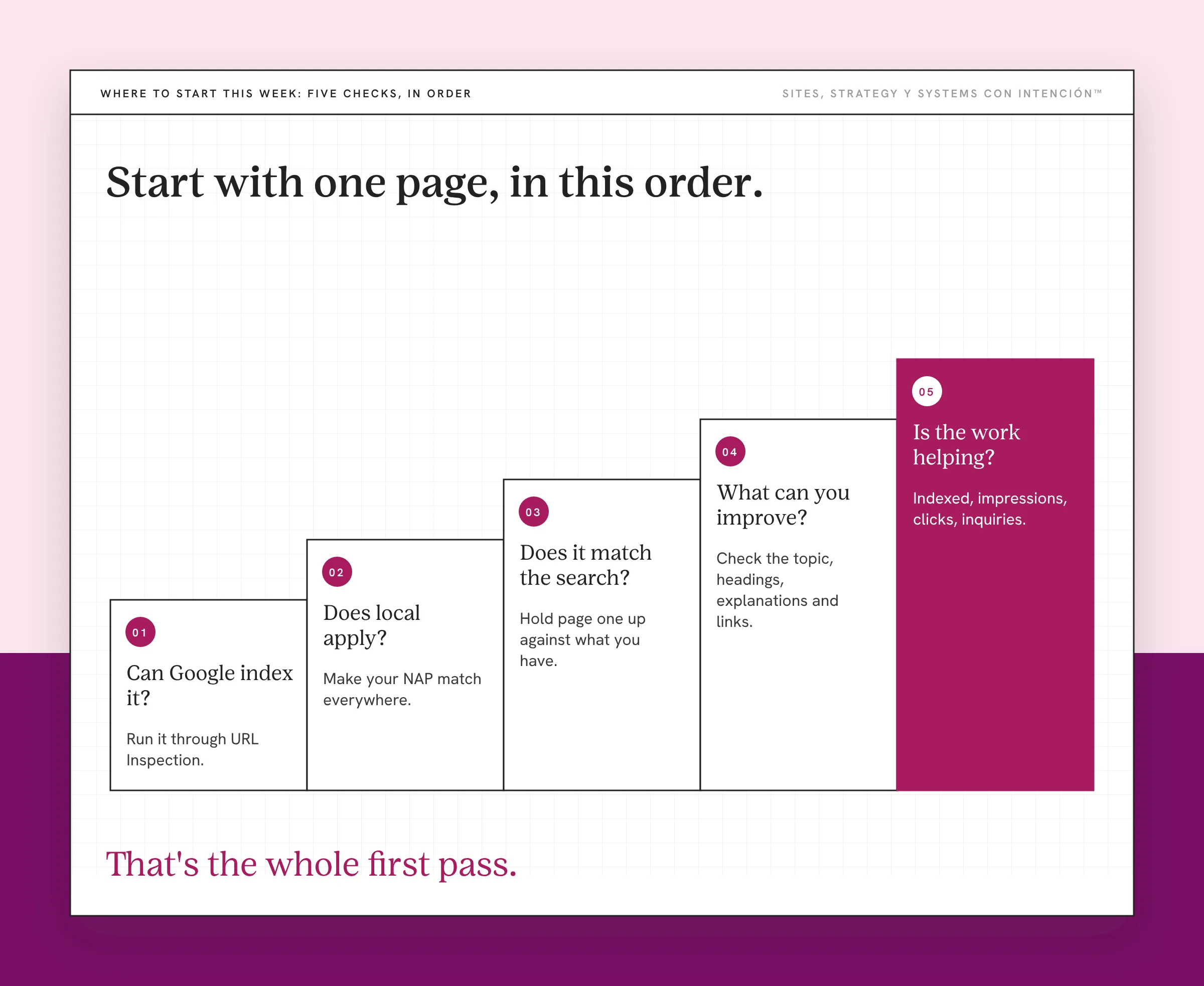
That's the whole first pass. It isn't the giant project that's been sitting on your list. The keyword research, the new content and the bigger plan all go better once you know the site can be seen and the pages you have fit their searches. Every content strategy I build starts from that first pass.
Key Takeaways
- SEO basics for small business start with indexing. A page Google hasn't indexed can't show up for any search.
- Decide whether local search applies before doing local work. A Business Profile is for businesses customers visit or that travel to their customers.
- Read page one for your target search: the format that ranks, who shows up and what the results are for.
- Improve the pages you have before publishing more. Volume without value is what Google warns against.
- Indexing, impressions, clicks and inquiries measure different things. Only inquiries pay.
Okay, but where do I even start with SEO on my site?
Start with La Digital Rueda. It asks a few questions about your site, your content and your backend and shows you where the pressure is before you pick your first SEO task. It's free and takes about two minutes.
And if you'd like more of this in your inbox, Off the Clock is where I write about building a business that keeps working while you're with clients.
Frequently Asked Questions
Can I do SEO for my small business myself?
Yes. Every check in this post is one you can run yourself. That covers URL Inspection in Search Console, a site: search, your Business Profile and a read of the results for the searches that matter. It gets harder with technical problems that block indexing and with off-page work like earning links, which is a real discipline that can take one dedicated person. That's where outside help earns its cost.
How do I check if Google has indexed my page?
Open Google Search Console, paste the page's URL into the URL Inspection bar and read the verdict: "URL is on Google" or "URL is not on Google." For a quick look without Search Console, search site:yourdomain.com in Google. That shows a sample of your indexed pages. It won't show every one, so confirm anything that looks missing in Search Console.
Does every business need a Google Business Profile?
No. Google built it for businesses with a location customers can visit and for businesses that travel to their customers. Service-area businesses can have one with the address hidden. A fully remote business that never meets clients at a location or goes to them doesn't fit the guidelines. And it shouldn't list a home address just to get a profile.
Do I need to publish more content to rank?
Not first. Check whether your existing pages are indexed and whether each one matches what its search is looking for. Improving a page that's already there is usually faster than writing a new one. Publish new content when there's a real gap: a question your clients keep asking that no page on your site answers yet.
Is SEO worth it for a small business?
For a service business it's one of the few ways to get found without paying for every visit. Ads stop showing when the budget stops. A page that's indexed, matches its search and answers the question keeps working while you're busy with clients. It asks for patience up front and the payoff builds on itself.
How much does SEO cost for a small business?
There's no one honest number. What I'd watch is the cheap end. If someone's charging $50 for "full SEO," they're probably overworked, underpaid and following a plug-and-play checklist that won't reflect your business. Eso no cuadra. Affordable should mean support you can keep paying for that explains what it's doing. Walk away from anyone promising page one in 30 days.
About the Author